AD SSO Authentication (Kerberos)
Kerberos-based SSO provides a seamless user experience for domain-joined workstations. Users are authenticated transparently via their domain ticket, eliminating browser credential prompts.
How Kerberos SSO Works
Prerequisites
- Setup Active Directory Integration completed.
- Time Sync: SafeSquid and AD server time must match (max skew 5 mins).
- DNS: SafeSquid must resolve the AD domain; AD must have a DNS entry for SafeSquid.
- Monit: The Monit service must be running (
pidof monit).
Configure SSO Authentication
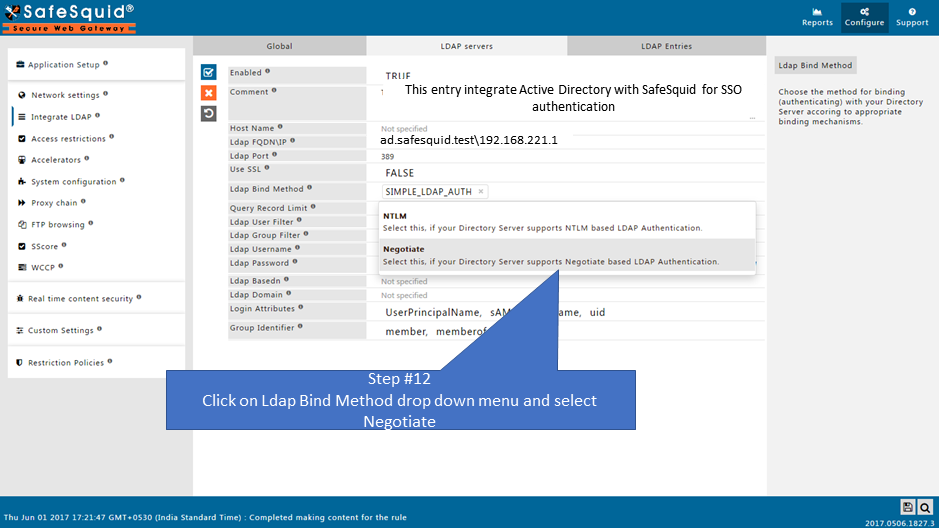
- Access SafeSquid Interface: Go to Application Setup → Integrate LDAP.
- Configure LDAP Server:
- Go to LDAP Servers tab and edit your entry.
- LDAP Bind Method: Select NEGOTIATE (this enables Kerberos SSO).
- Bind DN: Ensure this is a domain admin or account with high privileges to create the keytab.
- Automatic Keytab Generation:
When you save with NEGOTIATE, SafeSquid automatically generates:
HTTP.keytabkrb5.confkrb.tktVerify these in/usr/local/safesquid/security/.
- DNS Stub Zone: SafeSquid creates a stub zone for AD resolution in
/etc/bind/safesquid.dns.conf. Ensure this is active.
Enable SSO in Access Rules
- Navigate to Access Restrictions: Application Setup → Access Restrictions → Allow List.
- Configure Rule:
- PAM Authentication: Set to TRUE.
- SSO: Ensure the global SSO field is TRUE (default).
- Save and Apply: Click the checkmark to save.
Verification
| Action | Method | Expected Result |
|---|---|---|
| Transparent Login | Access a website from a domain-joined client. | Website loads immediately without a credential prompt. |
| Check Keytab | ls -l /usr/local/safesquid/security/HTTP.keytab | File exists and has recent timestamp. |
| Identity Log | tail -f /var/log/safesquid/identity.log | Shows authenticated usernames in user@DOMAIN format. |
| DNS Test | nslookup <AD_Domain> from SafeSquid. | Successfully resolves to AD server IP. |
Troubleshooting
| Symptom | Likely Cause | Fix |
|---|---|---|
| Repeated prompts (SSO fail) | Time skew | Run date on AD and SafeSquid; sync via NTP if they differ by >5 mins. |
| Prompt on some browsers | Browser config | Ensure SafeSquid FQDN/IP is in the "Local Intranet" or "Trusted Sites" zone in Windows Internet Options. |
| Keytab not generated | Permission or Bind issue | Ensure Bind account has sufficient AD permissions; check /var/log/safesquid/safesquid.log for Kerberos errors. |
| DNS resolution fail | Missing stub zone | Verify /etc/bind/safesquid.dns.conf contains the correct AD server IP and is included in your BIND config. |
Browser Configuration
For Chrome and Edge to send Kerberos tickets, the SafeSquid proxy URL must be recognized as an intranet site. You can enforce this via GPO: Administrative Templates → Google Chrome → Kerberos delegation server allowlist
Next steps
- Access Restriction (Apply policies by AD group)
- SSL Inspection (Attribute HTTPS traffic to AD users)
- Bypass Authentication (For non-browser apps that don't support Kerberos)