AD Simple Authentication
Simple authentication validates domain users via LDAP bind. When users browse the web, they are prompted by their browser to enter their Active Directory credentials.
When to use Simple Authentication
| Use Simple Auth When | Use SSO (Kerberos) Instead |
|---|---|
| Client devices are not joined to the domain | Corporate workstations are domain-joined |
| Fast setup is required (no Kerberos config) | Best user experience (no prompt) is required |
| Troubleshooting authentication issues | Production environment for domain users |
Prerequisites
- Setup Active Directory Integration must be completed.
- SafeSquid must be able to fetch LDAP entities (verify in LDAP Entities tab).
Configure Simple Authentication
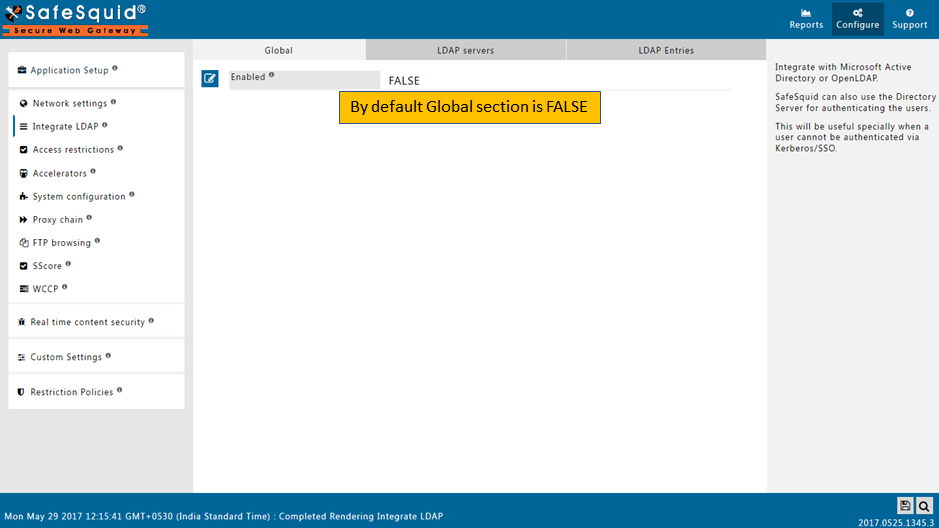
- Access SafeSquid Interface: Go to Application Setup → Integrate LDAP.
- Enable Section: Ensure the Integrate LDAP global section is set to TRUE.
- Configure LDAP Server:
- Go to LDAP Servers tab.
- Edit your AD server entry.
- Ensure LDAP Bind Method is set to SIMPLE (for browser-prompt authentication).
- Save Configuration: Click the checkmark to save.
Enable Authentication in Access Rules
- Go to Access Restrictions: Application Setup → Access Restrictions → Allow List.
- Edit Rule: Find the rule matching your client IPs or create a new one.
- Configure Auth:
- PAM Authentication: Set to TRUE.
- LDAP Profiles: (Optional) Select specific AD groups if this rule only applies to them. Leave blank for all AD users.
- Save Policy: Click the checkmark to save.
Verification
| Action | Method | Expected Result |
|---|---|---|
| Browser Test | Access any website from a client. | A browser login prompt should appear. |
| Login Test | Enter valid AD credentials. | Access is granted; the website loads. |
| Identity Log | tail -f /var/log/safesquid/identity.log | The log shows the authenticated AD username. |
| Detailed Log | Reports → Detailed Logs | Requests are tagged with the directory username and group. |
Troubleshooting
| Symptom | Likely Cause | Fix |
|---|---|---|
| No login prompt | Rule order or IP mismatch | Ensure the authentication rule is above general allow rules; verify client IP matches rule scope. |
| Prompt keeps reappearing | Incorrect AD credentials or Bind DN | Verify user password in AD; ensure Bind account in "Integrate LDAP" has read access. |
| Authentication fails | Time skew or DNS issues | Sync SafeSquid system time with AD server; ensure AD FQDN is resolvable. |
| Valid users blocked | Group membership issue | Check if the user is a member of the group specified in LDAP Profiles. |
Next steps
- Configure SSO Authentication for a transparent user experience.
- Access Restriction to define policies by AD group.
- SSL Inspection to attribute HTTPS traffic to AD users.