DNS Blacklisting
Why use DNS Blacklisting?
Unrestricted DNS resolution allows clients to reach domains listed as malicious in threat feeds. DNSBL blocks these connections at the resolution layer-before any traffic is exchanged-reducing exposure to malware, phishing, and botnet callbacks.
| Use DNSBL When | Use Access Restrictions Instead |
|---|---|
| Blocking known-malicious infrastructure | Blocking specific URL categories (Adult, Social) |
| Early threat mitigation is required | Policy requires deep content analysis |
| Using SOC-provided threat feeds | Blocking individual sites/FQDNs |
| Reducing bandwidth waste from botnets | Enforcing user-specific access rules |
Prerequisites
- SafeSquid SWG installed and operational.
- SafeSquid configured as the primary DNS resolver (see Supporting Services: BIND).
- A valid DNSBL service domain (e.g.,
in.dnsbl.orgor a private threat intel list). - Outbound network access to the DNSBL service.
Configure DNSBL in Real-time content security
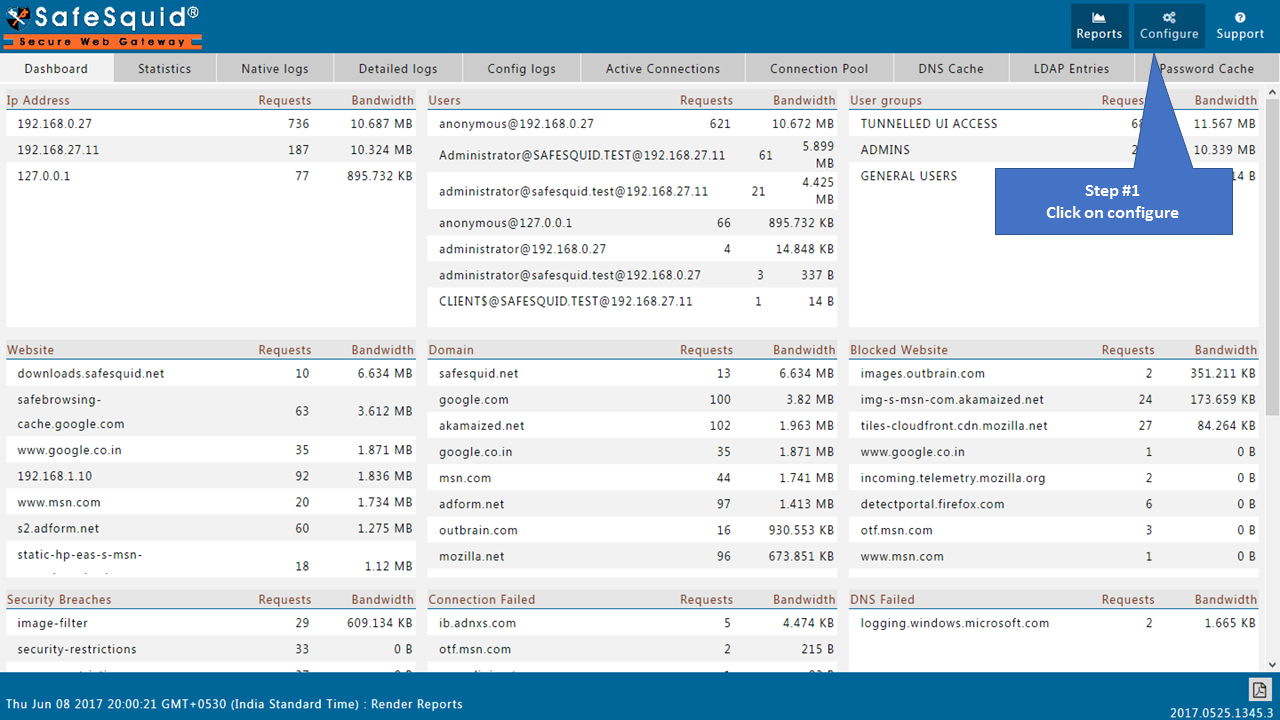
- Access the SafeSquid User Interface.
- Open the Configure page.
- Go to Real-time content security.
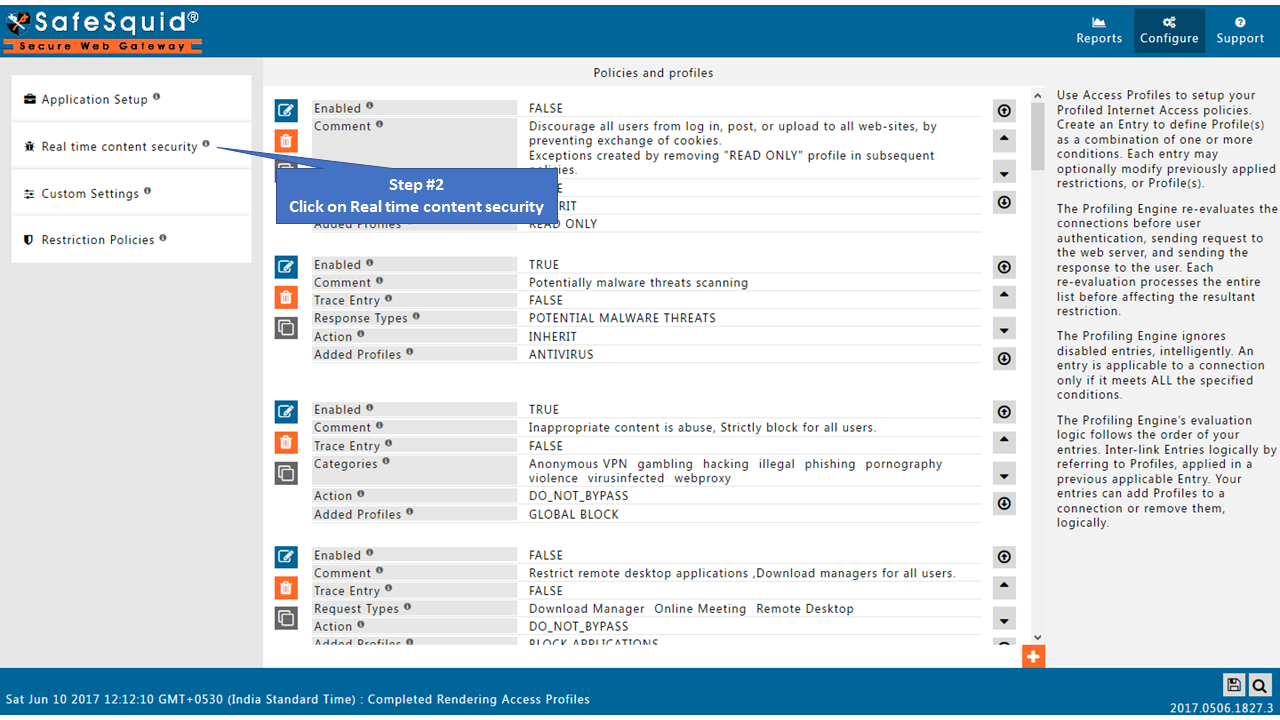
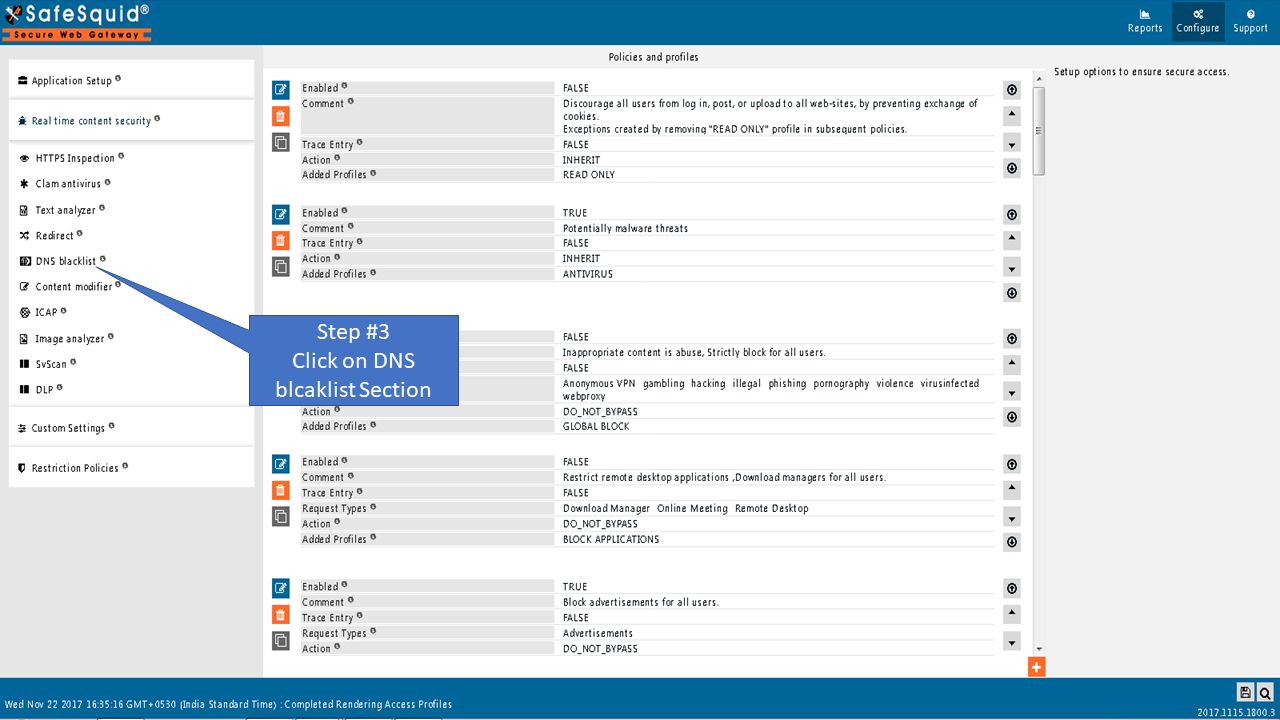
- Open the DNS Blacklist section.
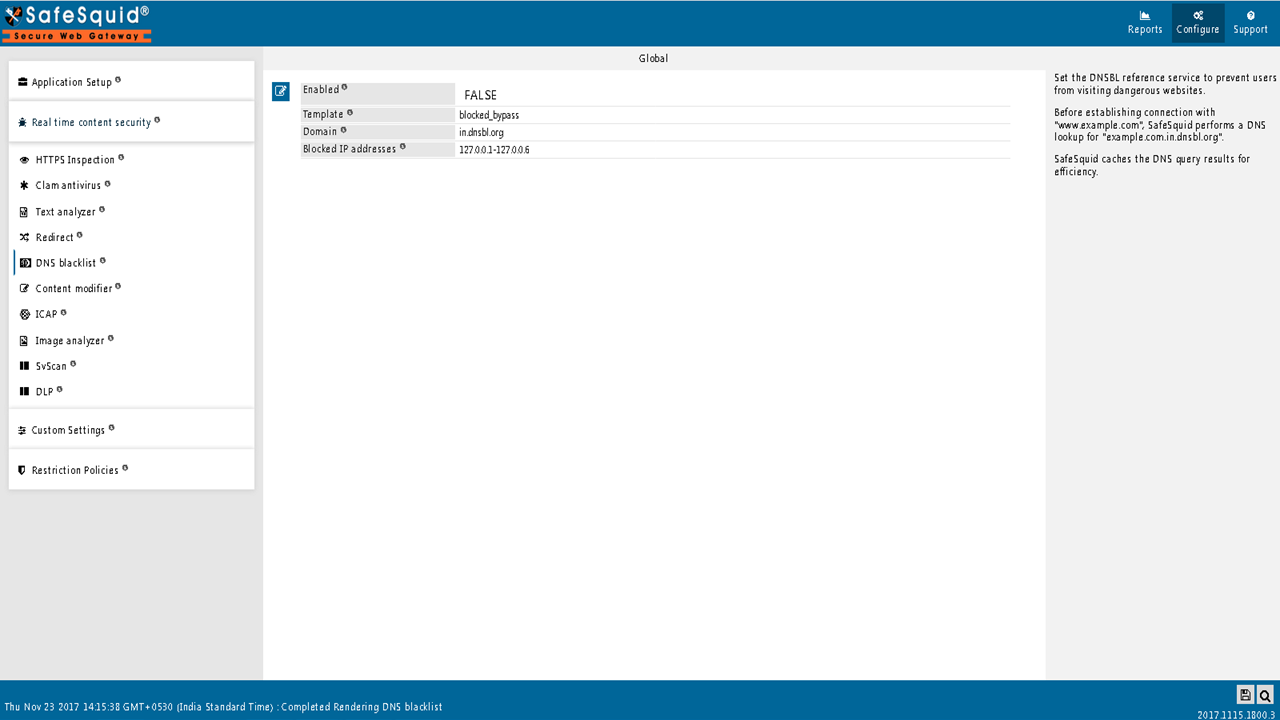
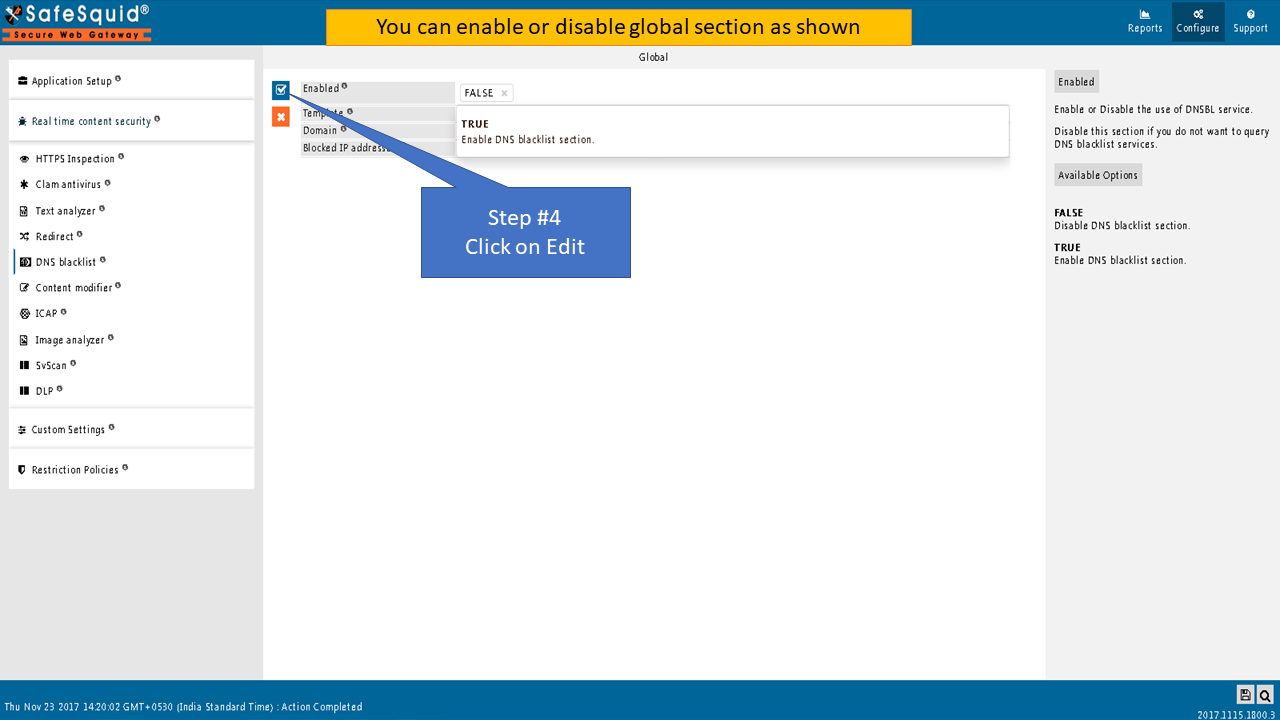
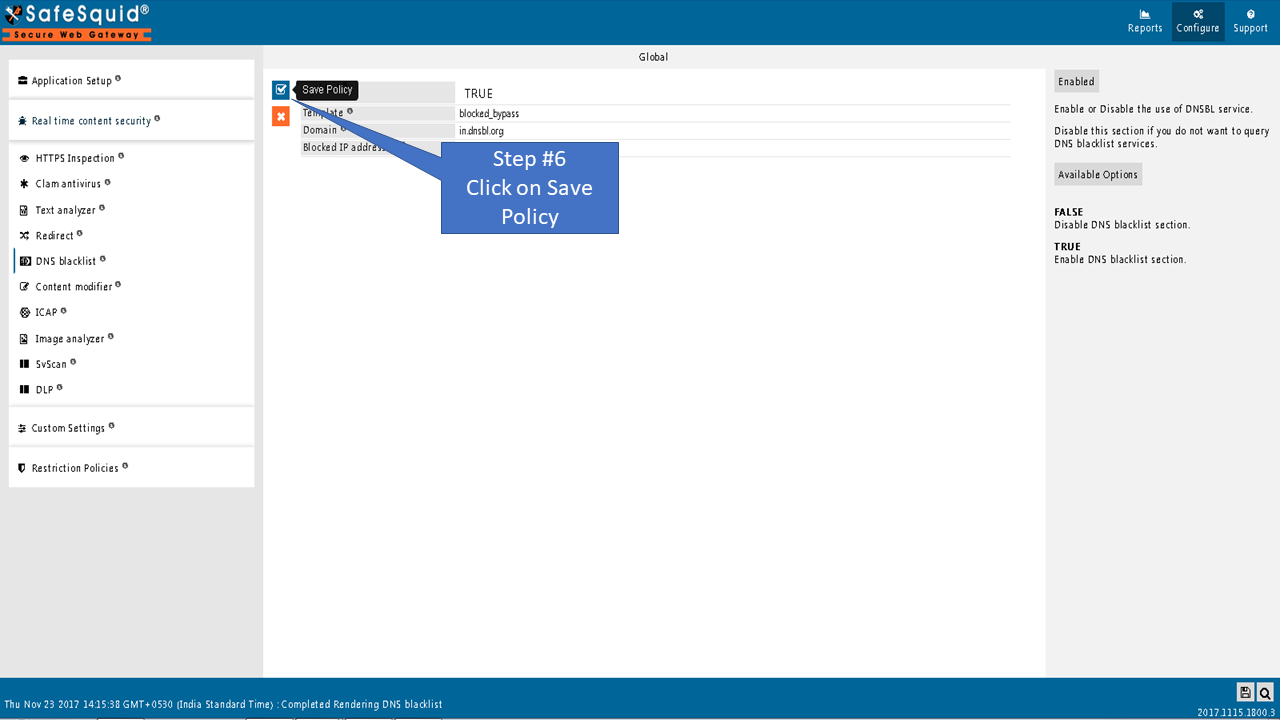
- Set Global options:
- Enabled: TRUE to enable DNSBL; FALSE to skip querying blacklist services.
- Template: Name of the block template displayed when a domain is blocked. Leave blank for default "blocked" message.
- Domain: DNSBL service domain for queries (e.g.,
in.dnsbl.org). SafeSquid appends this to queried domains:example.com.in.dnsbl.org. - Blocked IP addresses: Comma-separated IP ranges that trigger a block when returned by the DNSBL (e.g.,
127.0.0.1-127.0.0.6for in.dnsbl.org).
Administrators can use any DNS-based blacklist service (e.g., Spamhaus, local threat feed). Configure the Domain and Blocked IP addresses fields to match your service's return codes.
Understanding Return IP Codes (in.dnsbl.org)
When SafeSquid queries in.dnsbl.org, the service returns specific IP addresses indicating threat categories:
| Return IP | Category | Description |
|---|---|---|
| 127.0.0.2 | UCE | Unsolicited commercial email |
| 127.0.0.3 | Fraud | Financial fraud, phishing |
| 127.0.0.4 | Spam Promo | Promotional spam |
| 127.0.0.5 | Illegal Content | Illegal or harmful content |
| 127.0.0.6 | Pre-emptive | Pre-emptive blocking |
| 127.0.0.7 | List Practices | Improper list practices |
| 127.0.0.8 | Botnet/Malware | Botnet C&C, malware delivery |
Configuration: To block all categories, set Blocked IP addresses to 127.0.0.1-127.0.0.8.
- Save. SafeSquid caches DNSBL query results for efficiency.
Example: block sites via DNSBL server
Use blacklisting domain in.dnsbl.org and blocked IP addresses 127.0.0.1-127.0.0.6. SafeSquid blocks all matching domains and displays the blocked template. Use DNSBL when a SOC provides the list or when many domains must be blocked.

Verify configuration and blocked requests
- Interface: Confirm DNS Blacklist is enabled, Domain and Blocked IP addresses are set, and Template is correct.
- Block test: Request a domain known to be listed; expect block page and no connection to origin.
- Logs: In Security Logs, confirm entries for blocked requests (action/result indicating DNSBL block).
- Audit: Run a report filtered by block reason or DNSBL; export for evidence that the control is active and blocking malicious domains.
Troubleshooting
| Issue | Symptom | Resolution |
|---|---|---|
| DNSBL service unreachable | Blocks not applied; DNS timeouts | Check: Network connectivity to DNSBL service. Verify: Firewall allows outbound DNS (UDP/TCP 53) to DNSBL domain. Test: nslookup example.com.in.dnsbl.org from SafeSquid server. |
| Wrong blocked-IP range | No blocks or incorrect blocks | Fix: Align Blocked IP addresses with your DNSBL provider's return codes. Example: 127.0.0.1-127.0.0.8 for in.dnsbl.org. Verify: Query a known-bad domain and check what IP the DNSBL returns. |
| Cache causing stale results | Site unblocked after DNSBL update | Cause: SafeSquid caches DNSBL responses for performance. Fix: Wait for cache expiry (TTL-based) or restart SafeSquid: systemctl restart safesquid. |
| False positive blocks | Legitimate site blocked | Identify: Check DNSBL query logs to confirm it's a list issue. Fix: Add domain to bypass/allow-list in Access Restrictions. Alternative: Switch to a different DNSBL provider with lower false-positive rates. |
| DNSBL enabled but no blocks | Malicious sites still accessible | Check: 1) Enabled is TRUE. 2) Domain field is correct. 3) Blocked IP addresses includes the range returned by your DNSBL. Test: Query a known-malicious domain (use a test entry from your DNSBL provider). |
| Direct IP access bypasses DNSBL | Users access sites by IP instead of hostname | Limitation: DNSBL only works on DNS queries, not direct IP connections. Mitigation: Use Access Restriction to block by IP range or category. |
Still having issues? Contact SafeSquid support with:
- DNSBL service domain you're using
- Sample blocked domain query results
- Contents of
/var/log/safesquid/safesquid.logshowing DNS resolution attempts