Homograph Detection
Detect and block Internationalized Domain Name (IDN) homograph attacks where attackers use visually similar characters from different scripts (Cyrillic, Greek, etc.) to impersonate legitimate domains and enable phishing attacks.
Why Homograph Detection Matters
The threat: Attackers register domains that look identical to legitimate sites by using Unicode characters from different alphabets. For example:
apple.com(legitimate) vsаpple.com(Cyrillic 'а')paypal.com(legitimate) vspаypаl.com(Cyrillic characters)
Business impact:
- Credential theft (users enter passwords on fake login pages)
- Financial fraud (fake banking/payment sites)
- Brand impersonation (trust exploitation)
- Phishing campaigns bypass traditional URL filters
How it works: Browsers display internationalized domain names (IDN) using Unicode, making it nearly impossible for users to distinguish malicious lookalikes from legitimate domains.
When to Use Homograph Detection
| Use Homograph Detection When | Use Other Controls Instead |
|---|---|
| Protecting against phishing campaigns | Blocking known-malicious domains (use DNSBL) |
| Users access international sites legitimately | Enforcing URL category restrictions |
| Brand impersonation risk is high | Application-specific blocking (use App Signatures) |
| Compliance requires IDN attack mitigation | Blocking specific FQDNs (use Access Restriction) |
Homograph detection works best alongside DNSBL (block known-bad domains), SSL Inspection (detect fake certificates), and user security awareness training.
Prerequisites
- SafeSquid installed and operational (see Getting Started)
- Admin access to Configuration Portal
- DNS resolution handled by SafeSquid (see Supporting Services: BIND)
Configuration Steps
-
Access Configuration Portal
Navigate to Real Time Content Security → DNS Blacklist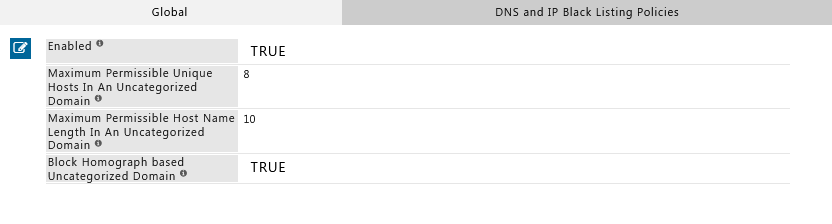
-
Enable Homograph Detection
- Enabled: Set to TRUE
- Save the configuration
-
Apply Changes
Click Apply to activate the new policy.
Homograph Detection is configured in the DNS Blacklist section because it operates at the DNS resolution layer, intercepting suspicious domain patterns before connection.
Verification
Test that Homograph Detection is blocking IDN attack attempts:
Method 1: Command-Line Test (cURL)
# Test with a homograph attack domain (Cyrillic 'а' in apple)
curl -v -x http://YOUR-SAFESQUID-IP:8080 http://аpple.com
Expected result: SafeSquid blocks the request and displays a block page.
Note: The URL http://аpple.com uses a Cyrillic 'а' (U+0430) instead of the Latin 'a' (U+0061).
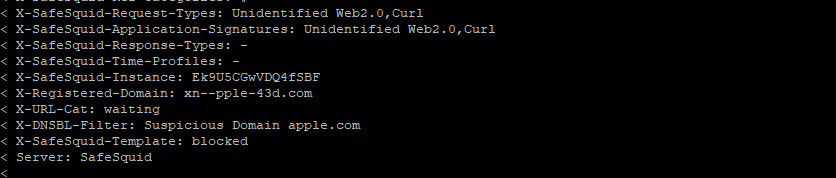
Method 2: Browser Test
- Configure your browser to use SafeSquid as proxy (see Connect Your Client)
- Navigate to
http://аpple.com - Expected result: SafeSquid displays a block page
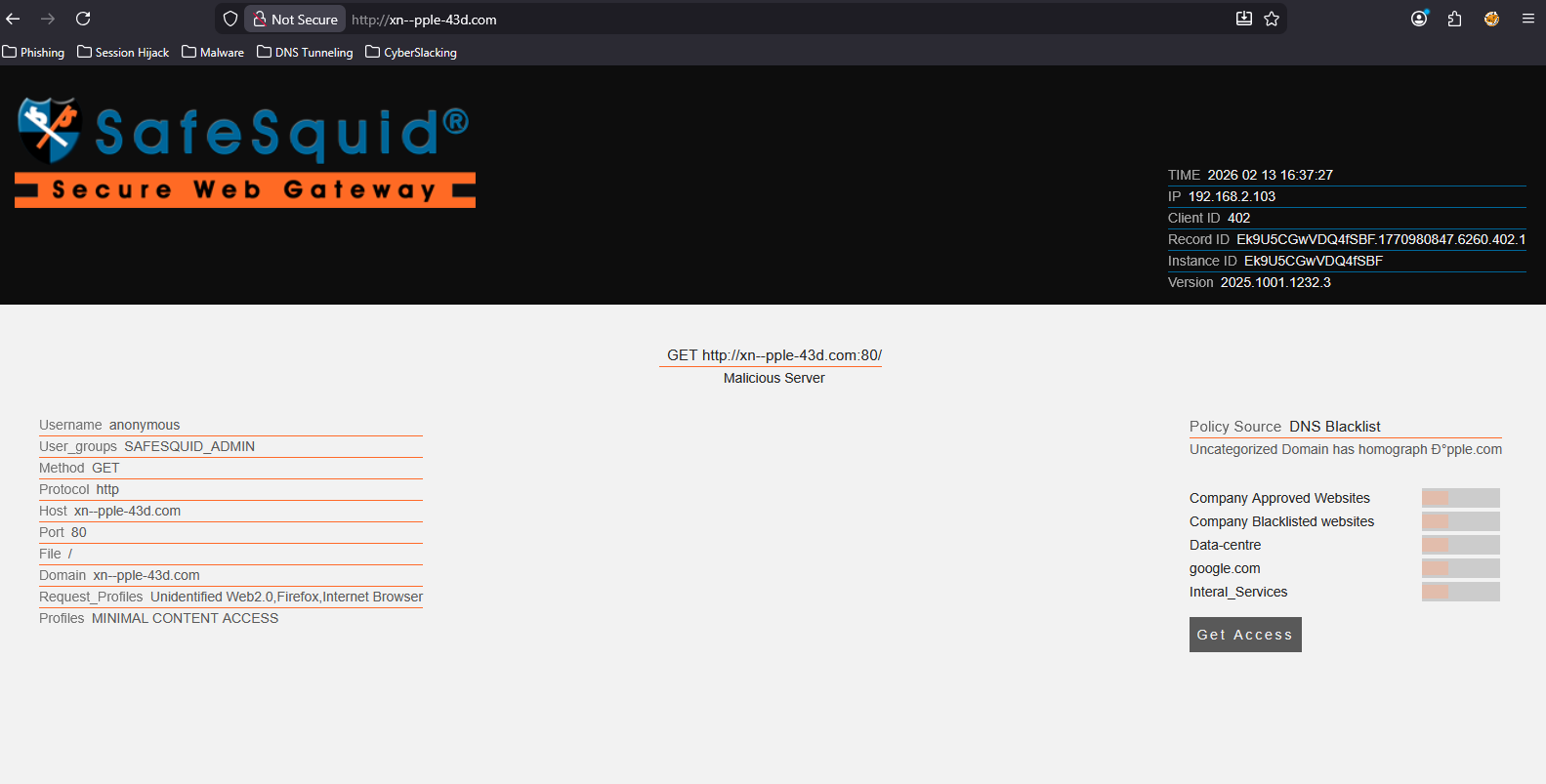
Method 3: Log Verification
Check SafeSquid logs for blocked homograph attempts:
tail -f /var/log/safesquid/security.log | grep -i homograph
Expected entries: Logs should show blocked requests with reason=homograph or similar indicators.
Troubleshooting
| Issue | Symptom | Resolution |
|---|---|---|
| Homograph attacks not blocked | IDN lookalike domains load successfully | Check: 1) Homograph Detection is Enabled = TRUE. 2) Changes were applied. 3) Browser is using SafeSquid as proxy. Test: Access http://аpple.com (with Cyrillic 'а'). |
| Legitimate IDN sites blocked | International domains (e.g., Chinese, Arabic) blocked incorrectly | Cause: Overly aggressive detection. Fix: Add legitimate IDN domains to bypass/allow-list in Access Restrictions. Alternative: Adjust detection sensitivity if the feature supports it. |
| No log entries | Can't confirm blocks in logs | Check: 1) Security logging is enabled. 2) Verify log path /var/log/safesquid/security.log exists. 3) Check disk space (logs may stop if disk is full). |
| Feature not available | Homograph Detection option not visible | Check: SafeSquid version supports this feature. Update: If missing, update to latest SafeSquid release. Verify: Run safesquid -v to check version. |
Still having issues? Contact SafeSquid support with:
- Screenshot of Homograph Detection configuration
- Sample blocked domain attempts
- Contents of
/var/log/safesquid/safesquid.logand/var/log/safesquid/security.log
How Homograph Detection Works
SafeSquid analyzes domain names during DNS resolution and checks for:
- Mixed scripts: Domains using characters from multiple alphabets (e.g., Latin + Cyrillic)
- Lookalike patterns: Visual similarity to known legitimate domains
- Suspicious Unicode: Non-ASCII characters in domain names
When detected, SafeSquid blocks the request and logs the attempt for audit trails.
Next Steps
- Layer defenses: Combine with DNSBL to block known-malicious domains
- Inspect certificates: Enable SSL Inspection to detect fake TLS certificates on lookalike domains
- Monitor attempts: Use Security Logs and Reporting to track homograph attack patterns
- User training: Educate users about IDN attacks and visual domain verification