Getting Started
What is SafeSquid SWG?
SafeSquid SWG (Secure Web Gateway) is the full product: proxy, policy console, reporting, and DNS security. SafeSquid is an SMP-aware HTTP Proxy Server designed for application-layer (Layer 7) security. Its Zero Trust Web Security architecture delivers scalable performance while ensuring comprehensive mitigation of Layer 7 threats.
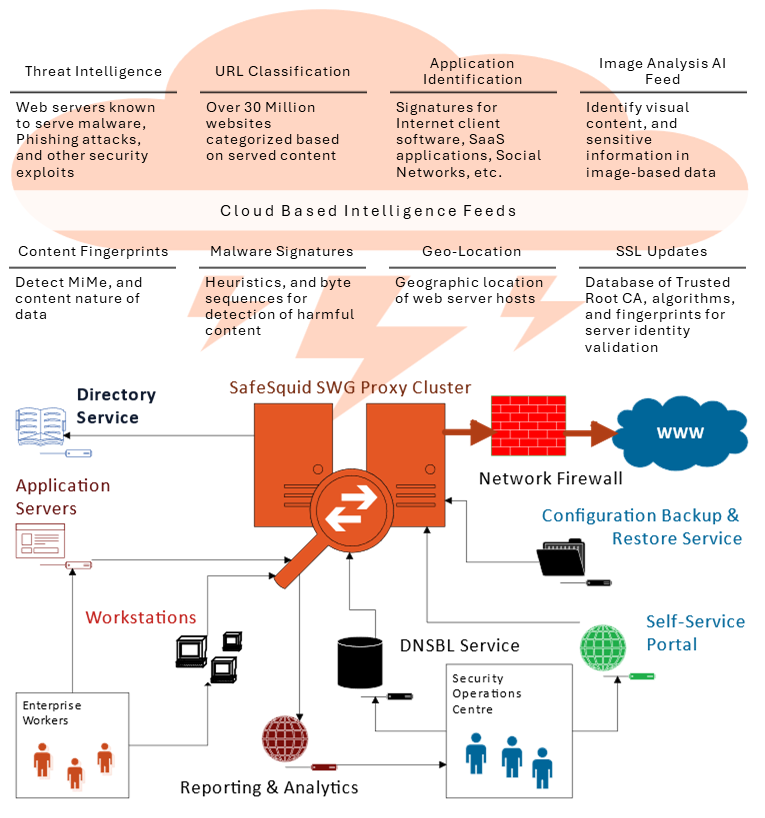 SafeSquid SWG: proxy layer, policy and configuration, reporting, and DNS security.
SafeSquid SWG enforces granular web access control, deep content mitigation, and real-time visibility in enterprise web traffic.
You'll need:
- A server or VM with minimum 4 CPU cores, 8 GB RAM
- At least 1 network interface (2+ recommended for WAN/LAN separation or NIC bonding for HA)
- Internet connectivity for downloads and license activation
- A browser on a machine that can reach the server (for admin access)
- Server firewall allowing inbound TCP 8080 (proxy) from LAN and TCP 8443 (admin UI) from admin workstations
- Network firewall allowing SafeSquid outbound internet access
After registration, you download an activation key; the gateway becomes fully operational once the key is uploaded and verified.
Pilot Deployment in 5 Steps
Follow the sequence below to reach a working pilot: sizing and registration, installation, license activation, and client connectivity. By the end you will have a deployed SafeSquid node, an active license, and clients sending web traffic through the proxy.
Deployment Planning
SafeSquid is platform-agnostic: single node, HA (active-passive or active-active), cloud VMs, or existing Linux hosts. The deployment guide covers sizing, hardware matrix, network bonding, and disaster recovery. Start with a single node for pilot; plan HA and DR before production.
Register and get your key
Register on the SafeSquid Self Service portal and download the activation key.
Install SafeSquid
SafeSquid can be installed via Appliance Builder ISO (SAB), cloud image, or as a TAR package. SAB (Recommended) for new bare metal or VM; Cloud for AWS, Azure, DigitalOcean, or private cloud; Linux TAR for an existing Linux server where you add SafeSquid only.
Activate Your License
Upload the activation key in the SafeSquid Interface (accessible at https://safesquid.cfg — an embedded Rest UI interface built into SafeSquid; accessible only when your client is configured to use the proxy, but NOT resolved by SafeSquid's DNS resolver — or directly at https://YOUR-SERVER-IP:8443 before proxy setup). The gateway is fully operational only after license verification.
Connect Your Client
Clients can be configured to use the proxy via browser settings, a PAC (Proxy Auto-Configuration) file, or system-wide proxy settings pushed via MDM or GPO. For the fastest pilot check, configure explicit proxy on one browser, then Verify Your Setup.
Troubleshooting
If the UI doesn't load, activation fails, or clients can't reach the proxy, see the Troubleshooting section for logs and common fixes.
Next Steps
Once your pilot is operational, configure security policies in this recommended order. Items 1-3 are essential for a functional security gateway; items 4-7 extend protection and visibility:
-
SSL Inspection — Most web traffic is encrypted. Enable SSL Inspection so SafeSquid can actually see and filter HTTPS content.
-
Authentication — Combine Active Directory user groups with network-based signatures for multi-factor authentication.
-
Integrated DNS Security — Block malicious DNS queries, enforce policy-aware resolution, and mitigate DNS tunneling.
-
Profiling Engine — Profile requests by identity, application, content, and time so policies apply to the right traffic.
-
Access Restriction — Define access control rules by URL category, application, user, and time window.
-
Malware Scanners — Scan downloads and content streams for malicious payloads.
-
Data Leakage Prevention — Prevent sensitive data exfiltration in uploads, downloads, and web posts using compliance templates and content rules.
Production Deployment
When moving to production:
- Push client configuration to all endpoints using PAC files, system-wide proxy settings, GPO, or MDM
- Deploy SafeSquid in a cluster for high availability (active-passive or active-active)
- Configure traffic forensics, usage reports, and real-time dashboards for visibility and compliance
- Integrate with existing IAM, SIEM, and threat intelligence platforms