Serve repeated requests from local cache
Content Caching stores local copies of requested pages and files. Later requests for the same content are served from cache instead of the origin, improving bandwidth and latency. SafeSquid provides configurable content caching.
Configure content caching
Create Access Policy
-
Access the SafeSquid User Interface and click Configure.
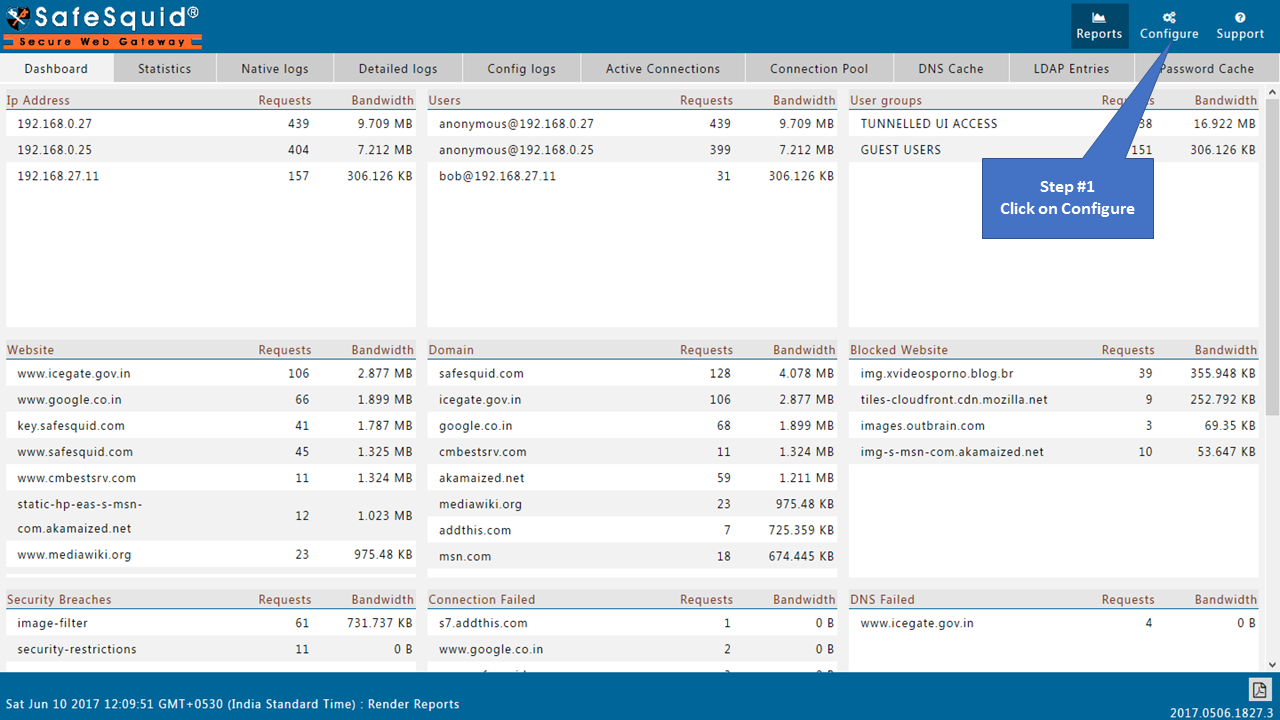
-
Navigate to Access Policies under Restriction Policies.

-
Click Add New to create a new policy.

-
Enter a descriptive comment for reference.

-
Select the desired categories from the Categories dropdown.

-
Set Action to Allow.

-
Assign a unique name in Added Profiles.

-
Click Save Policy.

Configure Caching Store
-
Navigate to Caching under Application Setup.

-
Click the Store tab.

-
Click Clone to duplicate an existing policy.


-
Click Edit Policy on the cloned entry.

-
Set Enabled to True.

-
Add an appropriate comment for future reference.

-
Select the profile created earlier from the Profiles dropdown.

-
Click Save Policy.

-
Click Save to apply the configuration globally.

Verification and Evidence
-
Navigate to Manage Cached Objects in the Caching section.

-
Verify cached websites appear under disk cache.
