Request Profiles
Request profiler manages rules by request attributes
The Request Profiler manages profiling based on the request sent to the web server. Configure rules by request method, protocol, referrer, and user agent. Use it to block or allow websites by hostname. Use it to make social networks (Facebook, Twitter) read-only (no like, comment, share, chat, or gaming). Use it to enforce safe search for Google, Yahoo, and YouTube.
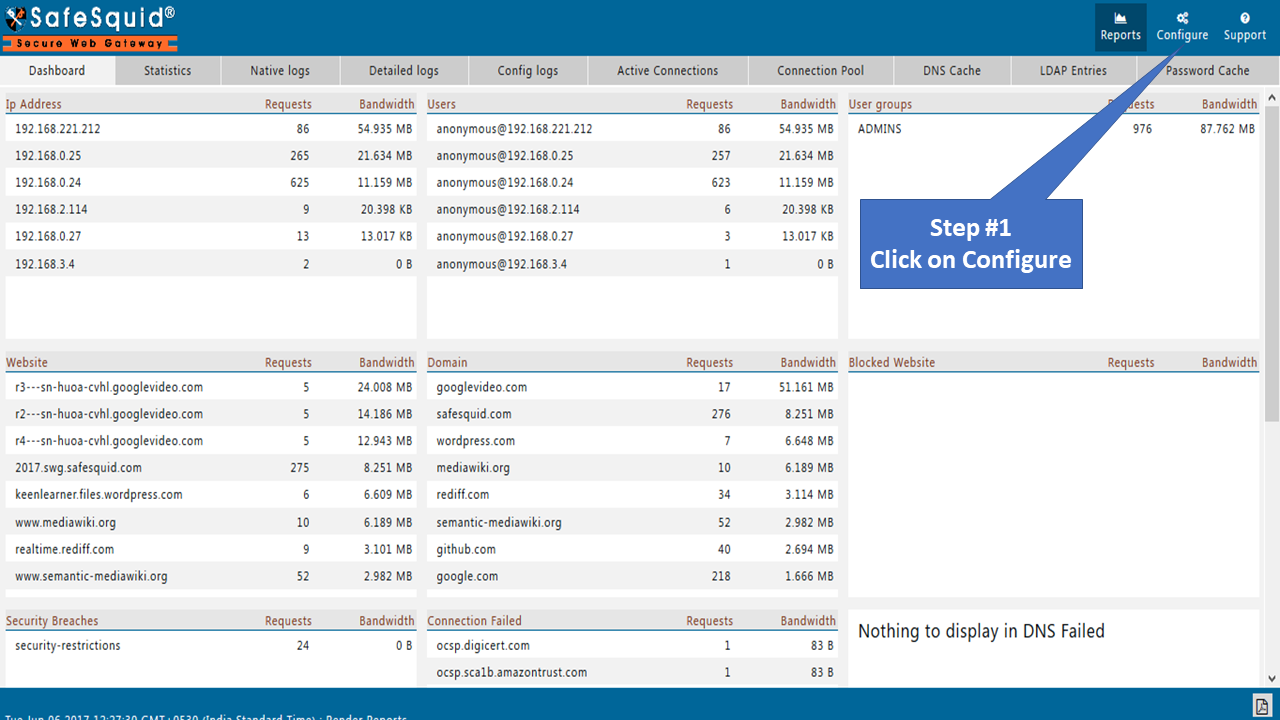
Access SafeSquid interface
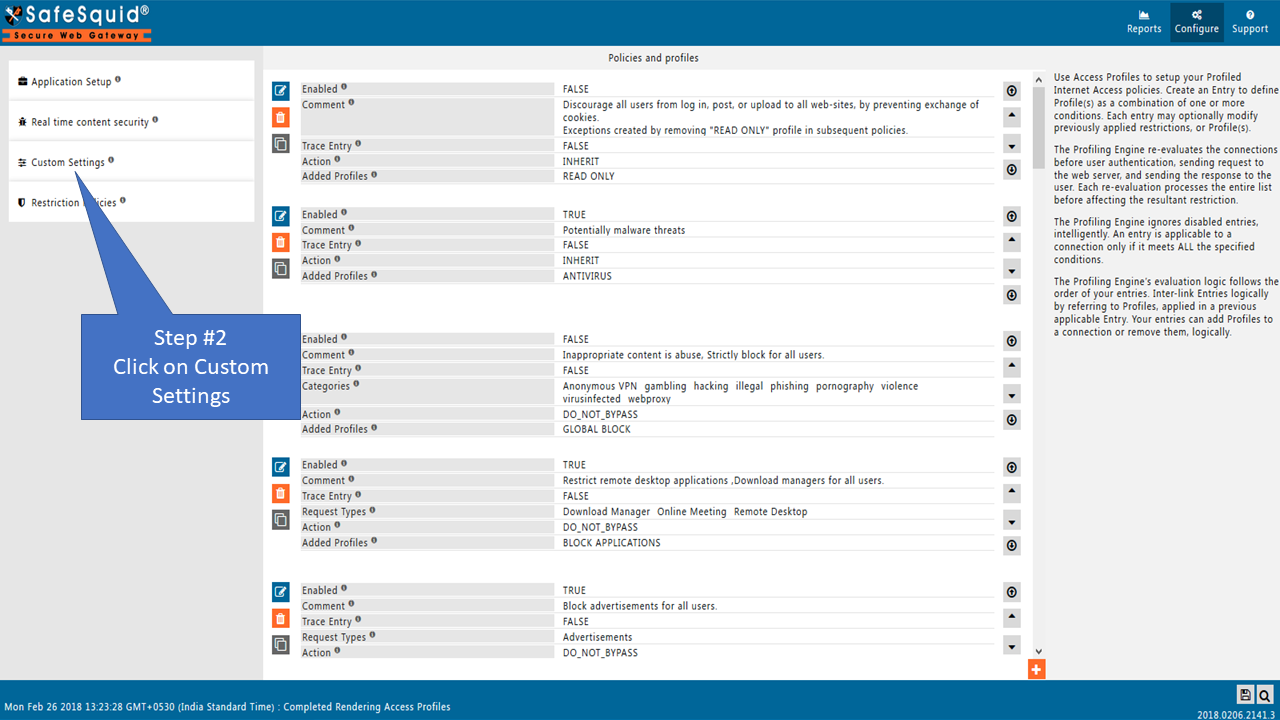
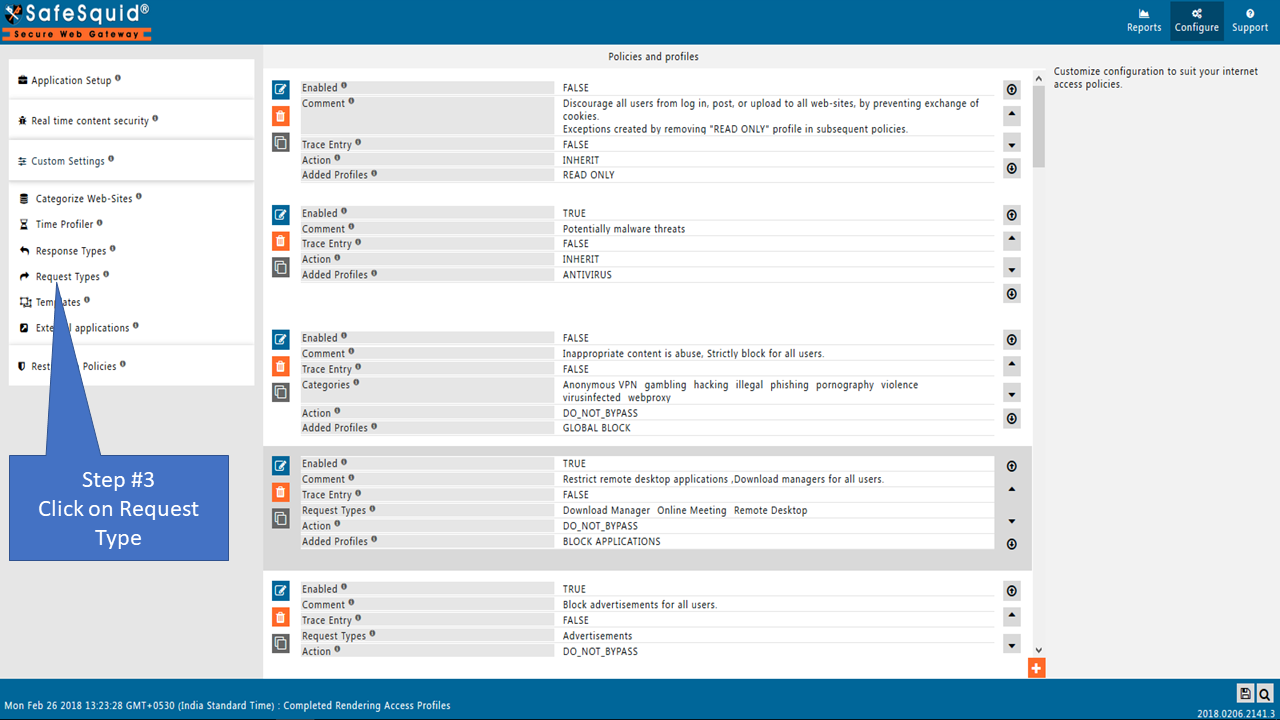
Go to the configure page
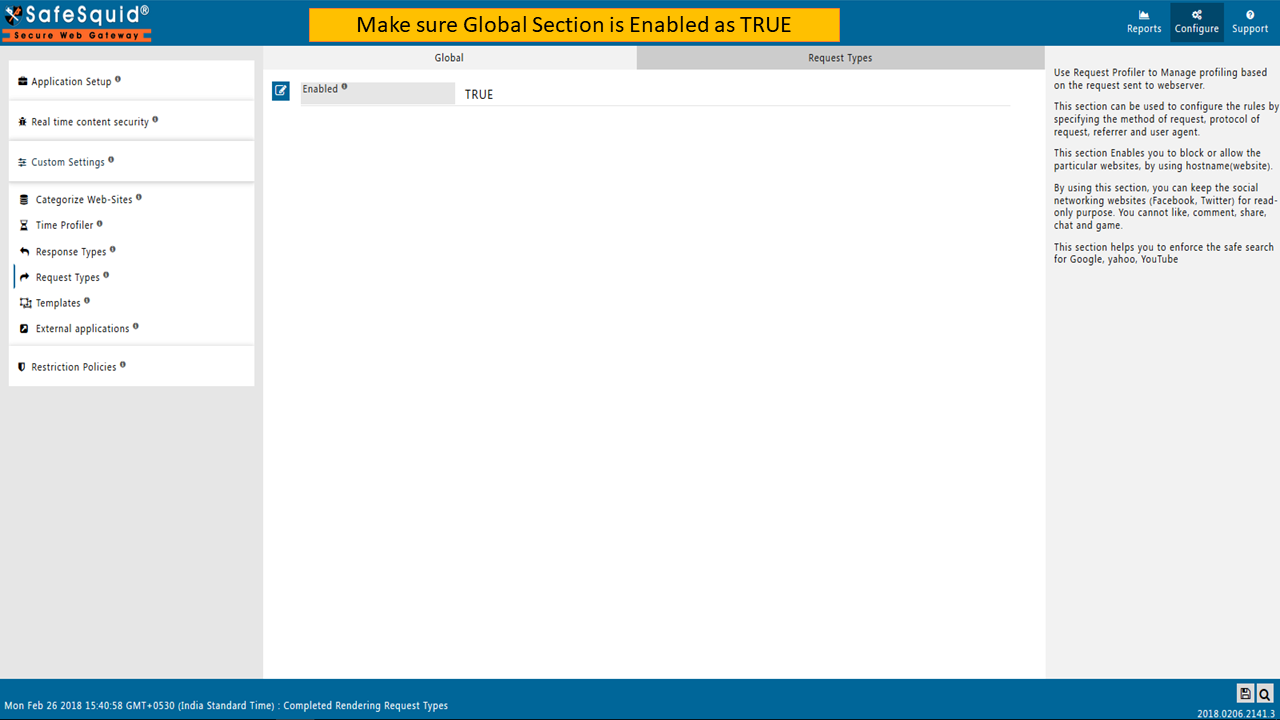
Global
Enabled
Enable or Disable request types of sections.
- TRUE: Enable request types of section
- FALSE: Disable request types of section
Request Types
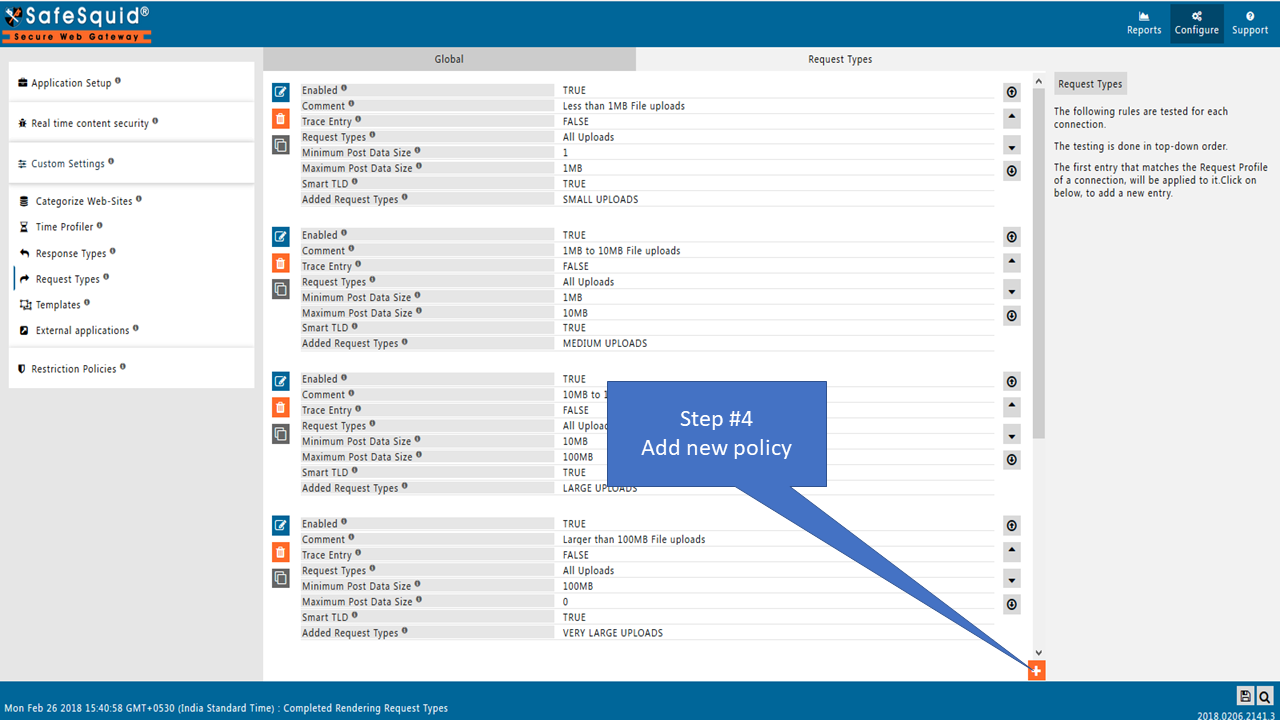
The following rules are tested for each connection. The testing is done in top-down order.
The first entry that matches the Request Profile of a connection, will be applied to it.
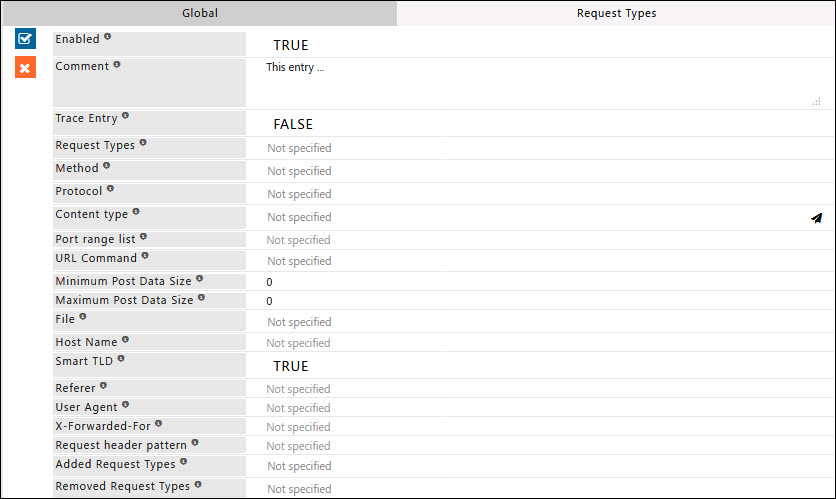
Enabled
Enable or Disable this entry
- TRUE: Enable this entry
- FALSE: Disable this entry
Comment
For documentation and future references, explain the relevance of this entry with your policies.
Trace Entry
Enable or Disable Tracing of this entry.
Select "Yes" to debug the application of entry using SafeSquid logs.
Enable entry tracing to validate that the entry is applied.
- TRUE: Select this option to enable profile tracing
- FALSE: Select this option to disable profile tracing
Request Profiles
Comma-separated list of Request Profiles to which this entry will be applied.
This could be one or more Request Profiles already applied (ADDED REQUEST PROFILES) to the connection, due to this entry in the list.
Leave Blank, it will apply to all connections irrespective of any applied request profile.
Method
This entry applies to requests matching the selected list of Method(s).
If this entry should be applied to all requests irrespective of methods, do not select any method.
- GET: The GET method is used to retrieve information from the server using a given requested web server. Requests using GET should only retrieve data and should have no other effect on the data. Select to apply this entry for requests with the GET method.
- POST: The POST method is used to submit data to be processed (For example: customer information, file upload etc. using HTML forms). The data is included in the body of the request. This may result in the creation of a new resource, the updates of existing resources or both. Select to apply this entry for requests with the POST method.
- CONNECT: CONNECT Converts the request connection to a transparent TCP/IP tunnel, usually to facilitate SSL-encrypted communication (HTTPS) through an unencrypted HTTP proxy (e.g. SSL tunnelling). Select to apply this entry for requests with the CONNECT method.
- HEAD: The HEAD method is identical to GET. However, in response to the HEAD request server shall not return a message body. Select to apply this entry for requests with the HEAD method.
- PUT: PUT method is used to upload a representation of the specified resource. If the request for any web server refers to an already existing resource, it will be modified. Otherwise, the server can create the resource with the present URI (Uniform Resource Identifier). Select to apply this entry for requests with the PUT method.
- DELETE: The DELETE method removes the specified resource. It intends to delete the resource or move it to an inaccessible location identified by the requested web server. Select to apply this entry for requests with the DELETE method.
- TRACE: TRACE Echoes back the received request so that a client can see what intermediate servers are adding or changing in the request. The final recipient of the request SHOULD reflect the message received back to the client as the entity-body of a 200 (OK) response. Select to apply this entry for requests with the TRACE method.
- OPTIONS: OPTIONS method returns the HTTP methods that the server supports URL. OPTIONS can be used to check the functionality of a web server by requesting * instead of a specific resource. Select to apply this entry for requests with the OPTIONS method. Unused
Protocol
This entry applies to requests matching the selected list of protocol(s).
If this entry should be applied to all requests irrespective of protocols, do not select any protocol.
- FTP: File Transfer Protocol (FTP) is a standard network protocol used to transfer files from any host to another host over a TCP-based network. Select to apply this entry for FTP clients.
- HTTP: Hypertext Transfer Protocol (HTTP) is an application protocol for distributed, collaborative, hypermedia information systems. HTTP is the protocol to exchange or transfer hypertext. Select to apply this entry for HTTP clients.
- HTTPS: Hypertext Transfer Protocol Secure (HTTPS) is a communications protocol for secure communication over a computer network. The very first request for HTTPS will be a CONNECT request, subsequently, it will be changed to HTTPS. Therefore, lower down in protocol, it is an HTTPS request. Select to apply this entry for HTTP clients who want to access websites using SSL.
Content type
This entry applies to regular expressions matching the MIME type. Here MIME-type indicates the entity-body sent to the recipient (used with POST and PUT requests).
Request Type is the type of request sent by the requester such as an incident or request for any information.
Example: Content-Type: application/x-www-form-URL encoded. If this entry should be applied to all requests irrespective of MIME type leave it blank.
Port range list
Comma-separated list of port or ports ranges to which this entry will be applied. Here port range indicates the TCP port(s) number on which the server is listening.
Example: value "80,21-25" means port 80 and port range from 21 to 25. This applies to all ports if left blank.
URL Command
Comma-separated list of URL command(s) to which this entry will be applied.
If this entry should be applied to all requests irrespective of any URL command leave it blank.
https: For HTTPS requests.
! https: For other than HTTPS requests.
Minimum Post Data Size
This entry applies only if the Request body is more than this size.
Example: Content-Length: 48
Maximum Post Data Size
This entry applies only if the Request body is less than this size.
Example: Content-Length: 480
File
This entry applies to regular expressions matching the file portion of the requested web server (the part of a URL that succeeds the hostname).
Leave it blank to apply all the requests irrespective of the file portion of URI (Uniform Resource Identifier).
Example: (cgi-bin|\?) will apply to queries in a URL.
Host Name
This entry applies to regular expressions matching the hostname(website) of the requested web server.
Leave it blank to apply all the requests irrespective of hostname(s).
Example: Host: en.wikipedia.org:80
Smart TLD
Enable this option if the regex for Host Name should be used to match irrespective of TLD.
Specify google$ in Host Name and smart TLD to ensure match for google.com or google.co.uk or google.co.in
To create a policy strictly for mail.google.com, set Smart TLD to disabled and set Host Name to mail\.google\.com
- TRUE: Ignore the TLD of the requested Host Name while matching regex
- FALSE: The regex contains a specific TLD for which the match is required
Referrer
This entry applies to regular expressions matching the referrer (the address of the resource from which the requested URI was obtained) of the requested web server.
Leave it blank to apply all requests irrespective of the referrer of the header.
Example: Referrer: http://en.wikipedia.org/wiki/Main_Page.
User Agent
This entry applies to regular expression matching to a specific internet client or web client (application requesting the information from the server).
Leave it blank to apply all requests irrespective of any application requesting the information from the server.
Example: User-Agent: Mozilla/5.0 (X11; Linux x86_64; rv:12.0) Gecko/20100101 Firefox/21.0.
X-Forwarded-For
This entry applies to regular expressions matching the X-Forwarded-For (the IP address from where the original request came from either proxy or load balancer).
Leave it blank to apply for all requests irrespective of X-forwarded.
Example: X-Forwarded-For: 129.78.138.66.
Request header pattern
This entry applies to regular expressions matching the request header pattern. Apply to all request patterns if left blank.
Added Request profiles
Comma-separated list of Request Profiles will be added to the connection if the above-specified test result is true.
Removed Request profiles
Comma-separated list of Request Profiles to be removed when all the above rules match.
If any of these Request profiles have been already applied to the connection by any of the other Request Profile rules, they will be removed.
Example
Rule#1
I want a Request type for Microsoft Teams Desktop application based on its user agent.
Connections that match the pattern for the team's user agent will be added to the Microsoft Teams Desktop application.
This is useful to remove authentication or bypass SSL inspection only for a specific application.

Rule#2
Example: When google.com is blocked organization-wide, allow only Google Keep while keeping other Google services blocked. Using Google Keep's host name, create a Request profile for Google Keep. That Request type allows access to Google Keep while other Google services remain blocked.

User Activity Visibility
Request Profiles enable visibility into user activity patterns. Create profiles to classify traffic by service, application, or behavior.
Cloud Storage Services
Track uploads and downloads to cloud storage:
| Service | Host Pattern | Profile Tag |
|---|---|---|
| Google Drive | drive\.google\.com|docs\.google\.com | CLOUD_GDRIVE |
| Dropbox | dropbox\.com|dropboxapi\.com | CLOUD_DROPBOX |
| OneDrive | onedrive\.live\.com|sharepoint\.com | CLOUD_ONEDRIVE |
| Box | box\.com|boxcloud\.com | CLOUD_BOX |
| iCloud | icloud\.com | CLOUD_ICLOUD |
Tip: Use Method GET for downloads, POST/PUT for uploads to distinguish activity type.
Social Media Platforms
Monitor social media usage and distinguish browsing from posting:
| Platform | Host Pattern | Profile Tag |
|---|---|---|
facebook\.com | SOCIAL_FACEBOOK | |
| Twitter/X | twitter\.com|x\.com | SOCIAL_TWITTER |
linkedin\.com | SOCIAL_LINKEDIN | |
instagram\.com | SOCIAL_INSTAGRAM |
Webmail Services
Track webmail usage:
| Service | Host Pattern | Profile Tag |
|---|---|---|
| Gmail | mail\.google\.com | WEBMAIL_GMAIL |
| Outlook | outlook\.live\.com|outlook\.office\.com | WEBMAIL_OUTLOOK |
| Yahoo Mail | mail\.yahoo\.com | WEBMAIL_YAHOO |
| ProtonMail | mail\.protonmail\.com | WEBMAIL_PROTON |
Desktop Applications
Identify applications by User Agent:
| Application | User Agent Pattern | Profile Tag |
|---|---|---|
| Microsoft Teams | Teams|SkypeSpaces | APP_TEAMS |
| Slack | Slack | APP_SLACK |
| Zoom | Zoom | APP_ZOOM |
| Webex | Webex|Cisco | APP_WEBEX |
| VS Code | VSCode|Visual.Studio.Code | APP_VSCODE |
AI Tools
Track AI assistant usage:
| Service | Host Pattern | Profile Tag |
|---|---|---|
| ChatGPT | chat\.openai\.com|chatgpt\.com | AI_CHATGPT |
| Claude | claude\.ai | AI_CLAUDE |
| Gemini | gemini\.google\.com | AI_GEMINI |
| Copilot | copilot\.microsoft\.com | AI_COPILOT |
Large File Transfers
Detect large uploads by combining method and size:
- Method: POST or PUT
- Content Type:
application/octet-stream|multipart/form-data - Minimum Post Data Size: 1048576 (1 MB)
- Added Profile:
LARGE_FILE_UPLOAD
Profile Priority
Profiles are evaluated top-to-bottom. Order entries from most specific to most general:
- Specific application endpoints
- Service-level patterns
- Category-level patterns
- Catch-all patterns
Best Practices
- Use meaningful names — Profile tags should be self-documenting
- Group by category —
CLOUD_*,SOCIAL_*,WEBMAIL_* - Separate read/write — Distinguish GET (read) from POST/PUT (write)
- Regular review — Update patterns as new services emerge
- Combine with DLP — Use profiles to trigger Data Leakage Prevention policies
Related: Data Leakage Prevention, Access Restriction, Reporting Module