> ## Documentation Index
> Fetch the complete documentation index at: https://docs.safesquid.com/llms.txt
> Use this file to discover all available pages before exploring further.
# FTP browsing
The **FTP** section configures global FTP-over-HTTP gateway behaviour. There is no policy list — only global fields.
## Core mechanics
### Anonymous credentials
When the client sends no username, SafeSquid substitutes **Username** and **Password** from this section before USER/PASS.
### Passive mode
When on, PASV data connections; when off, PORT/active with local bind on the same interface as the control connection.
### Sort defaults
Directory HTML listings use **Sort field** and **Sort order** when the client does not pass CGI sort parameters.
 ## Global fields
* **Passive mode** — PASV vs PORT data transfer.
* **Timeout** — Control read timeout; 0 uses OS TCP keepalive interval.
* **Username / Password** — Anonymous defaults when client omits credentials.
* **Sort order / Sort field** — Default directory listing order (name, size, date).
## Examples
Open **Configure → Application Setup → FTP browsing**. A single Global screen holds Passive mode,
Timeout, Username/Password for anonymous login, and Sort order/field — no row list.
## Global fields
* **Passive mode** — PASV vs PORT data transfer.
* **Timeout** — Control read timeout; 0 uses OS TCP keepalive interval.
* **Username / Password** — Anonymous defaults when client omits credentials.
* **Sort order / Sort field** — Default directory listing order (name, size, date).
## Examples
Open **Configure → Application Setup → FTP browsing**. A single Global screen holds Passive mode,
Timeout, Username/Password for anonymous login, and Sort order/field — no row list.
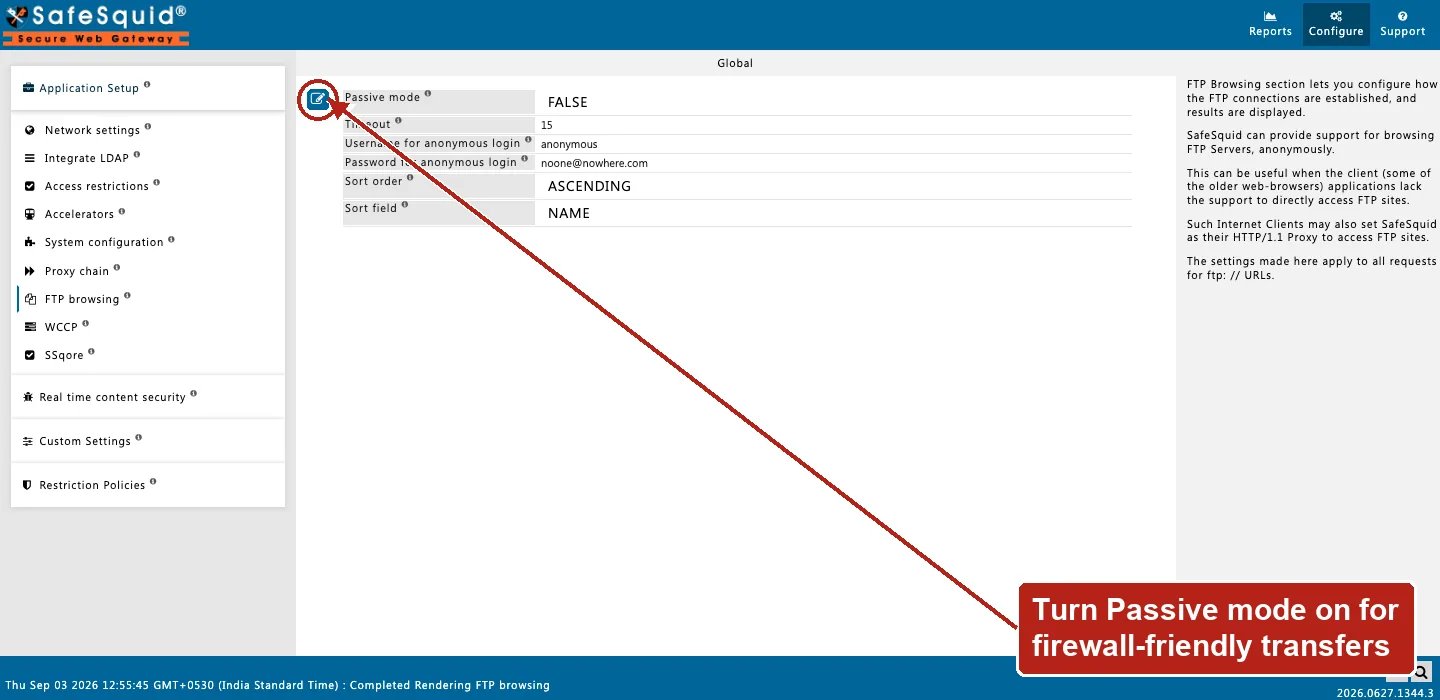 ### Anonymous behind firewall
**Config:** passive on, anonlogin anonymous.
**Result:** PASV data channel; listing and download without client credentials.
### Access denies FTP
**Config:** FTP globals normal; Access lacks proxy/FTP for client.
**Result:** Denied before FTP settings apply.
## How to verify
1. Open `ftp://` URL through proxy in browser.
2. Toggle passive if LIST works but RETR fails.
3. Check Detailed logs and REQUEST native logs.
## Related topics
- [Architecture and request pipeline](/admin_guide/start_here/architecture.md)
- [System-Wide Proxy Settings](/getting_started/client_configuration/system_wide_proxy.md)
- [Request Profiles](/use_cases/profiling_engine/request_profiles.md)
- [Welcome to SafeSquid](/getting_started/welcome.md)
- [Block Inappropriate Images by Using Image Analyzer](/use_cases/data_leakage_prevention/block_inappropriate_images_by_using_image_analyzer.md)
### Anonymous behind firewall
**Config:** passive on, anonlogin anonymous.
**Result:** PASV data channel; listing and download without client credentials.
### Access denies FTP
**Config:** FTP globals normal; Access lacks proxy/FTP for client.
**Result:** Denied before FTP settings apply.
## How to verify
1. Open `ftp://` URL through proxy in browser.
2. Toggle passive if LIST works but RETR fails.
3. Check Detailed logs and REQUEST native logs.
## Related topics
- [Architecture and request pipeline](/admin_guide/start_here/architecture.md)
- [System-Wide Proxy Settings](/getting_started/client_configuration/system_wide_proxy.md)
- [Request Profiles](/use_cases/profiling_engine/request_profiles.md)
- [Welcome to SafeSquid](/getting_started/welcome.md)
- [Block Inappropriate Images by Using Image Analyzer](/use_cases/data_leakage_prevention/block_inappropriate_images_by_using_image_analyzer.md)