> ## Documentation Index
> Fetch the complete documentation index at: https://docs.safesquid.com/llms.txt
> Use this file to discover all available pages before exploring further.
# Response Types
The **Response Types** section labels HTTP responses for [Access Profiles](/admin_guide/restriction_policies/access_profiles) and content filters. It does not block by itself.
## Core mechanics
### Two-pass evaluation
1. On response headers — response profiling runs with no body buffer.
2. On buffered body — hook runs again with detected MIME and size.
Every matching enabled row applies; no first-match stop.
 ### Content size
Non-zero min/max tested against body buffer size when present, and against Content-Length when CL flag set. Zero disables each test.
### MIME and extension
MIME regex tries response Content-Type header, then detected body type. Extension regex tries URL (query stripped), then attachment filename.
## Examples
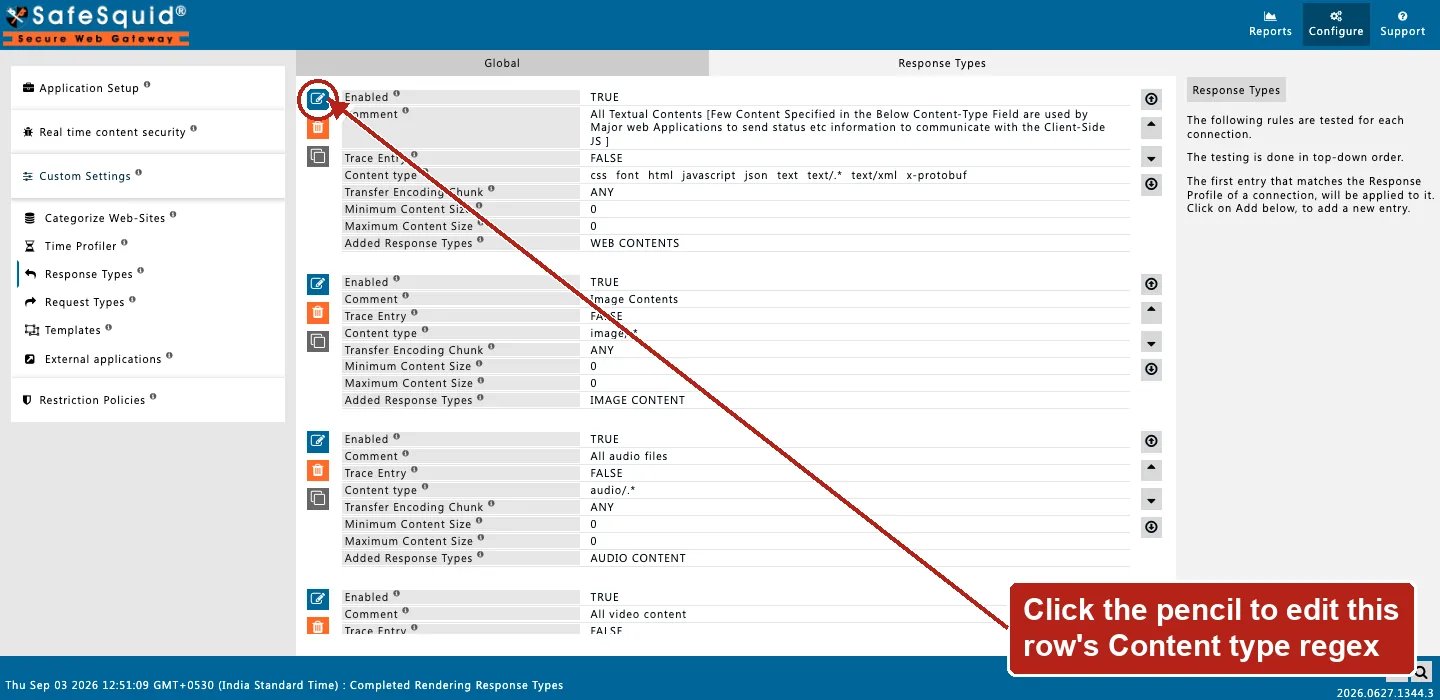
Open **Configure → Custom Settings → Response Types**. Row fields are Enabled, Comment, Trace
Entry, **Content type** (the MIME-pattern field referenced below), Transfer Encoding Chunk,
Minimum/Maximum Content Size, and Added Response Types.
### Content size
Non-zero min/max tested against body buffer size when present, and against Content-Length when CL flag set. Zero disables each test.
### MIME and extension
MIME regex tries response Content-Type header, then detected body type. Extension regex tries URL (query stripped), then attachment filename.
## Examples
Open **Configure → Custom Settings → Response Types**. Row fields are Enabled, Comment, Trace
Entry, **Content type** (the MIME-pattern field referenced below), Transfer Encoding Chunk,
Minimum/Maximum Content Size, and Added Response Types.
 ### Text for keyword filter
**Config:** MIME `(^text/|script$)`, add `text_res`.
**Result:** HTML/JS/text responses tagged.
### Images
**Config:** MIME `^image/`, add `image_res`.
**Result:** image Content-Types tagged for image filter policies.
### Large images
**Config:** MIME `^image/`, min size 1048576, add `large-image`.
**Result:** skipped below 1 MiB; tagged at or above threshold.
## How to verify
1. **Trace Entry**; fetch test URL; check native logs.
2. Detailed logs — `response_profiles`, `download_content_types`.
## Related topics
- [Response Profiles](/use_cases/profiling_engine/response_profiles.md)
- [Debug response headers](/admin_guide/start_here/debug_response_headers.md)
- [Content Signatures](/admin_guide/custom_settings/content_signatures.md)
- [Access Profiles](/admin_guide/restriction_policies/access_profiles.md)
- [Architecture and request pipeline](/admin_guide/start_here/architecture.md)
### Text for keyword filter
**Config:** MIME `(^text/|script$)`, add `text_res`.
**Result:** HTML/JS/text responses tagged.
### Images
**Config:** MIME `^image/`, add `image_res`.
**Result:** image Content-Types tagged for image filter policies.
### Large images
**Config:** MIME `^image/`, min size 1048576, add `large-image`.
**Result:** skipped below 1 MiB; tagged at or above threshold.
## How to verify
1. **Trace Entry**; fetch test URL; check native logs.
2. Detailed logs — `response_profiles`, `download_content_types`.
## Related topics
- [Response Profiles](/use_cases/profiling_engine/response_profiles.md)
- [Debug response headers](/admin_guide/start_here/debug_response_headers.md)
- [Content Signatures](/admin_guide/custom_settings/content_signatures.md)
- [Access Profiles](/admin_guide/restriction_policies/access_profiles.md)
- [Architecture and request pipeline](/admin_guide/start_here/architecture.md)