> ## Documentation Index
> Fetch the complete documentation index at: https://docs.safesquid.com/llms.txt
> Use this file to discover all available pages before exploring further.
# Time Profiler
The **Time Profiler** section tags connections with time labels from the appliance local clock. [Access Profiles](/admin_guide/restriction_policies/access_profiles) **Time Schedule** matches these tags.
## Core mechanics
### Row gate order
1. **Time Profiles** prerequisite tags (`profile_find`).
2. **Weekday range** — always enforced (Sunday = 0 … Saturday = 6).
3. **Match mode** — ABSOLUTE timestamp window or ALL RANGES (month + day + minutes-from-midnight).
4. Add/remove time labels.
 **Weekday active flag** is stored but not checked — weekday bounds always apply. Set explicit 0–6 or 1–5 ranges; template default 0 alone matches Sunday only.
### Match modes
* **ABSOLUTE** — Single start/end timestamp from configured month, day, hour, minute fields.
* **ALL RANGES** — Current month, day-of-month, and time-of-day must each fall in inclusive windows.
## Examples
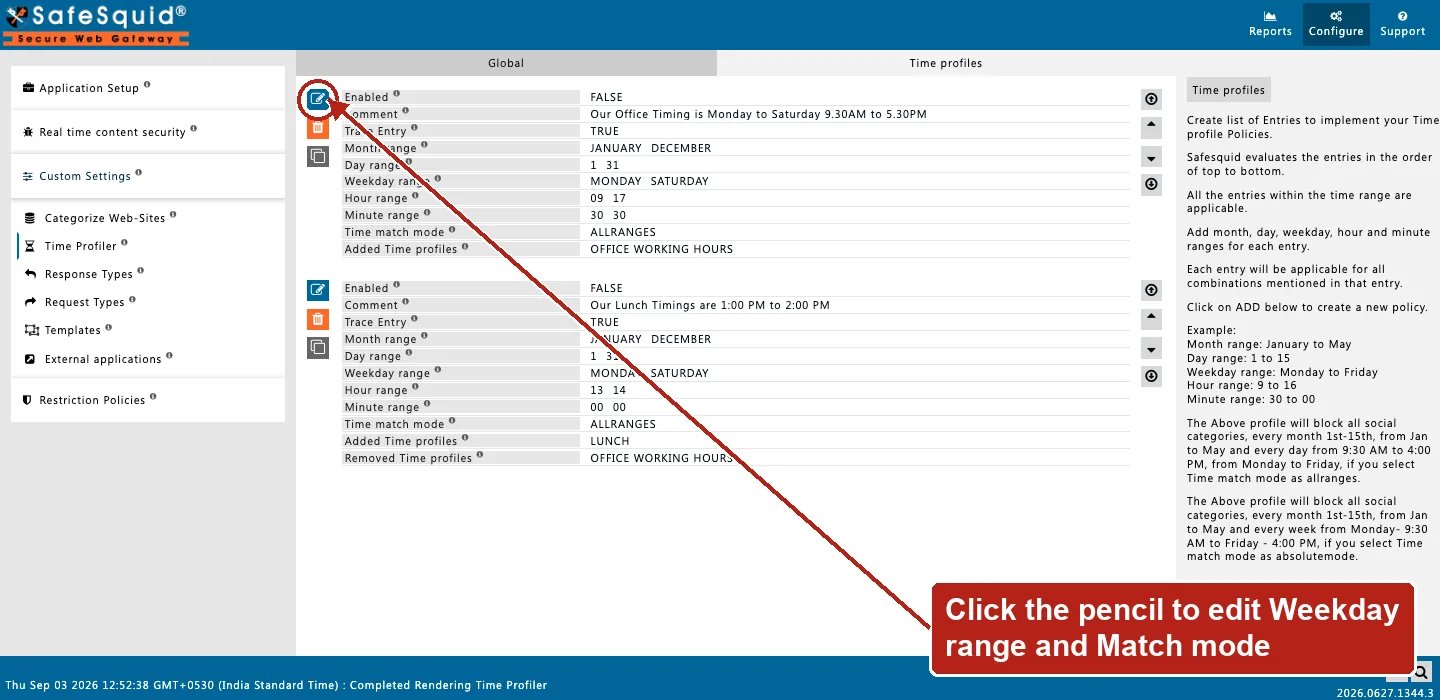
Open **Configure → Custom Settings → Time Profiler → Time profiles**. Row fields are Enabled,
Comment, Trace Entry, Month/Day/Weekday/Hour/Minute range, Time match mode, and Added Time
profiles.
**Weekday active flag** is stored but not checked — weekday bounds always apply. Set explicit 0–6 or 1–5 ranges; template default 0 alone matches Sunday only.
### Match modes
* **ABSOLUTE** — Single start/end timestamp from configured month, day, hour, minute fields.
* **ALL RANGES** — Current month, day-of-month, and time-of-day must each fall in inclusive windows.
## Examples
Open **Configure → Custom Settings → Time Profiler → Time profiles**. Row fields are Enabled,
Comment, Trace Entry, Month/Day/Weekday/Hour/Minute range, Time match mode, and Added Time
profiles.
 ### Business hours
**Config:** Weekday Mon–Fri, hours 9–17, ALL RANGES, add `business-hours`.
**Result:** tag present weekdays 09:00–17:59 local time.
### Lunch window
**Config:** Weekday 1–5, hours 12–13, add `LUNCH_TIME`.
**Result:** Access Profiles can Allow/Deny based on lunch tag.
## How to verify
1. Test inside and outside window with **Trace Entry**.
2. Detailed logs `time_profiles` column.
3. Confirm appliance timezone and clock.
## Related topics
- [Time Profiles](/use_cases/profiling_engine/time_profiles.md)
- [Allow Social Networking Sites During Lunch Hours](/use_cases/access_restriction/allow_social_networking_sites_during_lunch_hours.md)
- [Access Profiles](/admin_guide/restriction_policies/access_profiles.md)
- [Authentication](/admin_guide/start_here/authentication.md)
- [Architecture and request pipeline](/admin_guide/start_here/architecture.md)
### Business hours
**Config:** Weekday Mon–Fri, hours 9–17, ALL RANGES, add `business-hours`.
**Result:** tag present weekdays 09:00–17:59 local time.
### Lunch window
**Config:** Weekday 1–5, hours 12–13, add `LUNCH_TIME`.
**Result:** Access Profiles can Allow/Deny based on lunch tag.
## How to verify
1. Test inside and outside window with **Trace Entry**.
2. Detailed logs `time_profiles` column.
3. Confirm appliance timezone and clock.
## Related topics
- [Time Profiles](/use_cases/profiling_engine/time_profiles.md)
- [Allow Social Networking Sites During Lunch Hours](/use_cases/access_restriction/allow_social_networking_sites_during_lunch_hours.md)
- [Access Profiles](/admin_guide/restriction_policies/access_profiles.md)
- [Authentication](/admin_guide/start_here/authentication.md)
- [Architecture and request pipeline](/admin_guide/start_here/architecture.md)