> ## Documentation Index
> Fetch the complete documentation index at: https://docs.safesquid.com/llms.txt
> Use this file to discover all available pages before exploring further.
# DNS Blacklist
 ## Overview
The `Dnsbl` section provides domain blocking, category-based routing, and DNS-based blacklisting to prevent access to malicious or unauthorized websites.
## Core Mechanics (C++ Source Validation)
* **Sequential Heuristics**: The DNSBL module does not just check lists; it runs a sequence of heuristic checks on the HTTP `Host` header (including length validation, homograph detection, and category/request structural checks).
* **Enforcement & Block Status**: If any heuristic or blocklist check fails, the connection action is instantly set to **DO NOT BYPASS**. SafeSquid sets the HTTP status to `LMS_MALICIOUS_SERVER`, terminates the forward connection, and serves the specified `Template` to the client.
* **Bypass Checking**: The entire module execution is skipped if the connection carries the `FEATURE_DNSBL` bypass right, or if the request is destined for the SafeSquid interface itself.
## Schema Fields
### Global Fields
* **Enabled (enabled)**: When off, DNSBL/category/country/IP checks in this section are skipped. When on, uncategorized-domain heuristics run first, then policy rows.
* **Maximum Permissible Unique Hosts In An Uncategorized Domain (limit)**: Before policy rows, block hosts in an uncategorized registered domain when unique host count under that domain exceeds this value. Legacy UI allows -1 to disable; verify behaviour in your build if you rely on that value.
* **Maximum Permissible Host Name Length In An Uncategorized Domain (namelegth)**: Before policy rows, block when the host label length in an uncategorized domain exceeds this limit. Legacy UI allows -1 to disable; verify behaviour in your build if you rely on that value.
* **Block Homograph based Uncategorized Domain (homograph)**: When on, block hosts in uncategorized domains whose registered domain contains confusable (homograph) characters.
### Rule-Based Fields (Per Connection Tuning)
* **Enabled (enabled)**: Skip this policy row when disabled.
* **Comment (comment)**: Notes for operators. Used as block reason when non-empty (category/request blocks).
* **Threatful Categories (bl\_categories)**: Block when the connection’s website categories include any listed category. No DNS lookup. First matching policy row wins within this check.
* **Threatful Requests (bl\_requests)**: Block when the connection’s request types include any listed type. No DNS lookup. First matching policy row wins within this check.
* **Threatful Countries (bl\_countries)**: After resolving the host A record, block when GeoIP country code is in this list. Requires a successful A lookup and runs inside the IP-check pass.
* **DNSBL Domain (domain)**: Suffix appended to the request host for DNSBL lookup (for example example.com.in.dnsbl.org ). Leave empty on rows that only use category/request/country/IP list checks.
* **Blocked IP addresses (badips)**: IPs that count as a DNSBL hit. Compared against: host A record, reverse-DNSBL answer, or direct IP match. Failed DNSBL lookups are treated as 0.0.0.0 ; include that address to block lookup failures.
* **Template (templ)**: Block page template when this row triggers a block. Blank uses blocked (request-type rows may append the match name).
## How SafeSquid processes checks
1. When website categories are empty, uncategorized heuristics run: host name length, homograph, then unique-host count under the registered domain.
2. Category check: walk policy rows top to bottom; first row whose Threatful Categories match any connection category blocks immediately (no DNS).
3. Request type check: same first-match walk against Threatful Requests.
4. DNSBL check: append DNSBL Domain suffix to the request host, resolve A record, compare to Blocked IP addresses. Failed lookups are treated as `0.0.0.0` — include that address to block lookup failures.
5. IP check: compare host A record, reverse DNSBL answer, and GeoIP country (Threatful Countries) against Blocked IP addresses / country list — first block in each sub-pass wins.
6. On block: action **DO NOT BYPASS**, block template, debug header `X-DNSBL-Filter` with match detail.
## Important entry fields
* **Threatful Categories** — Block when the connection's website categories include any listed category. First matching policy row wins.
* **Threatful Requests** — Block when the connection's request types include any listed type. First matching row wins.
* **DNSBL Domain** — Suffix appended to the request host (for example `example.com.in.dnsbl.org`). Leave empty on rows that only use category/request/country/IP checks.
* **Blocked IP addresses** — IPs that count as a DNSBL hit (ranges supported). Compared against lookup answers and direct host A records.
* **Threatful Countries** — After resolving the host A record, block when GeoIP country code is in this list.
* **Template** — Block page when this row triggers. Blank uses `blocked` (request-type rows may append the match name).
## Examples
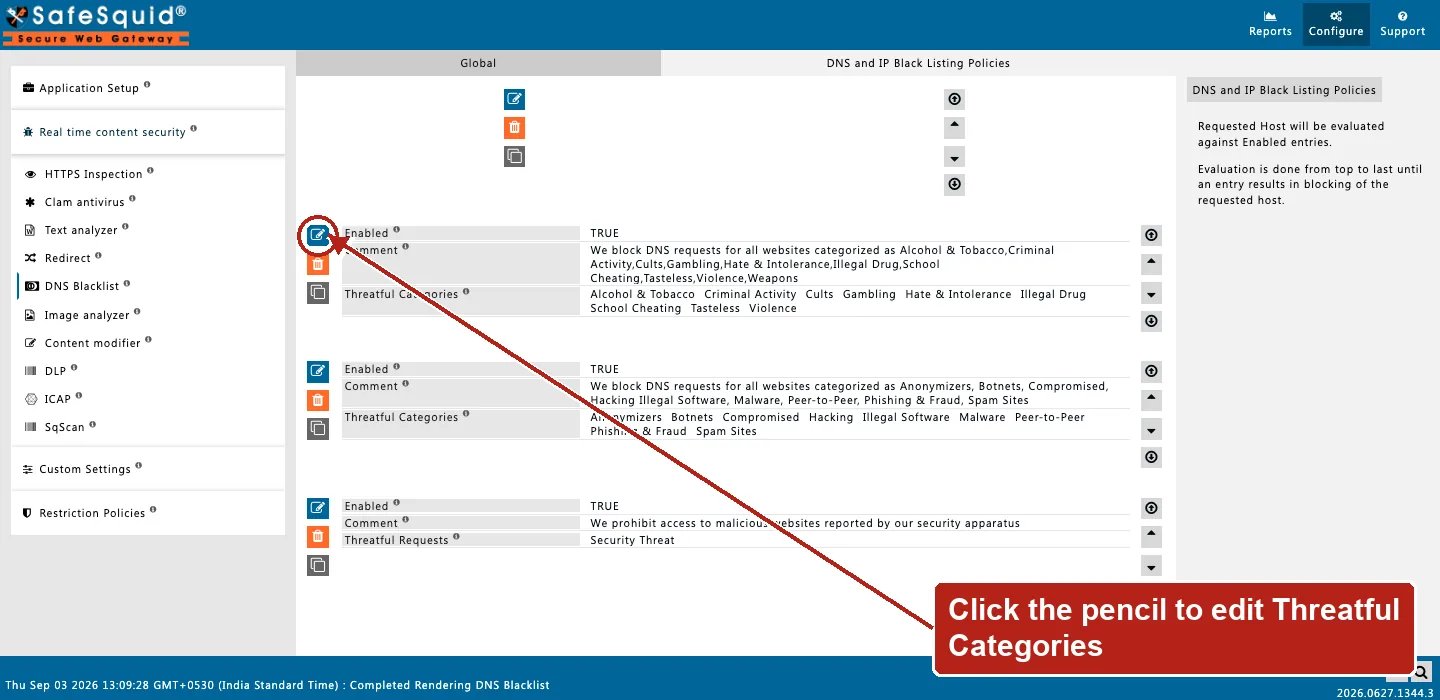
Open **Configure → Real time content security → DNS Blacklist → DNS and IP Black Listing
Policies**. Row fields are Enabled, Comment, and Threatful Categories (or Threatful Requests) —
the top row in the capture below is hidden since its category list names a CSAM category not
suitable to publish verbatim; the remaining rows show the field shape clearly.
## Overview
The `Dnsbl` section provides domain blocking, category-based routing, and DNS-based blacklisting to prevent access to malicious or unauthorized websites.
## Core Mechanics (C++ Source Validation)
* **Sequential Heuristics**: The DNSBL module does not just check lists; it runs a sequence of heuristic checks on the HTTP `Host` header (including length validation, homograph detection, and category/request structural checks).
* **Enforcement & Block Status**: If any heuristic or blocklist check fails, the connection action is instantly set to **DO NOT BYPASS**. SafeSquid sets the HTTP status to `LMS_MALICIOUS_SERVER`, terminates the forward connection, and serves the specified `Template` to the client.
* **Bypass Checking**: The entire module execution is skipped if the connection carries the `FEATURE_DNSBL` bypass right, or if the request is destined for the SafeSquid interface itself.
## Schema Fields
### Global Fields
* **Enabled (enabled)**: When off, DNSBL/category/country/IP checks in this section are skipped. When on, uncategorized-domain heuristics run first, then policy rows.
* **Maximum Permissible Unique Hosts In An Uncategorized Domain (limit)**: Before policy rows, block hosts in an uncategorized registered domain when unique host count under that domain exceeds this value. Legacy UI allows -1 to disable; verify behaviour in your build if you rely on that value.
* **Maximum Permissible Host Name Length In An Uncategorized Domain (namelegth)**: Before policy rows, block when the host label length in an uncategorized domain exceeds this limit. Legacy UI allows -1 to disable; verify behaviour in your build if you rely on that value.
* **Block Homograph based Uncategorized Domain (homograph)**: When on, block hosts in uncategorized domains whose registered domain contains confusable (homograph) characters.
### Rule-Based Fields (Per Connection Tuning)
* **Enabled (enabled)**: Skip this policy row when disabled.
* **Comment (comment)**: Notes for operators. Used as block reason when non-empty (category/request blocks).
* **Threatful Categories (bl\_categories)**: Block when the connection’s website categories include any listed category. No DNS lookup. First matching policy row wins within this check.
* **Threatful Requests (bl\_requests)**: Block when the connection’s request types include any listed type. No DNS lookup. First matching policy row wins within this check.
* **Threatful Countries (bl\_countries)**: After resolving the host A record, block when GeoIP country code is in this list. Requires a successful A lookup and runs inside the IP-check pass.
* **DNSBL Domain (domain)**: Suffix appended to the request host for DNSBL lookup (for example example.com.in.dnsbl.org ). Leave empty on rows that only use category/request/country/IP list checks.
* **Blocked IP addresses (badips)**: IPs that count as a DNSBL hit. Compared against: host A record, reverse-DNSBL answer, or direct IP match. Failed DNSBL lookups are treated as 0.0.0.0 ; include that address to block lookup failures.
* **Template (templ)**: Block page template when this row triggers a block. Blank uses blocked (request-type rows may append the match name).
## How SafeSquid processes checks
1. When website categories are empty, uncategorized heuristics run: host name length, homograph, then unique-host count under the registered domain.
2. Category check: walk policy rows top to bottom; first row whose Threatful Categories match any connection category blocks immediately (no DNS).
3. Request type check: same first-match walk against Threatful Requests.
4. DNSBL check: append DNSBL Domain suffix to the request host, resolve A record, compare to Blocked IP addresses. Failed lookups are treated as `0.0.0.0` — include that address to block lookup failures.
5. IP check: compare host A record, reverse DNSBL answer, and GeoIP country (Threatful Countries) against Blocked IP addresses / country list — first block in each sub-pass wins.
6. On block: action **DO NOT BYPASS**, block template, debug header `X-DNSBL-Filter` with match detail.
## Important entry fields
* **Threatful Categories** — Block when the connection's website categories include any listed category. First matching policy row wins.
* **Threatful Requests** — Block when the connection's request types include any listed type. First matching row wins.
* **DNSBL Domain** — Suffix appended to the request host (for example `example.com.in.dnsbl.org`). Leave empty on rows that only use category/request/country/IP checks.
* **Blocked IP addresses** — IPs that count as a DNSBL hit (ranges supported). Compared against lookup answers and direct host A records.
* **Threatful Countries** — After resolving the host A record, block when GeoIP country code is in this list.
* **Template** — Block page when this row triggers. Blank uses `blocked` (request-type rows may append the match name).
## Examples
Open **Configure → Real time content security → DNS Blacklist → DNS and IP Black Listing
Policies**. Row fields are Enabled, Comment, and Threatful Categories (or Threatful Requests) —
the top row in the capture below is hidden since its category list names a CSAM category not
suitable to publish verbatim; the remaining rows show the field shape clearly.
 ### 1 — Block malware category without DNS
* Policy row: Threatful Categories includes `Malware`
**Result:** any connection already tagged with Malware is blocked immediately with HTTP 451 and the row template; no DNSBL query runs for that decision.
### 2 — DNSBL listed host
* DNSBL Domain: `.in.dnsbl.org`
* Blocked IP addresses: `0.0.0.0,127.0.0.1-127.0.0.6`
**Result:** SafeSquid looks up `.in.dnsbl.org`; if the A record is in the blocked list (including `0.0.0.0` on failure), the request is blocked before fetch.
### 3 — Long hostname on uncategorized site
* Maximum host name length: **5**
* Site has no categories yet; host `verylonglabel.example`
**Result:** name-length heuristic blocks with reason about uncategorized host length; policy rows are not reached for that connection.
### 4 — Trusted users skip DNSBL
* Access Allow entry with **Bypass → DNS Blacklist**
**Result:** matching clients skip the entire DNSBL module; other users still run category, DNSBL, and IP checks.
## How to verify
1. Request a known-listed or test host and confirm HTTP 451 block page.
2. Check debug response header `X-DNSBL-Filter` (category name, `Request/…`, DNSBL host/IP, or heuristic reason).
3. Enable SECURITY in `LOG_LEVEL` for native `dnsbl` / blocked lines.
4. Open **Reports → Detailed logs**; `filter_name` shows `dnsbl` with filtering reason.
## Related topics
- [DNS Blacklisting](/use_cases/dns_security/dnsbl.md)
- [Integrations](/admin_guide/start_here/integrations.md)
- [Homograph Detection](/use_cases/dns_security/homograph_detection.md)
- [Categorize Web-Sites](/admin_guide/custom_settings/categorize_web_sites.md)
- [Architecture and request pipeline](/admin_guide/start_here/architecture.md)
### 1 — Block malware category without DNS
* Policy row: Threatful Categories includes `Malware`
**Result:** any connection already tagged with Malware is blocked immediately with HTTP 451 and the row template; no DNSBL query runs for that decision.
### 2 — DNSBL listed host
* DNSBL Domain: `.in.dnsbl.org`
* Blocked IP addresses: `0.0.0.0,127.0.0.1-127.0.0.6`
**Result:** SafeSquid looks up `.in.dnsbl.org`; if the A record is in the blocked list (including `0.0.0.0` on failure), the request is blocked before fetch.
### 3 — Long hostname on uncategorized site
* Maximum host name length: **5**
* Site has no categories yet; host `verylonglabel.example`
**Result:** name-length heuristic blocks with reason about uncategorized host length; policy rows are not reached for that connection.
### 4 — Trusted users skip DNSBL
* Access Allow entry with **Bypass → DNS Blacklist**
**Result:** matching clients skip the entire DNSBL module; other users still run category, DNSBL, and IP checks.
## How to verify
1. Request a known-listed or test host and confirm HTTP 451 block page.
2. Check debug response header `X-DNSBL-Filter` (category name, `Request/…`, DNSBL host/IP, or heuristic reason).
3. Enable SECURITY in `LOG_LEVEL` for native `dnsbl` / blocked lines.
4. Open **Reports → Detailed logs**; `filter_name` shows `dnsbl` with filtering reason.
## Related topics
- [DNS Blacklisting](/use_cases/dns_security/dnsbl.md)
- [Integrations](/admin_guide/start_here/integrations.md)
- [Homograph Detection](/use_cases/dns_security/homograph_detection.md)
- [Categorize Web-Sites](/admin_guide/custom_settings/categorize_web_sites.md)
- [Architecture and request pipeline](/admin_guide/start_here/architecture.md)