> ## Documentation Index
> Fetch the complete documentation index at: https://docs.safesquid.com/llms.txt
> Use this file to discover all available pages before exploring further.
# FTP browsing
The **FTP** section configures global FTP-over-HTTP gateway behaviour. There is no policy list — only global fields.
## Core mechanics
### Anonymous credentials
When the client sends no username, SafeSquid substitutes **Username** and **Password** from this section before USER/PASS. This is login to the remote FTP server, not proxy authentication — Access restrictions decide whether the client may use the proxy for FTP at all, before this section applies. See [Architecture and request pipeline](/configuration/start_here/architecture).
When the request's User-Agent header contains "Firefox", SafeSquid re-encodes any `+` character in the username or password to `%2B` before decoding it — without this, a `+` would be misread as a space.
### Passive mode
When on, PASV data connections; when off, PORT/active with local bind on the same interface as the control connection.
### Sort defaults
Directory HTML listings use **Sort field** and **Sort order** when the client does not pass CGI sort parameters.
### Caching anonymous FTP transfers
**Caching checks the literal word `anonymous`, not your configured anonymous-login username.** FTP file caching only happens when directory information is available *and* the request's username is exactly the literal word `anonymous` (case-insensitive) — this check is against the fixed word itself, not against whatever value is set in **Username for anonymous login**. Rename that field to anything else (for example `ftpguest`) and anonymous logins keep working exactly as before, but files fetched anonymously silently stop being cached. Authenticated FTP transfers are never cached through this path, regardless of username.
```mermaid theme={null}
flowchart TB
req["Client requests ftp:// URL over HTTP"] --> userCheck{Client sent a username?}
userCheck -->|No| subst[Substitute configured Username and Password before login]
userCheck -->|Yes| login[Log in to remote FTP server with client credentials]
subst --> login
login --> mode{Passive mode?}
mode -->|On| pasv[PASV data connection]
mode -->|Off| port[PORT active - local bind on control connection interface]
pasv --> op[LIST directory or RETR file]
port --> op
op --> cacheCheck{Username exactly anonymous and directory info available?}
cacheCheck -->|Yes| cache[Cache the transfer]
cacheCheck -->|No| noCache[Not cached - configured anonymous-login Username is not tested here]
```
## Global fields
* **Passive mode (`passive`)** — PASV vs PORT data transfer.
* **Timeout (`timeout`)** — Control read timeout; 0 uses OS TCP keepalive interval.
* **Username / Password (`anonlogin` / `anonpass`)** — Anonymous defaults when client omits credentials. The password is conventionally an email-address-shaped string, the long-standing convention for anonymous FTP.
* **Sort order / Sort field (`sortorder` / `sortfield`)** — Default directory listing order (name, size, date).
Use passive mode when SafeSquid itself sits behind a firewall or NAT that would block an unsolicited inbound data connection — it keeps both the control and data channels outbound from SafeSquid.
## Examples
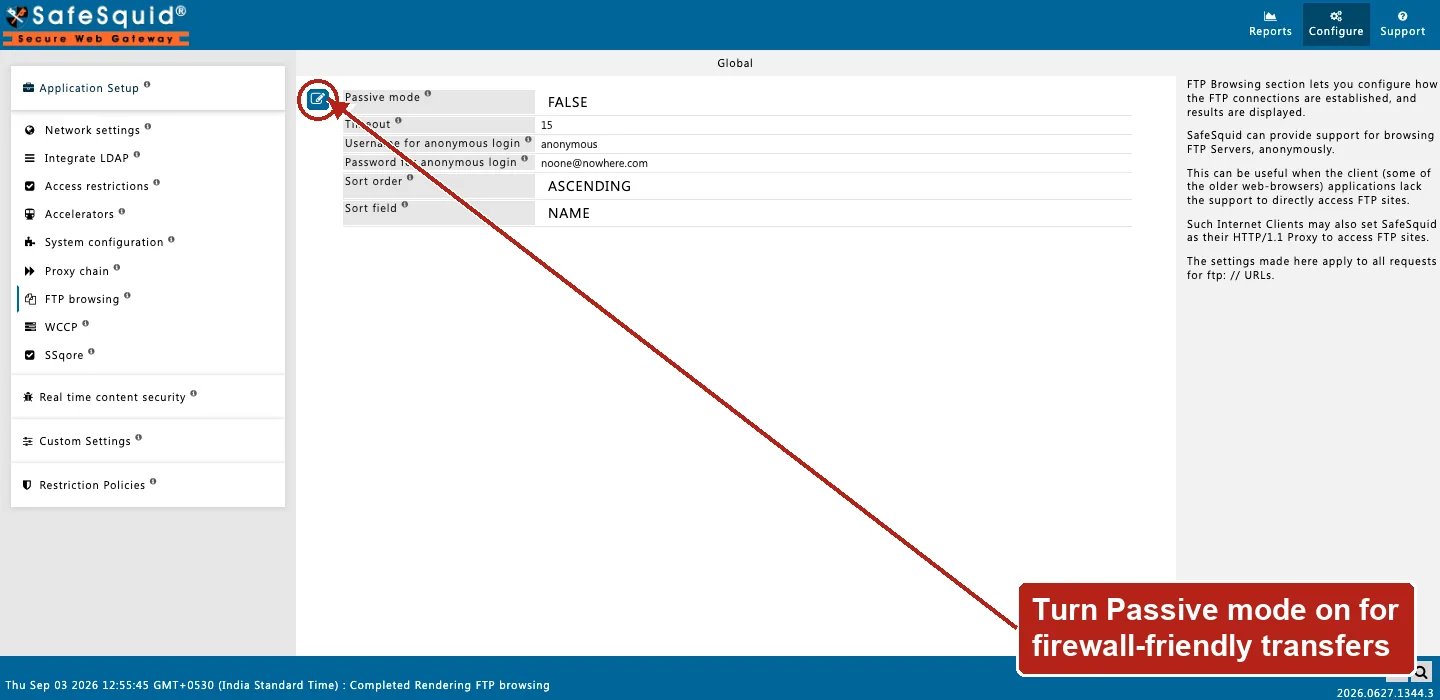
Open **Configure → Application Setup → FTP browsing**. A single Global screen holds Passive mode,
Timeout, Username/Password for anonymous login, and Sort order/field — no row list.
 ### Anonymous behind firewall
**Config:** passive on, anonlogin anonymous.
**Result:** PASV data channel; listing and download without client credentials.
### Access denies FTP
**Config:** FTP globals normal; Access lacks proxy/FTP for client.
**Result:** Denied before FTP settings apply.
### Changing the anonymous username breaks caching, not login
**Config:** Username for anonymous login changed from `anonymous` to `ftpguest`.
**Result:** clients with no credentials of their own still log in successfully (now as `ftpguest`), but files fetched this way are no longer cached — the caching check looks for the literal username `anonymous`, which no longer appears in these requests.
### A large directory sorted by size
**Config:** Sort field `SIZE`; Sort order descending.
**Result:** a directory listing without client-supplied sort parameters shows the largest files first.
## How to verify
1. Open `ftp://` URL through proxy in browser.
2. Toggle passive if LIST works but RETR fails.
3. Check Detailed logs and REQUEST native logs.
4) To confirm anonymous caching is active, fetch the same anonymous FTP file twice and check whether the second is served from cache — and confirm **Username for anonymous login** is still `anonymous` if it unexpectedly is not.
### Anonymous behind firewall
**Config:** passive on, anonlogin anonymous.
**Result:** PASV data channel; listing and download without client credentials.
### Access denies FTP
**Config:** FTP globals normal; Access lacks proxy/FTP for client.
**Result:** Denied before FTP settings apply.
### Changing the anonymous username breaks caching, not login
**Config:** Username for anonymous login changed from `anonymous` to `ftpguest`.
**Result:** clients with no credentials of their own still log in successfully (now as `ftpguest`), but files fetched this way are no longer cached — the caching check looks for the literal username `anonymous`, which no longer appears in these requests.
### A large directory sorted by size
**Config:** Sort field `SIZE`; Sort order descending.
**Result:** a directory listing without client-supplied sort parameters shows the largest files first.
## How to verify
1. Open `ftp://` URL through proxy in browser.
2. Toggle passive if LIST works but RETR fails.
3. Check Detailed logs and REQUEST native logs.
4) To confirm anonymous caching is active, fetch the same anonymous FTP file twice and check whether the second is served from cache — and confirm **Username for anonymous login** is still `anonymous` if it unexpectedly is not.