> ## Documentation Index
> Fetch the complete documentation index at: https://docs.safesquid.com/llms.txt
> Use this file to discover all available pages before exploring further.
# Proxy chain
```mermaid theme={null}
flowchart TB
req[Request] --> disabledCheck{Forwarding disabled or Access Bypass Forward set?}
disabledCheck -->|Yes| direct[Send direct]
disabledCheck -->|No| walk[Walk Forwarding proxies top to bottom]
walk --> row{"Enabled row matches, non-self Proxy?"}
row -->|Blank Proxy on match| stop[Stop collection immediately]
row -->|Non-blank Proxy| add[Add to candidate list]
add --> more{More rows?}
more -->|Yes| walk
more -->|No| connectCheck{CONNECT request?}
stop --> connectCheck
connectCheck -->|Yes| skipSel["Skip ICP/CARP selection logic"]
connectCheck -->|No| select["Select peer: CARP hash, ICP priority, or random tie-break"]
skipSel --> send["Send through selected peer, or direct if no candidate remains"]
select --> send
```
## Overview
The `Forward` section configures upstream proxy routing, enabling SafeSquid to chain requests to parents, siblings, or Cache Array Routing Protocol (CARP) clusters.
It is infrastructure routing, not a security control — it decides where a request goes next on its way out, not whether it is allowed.
## Core Mechanics (C++ Source Validation)
CARP hash, blank Proxy stop, ICP peer selection.
* **CARP Hashing**: When routing requests through an array of proxies, the routing engine performs a deterministic 32-bit bitwise rotation hash combining the requested URL and the peer’s hostname. The peer generating the highest hash score receives the request.
* **Self-Resolution (Loop Prevention)**: If SafeSquid calculates that its *own* hostname generates the highest CARP hash (`op >= hp`), it drops the forwarding requirement and resolves the request directly.
* **Cache Coordination**: When a request is forwarded to another CARP array member, SafeSquid sets `CONNECTION_NOCACHE`. This ensures the object is only cached on the designated CARP owner, creating a single, distributed logical cache without duplication.
## Schema Fields
### Global Fields
* **Enabled (enabled)**: Toggles proxy forwarding globally.
* **Enable CARP (carp)**: Enables Cache Array Routing Protocol for load balancing across peers.
* **CARP hash size (carphashsize)**: Determines the hash bucket size for CARP distribution.
- **CARP hash size semantics**: `0` uses the full hash range, matching the behavior of other CARP-compatible proxies when every peer in the array also uses `0`. A non-zero value increases the chance that different URLs land on the same peer — more cache overlap across peers. Every peer in the array must be configured with the same non-zero value for consistent results.
### Rule-Based Fields (Per Connection Tuning)
* **Enabled (enabled)**: Toggles the rule.
* **Comment (comment)**: User description.
* **Profiles (profiles)**: The trigger condition. Limit this entry to connections that already carry these Access Profile tags.
- **Profiles negation**: a profile prefixed with `!` applies the entry when that profile is absent.
- **Proxy (proxy)**: The IP address or hostname of the upstream proxy server.
- **User name (username)**: The username to authenticate with the upstream proxy.
- **Password (password)**: The password to authenticate with the upstream proxy.
- **Domain (domain)**: The NT domain to present when the upstream proxy uses NTLM authentication. Not a URL filter.
- **Port (port)**: The TCP port of the upstream proxy server.
- **ICP peer type (icptype)**: Defines the relationship with the peer (e.g., Parent, Sibling).
- **ICP port (icpport)**: The UDP port used for ICP queries.
- **Type (type)**: The type of the upstream proxy: `HTTP`, `SOCKS4`, `SOCKS5`, or `CONNECT`.
- **Applies to (which)**: The request types forwarded through this proxy: HTTP, FTP, and/or CONNECT (HTTPS).
## Important entry fields
* **Profiles** — Limit the row with Access Profile tags. Blank matches all profiles.
* **Proxy** — Upstream hostname or IP. Blank on a matching row **stops candidate collection** without forwarding. Rows whose Proxy equals this instance hostname or System configuration **Proxy hostname** are skipped (shared-config safety).
* **Type** — **HTTP** (standard proxy), **SOCKS4** / **SOCKS5**, or **CONNECT** tunnel. Port defaults to `3128` for HTTP/SOCKS and `443` for CONNECT when Port is 0.
* **Applies to** — Protocol flags: HTTP, FTP, CONNECT. Row is skipped when the connection protocol does not match any selected flag.
* **ICP peer type / ICP port** — When global CARP is off: **NONE** gives fixed priority 1; **PARENT** forwards on ICP miss; **SIBLING** forwards only on ICP HIT. UDP ICP uses the ICP port on this row; global ICP listen port and timeout come from [Caching](/configuration/application_setup/accelerators/caching).
- **ICP eligibility** — only Type `HTTP` is eligible for ICP peer selection.
- **User name / Password / Domain** — Upstream proxy authentication when the selected peer requires it. **Domain** applies only to NTLM.
**Blank Proxy stops collection.** A matching row with empty Proxy ends the scan — lower rows are not added as candidates. Place intentional “direct” stop rows carefully.
## Processing order
1. If forwarding is disabled, or Access **Bypass → Forward** is set, skip.
2. Walk Forwarding proxies top to bottom; add each enabled matching row with a non-self Proxy to the candidate list.
3. Blank Proxy on a matching row stops collection immediately.
4. CONNECT requests skip ICP/CARP selection logic used for plain HTTP.
5. Select one peer: CARP hash among candidates, or ICP priorities, or random tie-break.
6. Send the request through the selected peer, or direct if no candidate remains.
`startup.ini` may append implicit upstream rows from the proxy’s IP detection / port when set — not shown in the Web UI but affects runtime.
## Examples
Open **Configure → Application Setup → Proxy chain → Forwarding proxies**. Row fields are Enabled,
Comment, Profiles, Proxy, Port, ICP peer type, ICP port, Type, and Applies to.
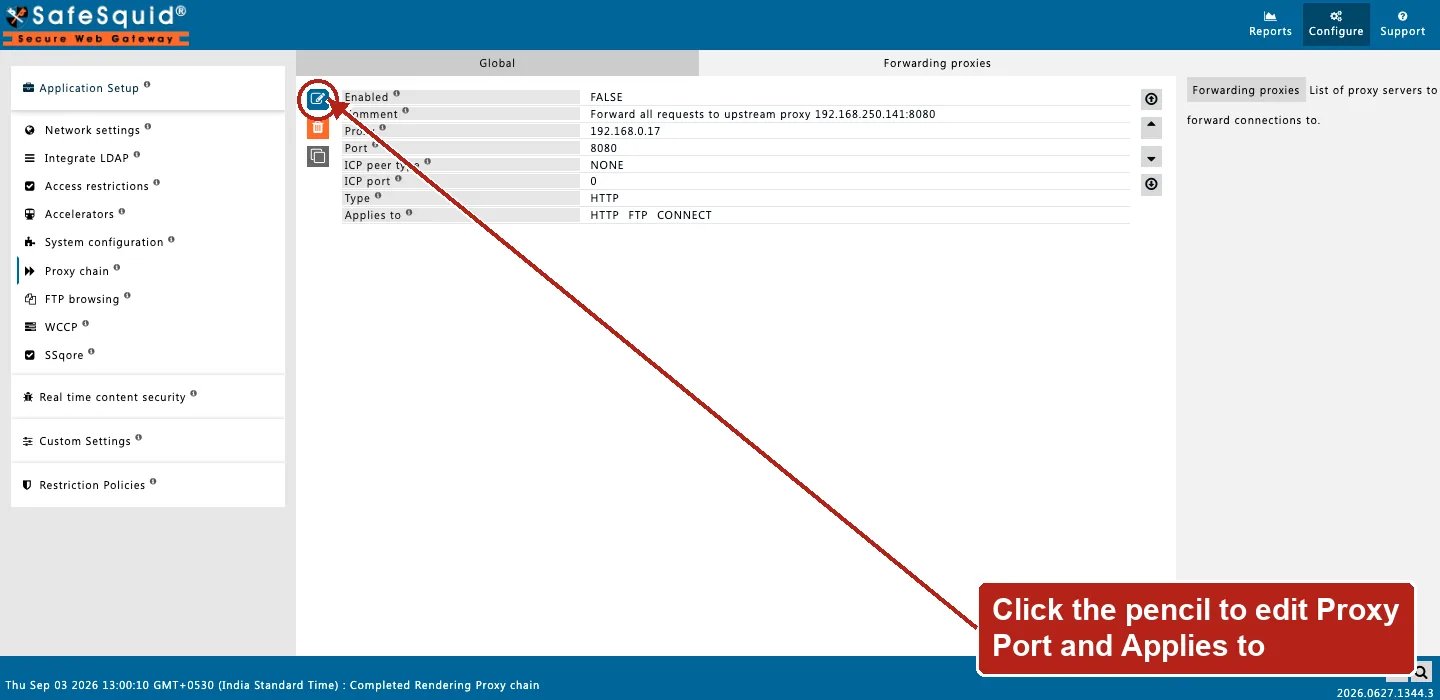 ### 1 — All HTTP through one upstream
* Enabled: on
* Row: Proxy `upstream.example.com`, Port `3128`, Type HTTP, Applies to HTTP + CONNECT
**Result:** matching HTTP and CONNECT traffic uses that upstream. Access Bypass Forward sends affected users direct instead.
### 2 — Profile-specific upstream with direct stop
* Row 1: Profiles `USE PARENT PROXY`, Proxy `parent.internal:8080`
* Row 2: Profiles blank, Proxy blank
**Result:** connections with the profile match row 1 and forward to the parent. Others match row 2, collection stops at blank Proxy, and traffic goes direct.
### 3 — CARP among two peers
* Enable CARP on; two rows with different Proxy hosts, both match profiles/protocols
**Result:** for each URL, CARP picks one peer (or local handling if this proxy wins the hash). Non-selected paths do not forward that request.
## How to verify
1. Enable FORWARD in `LOG_LEVEL`; look for native `forwarding:` lines.
2. From a test client, confirm upstream sees traffic from SafeSquid (or from your upstream auth logs).
3. Enable **Trace Entry** on one Forwarding proxies row to see candidate collection.
4. Detailed logs may show forward-related status when policies apply.
5) If a request that should be forwarded goes direct instead, look for a blank-Proxy row positioned above the one you expected to match — it stops candidate collection silently.
6) For a CARP setup, confirm every peer in the array uses the same CARP hash size.
### 1 — All HTTP through one upstream
* Enabled: on
* Row: Proxy `upstream.example.com`, Port `3128`, Type HTTP, Applies to HTTP + CONNECT
**Result:** matching HTTP and CONNECT traffic uses that upstream. Access Bypass Forward sends affected users direct instead.
### 2 — Profile-specific upstream with direct stop
* Row 1: Profiles `USE PARENT PROXY`, Proxy `parent.internal:8080`
* Row 2: Profiles blank, Proxy blank
**Result:** connections with the profile match row 1 and forward to the parent. Others match row 2, collection stops at blank Proxy, and traffic goes direct.
### 3 — CARP among two peers
* Enable CARP on; two rows with different Proxy hosts, both match profiles/protocols
**Result:** for each URL, CARP picks one peer (or local handling if this proxy wins the hash). Non-selected paths do not forward that request.
## How to verify
1. Enable FORWARD in `LOG_LEVEL`; look for native `forwarding:` lines.
2. From a test client, confirm upstream sees traffic from SafeSquid (or from your upstream auth logs).
3. Enable **Trace Entry** on one Forwarding proxies row to see candidate collection.
4. Detailed logs may show forward-related status when policies apply.
5) If a request that should be forwarded goes direct instead, look for a blank-Proxy row positioned above the one you expected to match — it stops candidate collection silently.
6) For a CARP setup, confirm every peer in the array uses the same CARP hash size.