> ## Documentation Index
> Fetch the complete documentation index at: https://docs.safesquid.com/llms.txt
> Use this file to discover all available pages before exploring further.
# System configuration
The **General** section sets global hostname, connection pool, debug headers, and per-connection compression/buffering policy rows.
## Core mechanics
### First matching policy row
Each getter walks **Compression and buffering policies** top-down. The first enabled row whose `profiles` match wins. Empty profiles match all. No match → built-in defaults.
That one matching entry supplies every timing, buffering, and compression value for the connection — values are never mixed across entries, and no entry below it is consulted. It is strictly first-match, not cumulative.
### CONNECT ports (cportrange)
The CONNECT port check applies only when a row matched. Port must be in the row list or CONNECT is blocked. When no row matched, all CONNECT ports are allowed (unless blocked elsewhere).
**A policy list with no catch-all leaves CONNECT unrestricted.** If every Compression and buffering policies row is scoped to a narrow Profiles value, or the list has no catch-all row at all, CONNECT is completely unrestricted for any connection that matches nothing. If you need CONNECT restricted for all traffic, keep an always-matching row (blank Profiles) last, with the CONNECT ports you intend to enforce.
### Compression and chunked buffering
`compressin` zero → identity-only upstream Accept-Encoding; non-zero → full encodings (TRUE and AUTO behave the same today). `bufferchunked`: 0 never, 2 always, 1 encoded-only when Content-Encoding is identity.
### Buffer and compression caveats
`maxdbuffer` only applies when Content-Length is known and the body is not chunked — a chunked or Content-Length-less response streams through without full buffering regardless of the configured size. `bufferwait` is the interval between re-sends of the "downloading" holding page while a large response is still buffering. Compress outgoing is effectively always on for SafeSquid's own Web interface, regardless of what the matched entry says — only traffic to external origins honours the matched entry's Compress outgoing setting.
```mermaid theme={null}
flowchart TB
conn[Connection with profiles] --> walk[Walk Compression and buffering policies top-down]
walk --> row{Row enabled and profiles match? - blank profiles matches all}
row -->|Yes| apply["Apply this row's timeouts, buffers, cportrange, compression - stop"]
row -->|No| more{More rows?}
more -->|Yes| walk
more -->|No| defaults[Use built-in defaults - CONNECT ports unrestricted]
```
## Section fields
The console splits this section into two tabs. Connection pool size and timeout are **Global**
fields, not a tab of their own — the pool view is a read-only panel reached from Global.
## Global fields
Open **Configure → Application Setup → System configuration → Global**.
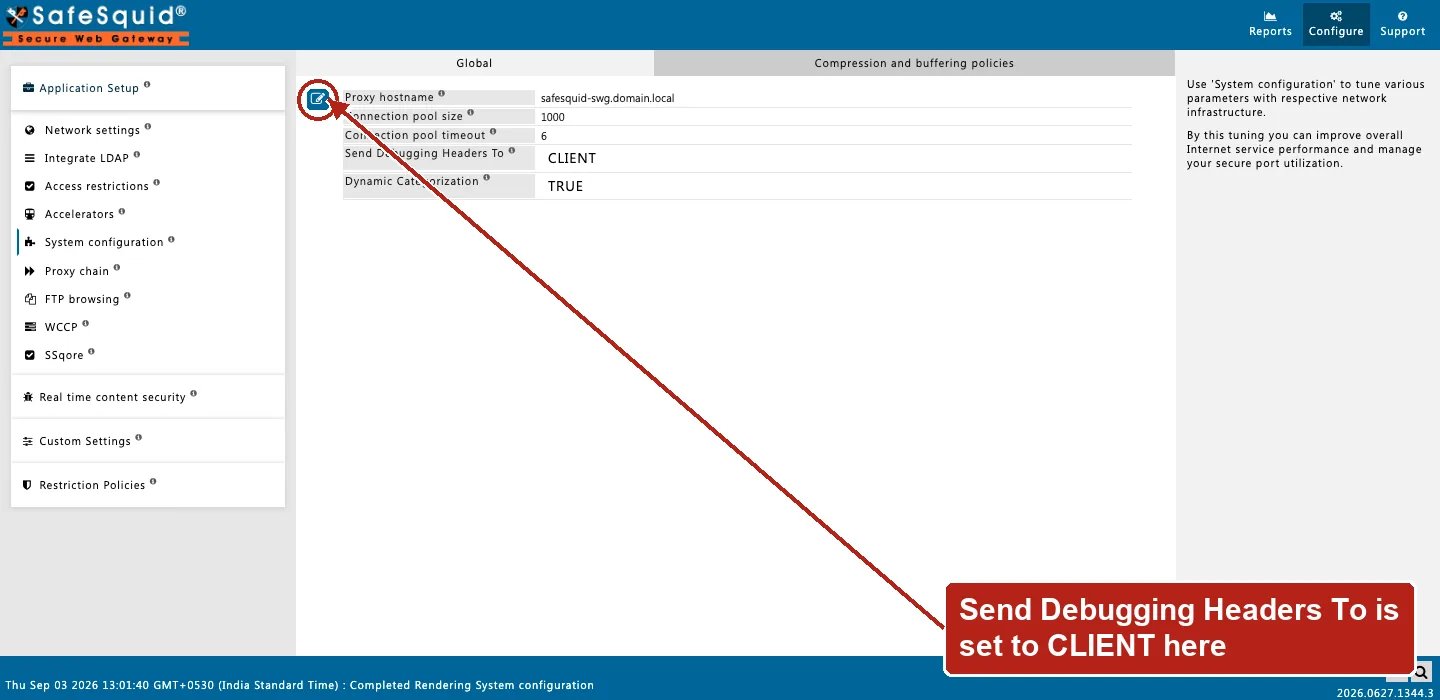 * **Proxy hostname (`hostname`)** — Identity in Via and Kerberos scripts; blank uses system hostname. Setting it to your organization's single LDAP domain name lets users log in without typing the domain themselves.
* **Connection pool size / timeout (`poolsize` / `pooltimeout`)** — Resizes upstream `serverpool` immediately on config update. When the pool is full the oldest pooled connection is dropped to make room; the idle clock resets each time a pooled connection is reused.
* **Send Debugging Headers To (`dheaders`)** — CLIENT, SERVER, BOTH, or NONE — see [Debug headers](/configuration/start_here/debug_response_headers).
* **Dynamic Categorization (`catreferer`)** — Referer categories applied to dependency requests, so a permitted page's sub-resources render instead of showing broken pieces.
### Connection pool panel
A read-only Web UI panel showing the connections currently held open in the pool, or awaiting reuse. Useful for confirming **Connection pool size** and **Connection pool timeout** are sized correctly under real load.
## Entry fields
* **Enabled (`enabled`)** — disabled entries are skipped during the top-to-bottom walk.
* **Comment (`comment`)** — administrator note; not evaluated.
* **Profiles (`profiles`)** — blank matches every connection; a profile prefixed with `!` applies the entry when that profile is absent.
* **Connection timeout (`ctimeout`)** — seconds allowed for the outbound connection to the origin server and its I/O before timing out.
* **Header timeout (`timeout`)** — seconds allowed for the client to finish sending its request headers.
* **Keepalive timeout (`keeptimeout`)** — seconds an idle client connection is kept open for reuse.
* **Maximum download buffer size (`maxdbuffer`)** — largest response body SafeSquid will fully buffer for inspection.
* **Maximum upload buffer size (`maxubuffer`)** — largest client upload SafeSquid will buffer for inspection.
* **Buffer wait time (`bufferwait`)** — seconds between re-sends of the "downloading" holding page while a large response is still buffering.
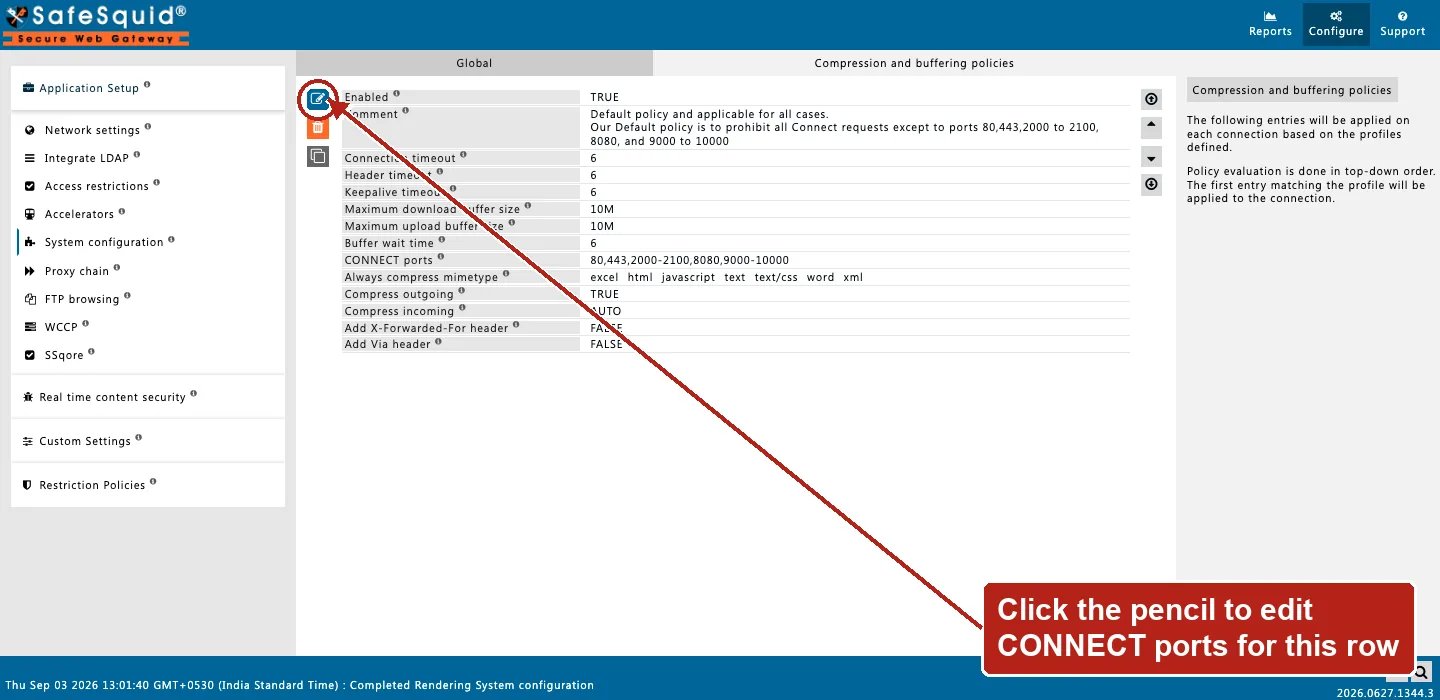
* **CONNECT ports (`cportrange`)** — ports allowed for HTTP CONNECT (tunneled HTTPS) when this entry matches. For example: `443,563`.
* **Always compress mimetype (`encodemime`)** — comma-separated regular expressions matched against the response's Content-Type.
* **Compress outgoing (`compressout`)** — gzip-compress eligible responses toward the client.
* **Compress incoming (`compressin`)** — `FALSE`, `TRUE`, or `AUTO`; controls the Accept-Encoding SafeSquid advertises upstream.
* **Buffer Chunked Responses (`buffer_chunked`)** — `NEVER`, `ENCODED`, or `ALWAYS`.
* **Add X-Forwarded-For header (`xforwardedfor`)** — when on, upstream requests include the client's address in `X-Forwarded-For`.
* **Add Via header (`via`)** — when on, upstream requests include a `Via` header naming this proxy hop.
## Examples
Open **Configure → Application Setup → System configuration → Compression and buffering
policies**. Row fields include Connection/Header/Keepalive timeout, Maximum download/upload buffer
size, Buffer wait time, CONNECT ports, and the compression fields.
* **Proxy hostname (`hostname`)** — Identity in Via and Kerberos scripts; blank uses system hostname. Setting it to your organization's single LDAP domain name lets users log in without typing the domain themselves.
* **Connection pool size / timeout (`poolsize` / `pooltimeout`)** — Resizes upstream `serverpool` immediately on config update. When the pool is full the oldest pooled connection is dropped to make room; the idle clock resets each time a pooled connection is reused.
* **Send Debugging Headers To (`dheaders`)** — CLIENT, SERVER, BOTH, or NONE — see [Debug headers](/configuration/start_here/debug_response_headers).
* **Dynamic Categorization (`catreferer`)** — Referer categories applied to dependency requests, so a permitted page's sub-resources render instead of showing broken pieces.
### Connection pool panel
A read-only Web UI panel showing the connections currently held open in the pool, or awaiting reuse. Useful for confirming **Connection pool size** and **Connection pool timeout** are sized correctly under real load.
## Entry fields
* **Enabled (`enabled`)** — disabled entries are skipped during the top-to-bottom walk.
* **Comment (`comment`)** — administrator note; not evaluated.
* **Profiles (`profiles`)** — blank matches every connection; a profile prefixed with `!` applies the entry when that profile is absent.
* **Connection timeout (`ctimeout`)** — seconds allowed for the outbound connection to the origin server and its I/O before timing out.
* **Header timeout (`timeout`)** — seconds allowed for the client to finish sending its request headers.
* **Keepalive timeout (`keeptimeout`)** — seconds an idle client connection is kept open for reuse.
* **Maximum download buffer size (`maxdbuffer`)** — largest response body SafeSquid will fully buffer for inspection.
* **Maximum upload buffer size (`maxubuffer`)** — largest client upload SafeSquid will buffer for inspection.
* **Buffer wait time (`bufferwait`)** — seconds between re-sends of the "downloading" holding page while a large response is still buffering.
* **CONNECT ports (`cportrange`)** — ports allowed for HTTP CONNECT (tunneled HTTPS) when this entry matches. For example: `443,563`.
* **Always compress mimetype (`encodemime`)** — comma-separated regular expressions matched against the response's Content-Type.
* **Compress outgoing (`compressout`)** — gzip-compress eligible responses toward the client.
* **Compress incoming (`compressin`)** — `FALSE`, `TRUE`, or `AUTO`; controls the Accept-Encoding SafeSquid advertises upstream.
* **Buffer Chunked Responses (`buffer_chunked`)** — `NEVER`, `ENCODED`, or `ALWAYS`.
* **Add X-Forwarded-For header (`xforwardedfor`)** — when on, upstream requests include the client's address in `X-Forwarded-For`.
* **Add Via header (`via`)** — when on, upstream requests include a `Via` header naming this proxy hop.
## Examples
Open **Configure → Application Setup → System configuration → Compression and buffering
policies**. Row fields include Connection/Header/Keepalive timeout, Maximum download/upload buffer
size, Buffer wait time, CONNECT ports, and the compression fields.
 ### CONNECT HTTPS only
**Config:** First matching row cportrange `443` only.
**Result:** CONNECT to 443 allowed; other ports blocked with security-restrictions template.
### Profile-specific buffering
**Config:** Row 1 profiles `text-filter`, maxdbuffer 128K above catch-all maxdbuffer 0.
**Result:** Text-filter connections buffer up to 128K; others stream without full download buffer — and a streamed response never reaches the downloaded-body scanners (SqScan, Clam antivirus, Image analyzer, Text analyzer, ICAP). See [Architecture and request pipeline](/configuration/start_here/architecture) for the verified buffered-vs-streamed scanning test.
### No row match
**Config:** All policy rows disabled for connection.
**Result:** CONNECT port check allows any port; default timeouts apply.
### A catch-all placed first blocks a specific entry
**Config:** Entry 1 (top) — Profiles blank, CONNECT ports `80,443,21,1025-65535`. Entry 2 (below) — Profiles `text-filter`, Maximum download buffer size `128M`.
**Result:** every connection matches entry 1 first, because it has no Profiles restriction — entry 2 never applies to anything. The fix is to move entry 2 above entry 1, so `text-filter` connections get its buffer size before the catch-all claims them.
## How to verify
1. Test CONNECT to allowed and blocked ports.
2. Enable Trace Entry on a policy row; check native logs.
3. Debug headers CLIENT in browser devtools when enabled.
### CONNECT HTTPS only
**Config:** First matching row cportrange `443` only.
**Result:** CONNECT to 443 allowed; other ports blocked with security-restrictions template.
### Profile-specific buffering
**Config:** Row 1 profiles `text-filter`, maxdbuffer 128K above catch-all maxdbuffer 0.
**Result:** Text-filter connections buffer up to 128K; others stream without full download buffer — and a streamed response never reaches the downloaded-body scanners (SqScan, Clam antivirus, Image analyzer, Text analyzer, ICAP). See [Architecture and request pipeline](/configuration/start_here/architecture) for the verified buffered-vs-streamed scanning test.
### No row match
**Config:** All policy rows disabled for connection.
**Result:** CONNECT port check allows any port; default timeouts apply.
### A catch-all placed first blocks a specific entry
**Config:** Entry 1 (top) — Profiles blank, CONNECT ports `80,443,21,1025-65535`. Entry 2 (below) — Profiles `text-filter`, Maximum download buffer size `128M`.
**Result:** every connection matches entry 1 first, because it has no Profiles restriction — entry 2 never applies to anything. The fix is to move entry 2 above entry 1, so `text-filter` connections get its buffer size before the catch-all claims them.
## How to verify
1. Test CONNECT to allowed and blocked ports.
2. Enable Trace Entry on a policy row; check native logs.
3. Debug headers CLIENT in browser devtools when enabled.