> ## Documentation Index
> Fetch the complete documentation index at: https://docs.safesquid.com/llms.txt
> Use this file to discover all available pages before exploring further.
# Categorize Web-Sites
**Categorize Web-Sites** is a Web UI application for local website category overrides. Categories assigned here feed the in-memory categorisation used on the request path together with cloud feeds (SSqore / DNS zone). Use it when vendor categories are wrong or when you need internal-only category names in [Access Profiles](/configuration/restriction_policies/access_profiles).
## Subsections
* **CATEGORY EDITOR** — Search, edit, bulk upload, and refresh local category assignments.
## What you can do
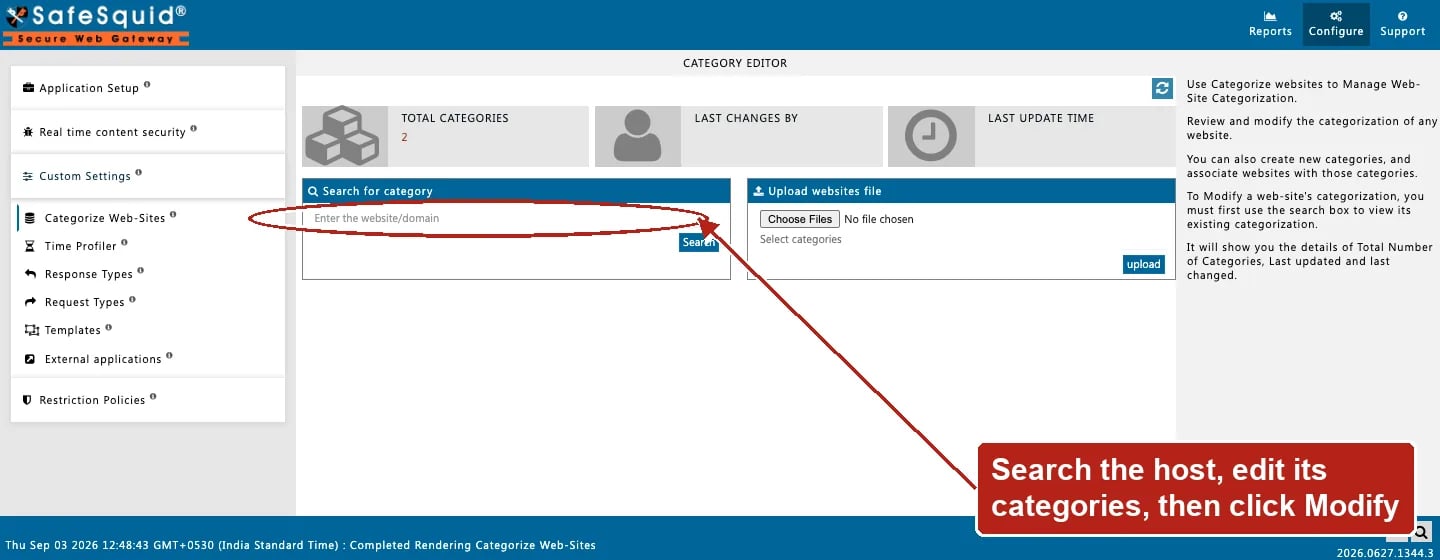
* **Search for category** — enter a hostname or domain; view categories currently assigned to that site.
* **Modify** — add, remove, or change category links for the searched site (saved through the category manager CGI).
* **Upload websites file** — bulk-assign categories to many hosts from a text file plus selected category names.
* **Update from database** (refresh control) — reload category metadata counts and timestamps from the backend store.
Open **Configure → Custom Settings → Categorize Web-Sites**. The single **CATEGORY EDITOR**
subsection holds Search for category, Upload websites file, and the Update from database refresh
control, alongside Total categories / Last changes by / Last update time.
 Cloud categorisation also comes from [SSqore](/configuration/application_setup/ssqore) and DNS zone feeds (see [Cloud / categorisation feeds](/configuration/start_here/cloud_feeds) and [startup.ini](/configuration/start_here/startup_ini) `DNS_CAT_ZONE`). Local overrides in this editor take precedence for matching needles on the hot path.
## How categories are used in policy
1. During categorisation, SafeSquid resolves categories for the request host (and related lookup paths).
2. Category names appear on the connection and in logs (`categories` column).
3. [Access Profiles](/configuration/restriction_policies/access_profiles) can match **Categories** to ALLOW or DENY.
4. [Request Types](/configuration/custom_settings/request_types) Domains and Urls can set **Bypass DNSBL and Categorization** to skip DNS Blacklist and categorisation for specific hosts.
## Examples
### 1 — Fix miscategorised partner site
1. Search `partner.example.com`.
2. Remove incorrect category; add `Business-Partners`.
3. Click Modify; confirm success message.
**Result:** subsequent requests classify the host with your local categories; Access Profiles matching `Business-Partners` apply.
### 2 — Bulk onboard internal domains
1. Prepare a text file listing internal hostnames.
2. Upload file; select category `Internal`.
3. Search one listed host to verify categories.
**Result:** all listed hosts share the assigned local category without editing each site individually.
## How to verify
1. Search the site again after modify; categories shown should match your edit.
2. Reproduce a browser request; check Detailed logs `categories` column.
3. Confirm Access Profiles DENY/ALLOW on category names behaves as expected.
## See also
* [Cloud / categorisation feeds](/configuration/start_here/cloud_feeds)
* [SSqore](/configuration/application_setup/ssqore)
* [Access Profiles](/configuration/restriction_policies/access_profiles)
* [DNS Blacklist](/configuration/real_time_content_security/dns_blacklist)
* [Architecture](/configuration/start_here/architecture)
* [Logging](/configuration/start_here/logging)
Cloud categorisation also comes from [SSqore](/configuration/application_setup/ssqore) and DNS zone feeds (see [Cloud / categorisation feeds](/configuration/start_here/cloud_feeds) and [startup.ini](/configuration/start_here/startup_ini) `DNS_CAT_ZONE`). Local overrides in this editor take precedence for matching needles on the hot path.
## How categories are used in policy
1. During categorisation, SafeSquid resolves categories for the request host (and related lookup paths).
2. Category names appear on the connection and in logs (`categories` column).
3. [Access Profiles](/configuration/restriction_policies/access_profiles) can match **Categories** to ALLOW or DENY.
4. [Request Types](/configuration/custom_settings/request_types) Domains and Urls can set **Bypass DNSBL and Categorization** to skip DNS Blacklist and categorisation for specific hosts.
## Examples
### 1 — Fix miscategorised partner site
1. Search `partner.example.com`.
2. Remove incorrect category; add `Business-Partners`.
3. Click Modify; confirm success message.
**Result:** subsequent requests classify the host with your local categories; Access Profiles matching `Business-Partners` apply.
### 2 — Bulk onboard internal domains
1. Prepare a text file listing internal hostnames.
2. Upload file; select category `Internal`.
3. Search one listed host to verify categories.
**Result:** all listed hosts share the assigned local category without editing each site individually.
## How to verify
1. Search the site again after modify; categories shown should match your edit.
2. Reproduce a browser request; check Detailed logs `categories` column.
3. Confirm Access Profiles DENY/ALLOW on category names behaves as expected.
## See also
* [Cloud / categorisation feeds](/configuration/start_here/cloud_feeds)
* [SSqore](/configuration/application_setup/ssqore)
* [Access Profiles](/configuration/restriction_policies/access_profiles)
* [DNS Blacklist](/configuration/real_time_content_security/dns_blacklist)
* [Architecture](/configuration/start_here/architecture)
* [Logging](/configuration/start_here/logging)