> ## Documentation Index
> Fetch the complete documentation index at: https://docs.safesquid.com/llms.txt
> Use this file to discover all available pages before exploring further.
# Clam antivirus
```mermaid theme={null}
flowchart TB
buffer[Buffer the upload or download body] --> walk[Walk enabled clamav rows top to bottom]
walk --> match{First row Profiles match?}
match -->|No| next[Next row]
match -->|Yes| scan[Stream body to clamd]
scan --> result{clamd result}
result -->|OK| allow[Allow]
result -->|FOUND| block[DO NOT BYPASS block]
block --> templ[Resolve template row then Default then built-in error]
```
## Overview
The `ClamAV` section configures integration with a clamd daemon for real-time malware scanning of HTTP traffic.
Clam antivirus is one of two built-in scan engines — the other is [SqScan](/configuration/real_time_content_security/sqscan), an in-memory scanner that needs no external daemon. Many deployments run both, or add ICAP, for defense in depth.
## Core Mechanics (C++ Source Validation)
Policy walk, results cache.
* **Evaluation Order**: Rules are evaluated top-to-bottom. The first rule whose `Profiles` condition matches the connection is selected, and execution stops.
* **Cache Optimization**: If an object is already stored in the SafeSquid cache and marked as `CACHE_CLEAN`, the ClamAV subsystem will completely bypass scanning to improve performance.
* **Results Caching**: SafeSquid maintains an internal `ResultsCache` to avoid repeatedly sending identical in-memory payloads to clamd.
* **Connection Pool**: A `ClamavPool` mechanism manages idle TCP/Unix sockets to the `clamd` daemon to prevent socket exhaustion during high concurrency.
* **Enforcement**: If a virus is detected, the subsystem immediately changes the connection action to **DO NOT BYPASS**, dropping the payload and returning the configured block template, populating variables like `_VIRUSNAME_`.
## Schema Fields
### Global Fields
* **Enabled (enabled)**: When enabled, SafeSquid scans buffered uploads and downloads through ClamAV. When disabled, scan hooks return immediately and status shows Disabled.
* **ClamAV hostname or socket path (clamavhost)**: TCP hostname or IP of clamd , or absolute Unix socket path starting with / (for example /var/run/clamav/clamd.ctl ). A path uses a local socket; a hostname uses TCP on ClamAV port.
* **ClamAV port (clamavport)**: TCP port for clamd when ClamAV hostname or socket path is a hostname (default 3310). Ignored when the host field is a Unix socket path.
* **Default template (dtempl)**: Template name shown when a virus is detected and the matching policy leaves Template blank. If blank, SafeSquid falls back to the error template after the entry template is checked.
### Rule-Based Fields (Per Connection Tuning)
* **Enabled (enabled)**: When disabled, this clamav row is skipped. First matching enabled row wins.
* **Comment (comment)**: Operator note appended to the filter reason when ClamAV reports FOUND on a matching connection.
* **Profiles (profiles)**: Limit this entry to connections that already carry these Access Profile tags. SafeSquid tests against the connection’s active profiles: blank ignores profiles; a positive tag applies when present; prefix ! applies when absent. With multiple tags, the first list entry that resolves decides (positive match -> apply; negated match -> skip; lone unmatched ! -> apply). ClamAV walks enabled rows top to bottom; the first matching row triggers scanning of buffered uploads and downloads and selects the block template on FOUND . ENFORCE CLAMAV SCANNING Typical tag on a scan row for connections that must be scanned. !BYPASS CLAMAV SCANNING Row applies only when the connection lacks the bypass tag (scan everyone except bypass-tagged users). (blank) Row can match any connection (subject to list order).
* **Template (templ)**: Template name shown when ClamAV blocks this connection. If blank: Default template, then built-in error .
## How SafeSquid processes policies
1. On config reload, SafeSquid tests the `clamd` connection when the section is enabled.
2. For each buffered upload or download part, enabled rows are walked top to bottom.
3. The first row whose Profiles match (and row Enabled is on) triggers a stream scan via `clamd`.
4. ClamAV returns `stream: … FOUND` or `stream: OK`. Only `FOUND` blocks.
5. Template resolution: row Template → Default template → `error`.
**Order matters.** Put specific profile rows above broad catch-all rows. The first match wins; later rows are not evaluated for that connection.
Clam antivirus is first-match-wins — the same evaluation model as Access restrictions, and the **opposite** of Access Profiles, which is cumulative. A broad row with a blank Profiles field above a narrower one means the narrower row can never fire for any connection the broad row also matches.
## Bypass and block severity
* Access restrictions **Bypass** with antivirus skips ClamAV entirely for that client.
* When a virus is found, action is **DO NOT BYPASS** (hard block) unless the connection has Allow bypassing and a valid bypass cookie — then action is **DENY** (soft block with continue option).
## Examples
Open **Configure → Real time content security → Clam antivirus → Global**. Fields are Enabled,
ClamAV hostname or socket path, ClamAV port, and Default template.
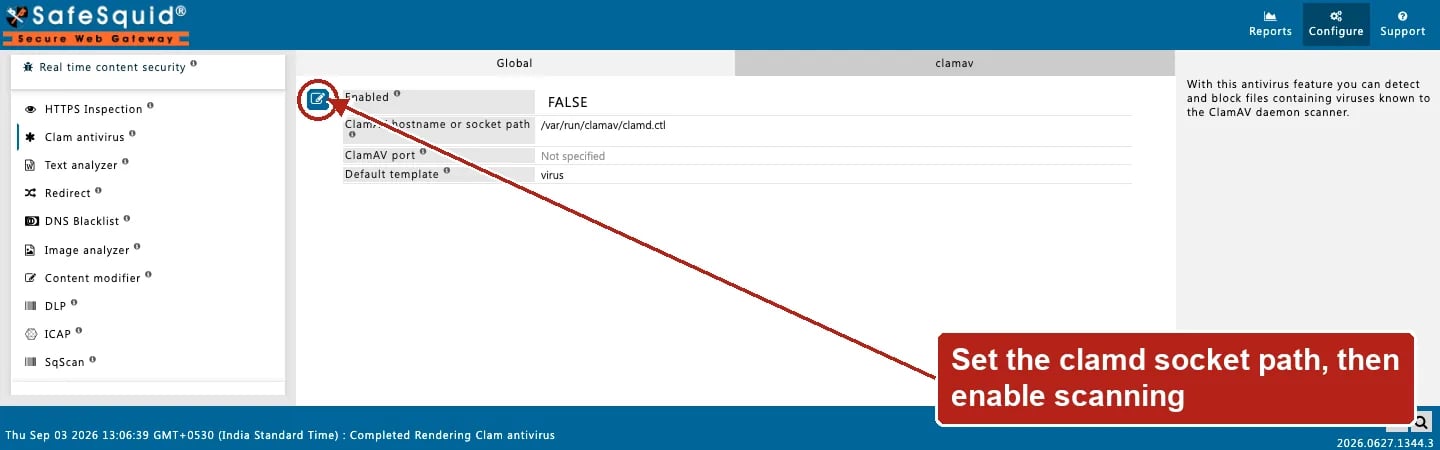 ### 1 — Scan everyone via local clamd
* Enabled: on
* ClamAV hostname or socket path: `/var/run/clamav/clamd.ctl`
* clamav row: Profiles blank, Enabled on, Template `virus`
**Result:** all buffered uploads and downloads are scanned; infected content is blocked with the virus template.
### 2 — Scan staff, skip guests
* Row A (top): Profiles `!BYPASS CLAMAV SCANNING`, Enabled on
* Row B: Profiles `BYPASS CLAMAV SCANNING`, Enabled off or omitted — guests tagged with bypass never hit row A
**Result:** only connections without the bypass tag are scanned. Row order and profile tags must align with your Access Profiles design.
### 3 — Remote clamd on TCP
* ClamAV hostname or socket path: `10.0.0.20`
* ClamAV port: `3310`
**Result:** SafeSquid opens a TCP stream to `clamd` on the scanner host for each scan.
## Recommended practice
* Keep ClamAV signature databases current on the appliance or scanner host.
* Verify `clamd` is listening before enabling the section (check native ANTIVIRUS logs on reload).
* Use SqScan or ICAP as a second layer if your policy requires defense in depth.
* Grant antivirus Bypass only to break-glass roles.
## How to verify
1. Download the EICAR test file through the proxy from a scanned profile.
2. Open **Reports → Detailed logs**; look for filter name Clam antivirus and a virus name in the reason.
3. Enable ANTIVIRUS and DEBUG log levels for native `clamav:` lines.
4. Dashboard stats show Objects Scanned and Threats Detected when scanning is active.
5) A flat Objects Scanned counter usually means the connection to the scanner, the entry Profiles, or the Access-level Bypass setting needs checking.
### 1 — Scan everyone via local clamd
* Enabled: on
* ClamAV hostname or socket path: `/var/run/clamav/clamd.ctl`
* clamav row: Profiles blank, Enabled on, Template `virus`
**Result:** all buffered uploads and downloads are scanned; infected content is blocked with the virus template.
### 2 — Scan staff, skip guests
* Row A (top): Profiles `!BYPASS CLAMAV SCANNING`, Enabled on
* Row B: Profiles `BYPASS CLAMAV SCANNING`, Enabled off or omitted — guests tagged with bypass never hit row A
**Result:** only connections without the bypass tag are scanned. Row order and profile tags must align with your Access Profiles design.
### 3 — Remote clamd on TCP
* ClamAV hostname or socket path: `10.0.0.20`
* ClamAV port: `3310`
**Result:** SafeSquid opens a TCP stream to `clamd` on the scanner host for each scan.
## Recommended practice
* Keep ClamAV signature databases current on the appliance or scanner host.
* Verify `clamd` is listening before enabling the section (check native ANTIVIRUS logs on reload).
* Use SqScan or ICAP as a second layer if your policy requires defense in depth.
* Grant antivirus Bypass only to break-glass roles.
## How to verify
1. Download the EICAR test file through the proxy from a scanned profile.
2. Open **Reports → Detailed logs**; look for filter name Clam antivirus and a virus name in the reason.
3. Enable ANTIVIRUS and DEBUG log levels for native `clamav:` lines.
4. Dashboard stats show Objects Scanned and Threats Detected when scanning is active.
5) A flat Objects Scanned counter usually means the connection to the scanner, the entry Profiles, or the Access-level Bypass setting needs checking.