> ## Documentation Index
> Fetch the complete documentation index at: https://docs.safesquid.com/llms.txt
> Use this file to discover all available pages before exploring further.
# DLP
## Overview
The `DLP` section inspects **uploaded** content and can block sensitive data leaving the network. MIME-based DLP policies set allow or block actions; OCR policies score text extracted from uploads against a global Threshold.
DLP runs on the request (upload) path only — not on downloaded responses. Access **Bypass** with DLP skips inspection; Access **Allow bypassing** can soften a DENY block when a valid bypass cookie is present.
Because the MIME layer only sees declared content type, pair a MIME allow entry (for example, allowing spreadsheet uploads) with a matching destination restriction in Access Profiles — otherwise allowing a common upload type through DLP is effectively blanket permission to upload that type anywhere, defeating the control.
## Core Mechanics (C++ Source Validation)
MIME regex compile (commas → `|`), policy walk, OCR scoring.
### MIME policy — last match wins
Unlike most SafeSquid lists, DLP MIME rows use **last matching enabled row wins**. Each row whose POSIX regex matches the uploaded part's MIME type overwrites the action as the walk continues top to bottom.
### OCR scoring
Unless MIME action is already **DO NOT BYPASS**, SafeSquid extracts text once (`text/*` uses text extraction; `image/*` uses OCR). Enabled OCR rows are walked while score \< Threshold; each keyword regex match adds Weight. Score ≥ Threshold → **DO NOT BYPASS**.
Modern zip-based Office documents (`.docx`, `.xlsx`, `.pptx`) are unarchived directly: their real paragraph or cell text is extracted with no OCR needed, and any images embedded inside the document are separately OCR'd for text they contain.
**Legacy binary Office formats (`.doc`, `.xls`, `.ppt` — pre-2007) and PDF are not zip containers, so the unarchive-and-extract step cannot open them.** They pass through as a single unmodified block of data — neither their text nor any embedded images are inspected. This is a known gap in today's content inspection, not something a configuration change can work around.
### Bypass severity
**DENY** may be bypassed with Allow bypassing and a valid bypass cookie. **DO NOT BYPASS** is never bypassed.
## Processing flow
```mermaid theme={null}
flowchart TB
upload[Upload part] --> mimeWalk[Walk DLP MIME rows top-down]
mimeWalk --> lastMatch[Last match sets action]
lastMatch --> dnb{DO NOT BYPASS?}
dnb -->|Yes| hardBlock[Hard block skip OCR]
dnb -->|No| ocr[Extract text OCR rows]
ocr --> thresh{score >= Threshold?}
thresh -->|Yes| hardBlock
thresh -->|No| allow[Continue or DENY with bypass option]
```
## Section fields
The console splits DLP into three tabs. The MIME walk and the OCR walk are separate stages of
the same upload inspection — see **Processing flow** above for how they hand off.
## Global fields
* **Enabled (enabled)** — Master switch for upload inspection and OCR scoring.
* **Threshold (threshold)** — OCR keyword weights summed per upload; total ≥ Threshold yields DO NOT BYPASS.
## DLP policy row fields
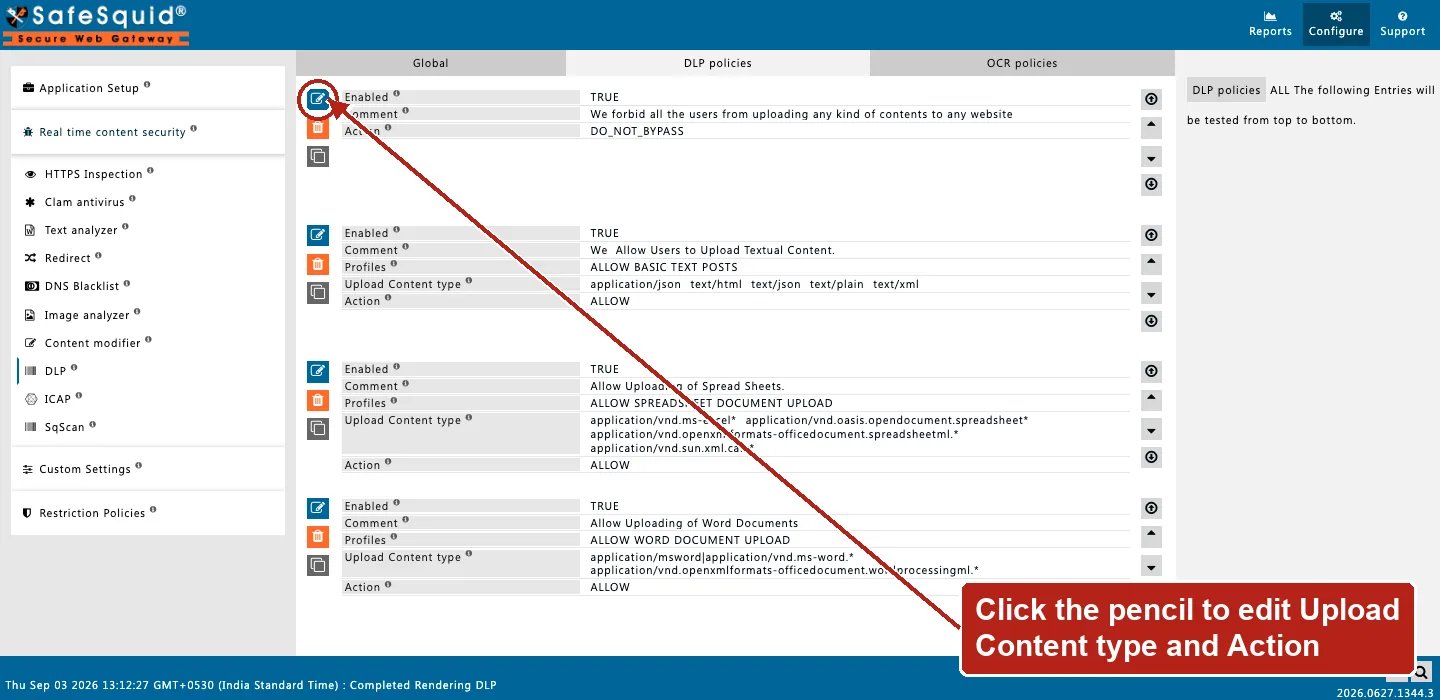
* **Upload Content type (mime)** — POSIX regex against part MIME. Commas become alternation (`|`). Blank matches all.
* **Profiles (profiles)** — Connection must match listed Access Profile tags.
* **Action (action)** — ALLOW, DENY, or DO NOT BYPASS.
The content-inspection layer can still escalate ALLOW or DENY to DO NOT BYPASS once the keyword score crosses Threshold; it never downgrades an existing DO NOT BYPASS.
* **Comment (comment)** — Block reason when Action is DENY or DO NOT BYPASS.
## OCR policy row fields
* **Search For (keyword)** — POSIX regex against extracted text.
* **Weight (score)** — Added on match. Weight 0 skips the row.
## Examples
Open **Configure → Real time content security → DLP → DLP policies** (sibling tabs: Global,
OCR policies). Row fields are Enabled, Comment, Profiles, Upload Content type, and Action.
 ### Block PDF uploads
* **Configuration:** Upload Content type `application/pdf`, Action DENY, Comment `PDF uploads not permitted`.
* **Result:** any upload part whose MIME matches is blocked with that comment as reason.
### OCR keyword threshold
* **Configuration:** Threshold 100; OCR row `confidential` Weight 60; OCR row `internal use only` Weight 50.
* **Result:** image upload containing both phrases scores 110 → DO NOT BYPASS at Threshold 100.
### Last match overrides allow
* **Configuration:** Row A blank MIME ALLOW; Row B below `image/` DO NOT BYPASS.
* **Result:** image uploads match both; row B wins (last match) and hard-blocks. Non-image uploads match only row A unless OCR scores high enough.
### Legacy document format bypasses content inspection
* **Configuration:** Threshold 100; an OCR row looking for a sensitive keyword; a user uploads a `.doc` file (legacy binary Word format) containing that keyword in its body text.
* **Result:** the MIME layer's action for `.doc` applies as configured, but the content-inspection layer cannot open the legacy binary format to extract its text, so the keyword is never seen and never contributes to the score. This is a known limitation of the pre-2007 Office formats and PDF, not a misconfiguration — a policy relying on keyword detection alone should not be assumed to cover these formats.
## How to verify
1. Upload test content through a profile without DLP bypass.
2. Enable DLP in `LOG_LEVEL` for native `dlp:` lines.
3. **Reports → Detailed logs** — filter name DLP with action and score.
4. Pair Access BYPASS + DLP checkbox to confirm skip path.
5) Test keyword scoring with `.docx`/`.xlsx`/`.pptx` uploads — testing with `.doc`/`.xls`/`.ppt` or PDF does not exercise the content-inspection layer at all, by design.
### Block PDF uploads
* **Configuration:** Upload Content type `application/pdf`, Action DENY, Comment `PDF uploads not permitted`.
* **Result:** any upload part whose MIME matches is blocked with that comment as reason.
### OCR keyword threshold
* **Configuration:** Threshold 100; OCR row `confidential` Weight 60; OCR row `internal use only` Weight 50.
* **Result:** image upload containing both phrases scores 110 → DO NOT BYPASS at Threshold 100.
### Last match overrides allow
* **Configuration:** Row A blank MIME ALLOW; Row B below `image/` DO NOT BYPASS.
* **Result:** image uploads match both; row B wins (last match) and hard-blocks. Non-image uploads match only row A unless OCR scores high enough.
### Legacy document format bypasses content inspection
* **Configuration:** Threshold 100; an OCR row looking for a sensitive keyword; a user uploads a `.doc` file (legacy binary Word format) containing that keyword in its body text.
* **Result:** the MIME layer's action for `.doc` applies as configured, but the content-inspection layer cannot open the legacy binary format to extract its text, so the keyword is never seen and never contributes to the score. This is a known limitation of the pre-2007 Office formats and PDF, not a misconfiguration — a policy relying on keyword detection alone should not be assumed to cover these formats.
## How to verify
1. Upload test content through a profile without DLP bypass.
2. Enable DLP in `LOG_LEVEL` for native `dlp:` lines.
3. **Reports → Detailed logs** — filter name DLP with action and score.
4. Pair Access BYPASS + DLP checkbox to confirm skip path.
5) Test keyword scoring with `.docx`/`.xlsx`/`.pptx` uploads — testing with `.doc`/`.xls`/`.ppt` or PDF does not exercise the content-inspection layer at all, by design.