> ## Documentation Index
> Fetch the complete documentation index at: https://docs.safesquid.com/llms.txt
> Use this file to discover all available pages before exploring further.
# ICAP
## Overview
The `ICAP` section sends HTTP request or response bodies to an external ICAP server for scanning or modification. Typical uses include antivirus ICAP services, DLP adapters, and content adaptation.
ICAP lets SafeSquid delegate inspection to specialized third-party scanners rather than relying only on its own built-in engines.
Access **Bypass** with ICAP skips all ICAP processing for matching clients.
## Core Mechanics (C++ Source Validation)
Policy walk, ICAP response handling.
### Row walk with fallback
For each REQMOD or RESPMOD hook, enabled rows are walked top to bottom. Row must match Profiles, include the Applies to flag, and have a valid ICAP Service URL.
If no row is eligible for the current hook — none match Profiles, include the Applies to flag, or carry a valid Service URL — ICAP does not run for that hook on this connection.
### Response codes
* **204 No Content** — clean; processing stops; later rows not tried.
* **200 OK** with configured threat header — block or content replacement; stops on first successful 200.
* **5xx** — `error` template, log `server failed`.
* Timeout or connection failure — try next matching row.
## Processing flow
```mermaid theme={null}
flowchart TB
hook[REQMOD or RESPMOD hook] --> walk[Walk ICAP rows top-down]
walk --> row{Match profiles flags URL?}
row -->|No| next[Next row]
row -->|Yes| icapcall[Call ICAP server]
icapcall --> code{Response code?}
code -->|204| clean[Allow stop]
code -->|200 + threat| block[Block or replace stop]
code -->|5xx| error[Error template]
code -->|timeout| next
```
## Schema Fields
### Global fields
* **Enabled (enabled)** — Master switch for ICAP REQMOD and RESPMOD.
### Policy rows
* **ICAP Service URL (icapurl)** — Full URI: host, port, service path (e.g. `icap://127.0.0.1:1344/avscan`).
* **ICAP Timeout (timeout)** — Seconds for connect and read/write.
* **Applies to (flags)** — REQUESTS (REQMOD) and/or RESPONSES (RESPMOD).
* **Threat ID Header (threatheader)** — Header name(s) on ICAP 200 response for threat name.
- **Threat ID Header, first-match nuance** — the **first** of the configured names present in the response supplies the threat name used for logging and the block template; if none of them are present in a 200 response, the reason is recorded as a missing threat header.
- **Profiles (profiles)** — Limit to connections with these tags. Blank matches all.
## Examples
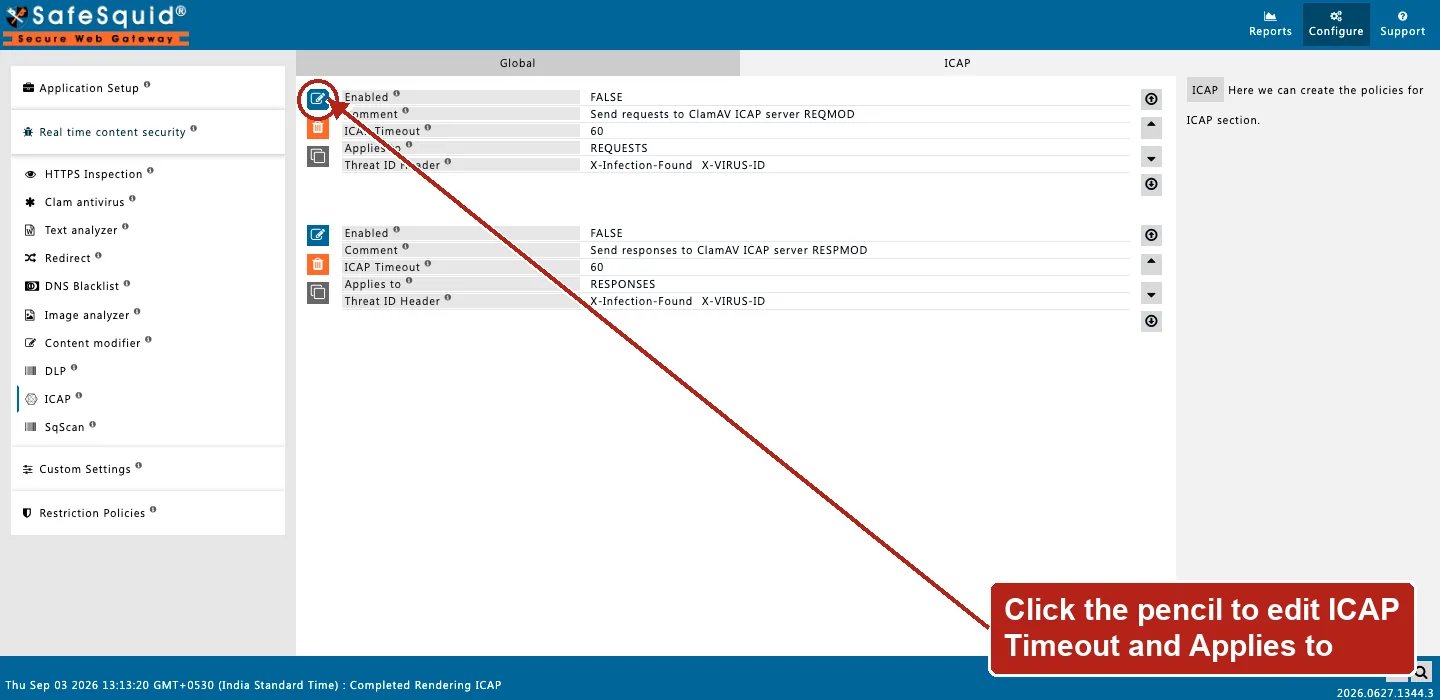
Open **Configure → Real time content security → ICAP → ICAP**. Live rows show Enabled, Comment,
ICAP Timeout, Applies to, and Threat ID Header — **ICAP Service URL and Profiles do not appear on
either shipped row**, though both are listed under Schema Fields above. Confirm before assuming
those two fields render on a fresh row.
 ### Scan downloads only
* **Configuration:** Applies to RESPONSES, Service URL `icap://10.0.0.5:1344/respmod`.
* **Result:** response bodies sent to ICAP RESPMOD; 204 allows; 200 with threat header blocks.
### REQMOD for uploads
* **Configuration:** Applies to REQUESTS, Service URL `icap://127.0.0.1:1344/reqmod`.
* **Result:** uploaded content scanned before forwarding to origin.
### Fallback server
* **Configuration:** Row A primary URL Timeout 30; Row B backup below Timeout 60.
* **Result:** row A timeout tries row B; 204 from row A stops before row B.
## How to verify
1. Enable ICAP log level; look for `ICAPSection::` lines and response codes.
2. Detailed logs show filter name ICAP on block.
3. Test EICAR through ICAP-enabled profile.
### Scan downloads only
* **Configuration:** Applies to RESPONSES, Service URL `icap://10.0.0.5:1344/respmod`.
* **Result:** response bodies sent to ICAP RESPMOD; 204 allows; 200 with threat header blocks.
### REQMOD for uploads
* **Configuration:** Applies to REQUESTS, Service URL `icap://127.0.0.1:1344/reqmod`.
* **Result:** uploaded content scanned before forwarding to origin.
### Fallback server
* **Configuration:** Row A primary URL Timeout 30; Row B backup below Timeout 60.
* **Result:** row A timeout tries row B; 204 from row A stops before row B.
## How to verify
1. Enable ICAP log level; look for `ICAPSection::` lines and response codes.
2. Detailed logs show filter name ICAP on block.
3. Test EICAR through ICAP-enabled profile.