> ## Documentation Index
> Fetch the complete documentation index at: https://docs.safesquid.com/llms.txt
> Use this file to discover all available pages before exploring further.
# Image analyzer
## Overview
The `Imgfilter` section scores `image/*` response and upload bodies and blocks or debug-replaces content when the engine score is at or above a threshold. Blocked images can be replaced with a template (default `checkeredgif`).
It exists to keep unwanted image content (for example, adult material) off the network — useful both for blocking what users download and for stopping the same kind of content from being uploaded through the proxy.
## Core Mechanics (C++ Source Validation)
### First match wins
Walk enabled filtering policy rows top to bottom; first profile match sets threshold, bypass, debug, and template.
### MIME and size gates
Only parts whose MIME starts with `image/` are candidates. Images smaller than 50×50 pixels are skipped — too small to meaningfully score, and excluding them avoids wasted work on tracking pixels and icons.
### Threshold scale
Roughly **-10** (unlikely inappropriate) through **0** (very likely). Block when engine score ≥ threshold.
### Debug mode
On responses with Debug enabled, images at or above threshold are blurred and annotated in-place; connection still marked blocked but block template not sent.
### Bypass
Bypass Image Scanning on a matching row skips buffering and scoring entirely.
## Processing flow
```mermaid theme={null}
flowchart TB
part[image/* body] --> size{>= 50x50?}
size -->|No| skip[Skip]
size -->|Yes| walk[Walk policy rows]
walk --> match{First profile match}
match --> bypass{Bypass on?}
bypass -->|Yes| skip
bypass -->|No| score[Engine score]
score --> thresh{score >= threshold?}
thresh -->|No| pass[Allow]
thresh -->|Yes| debug{Debug on response?}
debug -->|Yes| blur[Blur annotate]
debug -->|No| templ[Block template]
```
## Schema Fields
### Global fields
* **Enabled (enabled)** — Master switch; requires library init success.
* **Default template (dtempl)** — Fallback when row Template blank; default `checkeredgif`.
* **Library path (libpath)** — Path to imgfilter engine module.
### Policy rows
* **Profiles (profiles)** — Limit to tagged connections. Blank matches all.
* **Threshold (threshold)** — Block when score ≥ this value. A **lower** Threshold number is **stricter** (blocks more); a higher one is more permissive — for example, a Threshold of `-2` blocks less aggressively than a Threshold of `0`.
* **Bypass Image Scanning (bypass)** — Skip scan for matching profiles.
* **Debug (debug)** — Blur/annotate on response instead of block template. Has no equivalent effect on the upload path, which always uses the block template.
* **Template (template)** — Replacement on block. Falls back through the matching entry's own Template, then the section's Default template, then the built-in checkered placeholder — whichever is first non-blank.
## Examples
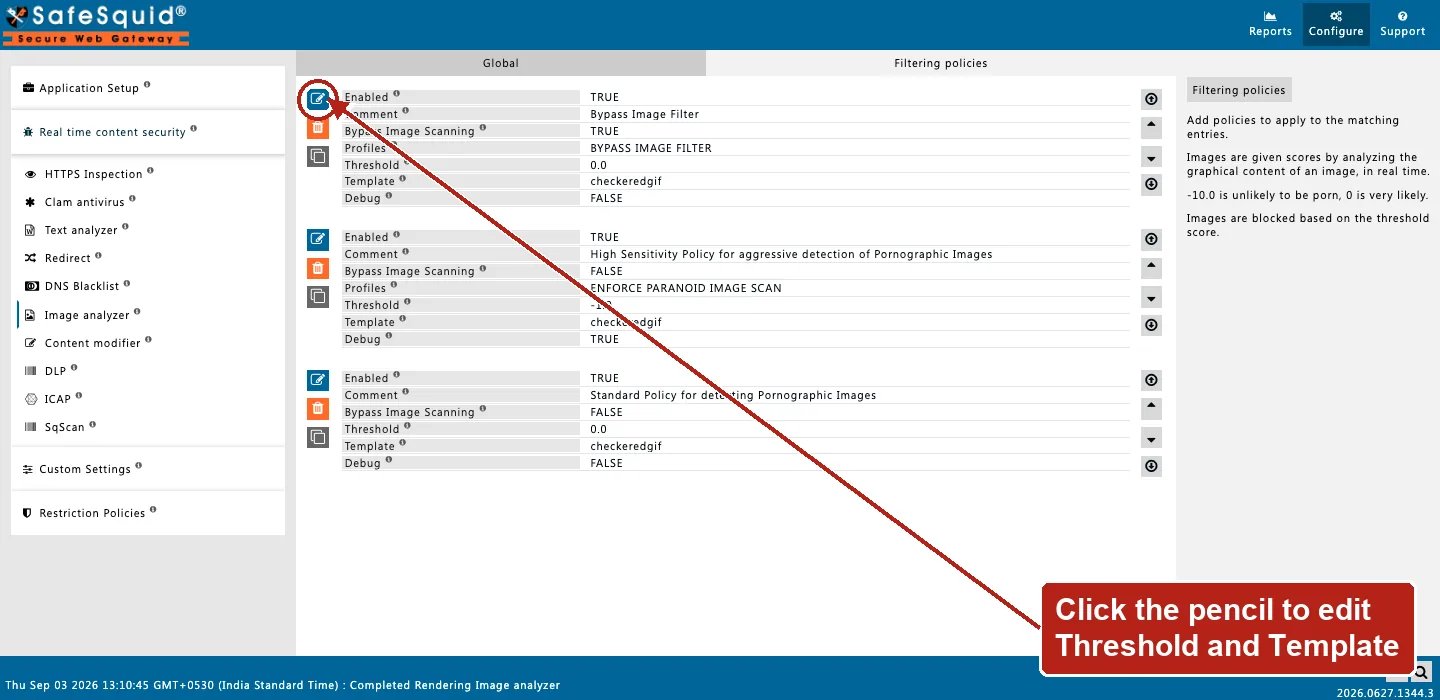
Open **Configure → Real time content security → Image analyzer → Filtering policies**. Row fields
are Enabled, Comment, Bypass Image Scanning, Profiles, Threshold, Template, and Debug.
 ### Block for students
* **Configuration:** Profiles STUDENT, Threshold 0, Template checkeredgif.
* **Result:** student image responses scoring ≥ 0 replaced with checkered template.
### Staff bypass
* **Configuration:** Row A Profiles STAFF Bypass on; Row B blank Threshold -2.
* **Result:** staff skip imgfilter; others scored via row B.
### Debug tuning
* **Configuration:** Debug on, Threshold -5.
* **Result:** borderline response images blurred with score annotation; still logged blocked.
## How to verify
1. Fetch image through profile with image-filter tag and imgfilter enabled.
2. Enable imgfilter log level for score lines.
3. Detailed logs show filter name imgfilter on block. If a request you expected to be scored is missing, check whether an earlier entry's Bypass Image Scanning claimed it first.
### Block for students
* **Configuration:** Profiles STUDENT, Threshold 0, Template checkeredgif.
* **Result:** student image responses scoring ≥ 0 replaced with checkered template.
### Staff bypass
* **Configuration:** Row A Profiles STAFF Bypass on; Row B blank Threshold -2.
* **Result:** staff skip imgfilter; others scored via row B.
### Debug tuning
* **Configuration:** Debug on, Threshold -5.
* **Result:** borderline response images blurred with score annotation; still logged blocked.
## How to verify
1. Fetch image through profile with image-filter tag and imgfilter enabled.
2. Enable imgfilter log level for score lines.
3. Detailed logs show filter name imgfilter on block. If a request you expected to be scored is missing, check whether an earlier entry's Bypass Image Scanning claimed it first.