> ## Documentation Index
> Fetch the complete documentation index at: https://docs.safesquid.com/llms.txt
> Use this file to discover all available pages before exploring further.
# Text analyzer
```mermaid theme={null}
flowchart TB
resp[Response Content-Type] --> mimeGate{Any enabled row MIME regex matches?}
mimeGate -->|No| pass[Pass through unscanned]
mimeGate -->|Yes| buffer[Buffer response body]
buffer --> walk[Walk rows top to bottom]
walk --> row{Row MIME and Keyword regex match body?}
row -->|Yes| add[Add row Score to running total]
row -->|No| next[Next row]
add --> thresh{Total at or above Threshold?}
thresh -->|Yes| block[DO NOT BYPASS and HTTP 451 block page]
thresh -->|No| next
```
## Overview
The `Keywords-filtering` section (`safesquid-keywords-filtering(5)`) scans the textual content of HTTP payloads for specific patterns and assigns scores to determine if the content should be blocked.
Cumulative scoring suits content that no single keyword proves is a problem, but that is clearly objectionable once several related terms appear on the same page — acceptable-use enforcement against gambling, adult, or extremist material.
## Core Mechanics (C++ Source Validation)
Cumulative scoring, early exit at threshold.
* **Cumulative Scoring Engine**: Unlike standard first-match modules, the keyword filter evaluates *all* enabled rules matching the connection profile. When a Regex keyword is matched, its defined `Score` is added to a cumulative tally for that connection.
* **Early Exit**: If the cumulative score breaches the Global Threshold (`if (x >= threshold)`), scanning immediately stops to save CPU.
* **MIME Filtering**: SafeSquid will only scan payloads whose `Content-Type` matches the specified `Mime type` regular expression.
* **Enforcement**: Once the threshold is breached, the connection action becomes **DO NOT BYPASS**, serving the specified block template and populating the `_SCORE_` and `_REASON_` template variables.
**A Text analyzer block is not click-through-able.** Even when the matching Access restrictions entry grants **Allow bypassing**, a Text analyzer block offers the user no continue-anyway link — that override applies to some other block reasons, not this one.
## Schema Fields
### Global Fields
* **Enabled (enabled)**: Turn Text analyzer on or off for all connections, unless the matching Access restrictions entry's **Bypass** grants **Text analyzer**.
* **Threshold (threshold)**: Minimum total score from matching rows to block. Block when total ≥ this value (strictly below = allow).
* **Template (templ)**: Block page template when score ≥ Threshold. Blank uses blocked . Template receives *SCORE* and *THRESHOLD* variables.
### Rule-Based Fields (Per Connection Tuning)
* **Enabled (enabled)**: Skip this row when disabled. Rows with Score 0 or blank Keyword are never applied.
* **Comment (comment)**: Notes for operators. Logged on match when non-empty.
* **Profiles (profiles)**: Apply only when the connection has one of these profiles. Blank = all connections. Prefix ! to skip connections that have a profile.
* **Mime type (mime)**: Regex on response Content-Type . Blank defaults to matching text (same as built-in text/css/javascript/xml/json family).
* **Keyword(s) (keyword)** — Regex searched in the response body. Required; blank Keyword skips the row. Example: `\b(gambling|casino)\b`. One match adds Score once per scan pass for this row.
* **Score (score)**: Points added when this row’s keyword regex matches the body. Use 0 to disable the row. Negative values reduce the running total — useful for a keyword that should offset an otherwise-alarming score in a legitimate context, for example a news article that discusses a sensitive topic responsibly.
## How SafeSquid processes the list
1. During response processing, if any enabled row matches the response `Content-Type`, SafeSquid buffers the body.
2. After the body is available, rows are walked top to bottom.
3. Mime type regex must match `Content-Type`. Blank mime defaults to matching `text` (same family as text/css/javascript/xml/json).
4. Keyword regex is searched in the buffered body; each match adds that row's Score (negative scores reduce the total).
5. Rows with Score 0 or blank Keyword are never applied.
6. At or above Threshold: HTTP 451 block page, bypass disallowed, cache code `TCP_DENIED` — the connection's cache entry is marked so the blocked response is never served from cache.
## Important entry fields
* **Profiles** — Apply only when the connection has one of these profiles. Blank = all connections. Prefix `!` to skip connections that have a profile.
* **Mime type** — Regex on response `Content-Type`. Blank defaults to matching `text`.
* **Keyword(s)** — Regex searched in the response body. Required; blank Keyword skips the row.
* **Score** — Points added when the keyword regex matches. Use 0 to disable the row. Negative values reduce the running total.
## Examples
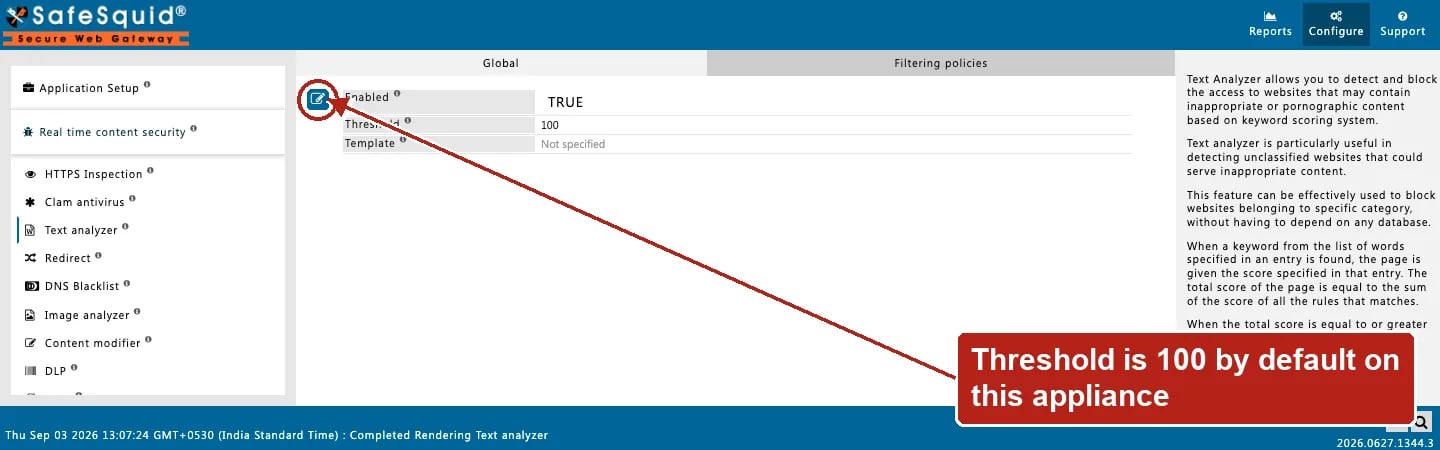
Open **Configure → Real time content security → Text analyzer → Global** for Enabled, Threshold,
and Template. The **Filtering policies** row list is not screenshotted here — its shipped default
keyword rows contain explicit search terms, unsuitable to publish verbatim.
 ### 1 — Block pages with multiple mild terms
* Threshold: **100**
* Row A: Keyword `gambling`, Score **40**
* Row B: Keyword `casino`, Score **70**
**Result:** a page containing both terms scores 110, meets Threshold, and is blocked with HTTP 451 and the configured template. A page with only `gambling` scores 40 and is allowed.
### 2 — Single high-weight term
* Threshold: **50**
* Row: Keyword `\bweapon\b`, Score **100**, Mime blank (text family)
**Result:** any text/html body matching the regex is blocked on first row match; scan stops once total ≥ Threshold.
### 3 — Limit to students profile
* Row: Profiles `Students`, Keyword `weapon`, Score **80**
* Threshold: **50**
**Result:** staff without the Students profile skip the row entirely; student connections with `weapon` in the body are blocked.
### 4 — Non-text response skipped
* Row: Mime `text`, Keyword `badword`, Score **100**
**Result:** an `image/png` response does not match the mime regex, is not buffered for keyword scan, and passes through even if binary data accidentally contained the string.
## How to verify
1. Fetch a test page through the proxy and confirm block vs allow against known body content.
2. Check debug response header `X-Text-Analyzer` (shows score vs threshold, `Buffering Requested` when mime matched, or `Disabled` when the section is off for that connection).
3. Enable TEXT\_ANALYZER in `LOG_LEVEL` for native `match:` and `blocked` / `allowed` lines.
4. Open **Reports → Detailed logs**; blocked responses show `filter_name` for text analyzer and the score reason.
5. If a page you expect to be blocked passes through, check its actual `Content-Type` first — a Mime type mismatch is the most common reason a response is never scanned.
### 1 — Block pages with multiple mild terms
* Threshold: **100**
* Row A: Keyword `gambling`, Score **40**
* Row B: Keyword `casino`, Score **70**
**Result:** a page containing both terms scores 110, meets Threshold, and is blocked with HTTP 451 and the configured template. A page with only `gambling` scores 40 and is allowed.
### 2 — Single high-weight term
* Threshold: **50**
* Row: Keyword `\bweapon\b`, Score **100**, Mime blank (text family)
**Result:** any text/html body matching the regex is blocked on first row match; scan stops once total ≥ Threshold.
### 3 — Limit to students profile
* Row: Profiles `Students`, Keyword `weapon`, Score **80**
* Threshold: **50**
**Result:** staff without the Students profile skip the row entirely; student connections with `weapon` in the body are blocked.
### 4 — Non-text response skipped
* Row: Mime `text`, Keyword `badword`, Score **100**
**Result:** an `image/png` response does not match the mime regex, is not buffered for keyword scan, and passes through even if binary data accidentally contained the string.
## How to verify
1. Fetch a test page through the proxy and confirm block vs allow against known body content.
2. Check debug response header `X-Text-Analyzer` (shows score vs threshold, `Buffering Requested` when mime matched, or `Disabled` when the section is off for that connection).
3. Enable TEXT\_ANALYZER in `LOG_LEVEL` for native `match:` and `blocked` / `allowed` lines.
4. Open **Reports → Detailed logs**; blocked responses show `filter_name` for text analyzer and the score reason.
5. If a page you expect to be blocked passes through, check its actual `Content-Type` first — a Mime type mismatch is the most common reason a response is never scanned.