> ## Documentation Index
> Fetch the complete documentation index at: https://docs.safesquid.com/llms.txt
> Use this file to discover all available pages before exploring further.
# Elevated Privacy
Open **Configure → Restriction Policies → Privacy control → Elevated Privacy**. This section sits under the **Privacy control** menu group alongside [Cookie filter](/configuration/restriction_policies/privacy_control/cookie_filter), [Header filter](/configuration/restriction_policies/privacy_control/header_filter) and [Elevated Privacy](/configuration/restriction_policies/privacy_control/elevated_privacy) — configure them together, since a Cookie filter allow row and an Elevated Privacy STANDARD row can otherwise fight over the same header.
The `Elevated` section reduces cross-site tracking by stripping third-party cookies and selected tracking headers. Without it, third-party cookies and related trackers can follow users from site to site.
## Core mechanics
### First match wins
On each request and response header pass, enabled Elevated policy rows are walked top to bottom. The **first** matching row sets the privacy level for that connection; later rows are skipped.
### Privacy levels (action field)
* **NOT-REQUIRED** — No stripping; bypass elevated privacy.
* **LOW** — Drop third-party Cookie and Set-Cookie when cookie flag set.
* **STANDARD** — LOW plus remove Referer and Origin on outgoing requests.
* **PARANOID** — STANDARD plus remove User-Agent (may break browser-variant sites).
Changes are logged to the privacy log and Detailed logs with filter name Elevated-Privacy. Debug header `X-Elevated-Privacy` reports level when Send Debugging Headers includes client.
```mermaid theme={null}
flowchart TB
hdr[Request or response headers] --> walk[Walk Elevated rows top-down]
walk --> match{First enabled profile match?}
match -->|No| none[No elevated changes]
match -->|Yes| level{Privacy level}
level -->|NOT-REQUIRED| none
level -->|LOW| cookies[Strip third-party cookies]
level -->|STANDARD| cookies --> stripRO[Remove Referer Origin]
level -->|PARANOID| stripRO --> stripUA[Remove User-Agent]
```
### Global fields
* **Enabled (`enabled`)** — master switch. When off, request and response header processing exits without changing any headers.
### Important entry fields
* **Profiles (`profiles`)** — limits the row to connections carrying the listed Access Profiles; blank matches every connection.
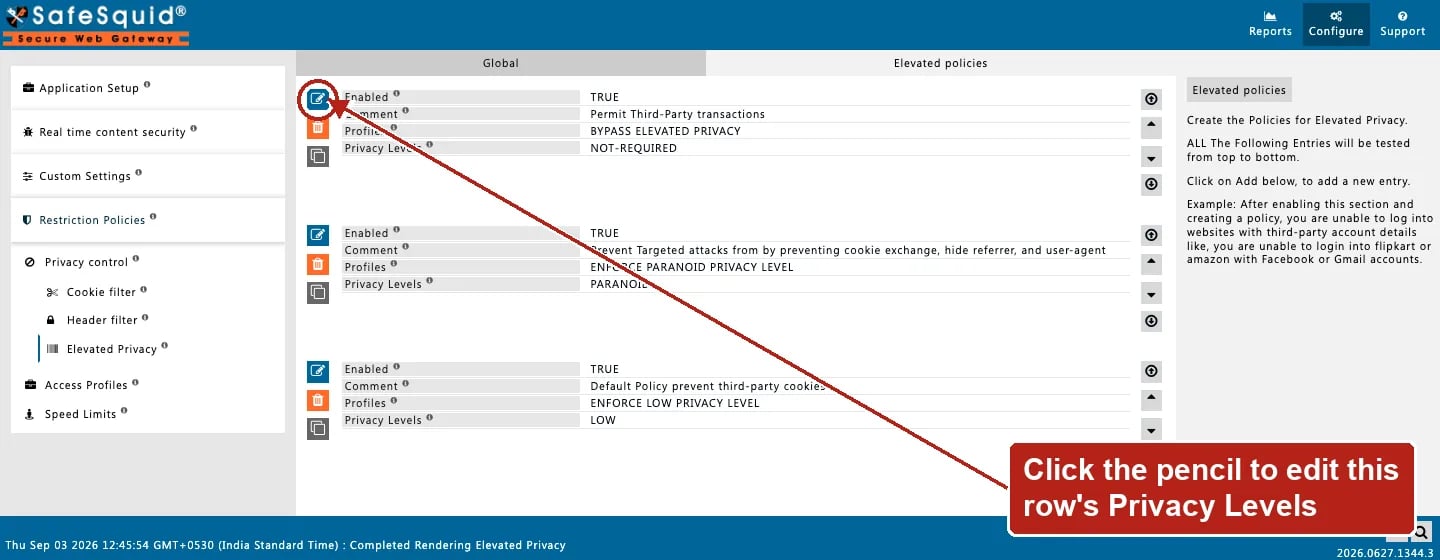
* **Privacy Levels (`action`)** — NOT-REQUIRED, LOW, STANDARD, or PARANOID, applied when this row is the first match.
* **Comment (`comment`)** — operator note only; does not affect matching.
## Examples
Open **Configure → Restriction Policies → Privacy control → Elevated Privacy → Elevated
policies**. Rows are tested top to bottom; the first enabled match sets the level for the
connection.
 ### Paranoid for guests, bypass for staff
* **Configuration:** Row A Profiles STAFF NOT-REQUIRED; Row B blank PARANOID.
* **Result:** staff keep full headers; others get paranoid stripping.
### Cookie-only for marketing
* **Configuration:** Profiles MARKETING USERS, Privacy Levels LOW.
* **Result:** only third-party cookies stripped; Referer and User-Agent remain.
### Standard privacy for everyone
* **Configuration:** One row, Profiles blank, Privacy Levels STANDARD.
* **Result:** every connection has third-party cookies dropped and Referer/Origin removed from outgoing requests.
Start with LOW or STANDARD before PARANOID — removing User-Agent breaks some applications. Place NOT-REQUIRED bypass rows above broad PARANOID rows.
## How to verify
1. Browse multi-site flow; inspect request headers upstream of proxy.
2. Check `privacy.log` under Reports.
3. Enable elevated log level for native privacy lines.
4. Debug header `X-Elevated-Privacy` on client when configured.
### Paranoid for guests, bypass for staff
* **Configuration:** Row A Profiles STAFF NOT-REQUIRED; Row B blank PARANOID.
* **Result:** staff keep full headers; others get paranoid stripping.
### Cookie-only for marketing
* **Configuration:** Profiles MARKETING USERS, Privacy Levels LOW.
* **Result:** only third-party cookies stripped; Referer and User-Agent remain.
### Standard privacy for everyone
* **Configuration:** One row, Profiles blank, Privacy Levels STANDARD.
* **Result:** every connection has third-party cookies dropped and Referer/Origin removed from outgoing requests.
Start with LOW or STANDARD before PARANOID — removing User-Agent breaks some applications. Place NOT-REQUIRED bypass rows above broad PARANOID rows.
## How to verify
1. Browse multi-site flow; inspect request headers upstream of proxy.
2. Check `privacy.log` under Reports.
3. Enable elevated log level for native privacy lines.
4. Debug header `X-Elevated-Privacy` on client when configured.