> ## Documentation Index
> Fetch the complete documentation index at: https://docs.safesquid.com/llms.txt
> Use this file to discover all available pages before exploring further.
# Homograph Detection
Detect and block Internationalized Domain Name (IDN) homograph attacks where attackers use visually similar characters from different scripts (Cyrillic, Greek, etc.) to impersonate legitimate domains and enable phishing attacks.
## Why Homograph Detection Matters
**The threat:** Attackers register domains that look identical to legitimate sites by using Unicode characters from different alphabets. For example:
* `apple.com` (legitimate) vs `аpple.com` (Cyrillic 'а')
* `paypal.com` (legitimate) vs `pаypаl.com` (Cyrillic characters)
**Business impact:**
* Credential theft (users enter passwords on fake login pages)
* Financial fraud (fake banking/payment sites)
* Brand impersonation (trust exploitation)
* Phishing campaigns bypass traditional URL filters
**How it works:** Browsers display internationalized domain names (IDN) using Unicode, making it nearly impossible for users to distinguish malicious lookalikes from legitimate domains.
## When to Use Homograph Detection
| Use Homograph Detection When | Use Other Controls Instead |
| --------------------------------------------- | -------------------------------------------------- |
| Protecting against phishing campaigns | Blocking known-malicious domains (use DNSBL) |
| Users access international sites legitimately | Enforcing URL category restrictions |
| Brand impersonation risk is high | Application-specific blocking (use App Signatures) |
| Compliance requires IDN attack mitigation | Blocking specific FQDNs (use Access Restriction) |
:::tip
**Combine with Other Defenses**
Homograph detection works best alongside [DNSBL](/DNSBL) (block known-bad domains), [SSL Inspection](/SSL_Inspection) (detect fake certificates), and user security awareness training.
:::
## Prerequisites
* SafeSquid installed and operational (see [Getting Started](/Getting_Started))
* Admin access to [Configuration Portal](/Configuration_Portal)
* DNS resolution handled by SafeSquid (see [Supporting Services: BIND](/Bind))
## Configuration Steps
1. **Access Configuration Portal**\
Navigate to **Real Time Content Security** → **DNS Blacklist**
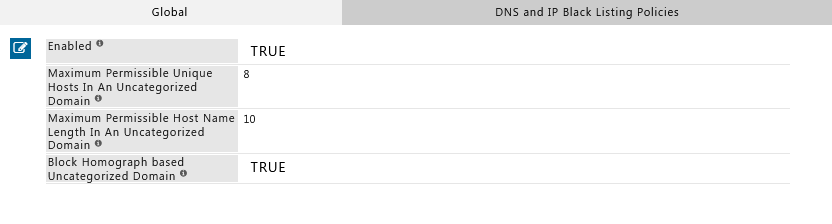 2. **Enable Homograph Detection**
* **Enabled:** Set to **TRUE**
* **Save** the configuration
3. **Apply Changes**\
Click **Apply** to activate the new policy.
:::note
**Feature Location**
Homograph Detection is configured in the **DNS Blacklist** section because it operates at the DNS resolution layer, intercepting suspicious domain patterns before connection.
:::
## Verification
Test that Homograph Detection is blocking IDN attack attempts:
### Method 1: Command-Line Test (cURL)
```bash theme={null}
# Test with a homograph attack domain (Cyrillic 'а' in apple)
curl -v -x http://YOUR-SAFESQUID-IP:8080 http://аpple.com
```
**Expected result:** SafeSquid blocks the request and displays a block page.
**Note:** The URL `http://аpple.com` uses a Cyrillic 'а' (U+0430) instead of the Latin 'a' (U+0061).
2. **Enable Homograph Detection**
* **Enabled:** Set to **TRUE**
* **Save** the configuration
3. **Apply Changes**\
Click **Apply** to activate the new policy.
:::note
**Feature Location**
Homograph Detection is configured in the **DNS Blacklist** section because it operates at the DNS resolution layer, intercepting suspicious domain patterns before connection.
:::
## Verification
Test that Homograph Detection is blocking IDN attack attempts:
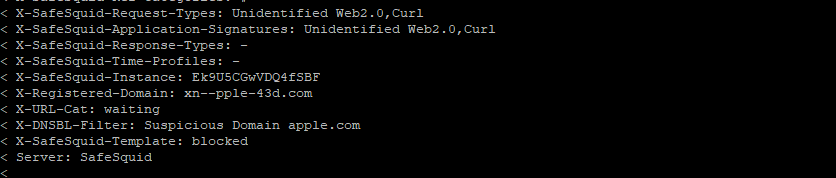
### Method 1: Command-Line Test (cURL)
```bash theme={null}
# Test with a homograph attack domain (Cyrillic 'а' in apple)
curl -v -x http://YOUR-SAFESQUID-IP:8080 http://аpple.com
```
**Expected result:** SafeSquid blocks the request and displays a block page.
**Note:** The URL `http://аpple.com` uses a Cyrillic 'а' (U+0430) instead of the Latin 'a' (U+0061).
 ***
### Method 2: Browser Test
1. Configure your browser to use SafeSquid as proxy (see [Connect Your Client](/Connect_Your_Client))
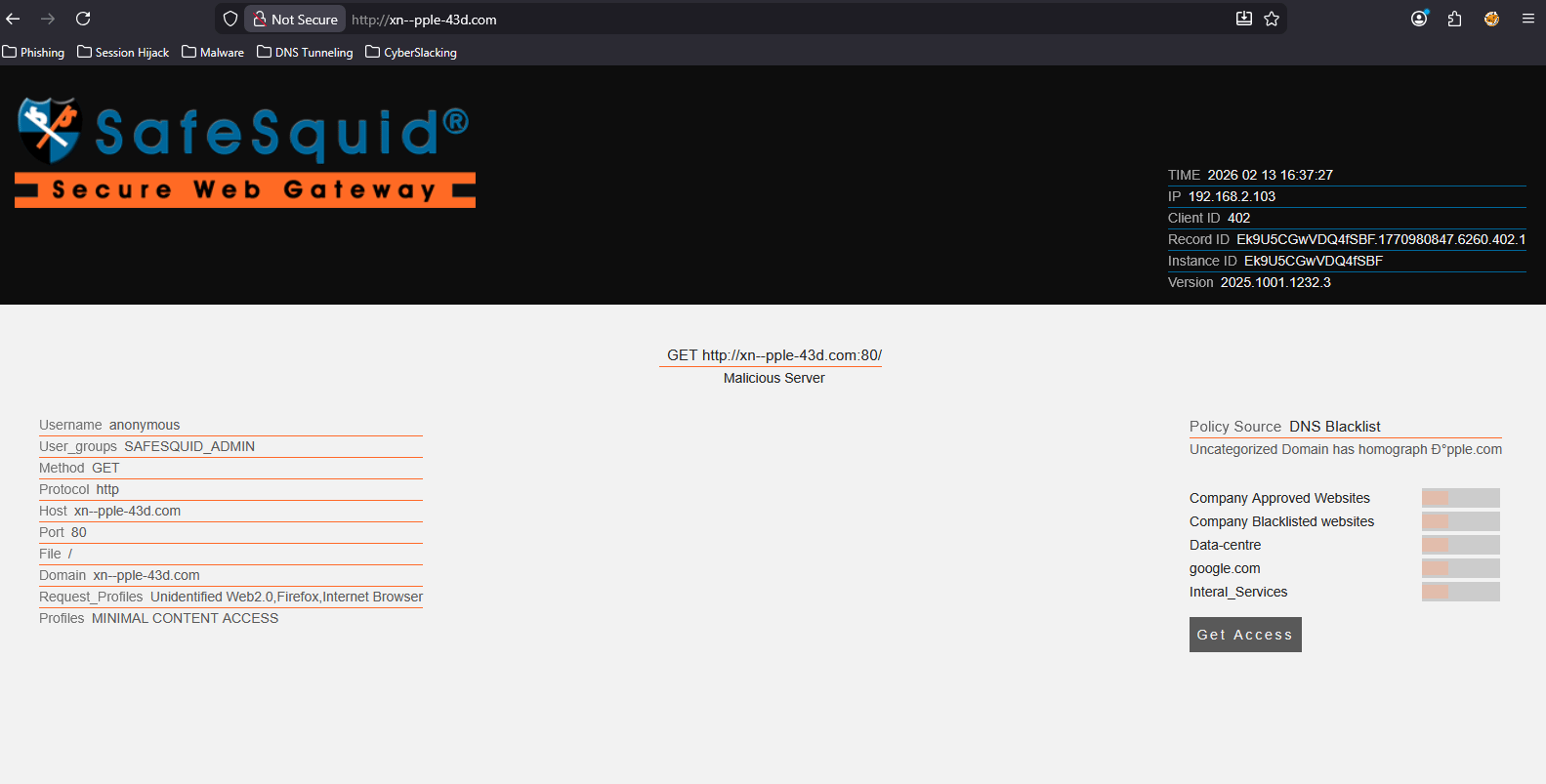
2. Navigate to `http://аpple.com`
3. **Expected result:** SafeSquid displays a block page
***
### Method 2: Browser Test
1. Configure your browser to use SafeSquid as proxy (see [Connect Your Client](/Connect_Your_Client))
2. Navigate to `http://аpple.com`
3. **Expected result:** SafeSquid displays a block page
 ***
### Method 3: Log Verification
Check SafeSquid logs for blocked homograph attempts:
```bash theme={null}
tail -f /var/log/safesquid/security.log | grep -i homograph
```
**Expected entries:** Logs should show blocked requests with `reason=homograph` or similar indicators.
## Troubleshooting
| Issue | Symptom | Resolution |
| --------------------------------- | ----------------------------------------------------------------- | -------------------------------------------------------------------------------------------------------------------------------------------------------------------------------------------------- |
| **Homograph attacks not blocked** | IDN lookalike domains load successfully | **Check:** 1) Homograph Detection is **Enabled** = TRUE. 2) Changes were applied. 3) Browser is using SafeSquid as proxy. **Test:** Access `http://аpple.com` (with Cyrillic 'а'). |
| **Legitimate IDN sites blocked** | International domains (e.g., Chinese, Arabic) blocked incorrectly | **Cause:** Overly aggressive detection. **Fix:** Add legitimate IDN domains to bypass/allow-list in Access Restrictions. **Alternative:** Adjust detection sensitivity if the feature supports it. |
| **No log entries** | Can't confirm blocks in logs | **Check:** 1) Security logging is enabled. 2) Verify log path `/var/log/safesquid/security.log` exists. 3) Check disk space (logs may stop if disk is full). |
| **Feature not available** | Homograph Detection option not visible | **Check:** SafeSquid version supports this feature. **Update:** If missing, update to latest SafeSquid release. **Verify:** Run `safesquid -v` to check version. |
**Still having issues?** Contact SafeSquid support with:
* Screenshot of Homograph Detection configuration
* Sample blocked domain attempts
* Contents of `/var/log/safesquid/safesquid.log` and `/var/log/safesquid/security.log`
## How Homograph Detection Works
SafeSquid analyzes domain names during DNS resolution and checks for:
1. **Mixed scripts:** Domains using characters from multiple alphabets (e.g., Latin + Cyrillic)
2. **Lookalike patterns:** Visual similarity to known legitimate domains
3. **Suspicious Unicode:** Non-ASCII characters in domain names
When detected, SafeSquid blocks the request and logs the attempt for audit trails.
## Source register
| Topic | Status | Source |
| -------------------------------------------- | ------------- | --------------------------------------------------------- |
| Homograph control + version gate | **Confirmed** | This page (`safesquid -v`), configuration steps |
| `reason=homograph` style log indicators | **Draft** | **CTO:** confirm exact field strings in shipping logs |
| Algorithm detail (mixed scripts, lookalikes) | **Draft** | High-level description; engineering SSOT if customers ask |
## Next Steps
* **Layer defenses:** Combine with [DNSBL](/DNSBL) to block known-malicious domains
* **Inspect certificates:** Enable [SSL Inspection](/SSL_Inspection) to detect fake TLS certificates on lookalike domains
* **Monitor attempts:** Use [Security Logs](/Security_Logs) and [Reporting](/Reporting_Module) to track homograph attack patterns
* **User training:** Educate users about IDN attacks and visual domain verification
## Related topics
- [Homograph Detection](/use_cases/dns_security/homograph_detection.md)
- [DNS Security](/use_cases/dns_security/dns_security.md)
- [Integrated DNS Security](/safesquid_swg/architecture/integrated_dns_security.md)
- [Threat Intelligence Feeds](/use_cases/malware_scanning/threat_intelligence_feeds.md)
- [DNS blacklist](/admin_guide/filtering_and_privacy/dns_blacklist.md)
***
### Method 3: Log Verification
Check SafeSquid logs for blocked homograph attempts:
```bash theme={null}
tail -f /var/log/safesquid/security.log | grep -i homograph
```
**Expected entries:** Logs should show blocked requests with `reason=homograph` or similar indicators.
## Troubleshooting
| Issue | Symptom | Resolution |
| --------------------------------- | ----------------------------------------------------------------- | -------------------------------------------------------------------------------------------------------------------------------------------------------------------------------------------------- |
| **Homograph attacks not blocked** | IDN lookalike domains load successfully | **Check:** 1) Homograph Detection is **Enabled** = TRUE. 2) Changes were applied. 3) Browser is using SafeSquid as proxy. **Test:** Access `http://аpple.com` (with Cyrillic 'а'). |
| **Legitimate IDN sites blocked** | International domains (e.g., Chinese, Arabic) blocked incorrectly | **Cause:** Overly aggressive detection. **Fix:** Add legitimate IDN domains to bypass/allow-list in Access Restrictions. **Alternative:** Adjust detection sensitivity if the feature supports it. |
| **No log entries** | Can't confirm blocks in logs | **Check:** 1) Security logging is enabled. 2) Verify log path `/var/log/safesquid/security.log` exists. 3) Check disk space (logs may stop if disk is full). |
| **Feature not available** | Homograph Detection option not visible | **Check:** SafeSquid version supports this feature. **Update:** If missing, update to latest SafeSquid release. **Verify:** Run `safesquid -v` to check version. |
**Still having issues?** Contact SafeSquid support with:
* Screenshot of Homograph Detection configuration
* Sample blocked domain attempts
* Contents of `/var/log/safesquid/safesquid.log` and `/var/log/safesquid/security.log`
## How Homograph Detection Works
SafeSquid analyzes domain names during DNS resolution and checks for:
1. **Mixed scripts:** Domains using characters from multiple alphabets (e.g., Latin + Cyrillic)
2. **Lookalike patterns:** Visual similarity to known legitimate domains
3. **Suspicious Unicode:** Non-ASCII characters in domain names
When detected, SafeSquid blocks the request and logs the attempt for audit trails.
## Source register
| Topic | Status | Source |
| -------------------------------------------- | ------------- | --------------------------------------------------------- |
| Homograph control + version gate | **Confirmed** | This page (`safesquid -v`), configuration steps |
| `reason=homograph` style log indicators | **Draft** | **CTO:** confirm exact field strings in shipping logs |
| Algorithm detail (mixed scripts, lookalikes) | **Draft** | High-level description; engineering SSOT if customers ask |
## Next Steps
* **Layer defenses:** Combine with [DNSBL](/DNSBL) to block known-malicious domains
* **Inspect certificates:** Enable [SSL Inspection](/SSL_Inspection) to detect fake TLS certificates on lookalike domains
* **Monitor attempts:** Use [Security Logs](/Security_Logs) and [Reporting](/Reporting_Module) to track homograph attack patterns
* **User training:** Educate users about IDN attacks and visual domain verification
## Related topics
- [Homograph Detection](/use_cases/dns_security/homograph_detection.md)
- [DNS Security](/use_cases/dns_security/dns_security.md)
- [Integrated DNS Security](/safesquid_swg/architecture/integrated_dns_security.md)
- [Threat Intelligence Feeds](/use_cases/malware_scanning/threat_intelligence_feeds.md)
- [DNS blacklist](/admin_guide/filtering_and_privacy/dns_blacklist.md)