> ## Documentation Index
> Fetch the complete documentation index at: https://docs.safesquid.com/llms.txt
> Use this file to discover all available pages before exploring further.
# SSO Authentication
> Configure Kerberos-based Single Sign-On (SSO) with Active Directory for transparent user authentication in SafeSquid.
# AD SSO Authentication (Kerberos)
Kerberos-based SSO provides a seamless user experience for domain-joined workstations. Users are authenticated transparently via their domain ticket, eliminating browser credential prompts.
## Problem statement
Corporate Windows fleets need transparent authentication so the proxy can enforce identity-aware policy without constant credential prompts. Kerberos SSO is the documented path for that experience in Active Directory environments.
## How Kerberos SSO Works
```mermaid theme={null}
sequenceDiagram
participant Client as Domain Client
participant SafeSquid
participant AD as Active Directory
Client->>SafeSquid: HTTP(S) request (Negotiate)
SafeSquid->>AD: Validate Kerberos ticket
AD-->>SafeSquid: User Identity & Group Membership
SafeSquid->>SafeSquid: Apply Group Policy
SafeSquid-->>Client: Allow / Deny
```
:::note
**Prerequisites**
* [Setup Active Directory Integration](/Setup_Active_Directory_Integration) completed.
* **Time Sync:** SafeSquid and AD server time must match (max skew 5 mins).
* **DNS:** SafeSquid must resolve the AD domain; AD must have a DNS entry for SafeSquid.
* **Monit:** The Monit service must be running (`pidof monit`).
* Clients must actually be domain-joined and eligible for Kerberos-based transparent authentication.
:::
## Configure SSO Authentication
1. **Access SafeSquid Interface:** Go to **Application Setup** → **Integrate LDAP**.
2. **Configure LDAP Server:**
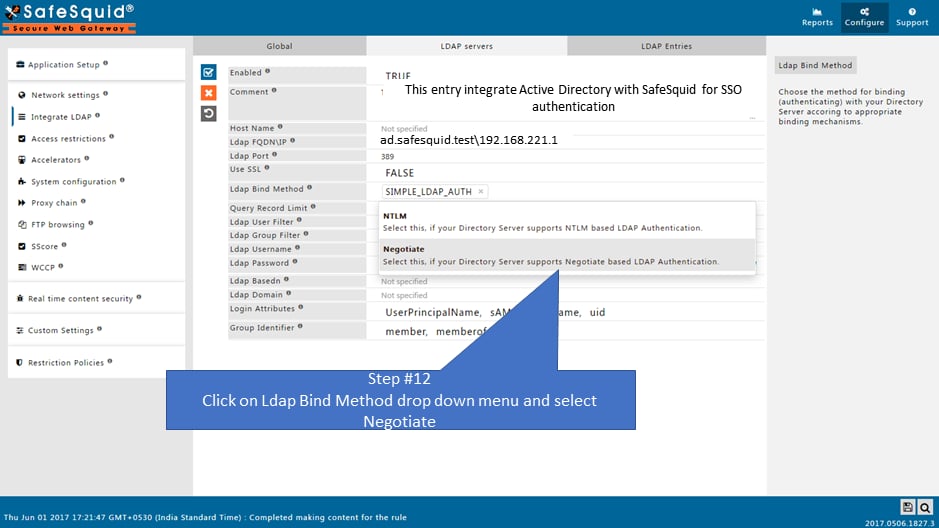
* Go to **LDAP Servers** tab and edit your entry.
* **LDAP Bind Method:** Select **NEGOTIATE** (this enables Kerberos SSO).
* **Bind DN:** Ensure this is a domain admin or account with high privileges to create the keytab.
3. **Automatic Keytab Generation:**
When you save with **NEGOTIATE**, SafeSquid automatically generates:
* `HTTP.keytab`
* `krb5.conf`
* `krb.tkt`
Verify these in `/usr/local/safesquid/security/`.
 4. **DNS Stub Zone:** SafeSquid creates a stub zone for AD resolution in `/etc/bind/safesquid.dns.conf`. Ensure this is active.
## Operational notes
* This page is the documented transparent-authentication path for AD. Do not generalize the same SSO claim to non-AD directory flows without proof.
* Browser and zone configuration matter. A technically correct Kerberos setup can still appear broken if the client refuses to send the ticket.
* Treat keytab and Kerberos material as operationally sensitive assets.
## Enable SSO in Access Rules
1. **Navigate to Access Restrictions:** **Application Setup** → **Access Restrictions** → **Allow List**.
2. **Configure Rule:**
* **PAM Authentication:** Set to **TRUE**.
* **SSO:** Ensure the global SSO field is **TRUE** (default).
3. **Save and Apply:** Click the checkmark to save.
## Verification
| Action | Method | Expected Result |
| --------------------- | ------------------------------------------------- | ------------------------------------------------------ |
| **Transparent Login** | Access a website from a domain-joined client. | Website loads immediately without a credential prompt. |
| **Check Keytab** | `ls -l /usr/local/safesquid/security/HTTP.keytab` | File exists and has recent timestamp. |
| **Identity Log** | `tail -f /var/log/safesquid/identity.log` | Shows authenticated usernames in `user@DOMAIN` format. |
| **DNS Test** | `nslookup ` from SafeSquid. | Successfully resolves to AD server IP. |
## Troubleshooting
| Symptom | Likely Cause | Fix |
| --------------------------- | ------------------------------------ | ----------------------------------------------------------------------------------------------------------------------- |
| Repeated prompts (SSO fail) | Time skew | Run `date` on AD and SafeSquid; sync via NTP if they differ by more than 5 minutes. |
| Prompt on some browsers | Browser config or client eligibility | Ensure the client is domain-joined and the SafeSquid host is treated as an intranet or delegated target where required. |
| Keytab not generated | Permission or Bind issue | Ensure the bind account has sufficient AD permissions; check `/var/log/safesquid/safesquid.log` for Kerberos errors. |
| DNS resolution fail | Missing or wrong stub zone | Verify `/etc/bind/safesquid.dns.conf` contains the correct AD server IP and is included in your BIND config. |
:::tip
**Browser Configuration**
For Chrome and Edge to send Kerberos tickets, the SafeSquid proxy URL must be recognized as an intranet site. You can enforce this via GPO:
**Administrative Templates** → **Google Chrome** → **Kerberos delegation server allowlist**
:::
## Source register
| Topic | Status | Source |
| -------------------------------------- | ------------- | ---------------------------- |
| Kerberos SSO, keytab, time skew | **Confirmed** | This page, [NTP](/NTP) |
| BIND stub for AD DNS | **Confirmed** | This page, [BIND](/Bind) |
| Chrome/Edge intranet zone for Kerberos | **Confirmed** | Tip above (browser behavior) |
## Next steps
* [Access Restriction](/Access_Restriction) (Apply policies by AD group)
* [SSL Inspection](/SSL_Inspection) (Attribute HTTPS traffic to AD users)
* [Bypass Authentication](/Bypass_Authentication) (For non-browser apps that don't support Kerberos)
## Related topics
- [SSO Authentication](/use_cases/authentication/openldap_sso_authentication.md)
- [SSO Authentication Fail](/troubleshooting/sso_authentication_fail.md)
- [SSO Authentication with RODC](/use_cases/authentication/configure_kerberos_authentication_with_rodc.md)
- [Simple Authentication](/use_cases/authentication/ad_simple_authentication.md)
4. **DNS Stub Zone:** SafeSquid creates a stub zone for AD resolution in `/etc/bind/safesquid.dns.conf`. Ensure this is active.
## Operational notes
* This page is the documented transparent-authentication path for AD. Do not generalize the same SSO claim to non-AD directory flows without proof.
* Browser and zone configuration matter. A technically correct Kerberos setup can still appear broken if the client refuses to send the ticket.
* Treat keytab and Kerberos material as operationally sensitive assets.
## Enable SSO in Access Rules
1. **Navigate to Access Restrictions:** **Application Setup** → **Access Restrictions** → **Allow List**.
2. **Configure Rule:**
* **PAM Authentication:** Set to **TRUE**.
* **SSO:** Ensure the global SSO field is **TRUE** (default).
3. **Save and Apply:** Click the checkmark to save.
## Verification
| Action | Method | Expected Result |
| --------------------- | ------------------------------------------------- | ------------------------------------------------------ |
| **Transparent Login** | Access a website from a domain-joined client. | Website loads immediately without a credential prompt. |
| **Check Keytab** | `ls -l /usr/local/safesquid/security/HTTP.keytab` | File exists and has recent timestamp. |
| **Identity Log** | `tail -f /var/log/safesquid/identity.log` | Shows authenticated usernames in `user@DOMAIN` format. |
| **DNS Test** | `nslookup ` from SafeSquid. | Successfully resolves to AD server IP. |
## Troubleshooting
| Symptom | Likely Cause | Fix |
| --------------------------- | ------------------------------------ | ----------------------------------------------------------------------------------------------------------------------- |
| Repeated prompts (SSO fail) | Time skew | Run `date` on AD and SafeSquid; sync via NTP if they differ by more than 5 minutes. |
| Prompt on some browsers | Browser config or client eligibility | Ensure the client is domain-joined and the SafeSquid host is treated as an intranet or delegated target where required. |
| Keytab not generated | Permission or Bind issue | Ensure the bind account has sufficient AD permissions; check `/var/log/safesquid/safesquid.log` for Kerberos errors. |
| DNS resolution fail | Missing or wrong stub zone | Verify `/etc/bind/safesquid.dns.conf` contains the correct AD server IP and is included in your BIND config. |
:::tip
**Browser Configuration**
For Chrome and Edge to send Kerberos tickets, the SafeSquid proxy URL must be recognized as an intranet site. You can enforce this via GPO:
**Administrative Templates** → **Google Chrome** → **Kerberos delegation server allowlist**
:::
## Source register
| Topic | Status | Source |
| -------------------------------------- | ------------- | ---------------------------- |
| Kerberos SSO, keytab, time skew | **Confirmed** | This page, [NTP](/NTP) |
| BIND stub for AD DNS | **Confirmed** | This page, [BIND](/Bind) |
| Chrome/Edge intranet zone for Kerberos | **Confirmed** | Tip above (browser behavior) |
## Next steps
* [Access Restriction](/Access_Restriction) (Apply policies by AD group)
* [SSL Inspection](/SSL_Inspection) (Attribute HTTPS traffic to AD users)
* [Bypass Authentication](/Bypass_Authentication) (For non-browser apps that don't support Kerberos)
## Related topics
- [SSO Authentication](/use_cases/authentication/openldap_sso_authentication.md)
- [SSO Authentication Fail](/troubleshooting/sso_authentication_fail.md)
- [SSO Authentication with RODC](/use_cases/authentication/configure_kerberos_authentication_with_rodc.md)
- [Simple Authentication](/use_cases/authentication/ad_simple_authentication.md)