> ## Documentation Index
> Fetch the complete documentation index at: https://docs.safesquid.com/llms.txt
> Use this file to discover all available pages before exploring further.
# Simple Authentication
> Configure OpenLDAP simple bind authentication in SafeSquid for directory-backed user identification.
# OpenLDAP Simple Authentication
Simple authentication validates users against OpenLDAP using standard LDAP bind. Users are prompted by their browser to enter their directory credentials when accessing the proxy.
## Problem statement
OpenLDAP environments still need directory-backed user identity on the proxy path, especially where group-based policy or audit attribution is required.
:::note
**Prerequisites**
* SafeSquid installed and operational.
* OpenLDAP server reachable from the SafeSquid server (default port 389).
* Admin access to the SafeSquid [Configuration Portal](/Configuration_Portal).
* A known-good bind account and correct Base DN.
:::
## Configure OpenLDAP Connection
1. **Access SafeSquid Interface:** Click **Configure** → **Application Setup** → **Integrate LDAP**.
2. **Enable Section:** Set the **Integrate LDAP** global section to **TRUE**.
3. **Add LDAP Server:**
* Go to **LDAP Servers** tab and click **Add New**.
* **LDAP Server IP:** Enter your OpenLDAP server IP.
* **Bind DN:** Enter the admin DN (e.g., `cn=admin,dc=safesquid,dc=net`).
* **Password:** Enter the bind password using the encryption arrow.
* **Base DN:** Enter your directory base (e.g., `dc=safesquid,dc=net`).
* **LDAP Domain:** Enter your domain name.
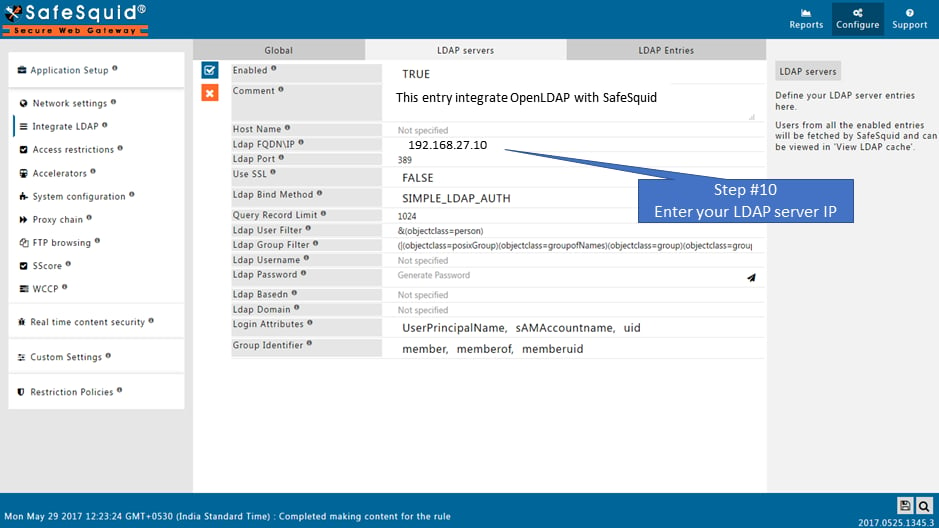 4. **Save Configuration:** Click the checkmark to save.
## Operational notes
* This is the confirmed OpenLDAP-backed authentication path.
* Keep the user experience explicit: this method is browser-prompt based, not Kerberos-like transparent SSO.
* Verify group visibility before relying on group-based policy outcomes.
## Verification
| Step | Action | Expected Result |
| ------------------------ | ------------------------------------------ | ------------------------------------------------------------------------------- |
| **Test User Extraction** | Go to **LDAP Entities** tab. | You should see all users and groups from your OpenLDAP server. |
| **Check Logs** | `tail -f /var/log/safesquid/safesquid.log` | Look for "LDAP bind successful" messages. |
| **Network Test** | `ldapsearch -h -D "" -W` | Successful response from the LDAP server confirms credentials and connectivity. |
## Troubleshooting
## Troubleshooting
| Symptom | Likely Cause | Fix |
| ----------------------- | -------------------------------- | ----------------------------------------------------------------------------------------------- |
| No LDAP entries fetched | Incorrect Base DN or Bind DN | Verify your DN syntax and confirm the directory structure with an LDAP browser or `ldapsearch`. |
| Connection refused | Firewall, port, or routing issue | Ensure the LDAP path is open between SafeSquid and the LDAP server. |
| Authentication fails | Password mismatch | Re-enter the password in SafeSquid and ensure it is stored correctly. |
| UI shows failure | Bind account permissions | Ensure the account used for Bind DN has read permissions for the required directory scope. |
## Source register
| Topic | Status | Source |
| -------------------------------- | ------------- | ------------------------------- |
| OpenLDAP bind, **LDAP Entities** | **Confirmed** | This page |
| Port **389** | **Confirmed** | Troubleshooting (standard LDAP) |
## Next steps
* [Enable SSO Authentication](/OpenLDAP_SSO_Authentication) to apply these identities to access rules.
* [Access Restriction](/Access_Restriction) to define policies by LDAP group.
## Related topics
- [Simple Authentication](/use_cases/authentication/ad_simple_authentication.md)
- [Authentication](/use_cases/authentication/authentication.md)
- [SSO Authentication](/use_cases/authentication/openldap_sso_authentication.md)
- [Active Directory](/use_cases/authentication/active_directory.md)
- [OpenLDAP](/use_cases/authentication/openldap.md)
4. **Save Configuration:** Click the checkmark to save.
## Operational notes
* This is the confirmed OpenLDAP-backed authentication path.
* Keep the user experience explicit: this method is browser-prompt based, not Kerberos-like transparent SSO.
* Verify group visibility before relying on group-based policy outcomes.
## Verification
| Step | Action | Expected Result |
| ------------------------ | ------------------------------------------ | ------------------------------------------------------------------------------- |
| **Test User Extraction** | Go to **LDAP Entities** tab. | You should see all users and groups from your OpenLDAP server. |
| **Check Logs** | `tail -f /var/log/safesquid/safesquid.log` | Look for "LDAP bind successful" messages. |
| **Network Test** | `ldapsearch -h -D "" -W` | Successful response from the LDAP server confirms credentials and connectivity. |
## Troubleshooting
## Troubleshooting
| Symptom | Likely Cause | Fix |
| ----------------------- | -------------------------------- | ----------------------------------------------------------------------------------------------- |
| No LDAP entries fetched | Incorrect Base DN or Bind DN | Verify your DN syntax and confirm the directory structure with an LDAP browser or `ldapsearch`. |
| Connection refused | Firewall, port, or routing issue | Ensure the LDAP path is open between SafeSquid and the LDAP server. |
| Authentication fails | Password mismatch | Re-enter the password in SafeSquid and ensure it is stored correctly. |
| UI shows failure | Bind account permissions | Ensure the account used for Bind DN has read permissions for the required directory scope. |
## Source register
| Topic | Status | Source |
| -------------------------------- | ------------- | ------------------------------- |
| OpenLDAP bind, **LDAP Entities** | **Confirmed** | This page |
| Port **389** | **Confirmed** | Troubleshooting (standard LDAP) |
## Next steps
* [Enable SSO Authentication](/OpenLDAP_SSO_Authentication) to apply these identities to access rules.
* [Access Restriction](/Access_Restriction) to define policies by LDAP group.
## Related topics
- [Simple Authentication](/use_cases/authentication/ad_simple_authentication.md)
- [Authentication](/use_cases/authentication/authentication.md)
- [SSO Authentication](/use_cases/authentication/openldap_sso_authentication.md)
- [Active Directory](/use_cases/authentication/active_directory.md)
- [OpenLDAP](/use_cases/authentication/openldap.md)