> ## Documentation Index
> Fetch the complete documentation index at: https://docs.safesquid.com/llms.txt
> Use this file to discover all available pages before exploring further.
# SSO Authentication
> Enable transparent authentication for OpenLDAP users in SafeSquid using directory profiles and access restrictions.
# OpenLDAP SSO Authentication
Configure Access Restrictions to utilize OpenLDAP identities. This enables identity-based policies where users are recognized by their directory username and group membership.
## Scope note
This page documents the rule-wiring flow that applies OpenLDAP-backed identity in SafeSquid policy. Do not casually equate this page with the Kerberos-based transparent SSO model documented for Active Directory.
:::note
**Prerequisites**
* [OpenLDAP Simple Authentication](/OpenLDAP_Simple_Authentication) configured and successful.
* LDAP users and groups must be visible in the **LDAP Entities** tab.
:::
## Enable Authentication in Access Rules
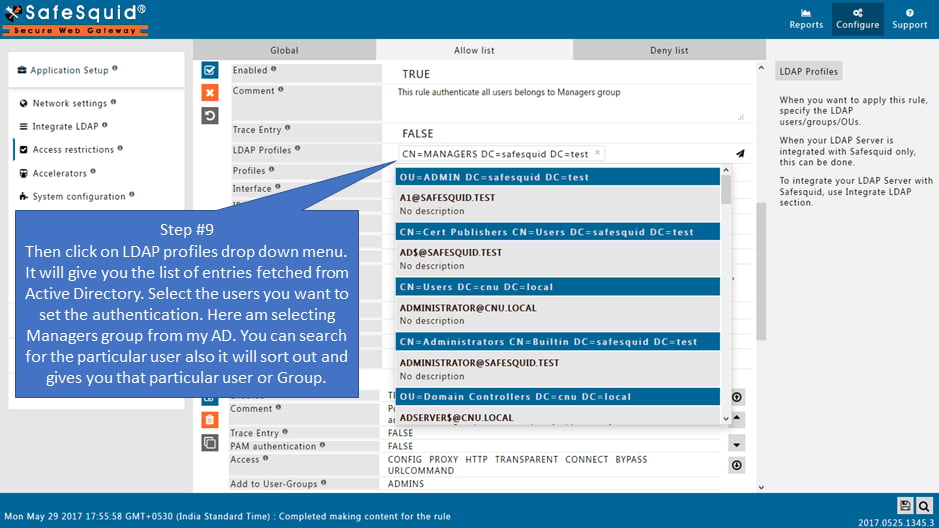
1. **Access Restrictions:** Go to **Application Setup** → **Access Restrictions** → **Allow List**.
2. **Edit Rule:** Edit the rule matching your client segment or create a new one.
3. **Apply LDAP Profiles:**
* **LDAP Profiles:** Select specific LDAP groups (e.g., `IT_Admins`) from the dropdown.
* Leave blank to apply this rule to all directory users.
4. **Enable PAM:** Ensure **PAM Authentication** is set to **TRUE**.
5. **Save Policy:** Click the checkmark to save.
## Operational notes
* Treat this as an identity-application path unless your target environment has separately proven a transparent user experience.
* Keep the terminology precise when describing the deployment to operators or customers.
 :::tip
**Note on Default Rules**
SafeSquid includes default entries under the **Allow List**. You can edit these to quickly map specific LDAP groups to default user-groups like `admins` or `users`.
:::
## Verification
| Action | Method | Expected Result |
| ---------------------- | ------------------------------------------------------ | ----------------------------------------------------------------- |
| **Test Access** | Browse from a client belonging to a mapped LDAP group. | Access is allowed/denied according to the rule. |
| **Check Identity Log** | `tail -f /var/log/safesquid/identity.log` | Shows the authenticated OpenLDAP username for each request. |
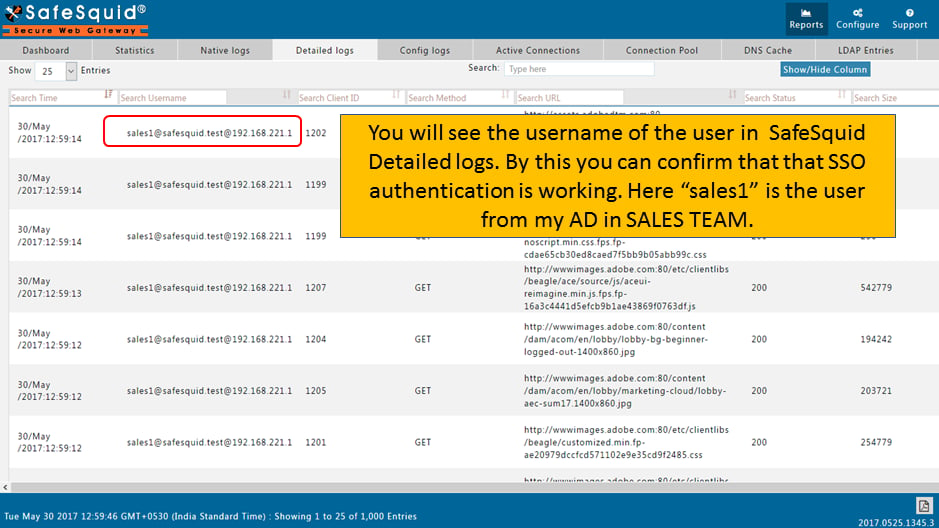
| **Review Dashboard** | **Reports** → **Detailed Logs** | Verify the **Username** column is populated with directory names. |
:::tip
**Note on Default Rules**
SafeSquid includes default entries under the **Allow List**. You can edit these to quickly map specific LDAP groups to default user-groups like `admins` or `users`.
:::
## Verification
| Action | Method | Expected Result |
| ---------------------- | ------------------------------------------------------ | ----------------------------------------------------------------- |
| **Test Access** | Browse from a client belonging to a mapped LDAP group. | Access is allowed/denied according to the rule. |
| **Check Identity Log** | `tail -f /var/log/safesquid/identity.log` | Shows the authenticated OpenLDAP username for each request. |
| **Review Dashboard** | **Reports** → **Detailed Logs** | Verify the **Username** column is populated with directory names. |
 ## Troubleshooting
| Symptom | Likely Cause | Fix |
| ----------------------------- | ---------------------------------------------------------------------------------------------------------- | ----------------------------------------------------------------------------------------------- |
| Authentication prompt appears | This flow does not provide the same transparent experience as AD Kerberos, or the rule path does not match | Verify what user experience your environment actually supports and check LDAP profile matching. |
| User recognized but blocked | Policy restriction | Check the access rules applied to the user-group assigned in the Allow List entry. |
| No username in logs | PAM set to FALSE or identity not applied on the matching rule | Ensure **PAM Authentication** is set to **TRUE** in the matching Allow List rule. |
## Source register
| Topic | Status | Source |
| -------------------------------------------------------- | ------------- | ---------------------------------------------------------------------------------- |
| OpenLDAP identity in Allow List + **PAM Authentication** | **Confirmed** | This page (scope: transparent identity via rule wiring documented here) |
| “SSO” naming vs Kerberos AD | **Draft** | OpenLDAP flow differs from AD Kerberos SSO; use exact feature names with customers |
## Next steps
* [Access Restriction](/Access_Restriction) to define policies for your different LDAP groups.
* [SSL Inspection](/SSL_Inspection) to attribute encrypted traffic to specific users.
* [Bypass Authentication](/Bypass_Authentication) for automated services.
## Related topics
- [SSO Authentication](/use_cases/authentication/ad_sso_authentication.md)
- [SSO Authentication Fail](/troubleshooting/sso_authentication_fail.md)
- [SSO Authentication with RODC](/use_cases/authentication/configure_kerberos_authentication_with_rodc.md)
- [Simple Authentication](/use_cases/authentication/ad_simple_authentication.md)
## Troubleshooting
| Symptom | Likely Cause | Fix |
| ----------------------------- | ---------------------------------------------------------------------------------------------------------- | ----------------------------------------------------------------------------------------------- |
| Authentication prompt appears | This flow does not provide the same transparent experience as AD Kerberos, or the rule path does not match | Verify what user experience your environment actually supports and check LDAP profile matching. |
| User recognized but blocked | Policy restriction | Check the access rules applied to the user-group assigned in the Allow List entry. |
| No username in logs | PAM set to FALSE or identity not applied on the matching rule | Ensure **PAM Authentication** is set to **TRUE** in the matching Allow List rule. |
## Source register
| Topic | Status | Source |
| -------------------------------------------------------- | ------------- | ---------------------------------------------------------------------------------- |
| OpenLDAP identity in Allow List + **PAM Authentication** | **Confirmed** | This page (scope: transparent identity via rule wiring documented here) |
| “SSO” naming vs Kerberos AD | **Draft** | OpenLDAP flow differs from AD Kerberos SSO; use exact feature names with customers |
## Next steps
* [Access Restriction](/Access_Restriction) to define policies for your different LDAP groups.
* [SSL Inspection](/SSL_Inspection) to attribute encrypted traffic to specific users.
* [Bypass Authentication](/Bypass_Authentication) for automated services.
## Related topics
- [SSO Authentication](/use_cases/authentication/ad_sso_authentication.md)
- [SSO Authentication Fail](/troubleshooting/sso_authentication_fail.md)
- [SSO Authentication with RODC](/use_cases/authentication/configure_kerberos_authentication_with_rodc.md)
- [Simple Authentication](/use_cases/authentication/ad_simple_authentication.md)