> ## Documentation Index
> Fetch the complete documentation index at: https://docs.safesquid.com/llms.txt
> Use this file to discover all available pages before exploring further.
# DNS Blacklisting
> Configure SafeSquid DNSBL to block access to dangerous sites using DNS-based blacklist services.
## Problems addressed
Unrestricted DNS resolution reaches malicious or abused domains before HTTP policy applies. SOC teams need an early, loggable block at resolution when threat feeds supply DNS-style indicators.
## Outcomes operators expect
* Block or template-block domains that return configured DNSBL codes before TCP to origin.
* Evidence in Security Logs and reports for audit—see **Verify** below.
## Advantages vs URL-only filtering
DNSBL fails closed earlier in the chain for **list-based** domain risk; URL and content rules still apply for paths, categories, and payloads. **Comparative** vendor efficacy: **Missing (in-repo)**.
## Acquire, deploy, use
Complete **Prerequisites**, configure **Real-time content security → DNS Blacklist** as below, then run block tests and log checks.
## Why use DNS Blacklisting?
Unrestricted DNS resolution allows clients to reach domains listed as malicious in threat feeds. DNSBL blocks these connections at the resolution layer-before any traffic is exchanged-reducing exposure to malware, phishing, and botnet callbacks.
| Use DNSBL When | Use Access Restrictions Instead |
| --------------------------------------- | ------------------------------------------------ |
| Blocking known-malicious infrastructure | Blocking specific URL categories (Adult, Social) |
| Early threat mitigation is required | Policy requires deep content analysis |
| Using SOC-provided threat feeds | Blocking individual sites/FQDNs |
| Reducing bandwidth waste from botnets | Enforcing user-specific access rules |
## Prerequisites
* SafeSquid SWG installed and operational.
* SafeSquid configured as the primary DNS resolver (see [Supporting Services: BIND](/Bind)).
* A valid DNSBL service domain (e.g., `in.dnsbl.org` or a private threat intel list).
* Outbound network access to the DNSBL service.
## Configure DNSBL in Real-time content security
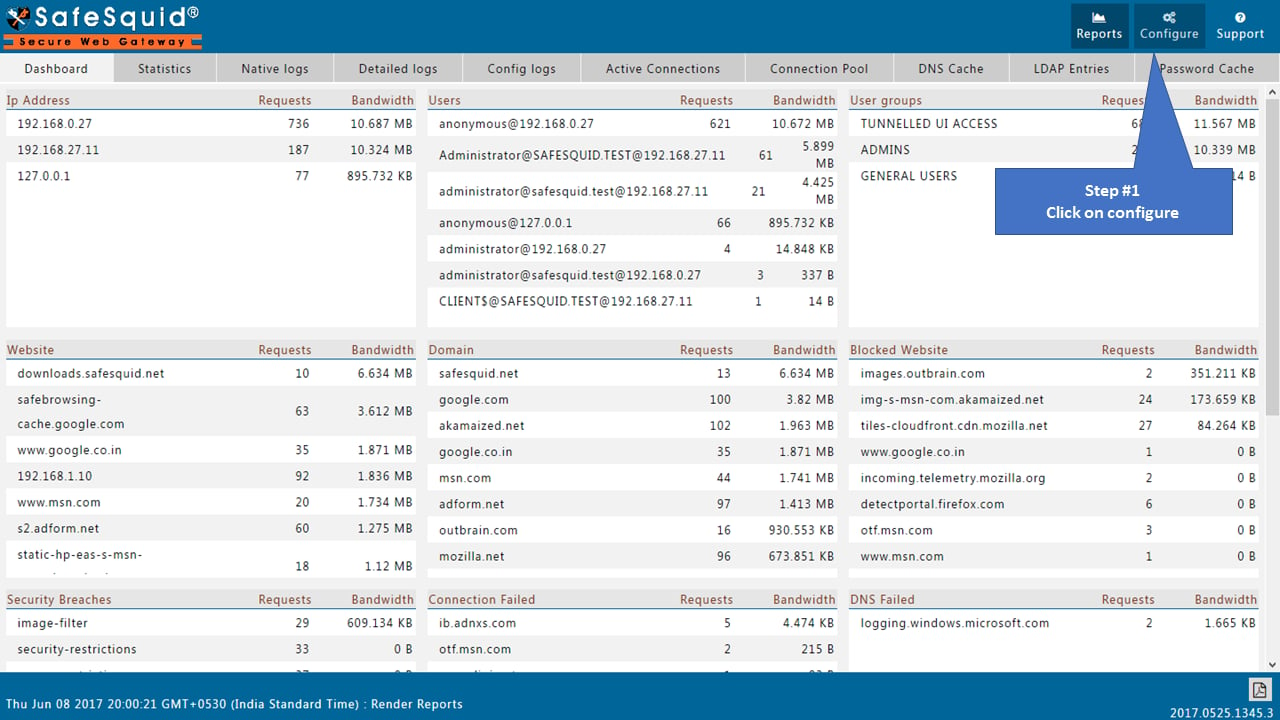
1. [Access the SafeSquid User Interface](/Configuration_Portal).
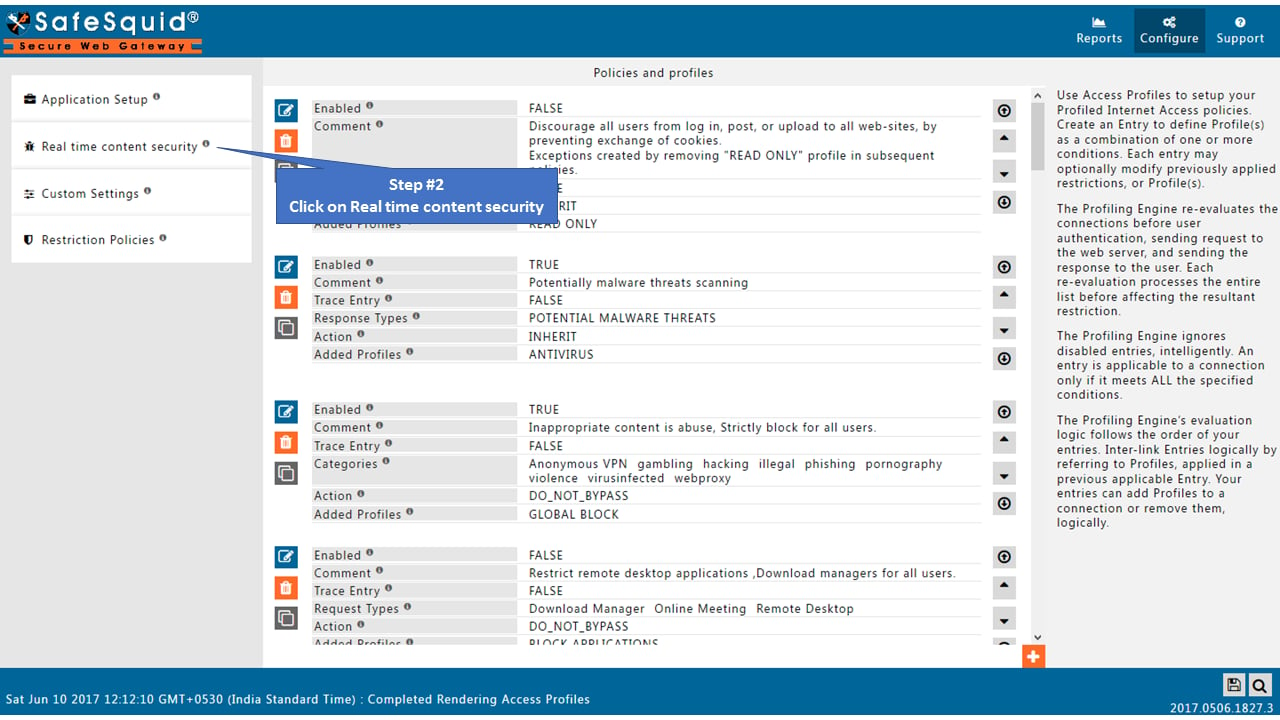
2. Open the Configure page.
3. Go to Real-time content security.
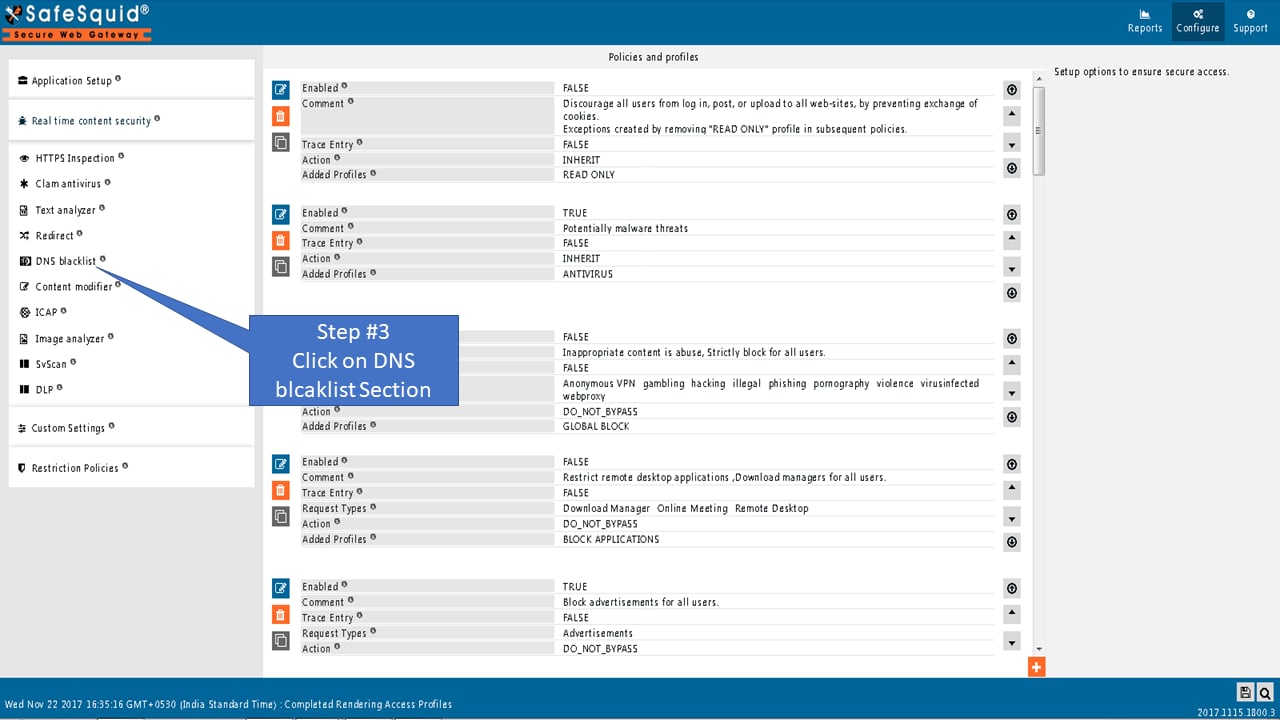
 4. Open the DNS Blacklist section.
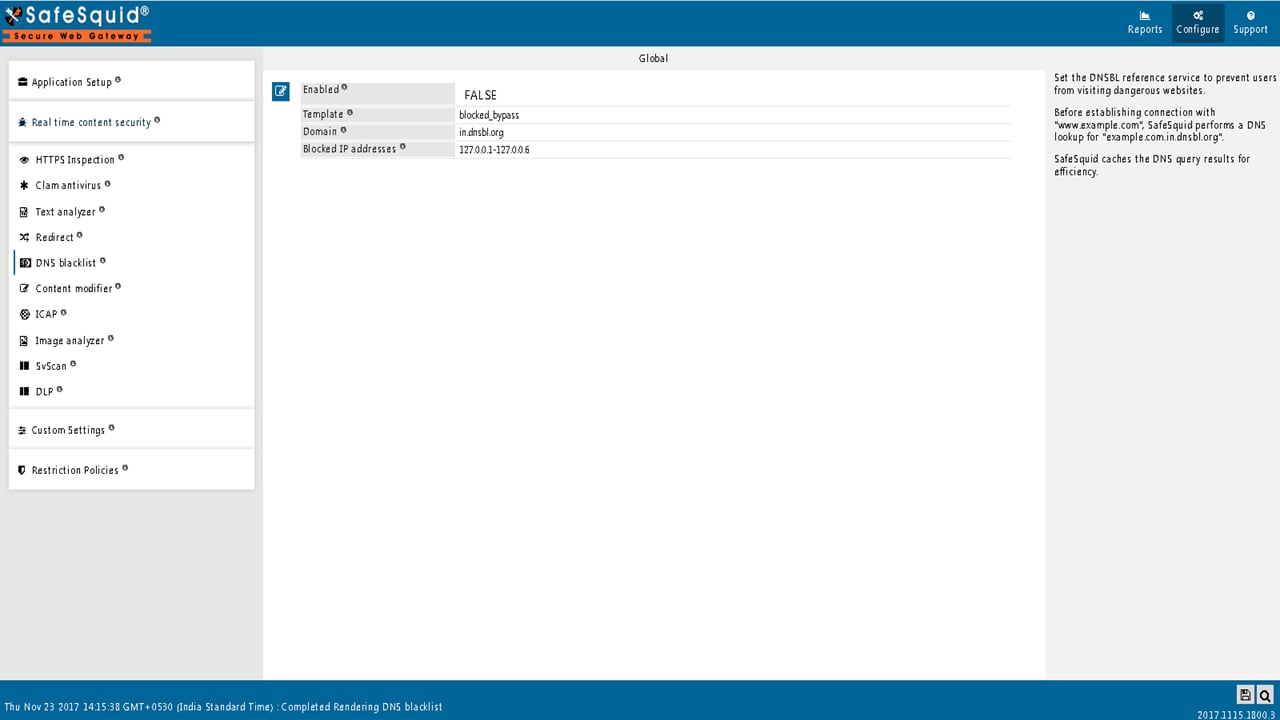
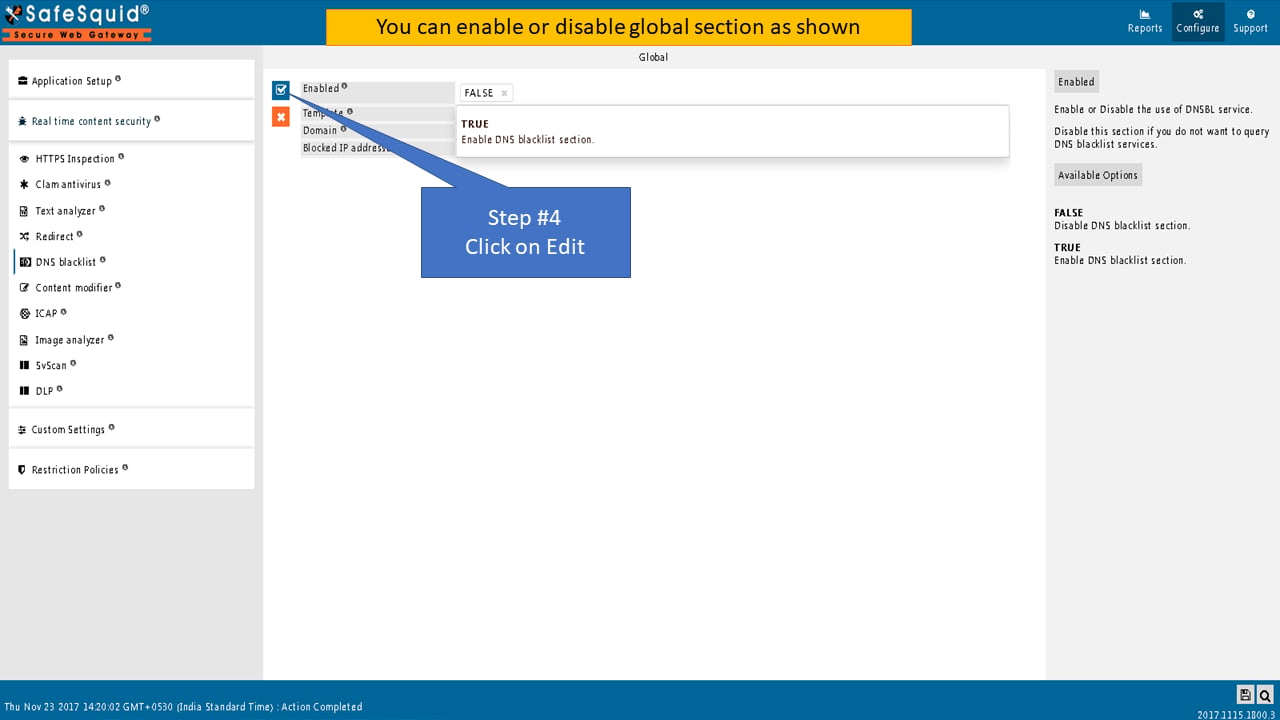
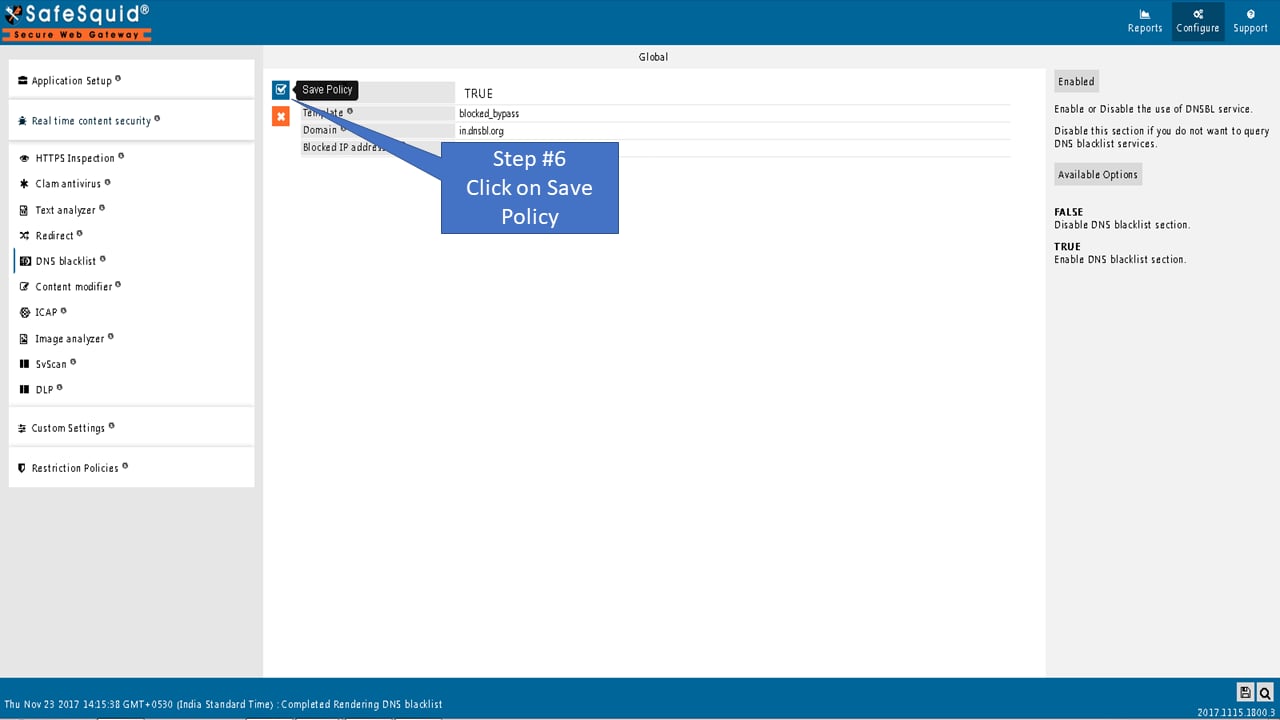 5. Set Global options:
* **Enabled**: TRUE to enable DNSBL; FALSE to skip querying blacklist services.
* **Template**: Name of the block template displayed when a domain is blocked. Leave blank for default "blocked" message.
* **Domain**: DNSBL service domain for queries (e.g., `in.dnsbl.org`). SafeSquid appends this to queried domains: `example.com.in.dnsbl.org`.
* **Blocked IP addresses**: Comma-separated IP ranges that trigger a block when returned by the DNSBL (e.g., `127.0.0.1-127.0.0.6` for in.dnsbl.org).
:::tip
**DNSBL Service Compatibility**
Administrators can use any DNS-based blacklist service (e.g., Spamhaus, local threat feed). Configure the **Domain** and **Blocked IP addresses** fields to match your service's return codes.
:::
***
### Understanding Return IP Codes (in.dnsbl.org)
When SafeSquid queries `in.dnsbl.org`, the service returns specific IP addresses indicating threat categories:
| Return IP | Category | Description |
| --------- | --------------- | ----------------------------- |
| 127.0.0.2 | UCE | Unsolicited commercial email |
| 127.0.0.3 | Fraud | Financial fraud, phishing |
| 127.0.0.4 | Spam Promo | Promotional spam |
| 127.0.0.5 | Illegal Content | Illegal or harmful content |
| 127.0.0.6 | Pre-emptive | Pre-emptive blocking |
| 127.0.0.7 | List Practices | Improper list practices |
| 127.0.0.8 | Botnet/Malware | Botnet C\&C, malware delivery |
**Configuration:** To block all categories, set **Blocked IP addresses** to `127.0.0.1-127.0.0.8`.
***
6. Save. SafeSquid caches DNSBL query results for efficiency.
### Example: block sites via DNSBL server
Use blacklisting domain in.dnsbl.org and blocked IP addresses 127.0.0.1-127.0.0.6. SafeSquid blocks all matching domains and displays the blocked template. Use DNSBL when a SOC provides the list or when many domains must be blocked.
5. Set Global options:
* **Enabled**: TRUE to enable DNSBL; FALSE to skip querying blacklist services.
* **Template**: Name of the block template displayed when a domain is blocked. Leave blank for default "blocked" message.
* **Domain**: DNSBL service domain for queries (e.g., `in.dnsbl.org`). SafeSquid appends this to queried domains: `example.com.in.dnsbl.org`.
* **Blocked IP addresses**: Comma-separated IP ranges that trigger a block when returned by the DNSBL (e.g., `127.0.0.1-127.0.0.6` for in.dnsbl.org).
:::tip
**DNSBL Service Compatibility**
Administrators can use any DNS-based blacklist service (e.g., Spamhaus, local threat feed). Configure the **Domain** and **Blocked IP addresses** fields to match your service's return codes.
:::
***
### Understanding Return IP Codes (in.dnsbl.org)
When SafeSquid queries `in.dnsbl.org`, the service returns specific IP addresses indicating threat categories:
| Return IP | Category | Description |
| --------- | --------------- | ----------------------------- |
| 127.0.0.2 | UCE | Unsolicited commercial email |
| 127.0.0.3 | Fraud | Financial fraud, phishing |
| 127.0.0.4 | Spam Promo | Promotional spam |
| 127.0.0.5 | Illegal Content | Illegal or harmful content |
| 127.0.0.6 | Pre-emptive | Pre-emptive blocking |
| 127.0.0.7 | List Practices | Improper list practices |
| 127.0.0.8 | Botnet/Malware | Botnet C\&C, malware delivery |
**Configuration:** To block all categories, set **Blocked IP addresses** to `127.0.0.1-127.0.0.8`.
***
6. Save. SafeSquid caches DNSBL query results for efficiency.
### Example: block sites via DNSBL server
Use blacklisting domain in.dnsbl.org and blocked IP addresses 127.0.0.1-127.0.0.6. SafeSquid blocks all matching domains and displays the blocked template. Use DNSBL when a SOC provides the list or when many domains must be blocked.
 ## Verify configuration and blocked requests
* **Interface**: Confirm DNS Blacklist is enabled, Domain and Blocked IP addresses are set, and Template is correct.
* **Block test**: Request a domain known to be listed; expect block page and no connection to origin.
* **Logs**: In [Security Logs](/Security_Logs), confirm entries for blocked requests (action/result indicating DNSBL block).
* **Audit**: Run a report filtered by block reason or DNSBL; export for evidence that the control is active and blocking malicious domains.
## Troubleshooting
| Issue | Symptom | Resolution |
| ----------------------------------- | -------------------------------------------- | ------------------------------------------------------------------------------------------------------------------------------------------------------------------------------------------------------------------------------- |
| **DNSBL service unreachable** | Blocks not applied; DNS timeouts | **Check:** Network connectivity to DNSBL service. **Verify:** Firewall allows outbound DNS (UDP/TCP 53) to DNSBL domain. **Test:** `nslookup example.com.in.dnsbl.org` from SafeSquid server. |
| **Wrong blocked-IP range** | No blocks or incorrect blocks | **Fix:** Align **Blocked IP addresses** with your DNSBL provider's return codes. Example: `127.0.0.1-127.0.0.8` for in.dnsbl.org. **Verify:** Query a known-bad domain and check what IP the DNSBL returns. |
| **Cache causing stale results** | Site unblocked after DNSBL update | **Cause:** SafeSquid caches DNSBL responses for performance. **Fix:** Wait for cache expiry (TTL-based) or restart SafeSquid: `systemctl restart safesquid`. |
| **False positive blocks** | Legitimate site blocked | **Identify:** Check DNSBL query logs to confirm it's a list issue. **Fix:** Add domain to bypass/allow-list in Access Restrictions. **Alternative:** Switch to a different DNSBL provider with lower false-positive rates. |
| **DNSBL enabled but no blocks** | Malicious sites still accessible | **Check:** 1) **Enabled** is TRUE. 2) **Domain** field is correct. 3) **Blocked IP addresses** includes the range returned by your DNSBL. **Test:** Query a known-malicious domain (use a test entry from your DNSBL provider). |
| **Direct IP access bypasses DNSBL** | Users access sites by IP instead of hostname | **Limitation:** DNSBL only works on DNS queries, not direct IP connections. **Mitigation:** Use [Access Restriction](/Access_Restriction) to block by IP range or category. |
**Still having issues?** Contact SafeSquid support with:
* DNSBL service domain you're using
* Sample blocked domain query results
* Contents of `/var/log/safesquid/safesquid.log` showing DNS resolution attempts
## Source register
| Topic | Status | Source |
| ------------------------------------------------ | ------------- | --------------------------------------------------------------------- |
| DNSBL UI path (Real-time content security) | **Confirmed** | This page |
| Example DNSBL domain `in.dnsbl.org` | **Draft** | Third-party list; confirm contract and return codes before production |
| Log evidence via [Security Logs](/Security_Logs) | **Confirmed** | Linked doc |
| Direct-IP bypass limitation | **Confirmed** | This page, [Access Restriction](/Access_Restriction) |
## Next steps
* Return to [DNS Security](/DNS_Security).
* Align resolver placement: [BIND](/Bind).
## Related topics
- [DNS Security](/use_cases/dns_security/dns_security.md)
- [DNS blacklist](/admin_guide/filtering_and_privacy/dns_blacklist.md)
- [DNS Failure](/troubleshooting/dns_failure.md)
- [Integrated DNS Security](/safesquid_swg/architecture/integrated_dns_security.md)
- [BIND Local DNS Resolver](/safesquid_swg/interface/bind.md)
## Verify configuration and blocked requests
* **Interface**: Confirm DNS Blacklist is enabled, Domain and Blocked IP addresses are set, and Template is correct.
* **Block test**: Request a domain known to be listed; expect block page and no connection to origin.
* **Logs**: In [Security Logs](/Security_Logs), confirm entries for blocked requests (action/result indicating DNSBL block).
* **Audit**: Run a report filtered by block reason or DNSBL; export for evidence that the control is active and blocking malicious domains.
## Troubleshooting
| Issue | Symptom | Resolution |
| ----------------------------------- | -------------------------------------------- | ------------------------------------------------------------------------------------------------------------------------------------------------------------------------------------------------------------------------------- |
| **DNSBL service unreachable** | Blocks not applied; DNS timeouts | **Check:** Network connectivity to DNSBL service. **Verify:** Firewall allows outbound DNS (UDP/TCP 53) to DNSBL domain. **Test:** `nslookup example.com.in.dnsbl.org` from SafeSquid server. |
| **Wrong blocked-IP range** | No blocks or incorrect blocks | **Fix:** Align **Blocked IP addresses** with your DNSBL provider's return codes. Example: `127.0.0.1-127.0.0.8` for in.dnsbl.org. **Verify:** Query a known-bad domain and check what IP the DNSBL returns. |
| **Cache causing stale results** | Site unblocked after DNSBL update | **Cause:** SafeSquid caches DNSBL responses for performance. **Fix:** Wait for cache expiry (TTL-based) or restart SafeSquid: `systemctl restart safesquid`. |
| **False positive blocks** | Legitimate site blocked | **Identify:** Check DNSBL query logs to confirm it's a list issue. **Fix:** Add domain to bypass/allow-list in Access Restrictions. **Alternative:** Switch to a different DNSBL provider with lower false-positive rates. |
| **DNSBL enabled but no blocks** | Malicious sites still accessible | **Check:** 1) **Enabled** is TRUE. 2) **Domain** field is correct. 3) **Blocked IP addresses** includes the range returned by your DNSBL. **Test:** Query a known-malicious domain (use a test entry from your DNSBL provider). |
| **Direct IP access bypasses DNSBL** | Users access sites by IP instead of hostname | **Limitation:** DNSBL only works on DNS queries, not direct IP connections. **Mitigation:** Use [Access Restriction](/Access_Restriction) to block by IP range or category. |
**Still having issues?** Contact SafeSquid support with:
* DNSBL service domain you're using
* Sample blocked domain query results
* Contents of `/var/log/safesquid/safesquid.log` showing DNS resolution attempts
## Source register
| Topic | Status | Source |
| ------------------------------------------------ | ------------- | --------------------------------------------------------------------- |
| DNSBL UI path (Real-time content security) | **Confirmed** | This page |
| Example DNSBL domain `in.dnsbl.org` | **Draft** | Third-party list; confirm contract and return codes before production |
| Log evidence via [Security Logs](/Security_Logs) | **Confirmed** | Linked doc |
| Direct-IP bypass limitation | **Confirmed** | This page, [Access Restriction](/Access_Restriction) |
## Next steps
* Return to [DNS Security](/DNS_Security).
* Align resolver placement: [BIND](/Bind).
## Related topics
- [DNS Security](/use_cases/dns_security/dns_security.md)
- [DNS blacklist](/admin_guide/filtering_and_privacy/dns_blacklist.md)
- [DNS Failure](/troubleshooting/dns_failure.md)
- [Integrated DNS Security](/safesquid_swg/architecture/integrated_dns_security.md)
- [BIND Local DNS Resolver](/safesquid_swg/interface/bind.md)