> ## Documentation Index
> Fetch the complete documentation index at: https://docs.safesquid.com/llms.txt
> Use this file to discover all available pages before exploring further.
# Header Filter Configuration and Reference
> Configure SafeSquid header filter: Global, Allow, Deny, Insert rules, and solution verification.
# Header Filter Configuration and Reference
## Global
The Global section controls how SafeSquid edits HTTP header messages between the browser and the Internet. Use it to increase privacy, control client requests and server responses, and add, delete, or modify request and response headers. The Insert sub-section adds new headers or modifies existing ones in addition to Allow/Deny.
The following subsections cover:
1. Request header patterns that are passed from browsers to webservers.
2. Response header patterns that are coming from webservers to clients.
 ### Enabled
Enable or Disable the header filter section.
**TRUE:** Enable header filter section.
**FALSE:** Disable header filter section.
### Policy
Select the default action to take, when no matching entry for a requested header is found.
**ALLOW:** Allow everything Except rules defined under Deny subsection.
**DENY:** Deny everything Except rules defined under Allow subsection.
## Allow
When the Policy is Deny, rules defined under this sub-section, are exclusively allowed access.
Add a new allow entry to explicitly permit the header for all connections or a specific set of conditions.
### Enabled
Enable or Disable the header filter section.
**TRUE:** Enable header filter section.
**FALSE:** Disable header filter section.
### Policy
Select the default action to take, when no matching entry for a requested header is found.
**ALLOW:** Allow everything Except rules defined under Deny subsection.
**DENY:** Deny everything Except rules defined under Allow subsection.
## Allow
When the Policy is Deny, rules defined under this sub-section, are exclusively allowed access.
Add a new allow entry to explicitly permit the header for all connections or a specific set of conditions.
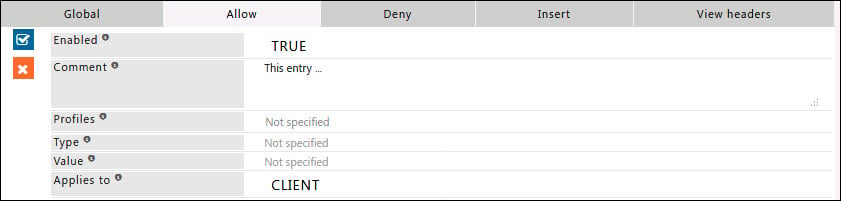 ### Enabled
Enable or Disable this entry.
**TRUE:** Enable this entry.
**FALSE:** Disable this entry.
### Comment
For documentation and future references, explain the relevance of this entry with your policies.
### Profiles
Specify the Profiles applicable for this entry.
This entry will be applicable only if the connection has any one of the specified profiles.
Leave it Blank, to apply for all connections irrespective of any applied profile.
To avoid application to a connection that has a profile, use a negated profile (! profile).
### Type
A regular expression matching the header type to which this entry applies.
Headers are in the form of type and value.
Leave blank to Match everything.
Example: X-GoogApps-Allowed-Domains.
### Value
A regular expression matching the header values.
Leave blank to Match everything.
**Example:** text/html.
### Applies to
This option is to select whether this entry applies to the server header, client header, or both.
**CLIENT:** This entry will be applied only for request headers, sent by the client.
**SERVER:** This entry will be applied only for response headers, sent by the server.
### Example
#### Rule#1
Allow WebSockets for connections with profile "ALLOW WEBSOCKET". Use this when all users' WebSocket connections are denied by default. The Allow rule permits WebSocket connections for a defined application or service and user group.
### Enabled
Enable or Disable this entry.
**TRUE:** Enable this entry.
**FALSE:** Disable this entry.
### Comment
For documentation and future references, explain the relevance of this entry with your policies.
### Profiles
Specify the Profiles applicable for this entry.
This entry will be applicable only if the connection has any one of the specified profiles.
Leave it Blank, to apply for all connections irrespective of any applied profile.
To avoid application to a connection that has a profile, use a negated profile (! profile).
### Type
A regular expression matching the header type to which this entry applies.
Headers are in the form of type and value.
Leave blank to Match everything.
Example: X-GoogApps-Allowed-Domains.
### Value
A regular expression matching the header values.
Leave blank to Match everything.
**Example:** text/html.
### Applies to
This option is to select whether this entry applies to the server header, client header, or both.
**CLIENT:** This entry will be applied only for request headers, sent by the client.
**SERVER:** This entry will be applied only for response headers, sent by the server.
### Example
#### Rule#1
Allow WebSockets for connections with profile "ALLOW WEBSOCKET". Use this when all users' WebSocket connections are denied by default. The Allow rule permits WebSocket connections for a defined application or service and user group.
 ## Deny
When the Policy is Allow, rules defined under this sub-section, are denied access exclusively.
Add a deny entry to explicitly block the header for all connections or a specific set of conditions.
## Deny
When the Policy is Allow, rules defined under this sub-section, are denied access exclusively.
Add a deny entry to explicitly block the header for all connections or a specific set of conditions.
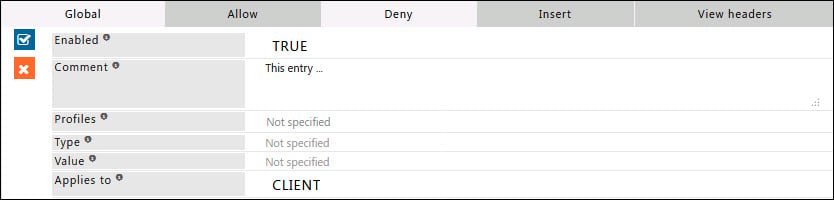 ### Enabled
Enable or Disable this entry.
**TRUE:** Enable this entry.
**FALSE:** Disable this entry.
### Comment
For documentation and future references, explain the relevance of this entry with your policies.
### Profiles
Specify the Profiles applicable for this entry.
This entry will be applicable only if the connection has any one of the specified profiles.
Leave it Blank, to apply for all connections irrespective of any applied profile.
To avoid application to a connection that has a profile, use a negated profile (! profile).
### Type
A regular expression matching the header type to which this entry applies.
Headers are in the form of type and value.
Leave blank to Match everything.
Example: X-GoogApps-Allowed-Domains.
### Value
A regular expression matching the header value.
Leave blank to Match everything.
Example: text/html.
### Applies to
This option is to select whether this entry applies to the server header, client header, or both.
**CLIENT:** This entry will be applied only for request headers, sent by the client.
**SERVER:** This entry will be applied only for response headers, sent by the server.
### Example
#### Rule#1
Deny all WebSocket connections by matching request headers containing "WebSocket"
For connections with the profile "REMOVE WEBSOCKETS" "websocket: upgrade" header will be removed from request headers, which will result in a WebSocket connection never being established.
### Enabled
Enable or Disable this entry.
**TRUE:** Enable this entry.
**FALSE:** Disable this entry.
### Comment
For documentation and future references, explain the relevance of this entry with your policies.
### Profiles
Specify the Profiles applicable for this entry.
This entry will be applicable only if the connection has any one of the specified profiles.
Leave it Blank, to apply for all connections irrespective of any applied profile.
To avoid application to a connection that has a profile, use a negated profile (! profile).
### Type
A regular expression matching the header type to which this entry applies.
Headers are in the form of type and value.
Leave blank to Match everything.
Example: X-GoogApps-Allowed-Domains.
### Value
A regular expression matching the header value.
Leave blank to Match everything.
Example: text/html.
### Applies to
This option is to select whether this entry applies to the server header, client header, or both.
**CLIENT:** This entry will be applied only for request headers, sent by the client.
**SERVER:** This entry will be applied only for response headers, sent by the server.
### Example
#### Rule#1
Deny all WebSocket connections by matching request headers containing "WebSocket"
For connections with the profile "REMOVE WEBSOCKETS" "websocket: upgrade" header will be removed from request headers, which will result in a WebSocket connection never being established.
 ### Insert
In this sub-section add rules to modify request and response headers. Insert additional information into the headers sent by the client browser.
### Insert
In this sub-section add rules to modify request and response headers. Insert additional information into the headers sent by the client browser.
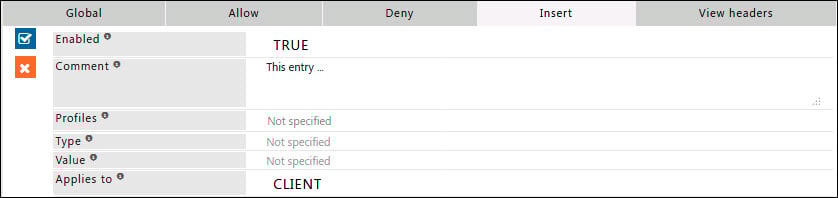 ### Enabled
Enable or Disable this entry.
**TRUE:** Enable this entry.
**FALSE:** Disable this entry.
### Comment
For documentation and future references, explain the relevance of this entry with your policies.
### Profiles
Specify the Profiles applicable for this entry.
This entry will be applicable only if the connection has any one of the specified profiles.
Leave it Blank, to apply for all connections irrespective of any applied profile.
To avoid application to a connection that has a profile, use a negated profile (! profile).
### Type
A regular expression matching the header type to which this entry applies.
Headers are in the form of type and value.
Leave blank to Match everything.
Example: X-GoogApps-Allowed-Domains.
### Value
A regular expression matching the header value.
Leave blank to Match everything.
Example: text/html.
### Applies to
This option is to select whether this entry applies to the server header, client header, or both.
**CLIENT:** This entry will be applied only for request headers, sent by the client.
**SERVER:** This entry will be applied only for response headers, sent by the server.
### Example
#### Rule#1
Restrict access to the corporate Google account only. When users try to log in with a personal Google account, login is blocked. Use the custom request header X-GoogApps-Allowed-Domains to specify allowed domains. Include the domain registered with Google Workspace in the list.
### Enabled
Enable or Disable this entry.
**TRUE:** Enable this entry.
**FALSE:** Disable this entry.
### Comment
For documentation and future references, explain the relevance of this entry with your policies.
### Profiles
Specify the Profiles applicable for this entry.
This entry will be applicable only if the connection has any one of the specified profiles.
Leave it Blank, to apply for all connections irrespective of any applied profile.
To avoid application to a connection that has a profile, use a negated profile (! profile).
### Type
A regular expression matching the header type to which this entry applies.
Headers are in the form of type and value.
Leave blank to Match everything.
Example: X-GoogApps-Allowed-Domains.
### Value
A regular expression matching the header value.
Leave blank to Match everything.
Example: text/html.
### Applies to
This option is to select whether this entry applies to the server header, client header, or both.
**CLIENT:** This entry will be applied only for request headers, sent by the client.
**SERVER:** This entry will be applied only for response headers, sent by the server.
### Example
#### Rule#1
Restrict access to the corporate Google account only. When users try to log in with a personal Google account, login is blocked. Use the custom request header X-GoogApps-Allowed-Domains to specify allowed domains. Include the domain registered with Google Workspace in the list.
 #### Rule#2
Allow YouTube during lunch hours while blocking inappropriate content. Enforce YouTube strict mode for all users. Use header insert to add the custom header YouTube-Restrict for strict restricted access. Per Google, YouTube strict mode does not filter 100% of inappropriate content.
#### Rule#2
Allow YouTube during lunch hours while blocking inappropriate content. Enforce YouTube strict mode for all users. Use header insert to add the custom header YouTube-Restrict for strict restricted access. Per Google, YouTube strict mode does not filter 100% of inappropriate content.
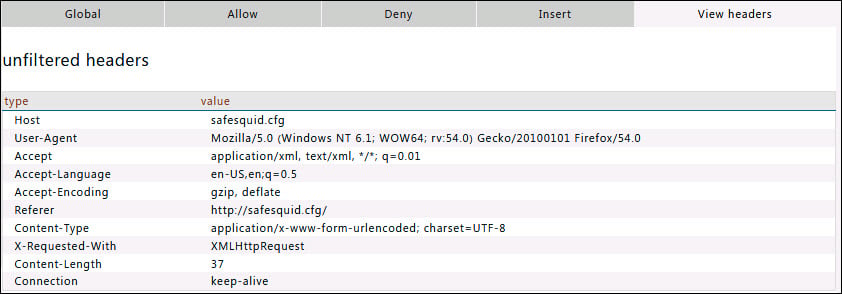
 ## View headers
In this sub-section, you can find the example headers with type and values.
## View headers
In this sub-section, you can find the example headers with type and values.
 ## Verification and Evidence
* **Interface Checks**: In [Configuration Portal](/Configuration_Portal), Restriction Profiles → Header Filter: Global enabled, Allow/Deny/Insert rules match intent; Type, Value, and Applies to are set correctly.
* **Log Analysis**: Requests and responses show modified or stripped headers per policy; WebSocket or target-site behavior matches expected allow/deny/insert.
* **Performance Validation**: Test with profile (e.g. ALLOW WEBSOCKET, REMOVE WEBSOCKETS, X-GoogApps-Allowed-Domains); expected sites work and restricted behavior is enforced.
**Related**: [Cookie Inspection](/Cookie_Inspection), [Access Restriction](/Access_Restriction), [URL Redirection SafeSearch](/SafeSearch), [Troubleshooting](/Troubleshooting)
## Related topics
- [Header Re-Write](/use_cases/header_rewrite/header_obfuscation.md)
- [Cookie Filter Configuration and Reference](/use_cases/cookie_inspection/cookie_filter_configuration.md)
- [Cookie Inspection](/use_cases/cookie_inspection/cookie_inspection.md)
- [Rewriting Policies Reference](/use_cases/header_rewrite/rewriting_policies_reference.md)
- [Header filter](/admin_guide/filtering_and_privacy/header_filter.md)
## Verification and Evidence
* **Interface Checks**: In [Configuration Portal](/Configuration_Portal), Restriction Profiles → Header Filter: Global enabled, Allow/Deny/Insert rules match intent; Type, Value, and Applies to are set correctly.
* **Log Analysis**: Requests and responses show modified or stripped headers per policy; WebSocket or target-site behavior matches expected allow/deny/insert.
* **Performance Validation**: Test with profile (e.g. ALLOW WEBSOCKET, REMOVE WEBSOCKETS, X-GoogApps-Allowed-Domains); expected sites work and restricted behavior is enforced.
**Related**: [Cookie Inspection](/Cookie_Inspection), [Access Restriction](/Access_Restriction), [URL Redirection SafeSearch](/SafeSearch), [Troubleshooting](/Troubleshooting)
## Related topics
- [Header Re-Write](/use_cases/header_rewrite/header_obfuscation.md)
- [Cookie Filter Configuration and Reference](/use_cases/cookie_inspection/cookie_filter_configuration.md)
- [Cookie Inspection](/use_cases/cookie_inspection/cookie_inspection.md)
- [Rewriting Policies Reference](/use_cases/header_rewrite/rewriting_policies_reference.md)
- [Header filter](/admin_guide/filtering_and_privacy/header_filter.md)