> ## Documentation Index
> Fetch the complete documentation index at: https://docs.safesquid.com/llms.txt
> Use this file to discover all available pages before exploring further.
# SqScan
> Configure SqScan in SafeSquid for in-memory virus and malware scanning with granular policy levels.
# Built-in malware and virus scanning with SqScan
SqScan is SafeSquid's built-in module for scanning traffic for viruses and malware. Browsing certain sites can expose users to malware and reduce performance. SqScan scans requested content and blocks access and downloads from infected or malicious sources.
## Virus scanning policies
## Enabling SqScan section on SafeSquid User Interface
## [Access the SafeSquid interface](/Configuration_Portal)
## Go to Configure Page
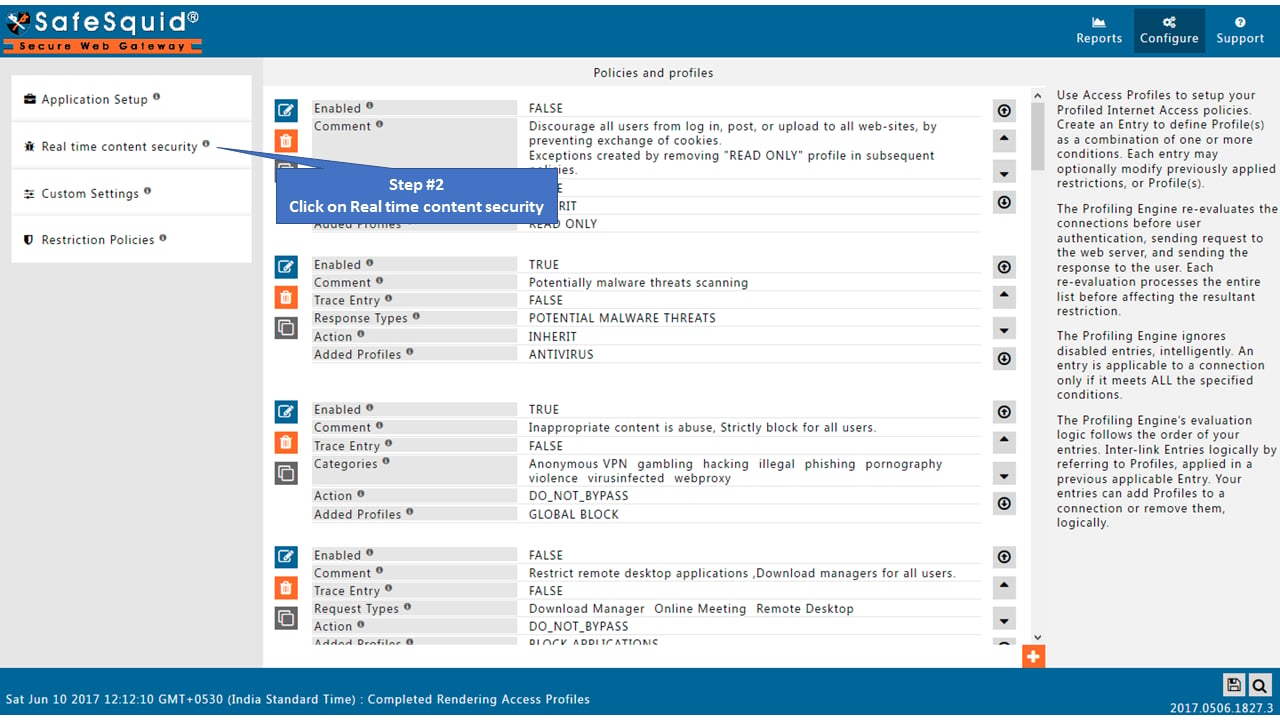
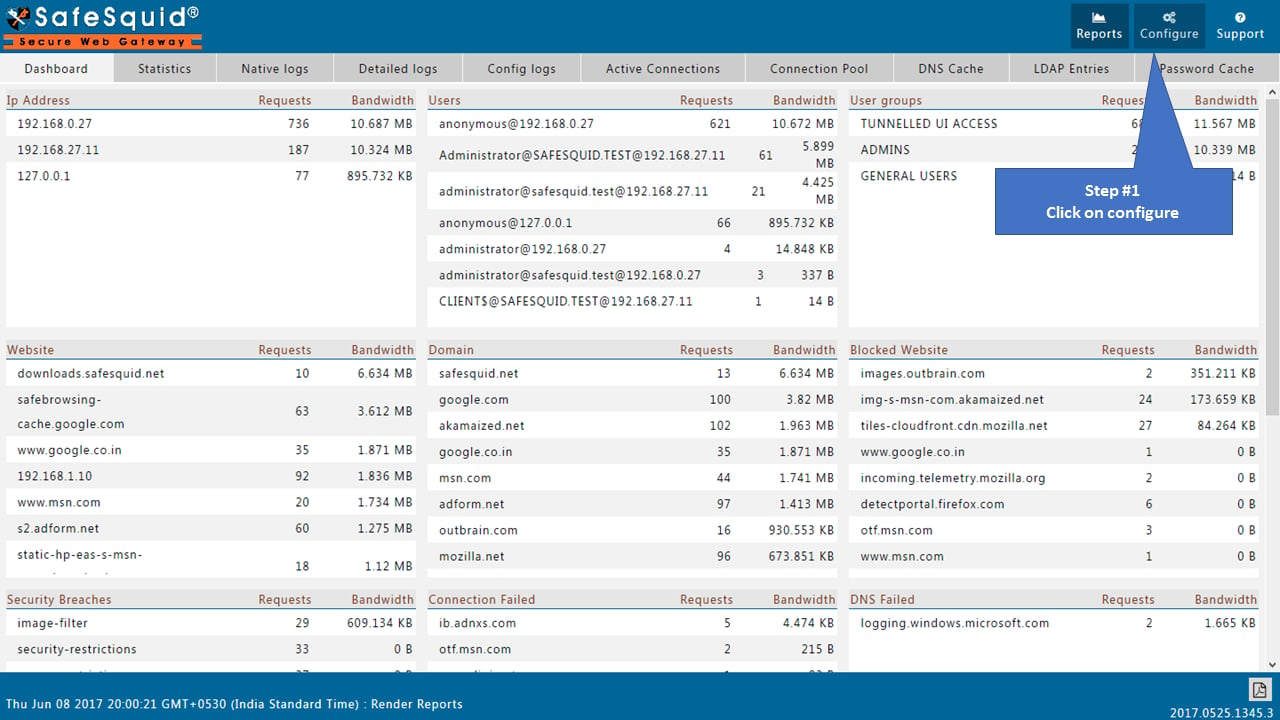 ## Go to Real-time content security
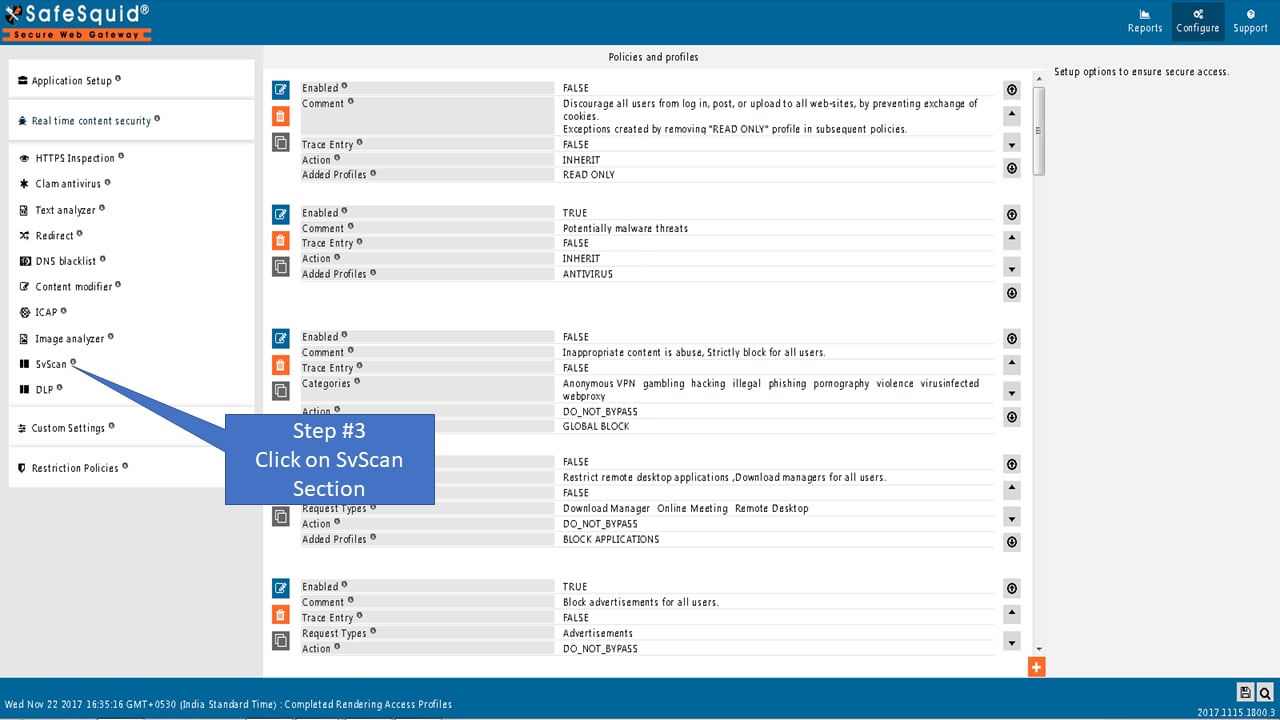
 ## Go to SqScan Section
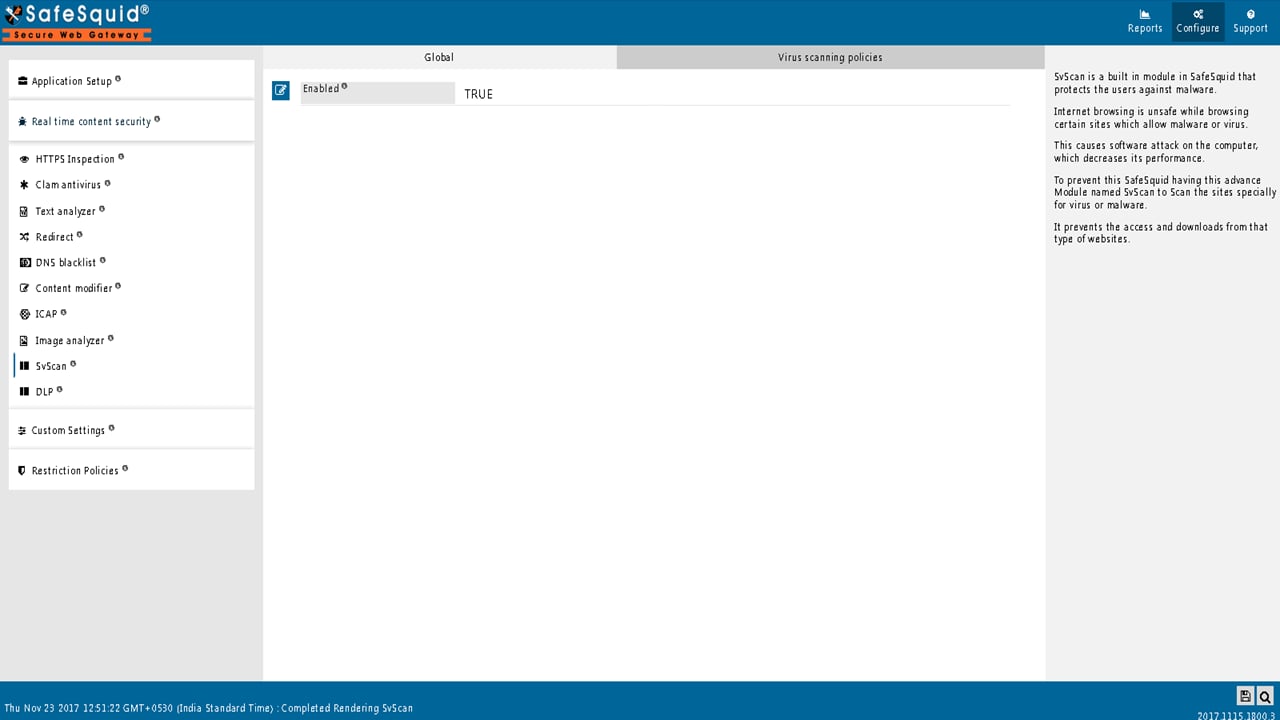
 ## Global
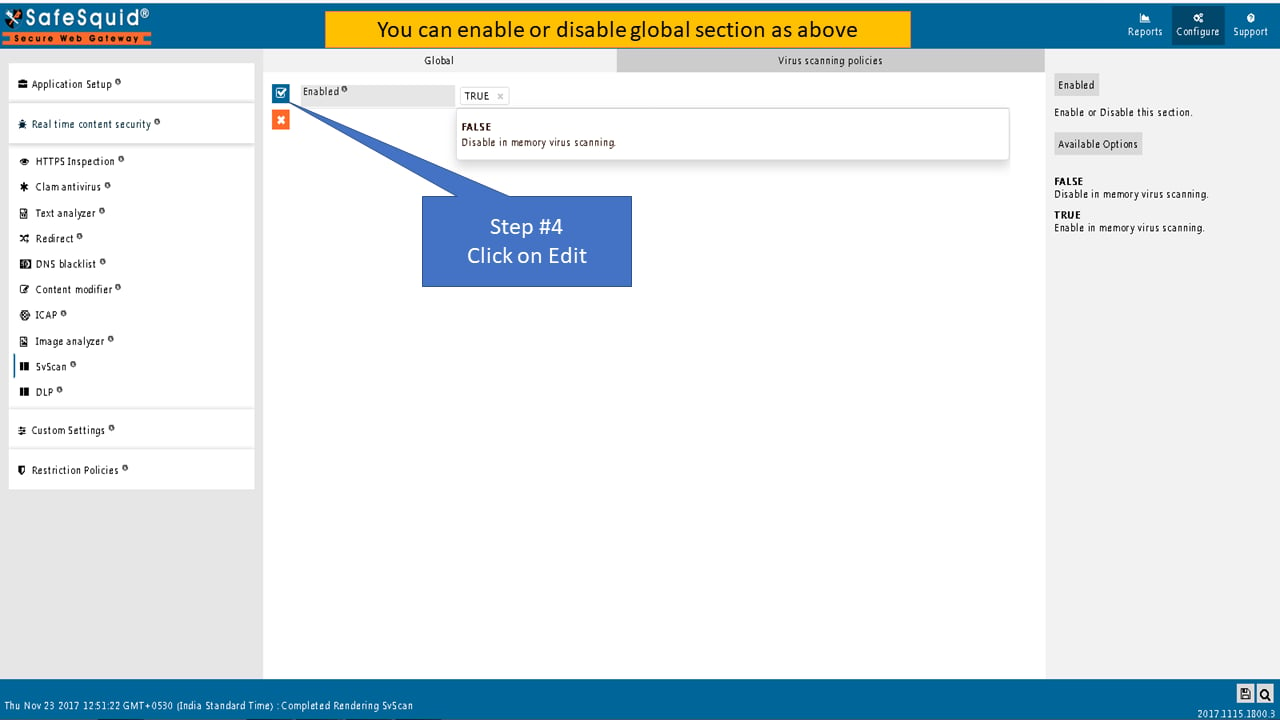
### Enabled
Enable or Disable this section.
* **TRUE**: Enable in-memory virus scanning
* **FALSE**: Disable in-memory virus scanning
## Global
### Enabled
Enable or Disable this section.
* **TRUE**: Enable in-memory virus scanning
* **FALSE**: Disable in-memory virus scanning
 ## Virus Scanning Policies
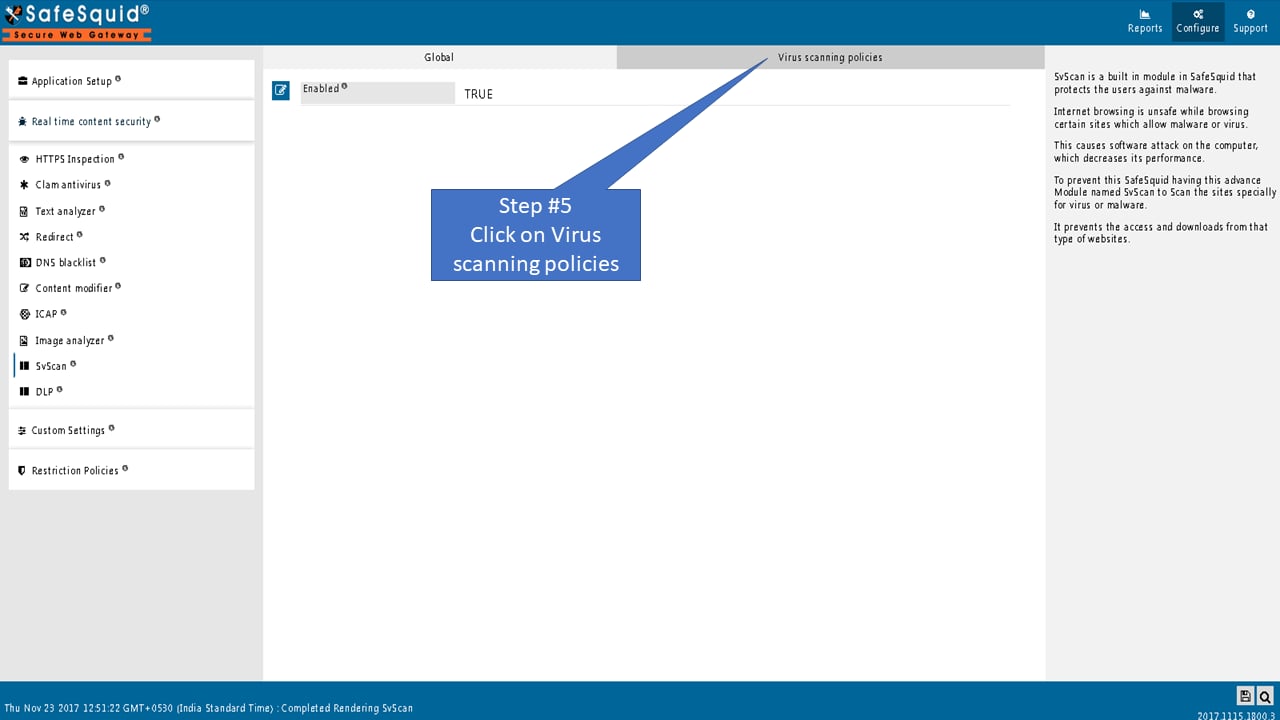
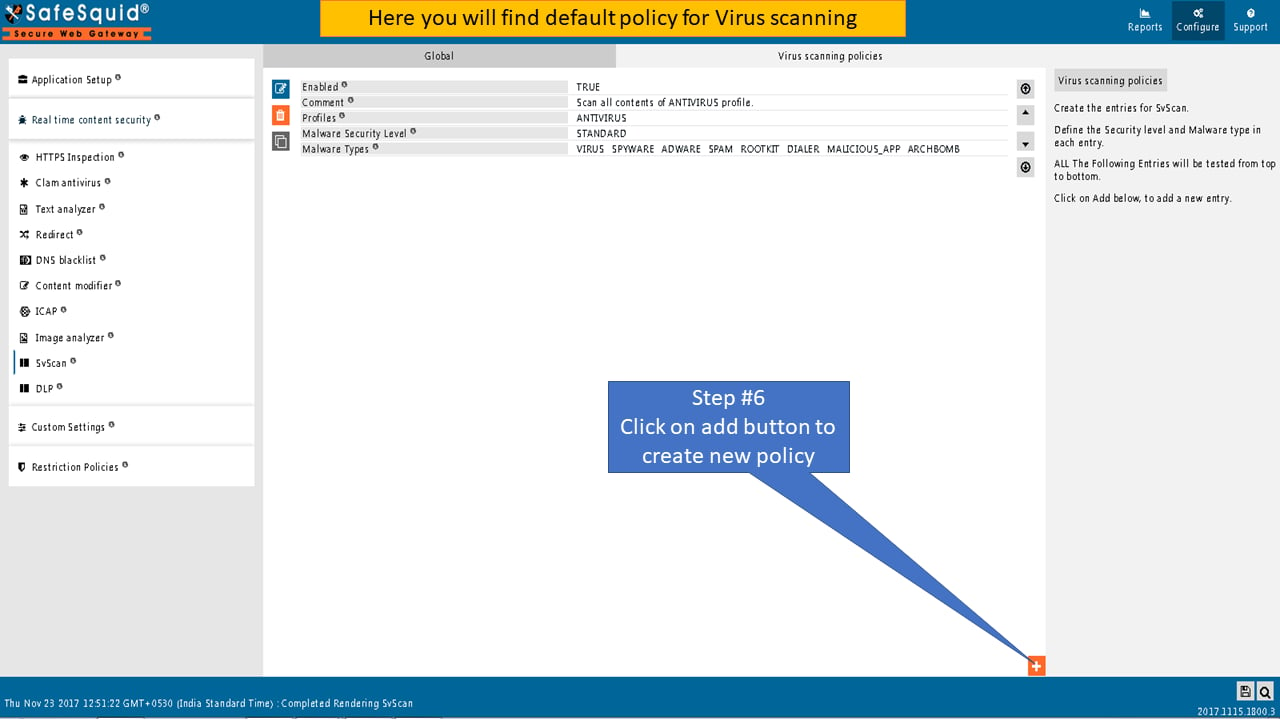
Create the entries for SqScan.
Define the Security level and Malware type in each entry.
ALL the Following Entries will be tested from top to bottom.
## Virus Scanning Policies
Create the entries for SqScan.
Define the Security level and Malware type in each entry.
ALL the Following Entries will be tested from top to bottom.
 Create the entries for SqScan.
Define the Security level and Malware type in each entry.
Create the entries for SqScan.
Define the Security level and Malware type in each entry.
 ### Enabled
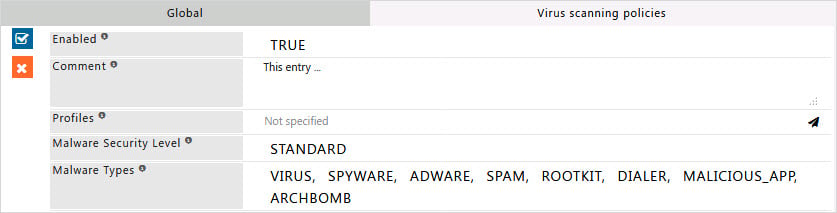
Enable or Disable the SqScan Policy.
**TRUE:** Enable this entry.
**FALSE**: Disable this entry.
### Comment
For documentation and future references, explain the relevance of this entry with your policies.
That is, by reading the policies, a future user can understand the purpose of that entry.
### Profiles
Specify the Profiles applicable for this entry.
This entry will be applicable only if the connection has any one of the specified profiles.
Leave it Blank, to apply for all connections irrespective of any applied profile.
To avoid application to a connection that has a profile, use a negated profile (!profile).
### Malware Security Level
Select a security level depending on your requirements.
Set security level as per your safety measures: standard or High or Paranoid.
Set the scan level to bypass or disable the scanning.
* **BYPASS**: Disable Virus Scanning for the matching Profiles
* **STANDARD**: Block if a threat is detected, but not on mere suspicion
* **HIGH**: Block if a threat is detected, even if the content is suspicious
* **PARANOID**: Block everything that SqScan cannot ensure is clean. Warning! This can cause all content to be blocked even in the event of any systemic failures of this functionality.
### Malware Types
Select Virus/Malware type(s) to be blocked, if received content has their signature(s).
SafeSquid will block all such requests if a threat is detected or if the content is suspicious.
* **VIRUS**: Enable Security Against VIRUS threats
* **SPYWARE**: Enable Security Against SPYWARE threats
* **ADWARE**: Enable Security Against ADWARE threats
* **SPAM:** Enable Security Against SPAM threats
* **ROOTKIT**: Enable Security Against ROOTKIT threats
* **DIALER**: Enable Security Against DIALER threats
* **MALICIOUS\_APP:** Enable Security Against MALICIOUS\_APP threats
* **ARCHBOMB**: Enable Security Against ARCHBOMB threats
## Related topics
- [SqScan](/admin_guide/security_scanners/sqscan.md)
- [Malware Scanners](/use_cases/malware_scanning/malware_scanners.md)
- [Architecture and request pipeline](/admin_guide/start_here/architecture.md)
- [Threat Intelligence Feeds](/use_cases/malware_scanning/threat_intelligence_feeds.md)
- [Integrations](/admin_guide/start_here/integrations.md)
### Enabled
Enable or Disable the SqScan Policy.
**TRUE:** Enable this entry.
**FALSE**: Disable this entry.
### Comment
For documentation and future references, explain the relevance of this entry with your policies.
That is, by reading the policies, a future user can understand the purpose of that entry.
### Profiles
Specify the Profiles applicable for this entry.
This entry will be applicable only if the connection has any one of the specified profiles.
Leave it Blank, to apply for all connections irrespective of any applied profile.
To avoid application to a connection that has a profile, use a negated profile (!profile).
### Malware Security Level
Select a security level depending on your requirements.
Set security level as per your safety measures: standard or High or Paranoid.
Set the scan level to bypass or disable the scanning.
* **BYPASS**: Disable Virus Scanning for the matching Profiles
* **STANDARD**: Block if a threat is detected, but not on mere suspicion
* **HIGH**: Block if a threat is detected, even if the content is suspicious
* **PARANOID**: Block everything that SqScan cannot ensure is clean. Warning! This can cause all content to be blocked even in the event of any systemic failures of this functionality.
### Malware Types
Select Virus/Malware type(s) to be blocked, if received content has their signature(s).
SafeSquid will block all such requests if a threat is detected or if the content is suspicious.
* **VIRUS**: Enable Security Against VIRUS threats
* **SPYWARE**: Enable Security Against SPYWARE threats
* **ADWARE**: Enable Security Against ADWARE threats
* **SPAM:** Enable Security Against SPAM threats
* **ROOTKIT**: Enable Security Against ROOTKIT threats
* **DIALER**: Enable Security Against DIALER threats
* **MALICIOUS\_APP:** Enable Security Against MALICIOUS\_APP threats
* **ARCHBOMB**: Enable Security Against ARCHBOMB threats
## Related topics
- [SqScan](/admin_guide/security_scanners/sqscan.md)
- [Malware Scanners](/use_cases/malware_scanning/malware_scanners.md)
- [Architecture and request pipeline](/admin_guide/start_here/architecture.md)
- [Threat Intelligence Feeds](/use_cases/malware_scanning/threat_intelligence_feeds.md)
- [Integrations](/admin_guide/start_here/integrations.md)