> ## Documentation Index
> Fetch the complete documentation index at: https://docs.safesquid.com/llms.txt
> Use this file to discover all available pages before exploring further.

# Bandwidth Management

> Control download speed, max download size, and upload size per user with SafeSquid Limits for bandwidth and data-handling policies.

# Control download speed and size per user with Limits

Use SafeSquid Limits to set download speed and maximum download or upload size per user. Configure limits in the Limits (or speed limits) section and attach to profiles.

### Prerequisites

When downloading files from HTTPS websites, ensure that [HTTPS Inspection](/SSL_Inspection) in SafeSquid is enabled

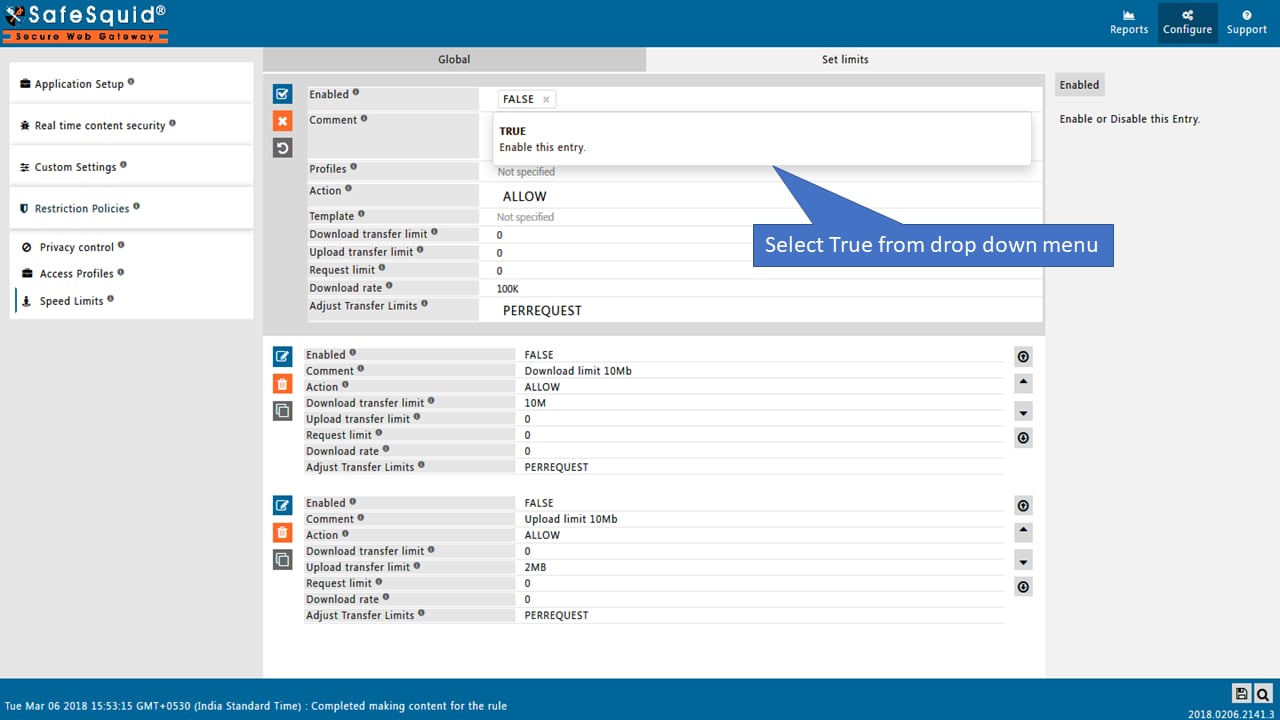
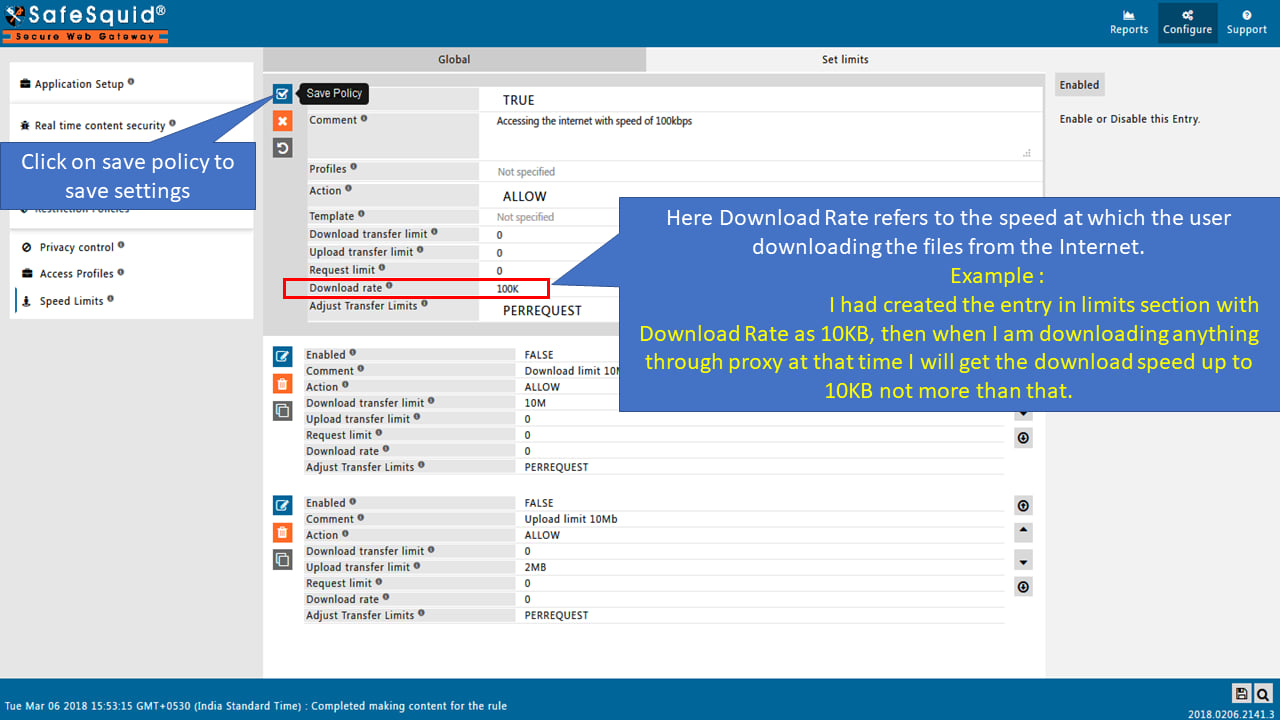
### Setup Download Rate
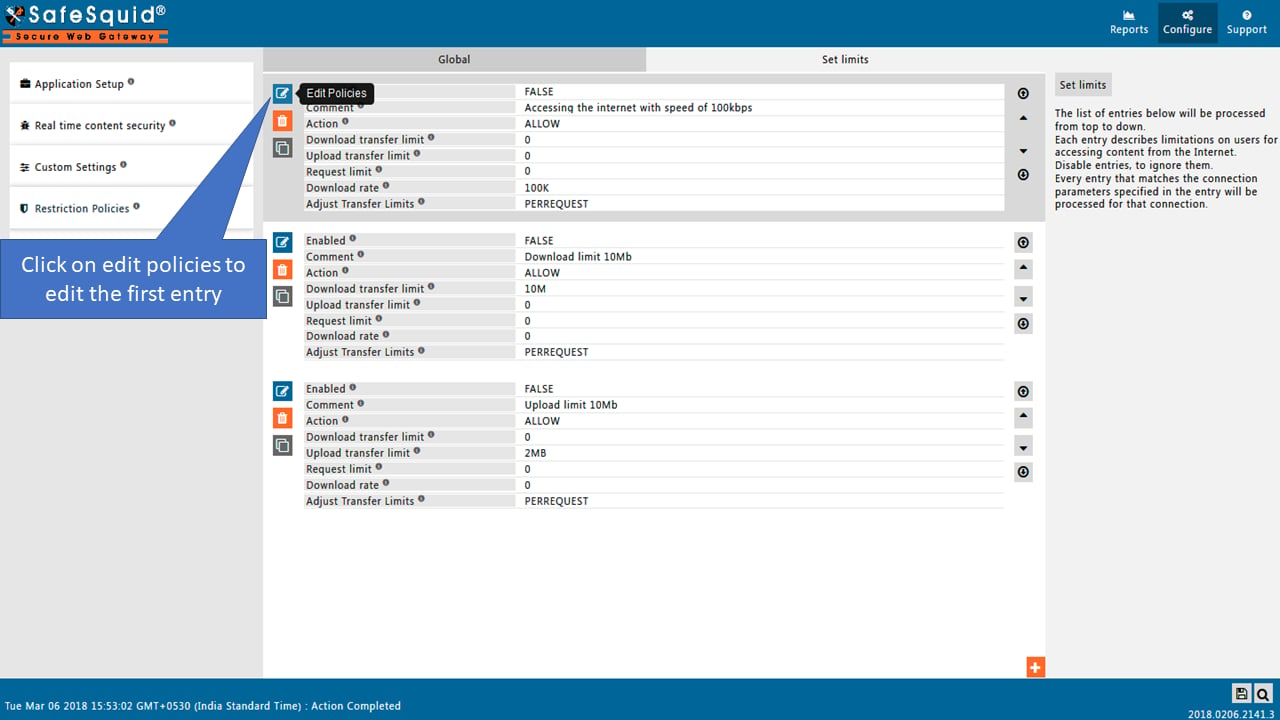
<img src="https://mintcdn.com/safe-squid-labs-12a0916f/MoDjed1u2_at-9B3/images/How_To/Setup_Download_Speed_At_Which_the_files_need_to_download/image1.webp?fit=max&auto=format&n=MoDjed1u2_at-9B3&q=85&s=bd4b4bf6e7ede779780df9d153a03785" alt="clicking on edit policies and editing the first entry in speed limits section " width="1280" height="720" data-path="images/How_To/Setup_Download_Speed_At_Which_the_files_need_to_download/image1.webp" />

<img src="https://mintcdn.com/safe-squid-labs-12a0916f/MoDjed1u2_at-9B3/images/How_To/Setup_Download_Speed_At_Which_the_files_need_to_download/image2.webp?fit=max&auto=format&n=MoDjed1u2_at-9B3&q=85&s=c2dcd97e9f06c261c11cbef731732248" alt="selecting true from the drop down menu" width="1280" height="720" data-path="images/How_To/Setup_Download_Speed_At_Which_the_files_need_to_download/image2.webp" />

<img src="https://mintcdn.com/safe-squid-labs-12a0916f/MoDjed1u2_at-9B3/images/How_To/Setup_Download_Speed_At_Which_the_files_need_to_download/image3.webp?fit=max&auto=format&n=MoDjed1u2_at-9B3&q=85&s=61aa94447c4acd682b160dea743f8e90" alt="setting the download rate as 10kb as an example in download rate field" width="1280" height="720" data-path="images/How_To/Setup_Download_Speed_At_Which_the_files_need_to_download/image3.webp" />

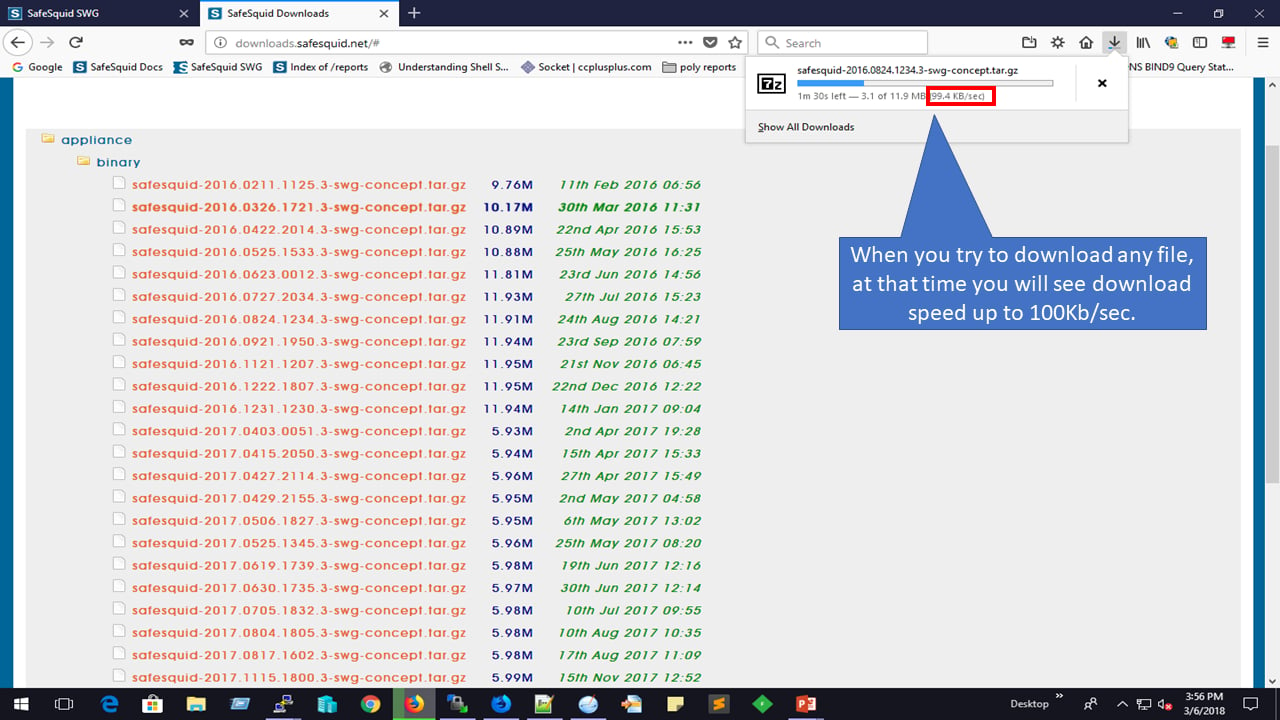
### Testing Download Rate

<img src="https://mintcdn.com/safe-squid-labs-12a0916f/MoDjed1u2_at-9B3/images/How_To/Setup_Download_Speed_At_Which_the_files_need_to_download/image4.webp?fit=max&auto=format&n=MoDjed1u2_at-9B3&q=85&s=7c3ed75beae513541babc347fb8fdb44" alt="testing the download rate by downloading a file" width="1280" height="720" data-path="images/How_To/Setup_Download_Speed_At_Which_the_files_need_to_download/image4.webp" />

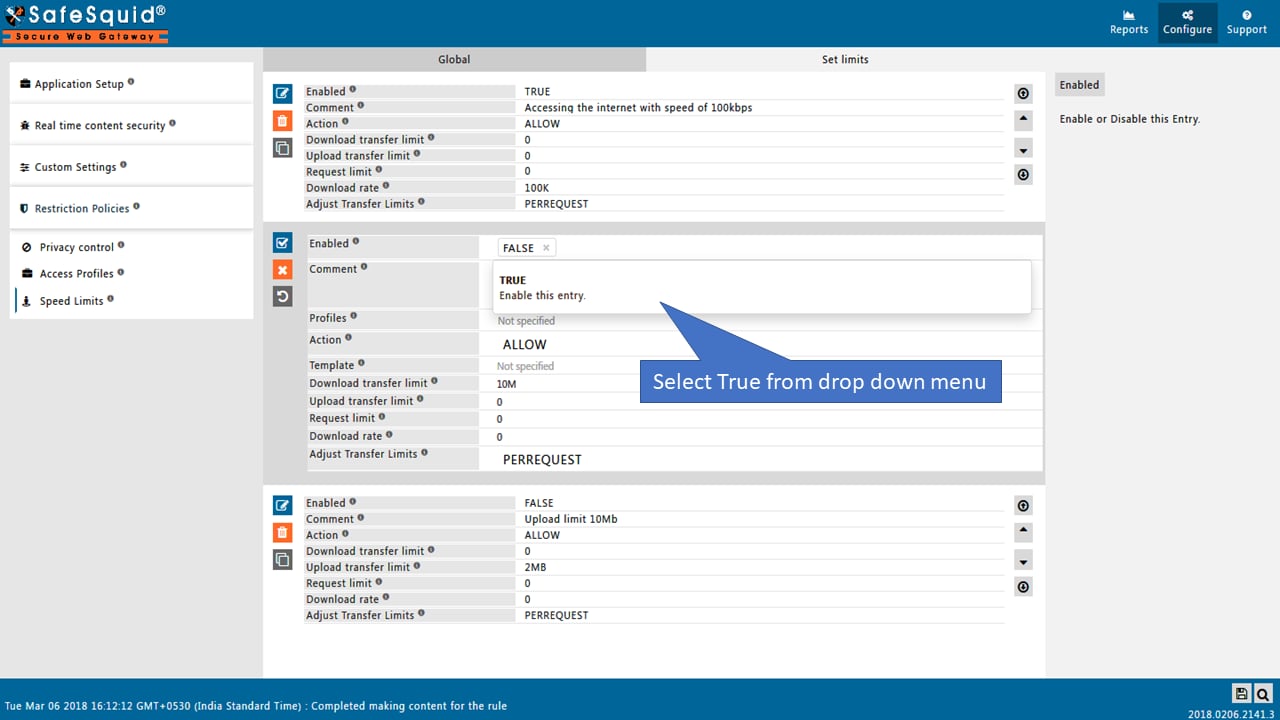
## Setup Maximum limit on the Download size

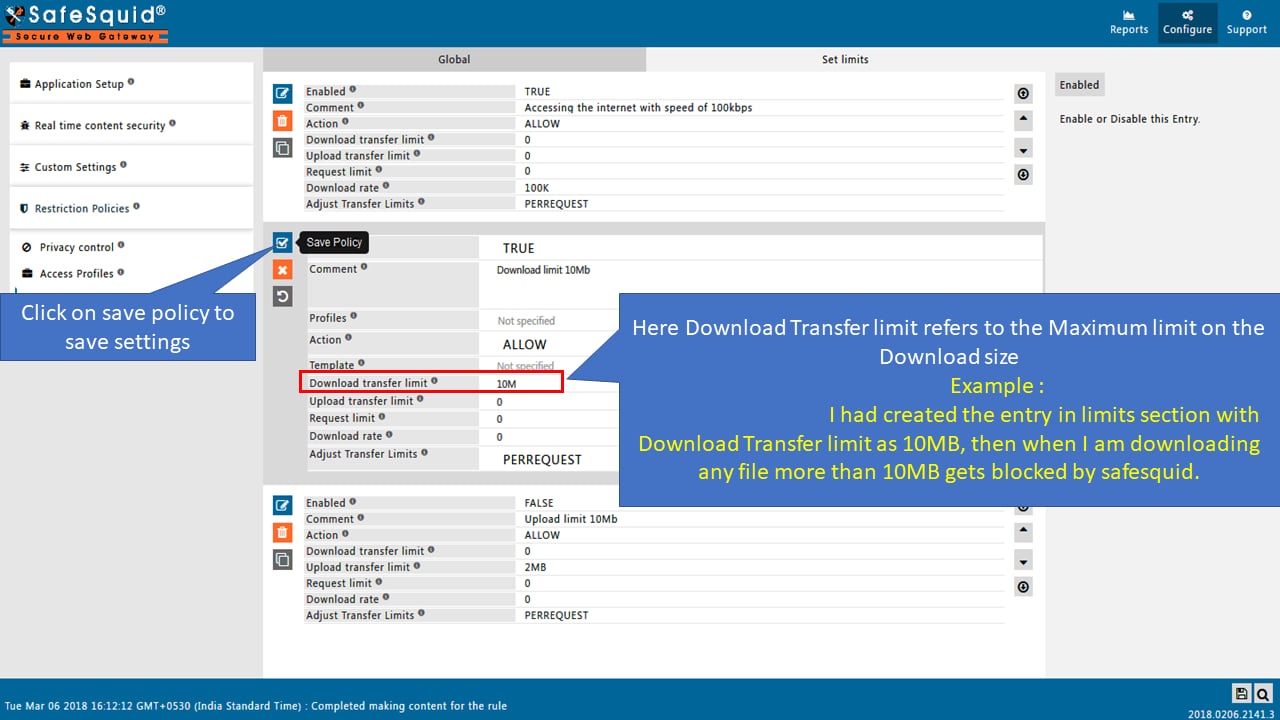
This can be achieved using SafeSquid limits feature, the interface provides an option to set up the limit on the Download size for users.

### Prerequisites

When downloading files from HTTPS websites, ensure that [HTTPS Inspection](/SSL_Inspection) in SafeSquid is enabled

### Setup Maximum Download Size
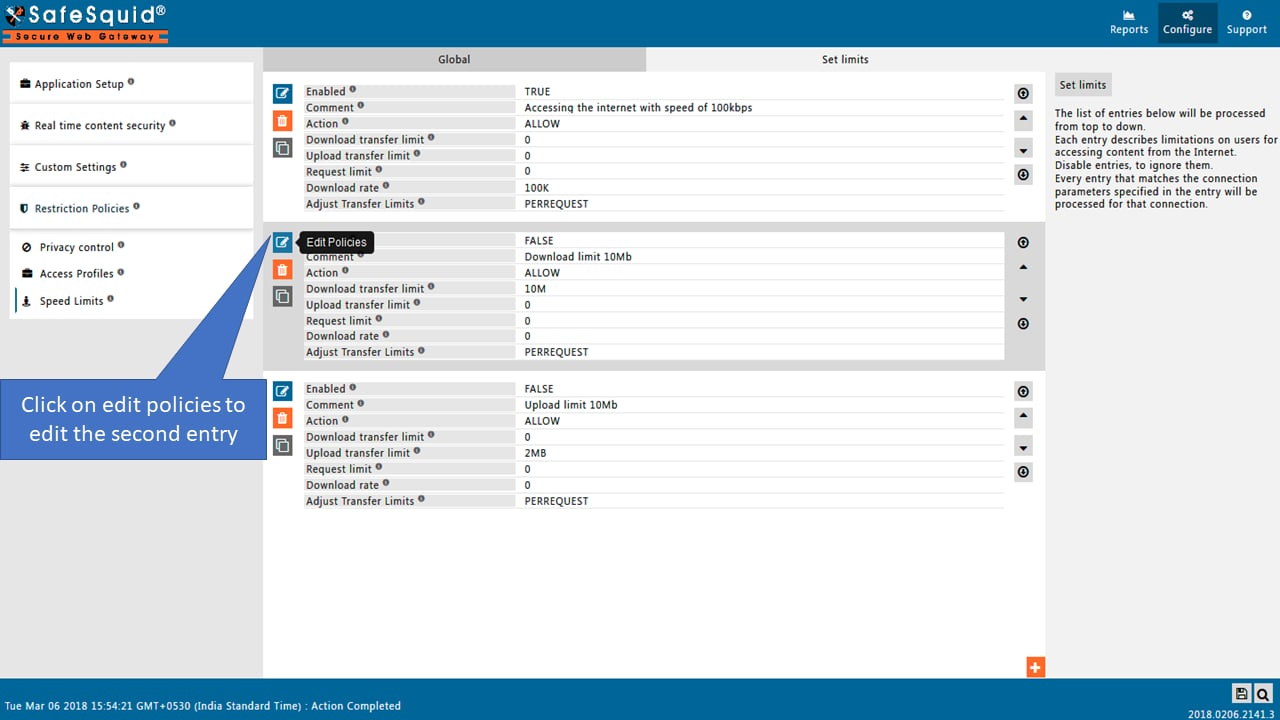
<img src="https://mintcdn.com/safe-squid-labs-12a0916f/MoDjed1u2_at-9B3/images/How_To/Setup_Maximum_limit_on_the_Download_size/image1.webp?fit=max&auto=format&n=MoDjed1u2_at-9B3&q=85&s=3a695992ecaf1689f85ca6552ae5f602" alt="Edit second entry in policy under Configuration Section to Setup Maximum limit on the Download size" width="1280" height="720" data-path="images/How_To/Setup_Maximum_limit_on_the_Download_size/image1.webp" />

<img src="https://mintcdn.com/safe-squid-labs-12a0916f/MoDjed1u2_at-9B3/images/How_To/Setup_Maximum_limit_on_the_Download_size/image2.webp?fit=max&auto=format&n=MoDjed1u2_at-9B3&q=85&s=291f4985d99ffc59cfadb92ac389a7db" alt="Enabled second entry as True in policy under Configuration Section to Setup Maximum limit on the Download size" width="1280" height="720" data-path="images/How_To/Setup_Maximum_limit_on_the_Download_size/image2.webp" />

<img src="https://mintcdn.com/safe-squid-labs-12a0916f/MoDjed1u2_at-9B3/images/How_To/Setup_Maximum_limit_on_the_Download_size/image3.webp?fit=max&auto=format&n=MoDjed1u2_at-9B3&q=85&s=62f93d9f170a8b7f8ff3829fe3543157" alt="Save policy under Configuration Section to Setup Maximum limit on the Download size" width="1280" height="720" data-path="images/How_To/Setup_Maximum_limit_on_the_Download_size/image3.webp" />

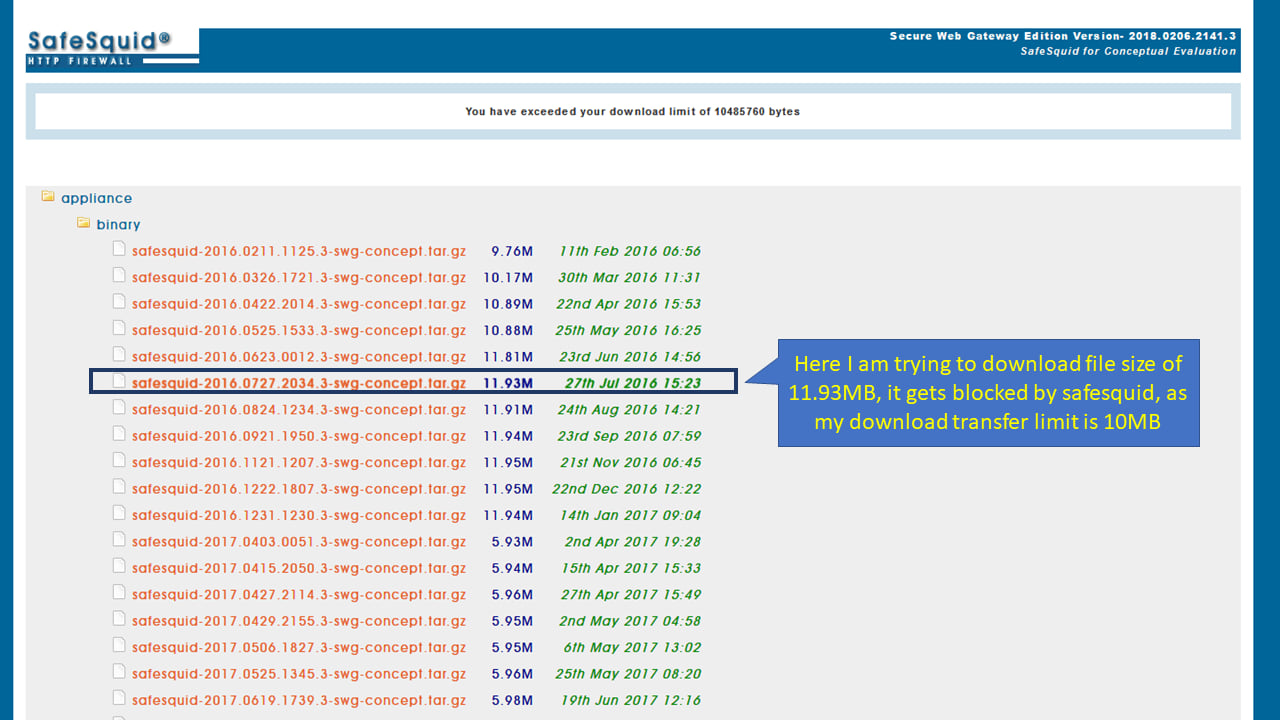
### Testing Maximum Download Limit

<img src="https://mintcdn.com/safe-squid-labs-12a0916f/cI-kUTNiWWPhOtFM/images/How_To/Setup_Maximum_limit_on_the_Download_size/image4.webp?fit=max&auto=format&n=cI-kUTNiWWPhOtFM&q=85&s=9a39cb40401f83a281ac5ecd6ecf01c7" alt="Testing of policy that set maximum limit on Download size" width="1280" height="720" data-path="images/How_To/Setup_Maximum_limit_on_the_Download_size/image4.webp" />

# Setup Maximum limit on the Upload size

This can be achieved using SafeSquid limits feature, the interface provides an option to set up the limit on the Download size for users.

### Prerequisites

When downloading files from HTTPS websites, ensure that [HTTPS Inspection](/SSL_Inspection) in SafeSquid is enabled

### Setup Maximum Upload Size
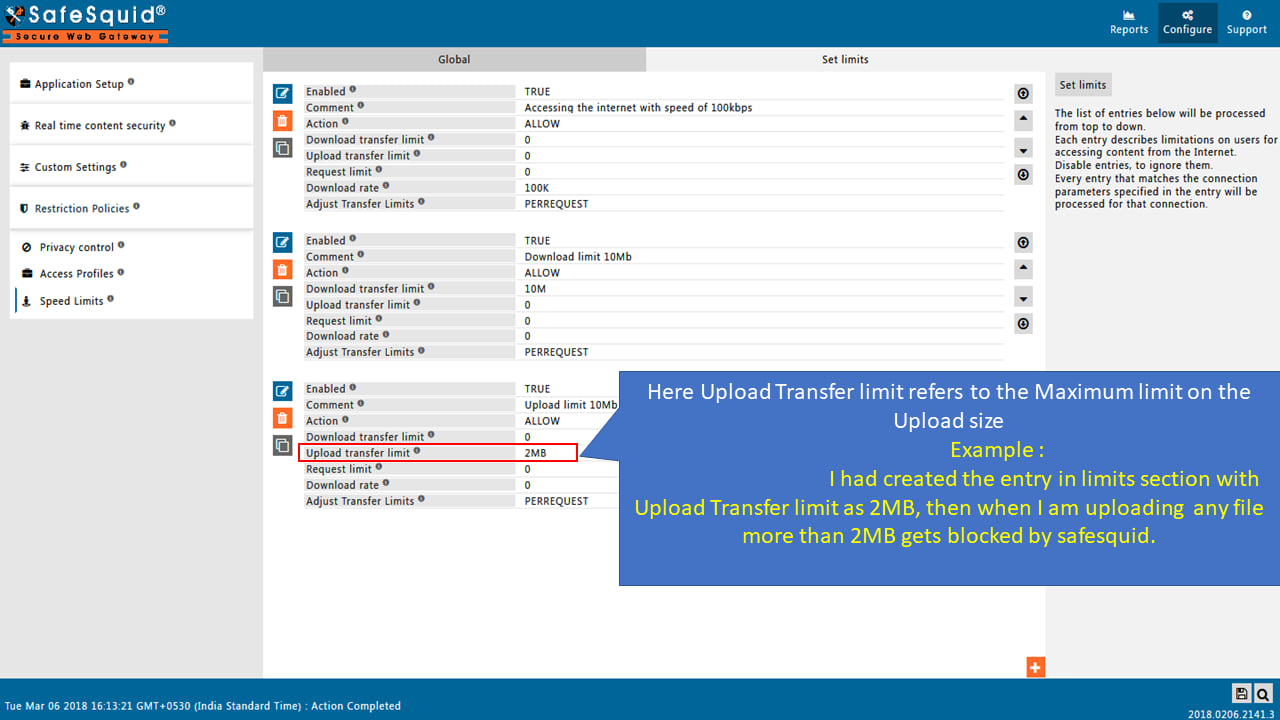
<img src="https://mintcdn.com/safe-squid-labs-12a0916f/cI-kUTNiWWPhOtFM/images/How_To/Setup_Maximum_limit_on_the_Upload_size/image1.webp?fit=max&auto=format&n=cI-kUTNiWWPhOtFM&q=85&s=53fef70bde38587f626a18cdbaaa4eab" alt="Setup Maximum limit on the Upload size in Speed Limits section" width="1280" height="720" data-path="images/How_To/Setup_Maximum_limit_on_the_Upload_size/image1.webp" />

### Testing Upload Limit

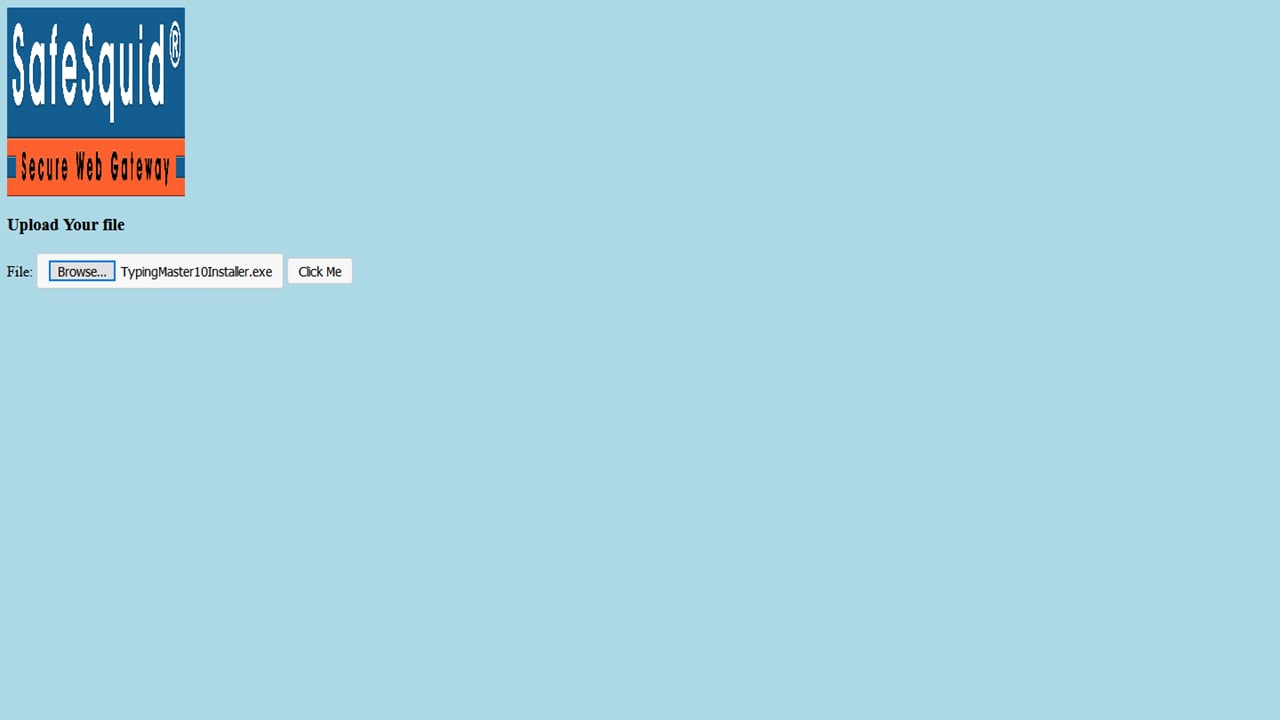
Here I am selecting the file to Upload
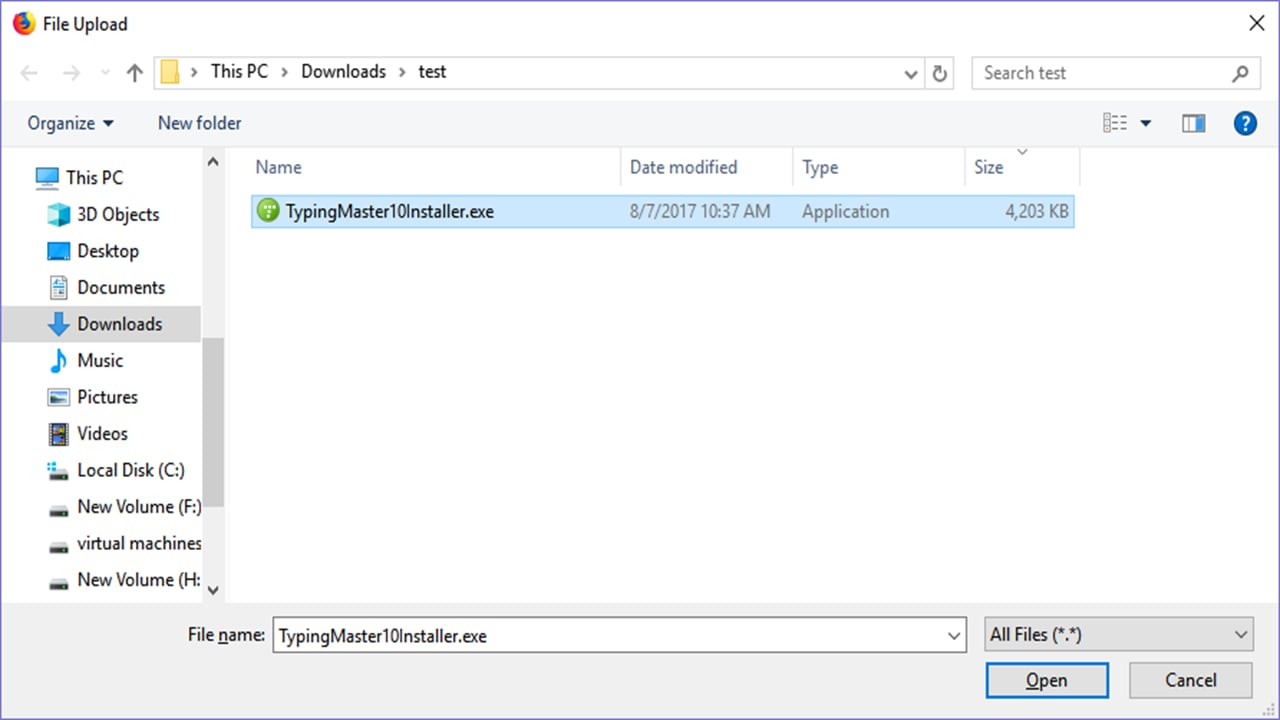
<img src="https://mintcdn.com/safe-squid-labs-12a0916f/cI-kUTNiWWPhOtFM/images/How_To/Setup_Maximum_limit_on_the_Upload_size/image2.webp?fit=max&auto=format&n=cI-kUTNiWWPhOtFM&q=85&s=ad63dc86f8e24491b3c3ad0027ec6348" alt="Select the file to Upload to check Maximum limit on the Upload size" width="1280" height="720" data-path="images/How_To/Setup_Maximum_limit_on_the_Upload_size/image2.webp" />

<img src="https://mintcdn.com/safe-squid-labs-12a0916f/cI-kUTNiWWPhOtFM/images/How_To/Setup_Maximum_limit_on_the_Upload_size/image3.webp?fit=max&auto=format&n=cI-kUTNiWWPhOtFM&q=85&s=95d46d0e4b58ba3ad1de73ca73225788" alt="Select the file to Upload to check Maximum limit on the Upload size" width="1280" height="720" data-path="images/How_To/Setup_Maximum_limit_on_the_Upload_size/image3.webp" />

When I click on upload, I will get the below error, Because I am uploading 4MB file, but I have maximum upload limit of 2MB
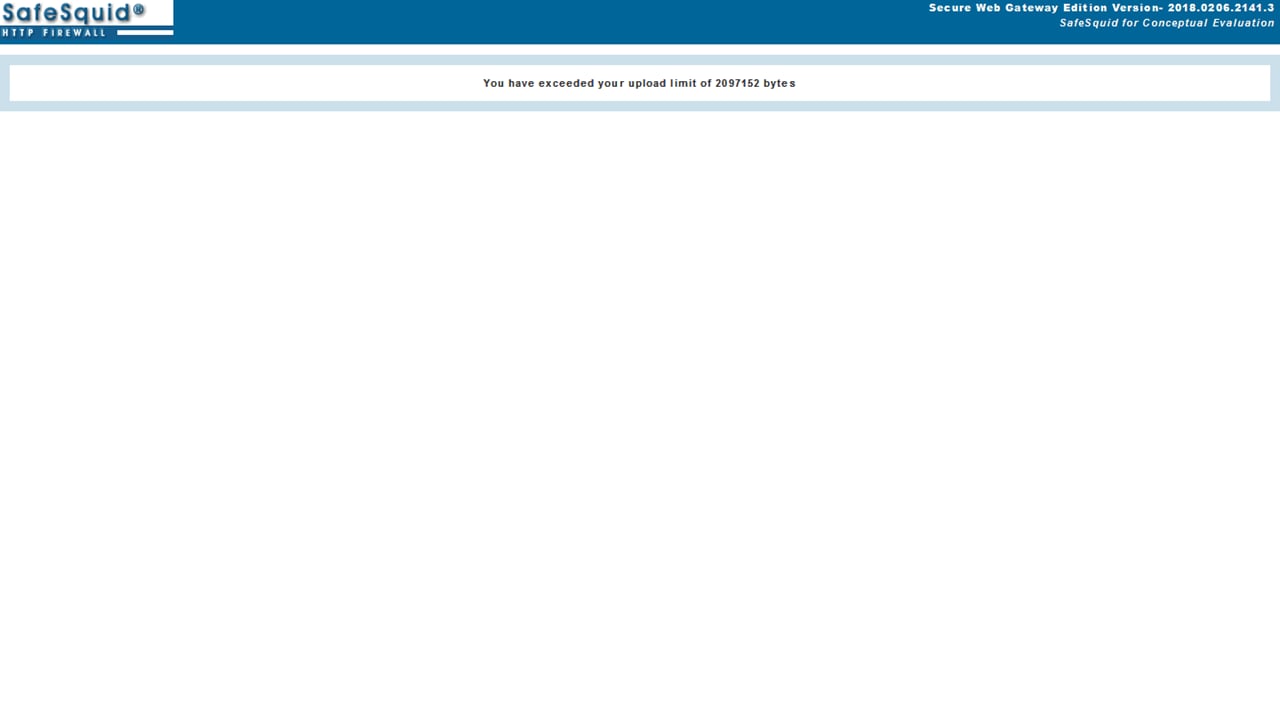
<img src="https://mintcdn.com/safe-squid-labs-12a0916f/cI-kUTNiWWPhOtFM/images/How_To/Setup_Maximum_limit_on_the_Upload_size/image4.webp?fit=max&auto=format&n=cI-kUTNiWWPhOtFM&q=85&s=a306d365ba15bd79a347897e7570cf82" alt="Error template of Maximum limit on the Upload size" width="1280" height="720" data-path="images/How_To/Setup_Maximum_limit_on_the_Upload_size/image4.webp" />


## Related topics

- [Performance Accelerators](/use_cases/performance_acceleration/performance_accelerators.md)
- [Speed Limits](/use_cases/performance_acceleration/speed_limits.md)
- [Server Geo-Location](/use_cases/dns_security/geoip.md)
- [Welcome to SafeSquid](/getting_started/welcome.md)
- [CPU, Memory, Storage, and Throughput Sizing](/deployment/sizing.md)