> ## Documentation Index
> Fetch the complete documentation index at: https://docs.safesquid.com/llms.txt
> Use this file to discover all available pages before exploring further.
# Time Profiles
> Configure SafeSquid Time Profiler to implement time-based internet access control using customizable time ranges including month, day, weekday, hour, and minute.
# Enforce access by time range
Time Profiler enforces time-based internet access using configurable ranges: month, day, weekday, hour, and minute. Create Time Profile entries as combinations of these ranges; SafeSquid allows or blocks categories and websites according to the active profile.
## Enable Time Profiler
1. Access the [SafeSquid interface](/Configuration_Portal).
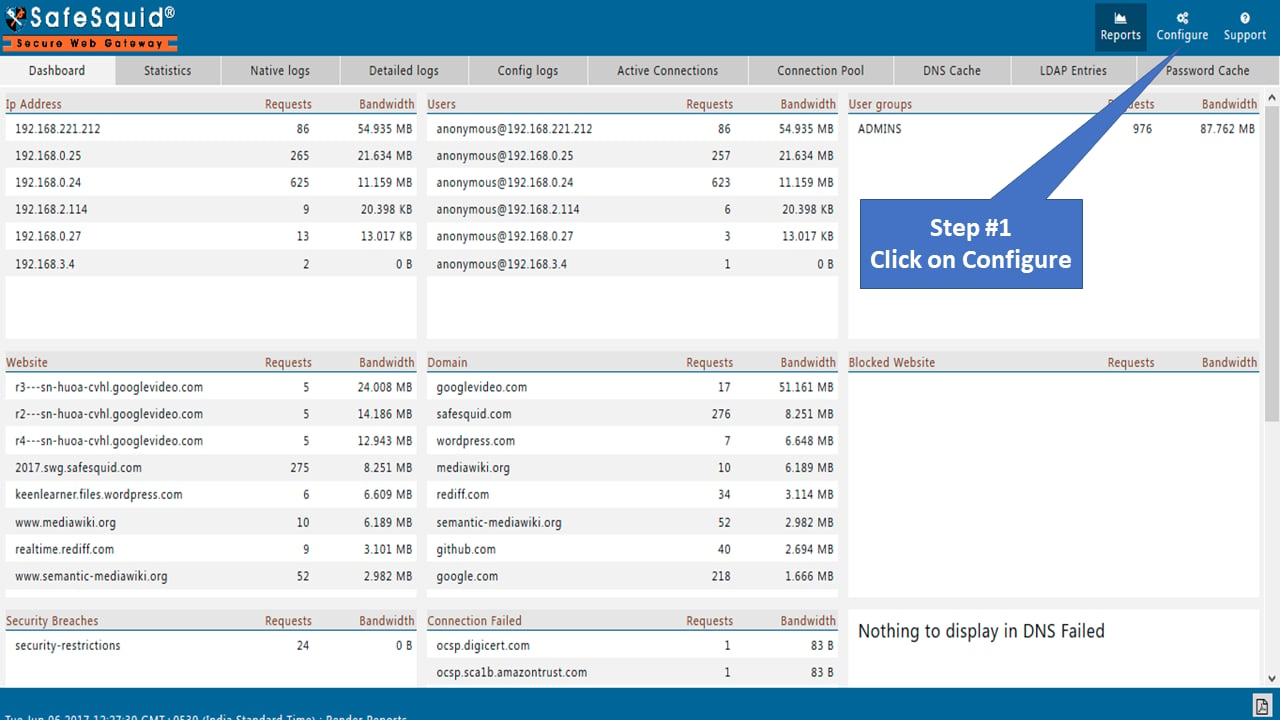
2. Navigate to **Configure** page.
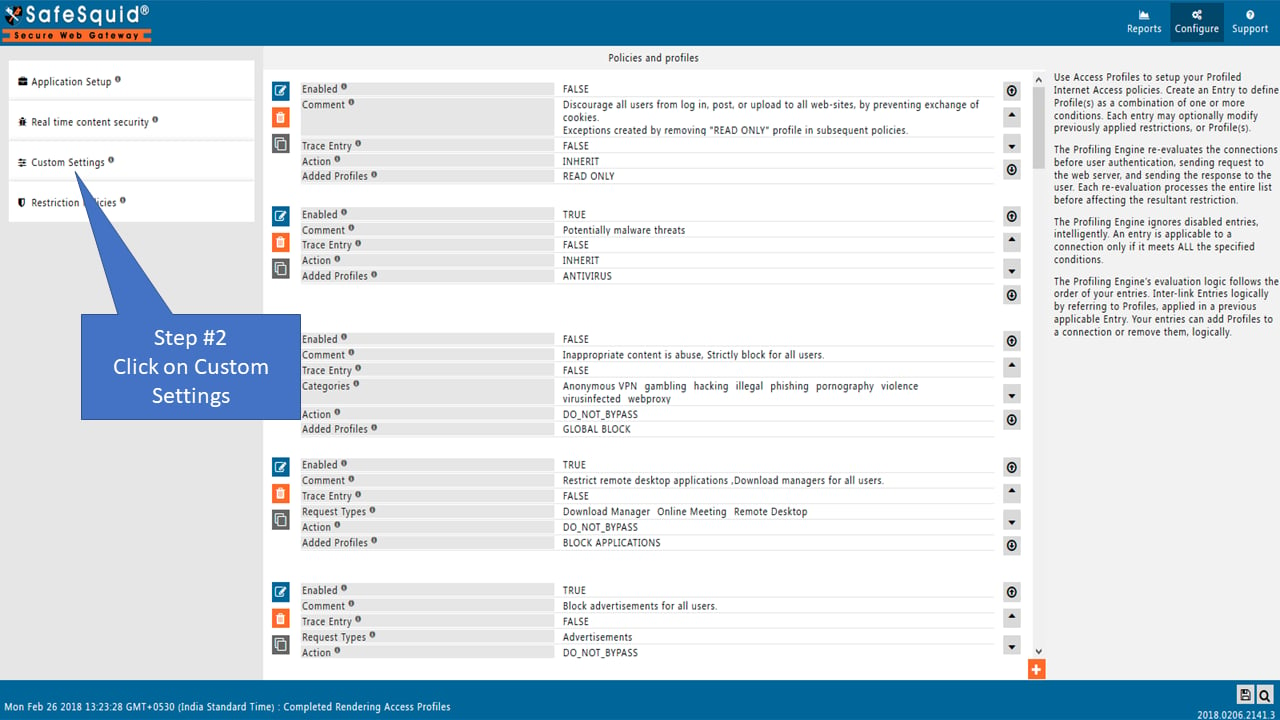
 3. Click **Custom Settings** in the sidebar.
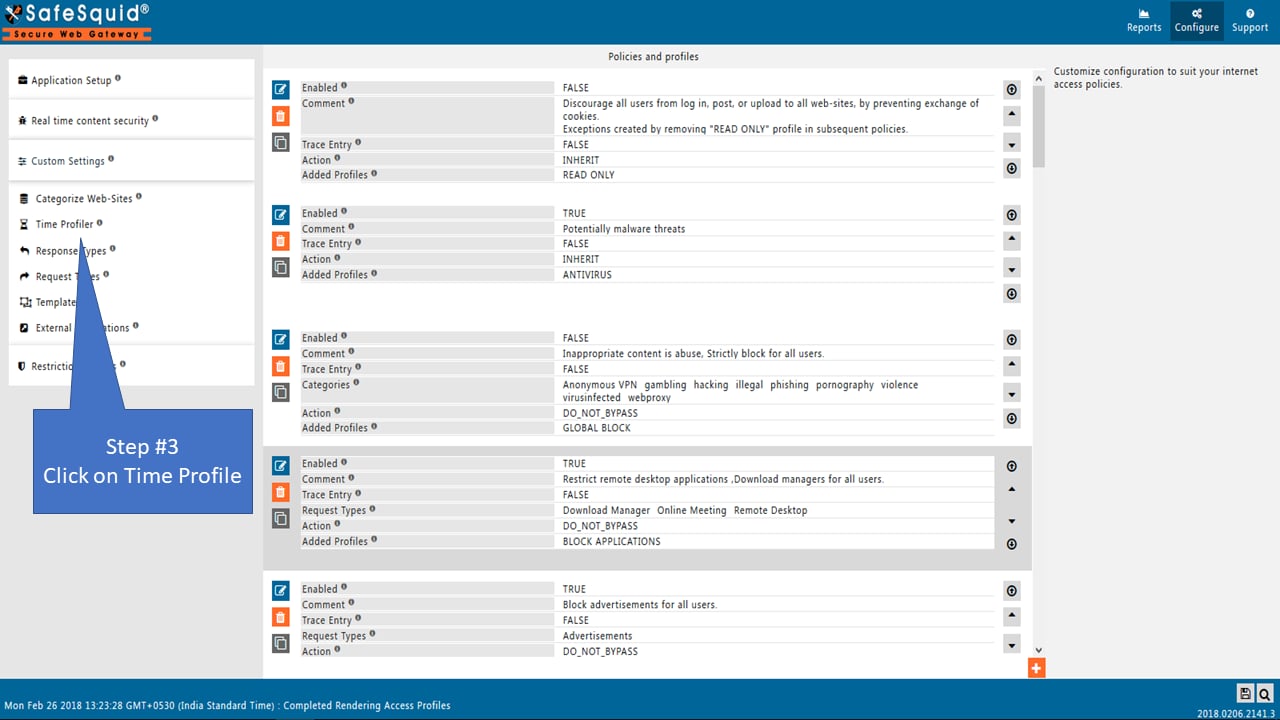
 4. Select **Time Profiler**.
 ## Configuration Options
### Global Settings
| Setting | Description |
| ----------- | --------------------------------------------------------- |
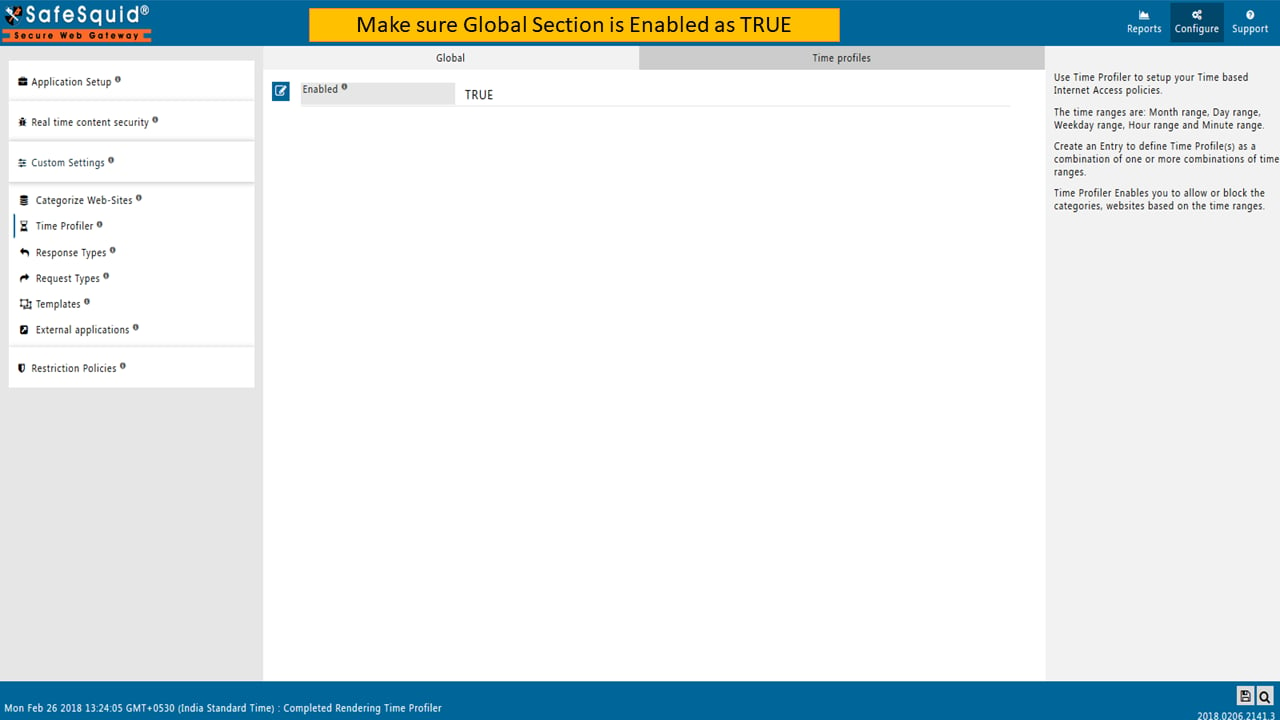
| **Enabled** | TRUE: Enable time profiles. FALSE: Disable time profiles. |
## Configuration Options
### Global Settings
| Setting | Description |
| ----------- | --------------------------------------------------------- |
| **Enabled** | TRUE: Enable time profiles. FALSE: Disable time profiles. |
 ### Time Profiles Tab
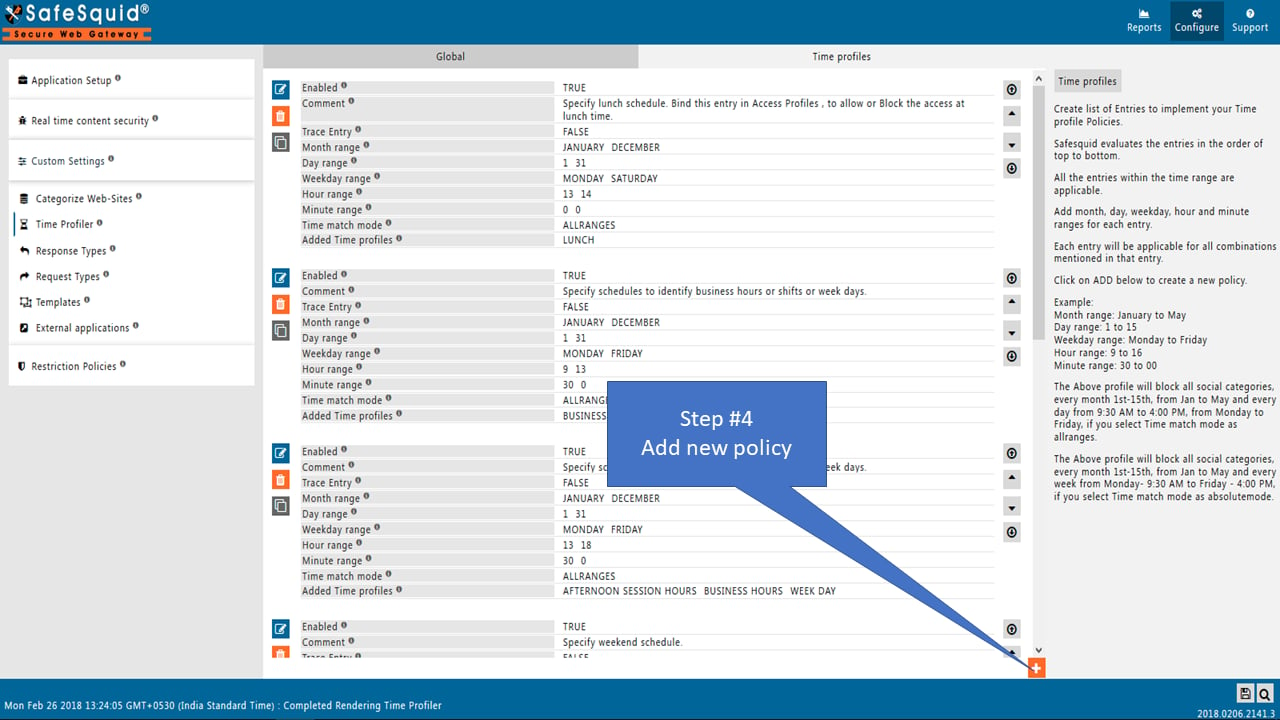
SafeSquid evaluates entries from top to bottom. All entries within the time range are applicable.
### Time Profiles Tab
SafeSquid evaluates entries from top to bottom. All entries within the time range are applicable.
 ### Entry Settings
| Field | Description |
| ------------------------- | ------------------------------------------------------------------------------------------------------------ |
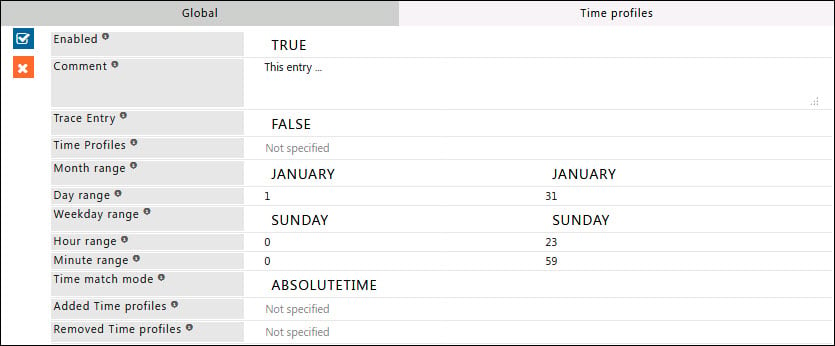
| **Enabled** | TRUE/FALSE - Enable or disable this entry |
| **Comment** | Documentation explaining the entry's purpose |
| **Trace Entry** | TRUE/FALSE - Enable debugging in SafeSquid logs |
| **Time Profiles** | List of Time Profiles for applicability. Leave blank to ignore. Use negation (! Weekday) to exclude profiles |
| **Month Range** | Active months (default: all months). Example: January to March |
| **Day Range** | Active days (default: all days). Example: 5 to 15 |
| **Weekday Range** | Active weekdays (default: all). Example: Monday to Thursday |
| **Hour Range** | Active hours (default: all). Example: 9 to 12 (9 AM to 12 PM) |
| **Minute Range** | Active minutes in conjunction with Hour Range. Example: 15 to 30 |
| **Time Match Mode** | ABSOLUTETIME or ALLRANGES. See the **Time Match Modes** section below for details on each mode |
| **Added Time Profiles** | Profiles to append when entry matches |
| **Removed Time Profiles** | Profiles to remove when entry matches |
### Time Match Modes
**ABSOLUTETIME:** Matches any time between starting and ending time only.
* Example: Weekday Monday-Friday, Hour 9-17
* Active from Monday 9 AM to Friday 5 PM continuously
**ALLRANGES:** Matches time within all specified ranges.
* Example: Weekday Monday-Friday, Hour 10-17
* Active every day Monday-Friday between 10 AM and 5 PM
## Examples
### Example 1: Standard Office Hours
Office hours: 10 AM to 9 PM, Monday to Friday.
| Field | Value |
| ------------------- | --------------------- |
| Hour Range | 10 to 21 |
| Weekday Range | Monday to Friday |
| Added Time Profiles | STANDARD OFFICE HOURS |
### Entry Settings
| Field | Description |
| ------------------------- | ------------------------------------------------------------------------------------------------------------ |
| **Enabled** | TRUE/FALSE - Enable or disable this entry |
| **Comment** | Documentation explaining the entry's purpose |
| **Trace Entry** | TRUE/FALSE - Enable debugging in SafeSquid logs |
| **Time Profiles** | List of Time Profiles for applicability. Leave blank to ignore. Use negation (! Weekday) to exclude profiles |
| **Month Range** | Active months (default: all months). Example: January to March |
| **Day Range** | Active days (default: all days). Example: 5 to 15 |
| **Weekday Range** | Active weekdays (default: all). Example: Monday to Thursday |
| **Hour Range** | Active hours (default: all). Example: 9 to 12 (9 AM to 12 PM) |
| **Minute Range** | Active minutes in conjunction with Hour Range. Example: 15 to 30 |
| **Time Match Mode** | ABSOLUTETIME or ALLRANGES. See the **Time Match Modes** section below for details on each mode |
| **Added Time Profiles** | Profiles to append when entry matches |
| **Removed Time Profiles** | Profiles to remove when entry matches |
### Time Match Modes
**ABSOLUTETIME:** Matches any time between starting and ending time only.
* Example: Weekday Monday-Friday, Hour 9-17
* Active from Monday 9 AM to Friday 5 PM continuously
**ALLRANGES:** Matches time within all specified ranges.
* Example: Weekday Monday-Friday, Hour 10-17
* Active every day Monday-Friday between 10 AM and 5 PM
## Examples
### Example 1: Standard Office Hours
Office hours: 10 AM to 9 PM, Monday to Friday.
| Field | Value |
| ------------------- | --------------------- |
| Hour Range | 10 to 21 |
| Weekday Range | Monday to Friday |
| Added Time Profiles | STANDARD OFFICE HOURS |
 ### Example 2: Lunch Hours
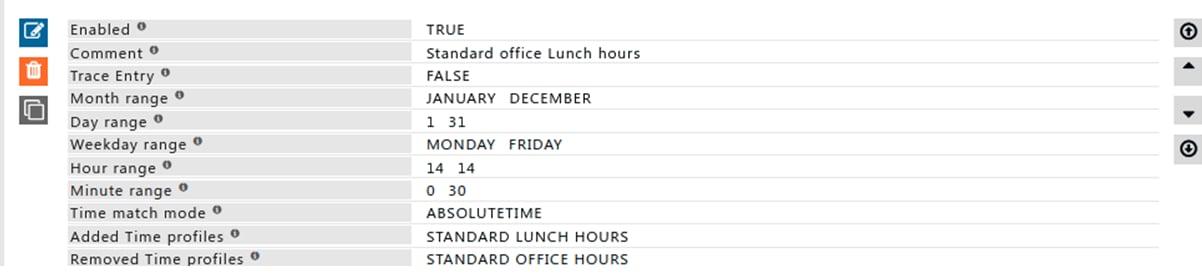
Lunch hours: 2 PM to 2:30 PM, Monday to Friday. Allow Social Media during lunch.
| Field | Value |
| ------------------- | -------------------- |
| Hour Range | 14 to 14 |
| Minute Range | 0 to 30 |
| Weekday Range | Monday to Friday |
| Added Time Profiles | STANDARD LUNCH HOURS |
### Example 2: Lunch Hours
Lunch hours: 2 PM to 2:30 PM, Monday to Friday. Allow Social Media during lunch.
| Field | Value |
| ------------------- | -------------------- |
| Hour Range | 14 to 14 |
| Minute Range | 0 to 30 |
| Weekday Range | Monday to Friday |
| Added Time Profiles | STANDARD LUNCH HOURS |
 ## Related topics
- [Time Profiler](/admin_guide/policies_and_profiles/time_profiler.md)
- [Access Profiles](/admin_guide/policies_and_profiles/access_profiles.md)
- [Allow Social Networking Sites During Lunch Hours](/use_cases/access_restriction/allow_social_networking_sites_during_lunch_hours.md)
- [Security Logs](/use_cases/audit_and_forensics/security_logs.md)
- [Profiling Engine](/use_cases/profiling_engine/profiling_engine.md)
## Related topics
- [Time Profiler](/admin_guide/policies_and_profiles/time_profiler.md)
- [Access Profiles](/admin_guide/policies_and_profiles/access_profiles.md)
- [Allow Social Networking Sites During Lunch Hours](/use_cases/access_restriction/allow_social_networking_sites_during_lunch_hours.md)
- [Security Logs](/use_cases/audit_and_forensics/security_logs.md)
- [Profiling Engine](/use_cases/profiling_engine/profiling_engine.md)