> ## Documentation Index
> Fetch the complete documentation index at: https://docs.safesquid.com/llms.txt
> Use this file to discover all available pages before exploring further.
# Reverse Proxy
> Configure SafeSquid as reverse proxy for performance, SSL termination, security, and caching without client proxy settings.
# Reverse proxy protects and accelerates backend servers
A reverse proxy sits in front of backend web servers and accepts client requests. It forwards requests to the appropriate backend and returns responses. Clients connect to the reverse proxy; they do not need proxy configuration. SafeSquid as reverse proxy provides a single point for SSL termination, authentication, caching, and load distribution while hiding backend server identities.
## Benefits of SafeSquid reverse proxy
**Web acceleration**
SafeSquid Reverse proxies can compress inbound and outbound data, as well as cache commonly requested content, both of which speed up the flow of traffic between clients and servers. They can also perform additional tasks such as SSL encryption to take load off the web servers, thereby boosting their performance.
**SSL Termination**
Here the reverse proxy handles incoming HTTPS connections, decrypting the requests and passing unencrypted requests on to the web servers. This has several benefits:
Removes the need to install certificates on many back-end web servers.
Provides a single point of configuration and management for SSL/TLS
Takes the processing load of encrypting/decrypting HTTPS traffic away from web servers.
Makes testing and intercepting HTTP requests to individual web servers easier.
**Security and anonymity**
By intercepting requests headed for the back-end servers, a reverse proxy server protects their identities and acts as an additional defense against security attacks. It also ensures that multiple servers can be accessed from a single record locator or URL regardless of the structure of the local area network.
**Authentication**
You can use SafeSquid reverse proxy to provide a single point of authentication for all HTTP and HTTPS requests.
**Caching**
The SafeSquid reverse proxy can also act as a cache. You can either have a dumb cache that simply expires after a set period, or better still a cache that respects Cache-Control and Expires headers. This can considerably reduce the load on the back-end servers.
Setup the SafeSquid in reverse proxy mode. A reverse proxy by itself appears to the client just like an ordinary website No special configuration on the client is necessary. Basically, a reverse proxy is on the website end which will be used to protect and reduce the load on the website
This example uses a website hosted on an Apache server and sets up the reverse proxy for that website.
**Website details:**
FQDN: test.safesquid.net
IP: 192.168.27.50
**SafeSquid proxy** runs on 192.168.27.10.
### Configuration on website
Create a DNS entry for the website pointing to the proxy IP. Traffic to that hostname then fetches content via the proxy server.
On the request of traffic proxy server will fetch content from original site, and response back to the request.
**In this example:**
192.168.27.10 is pointing to test.safesquid.net
### Configuration on proxy server
Make sure that port 80 is free in proxy server, because it should not be allocated by any other service in the proxy server
You can verify it by using below command:
```bash theme={null}
netstat -tulnp
```
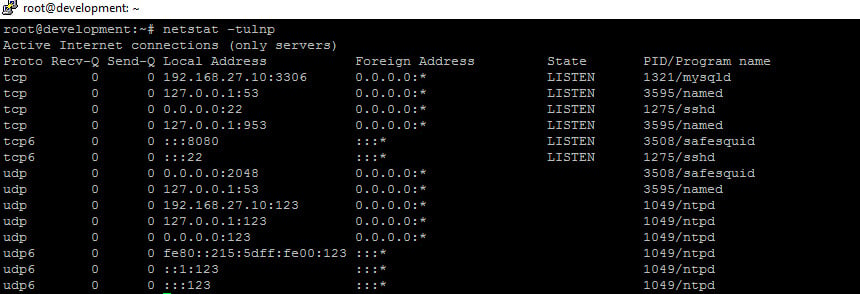 No service is allocated to port 80
Enable forwarding option in **/etc/sysctl.conf file**
Replace this line as\*\*: net.ipv4.ip\_forward=0 to net.ipv4.ip\_forward=1\*\*
```bash theme={null}
net.ipv4.ip_forward=1
```
Then add the Iptables rule to redirect the traffic from 80 to 8080:
```bash theme={null}
iptables -A PREROUTING -t nat -p tcp --dport 80 -j REDIRECT --to 8080
```
On the proxy, block all websites except the target website so the proxy does not act as an open proxy.
See how to allow single website
Create a DNS entry for the website pointing to the back-end server IP. In this example **192.168.27.50** is **test.safesquid.net**.
No service is allocated to port 80
Enable forwarding option in **/etc/sysctl.conf file**
Replace this line as\*\*: net.ipv4.ip\_forward=0 to net.ipv4.ip\_forward=1\*\*
```bash theme={null}
net.ipv4.ip_forward=1
```
Then add the Iptables rule to redirect the traffic from 80 to 8080:
```bash theme={null}
iptables -A PREROUTING -t nat -p tcp --dport 80 -j REDIRECT --to 8080
```
On the proxy, block all websites except the target website so the proxy does not act as an open proxy.
See how to allow single website
Create a DNS entry for the website pointing to the back-end server IP. In this example **192.168.27.50** is **test.safesquid.net**.
 Access the website from a client machine without configuring proxy settings in the browser. Server logs show that the website was accessed via the proxy IP.
 ## Next steps
* [Forward Proxy](/Forward_Proxy) for client-facing explicit proxy.
* [SSL Inspection](/Configure_HTTPS_Inspection) for HTTPS termination.
* [Proxy Clustering](/Proxy_Clustering) for high availability.
## Related topics
- [Choose an Architecture](/deployment/choose_an_architecture.md)
- [Welcome to SafeSquid](/getting_started/welcome.md)
- [Access Restriction](/use_cases/access_restriction/access_restriction.md)
- [System-Wide Proxy Settings](/getting_started/client_configuration/system_wide_proxy.md)
- [SafeSquid Appliance Builder](/getting_started/install_safesquid/safesquid_appliance_builder.md)
## Next steps
* [Forward Proxy](/Forward_Proxy) for client-facing explicit proxy.
* [SSL Inspection](/Configure_HTTPS_Inspection) for HTTPS termination.
* [Proxy Clustering](/Proxy_Clustering) for high availability.
## Related topics
- [Choose an Architecture](/deployment/choose_an_architecture.md)
- [Welcome to SafeSquid](/getting_started/welcome.md)
- [Access Restriction](/use_cases/access_restriction/access_restriction.md)
- [System-Wide Proxy Settings](/getting_started/client_configuration/system_wide_proxy.md)
- [SafeSquid Appliance Builder](/getting_started/install_safesquid/safesquid_appliance_builder.md)