> ## Documentation Index
> Fetch the complete documentation index at: https://docs.safesquid.com/llms.txt
> Use this file to discover all available pages before exploring further.
# Redirect One Website to Another
> Configure SafeSquid to redirect one URL to another using Real Time Content Security Redirect policies.
# Redirect One Website to Another
### [Access the SafeSquid User Interface ](/Configuration_Portal)
SafeSquid includes sample policies to support policy creation. The sample policy "Enable interface access through authentication" is already present. Enable those policies to make them applicable.
Click on 'Configure' which is at top right of the SafeSquid Interface.
On the left side bar of SafeSquid Interface click on\*\* Real Time Content Security >> Redirect\*\*
Make the Global Section Enabled to TRUE.
 Click Redirection Policies to see default policies, then add a new policy.
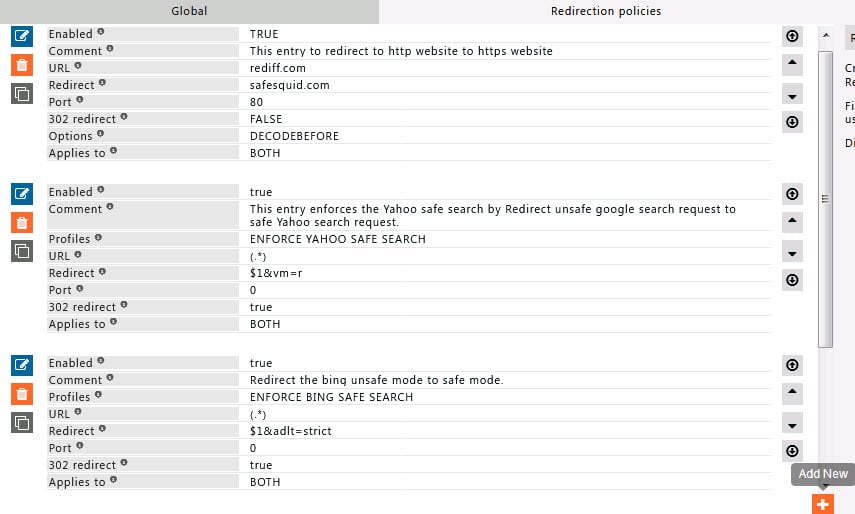 Create a policy in **Configure** → **Access Profiles** (or **Templates**) with source/destination and redirect action as in the following example:
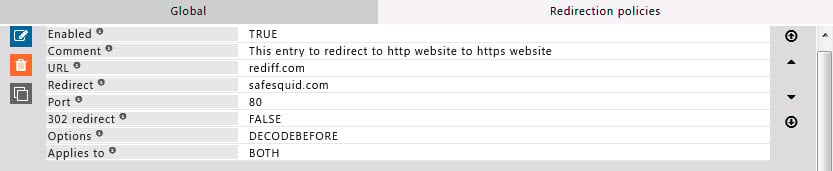 Click on save (Save button is placed at right bottom)
### Verify redirect
In this the URL value 'rediff.com' is redirect to 'SafeSquid.com' and the port to redirect to 80.
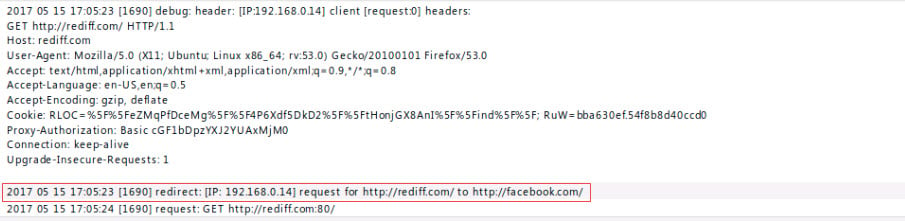
In a browser, open [https://www.rediff.com/](https://www.rediff.com/), it must redirect to SafeSquid.com; verify in SafeSquid under Native logs on SafeSquid interface Reports >> Native logs as like below.
Click on save (Save button is placed at right bottom)
### Verify redirect
In this the URL value 'rediff.com' is redirect to 'SafeSquid.com' and the port to redirect to 80.
In a browser, open [https://www.rediff.com/](https://www.rediff.com/), it must redirect to SafeSquid.com; verify in SafeSquid under Native logs on SafeSquid interface Reports >> Native logs as like below.
 ## Related topics
- [URL Redirection](/use_cases/url_redirection/url_redirection.md)
- [URL redirect](/admin_guide/filtering_and_privacy/redirect.md)
- [Caching and Prefetching](/use_cases/performance_acceleration/caching.md)
- [Web Categorization](/use_cases/access_restriction/web_categorization.md)
- [Transparent Proxy](/use_cases/scaling_and_high_availability/transparent_proxy.md)
## Related topics
- [URL Redirection](/use_cases/url_redirection/url_redirection.md)
- [URL redirect](/admin_guide/filtering_and_privacy/redirect.md)
- [Caching and Prefetching](/use_cases/performance_acceleration/caching.md)
- [Web Categorization](/use_cases/access_restriction/web_categorization.md)
- [Transparent Proxy](/use_cases/scaling_and_high_availability/transparent_proxy.md)