

Restore Proxy Operation by Freeing Disk and RAM
Free disk and RAM to restore proxy operation can interrupt web access, policy enforcement, or evidence collection. Use this runbook to restore service, preserve logs, and prove the corrective action during security review. When SafeSquid partitions or RAM are full, the proxy can fail or behave unpredictably. Use the steps below to identify full partitions, clean logs and cache safely, and prevent recurrence.Prerequisites
Give the enough size to backup store. Example: to back up files of size 5GB, allow for a store of 5.5 GB. Don’t delete the original log files (.log extension) and database files.Check disk space
Run the below command to check the available disk space on each partition./dev/ram1 62M 1.3M 58M 3% /tmp/safesquid
If any of the above partitions is used over 80%, back up the following files. Then delete files as required.Partitions
When the ”/ ” partition is full remove the files from the below paths:/opt/safesquid/bin
change the directory to /opt/safesquid/bin by using the command below: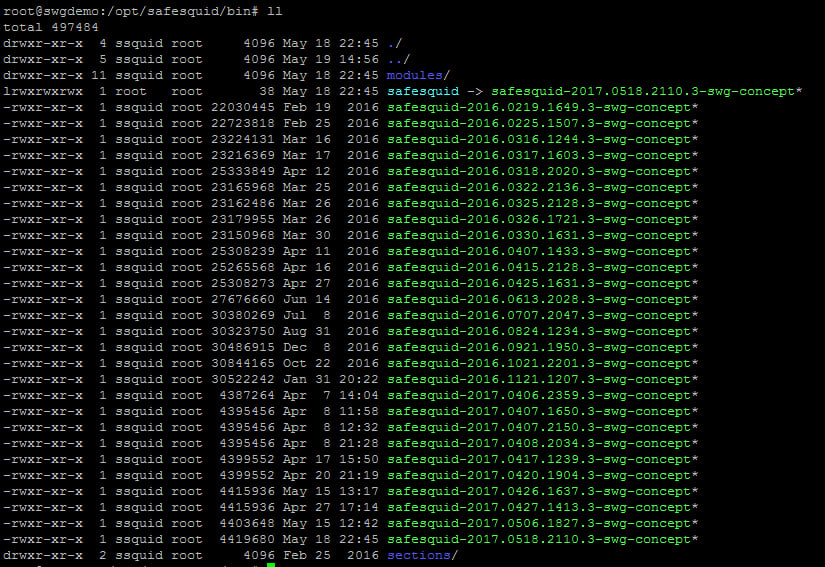
/var/log
You can also take the backup of system logs and delete the files with the .gz extension. This folder contains the logs related to a system, so don’t delete or modify the original files (i.e. with the .log extension). Example: dmesg.1.gz/var/cache/safesquid
Delete all files from this folder by using the command mentioned below. No need to take a backup of any file from this folder./var/db/safesquid
Delete all files except these three files from the directory: /var/db/safesquid/report/ safesquid2.db safesquid2.db-wal safesquid2.db-shm These files will be used to store the data required for reports generation you can take a backup or directly delete these files. If you delete or move the above files to another destination, restart the SafeSquid server. This recreates the deleted or moved files./var/log/safesquid
Change the directory to :/var/log/safesquid/native/ by using the below command/tmp/safesquid
Delete all files and folders present in this directory. By using this commandCapture useful evidence
Collect evidence before restarting services or changing policy. Keep screenshots, command output, and relevant SafeSquid logs with the incident ticket.[thread or request id] and a module name such as network:.
Record the affected user, source IP address, requested URL, timestamp, browser error, SafeSquid policy section changed, and verification result.
Next steps
- Use Find a complete connection log to trace a specific client transaction.
- Use Troubleshooting for the broader diagnostic checklist.
- Use Monit Service Governance to supervise SafeSquid processes and host resources with Monit.