

Problem
Service interruptions and policy failures increase operational risk when root cause is unclear.Benefits
You can diagnose faster with repeatable checks, reduce downtime, and restore expected protection.Advantages
You get symptom-first guidance that supports incident response and produces evidence for audit and postmortem review.Call to action
Follow the checks in order, capture the observed output, and apply the fix that matches your failure pattern.Get complete connection log with find_client_id.sh
Native logs are written in real time by response; entries for one connection can be scattered. To analyze a single connection from start to finish (profiles, categories, headers, errors), use the client id. It pulls all log lines for that connection. find_client_id.sh extracts complete connection details for a given client id. Below: how to obtain the client id and run the script. To use find_client_id.sh you are first required to get your connection’s client id. Client id can be extracted from the response headers section in browsers network tab. (Note: this assumes you know how to open developer tools in a browser.)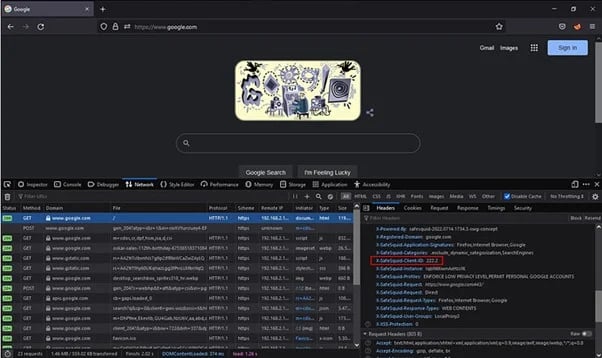
Next steps
- Troubleshooting - find the runbook that matches your symptom.
- Security Logs - read the logged decision for the client you identified.
- Support - collect evidence before you escalate.