

Transparent proxy intercepts traffic without client configuration
Why transparent proxy is used
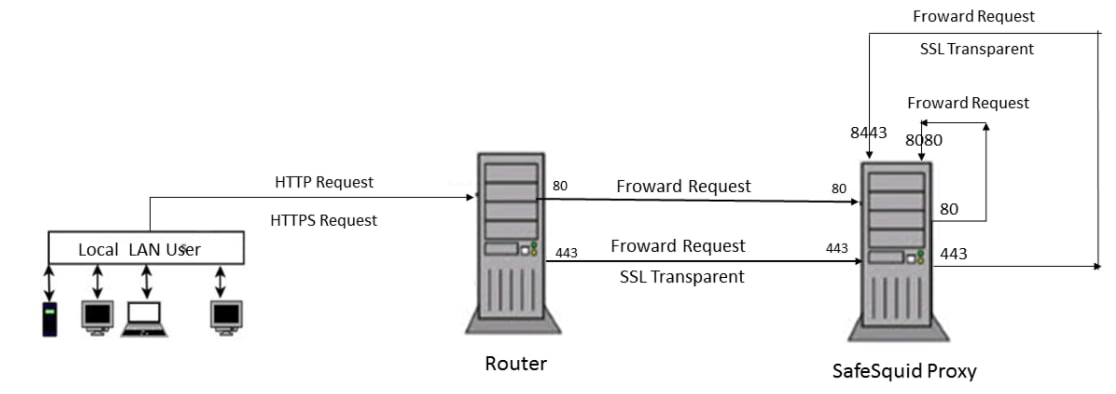
Uncontrolled direct internet access increases malware, data loss, and compliance risk. A secure web gateway (SWG) intercepts and examines web traffic so the organization can enforce policy and block threats. Explicit proxy requires every browser or application to be configured. Transparent proxy uses network-level redirection so traffic is sent to the proxy without endpoint configuration. Applications believe they connect directly to the destination. In reality, a router or firewall redirects traffic to SafeSquid, which then forwards it. This reduces deployment effort and ensures all HTTP/HTTPS traffic from the segment is inspected.Client scenario
Stark Tech has 200 employees. Stark Tech wants to provide internet services to the employees through WIFI. When the employees open their web browser, they’re connected to a proxy server that manages all the network’s communication. Since this is a new employee, the proxy displays a web page in the browser asking the employee to agree to certain terms and conditions. If the employee accepts, then the proxy routes its traffic to the actual destination using a transparent proxy.Transparent proxy intercepts without application awareness
A transparent proxy (inline, intercepting, or forced proxy) sits between the client and the internet and redirects requests and responses. The application is not configured to use a proxy; the user is unaware. SafeSquid supports HTTP and HTTPS in transparent mode (HTTPS is SSL transparent mode). Servers see traffic as coming from the proxy.How SafeSquid transparent proxy works
- Proxy caches create copies of the data stored on a server and serve the cached content to Bob. This reduces the strain on the web service by having the proxy provide the content instead of the service itself.
- Filtering proxies prevents access to certain websites or web services. These are commonly implemented by organizations to prevent users from accessing resources that are unrelated or disruptive to the organization.
- Gateway proxies modify or block network traffic based on certain policies. Locations that offer public Wifi often implement gateways that require users to register or accept an agreement before they can use the service.
Prerequisites
- Deploy SafeSquid Secure web gateway (SAB).
- Enable SafeSquid SSL transparent facility on two ports, one is port 8081 for HTTP traffic and the other one is port 8433 for HTTPS traffic. Also, Enable SSL Inspection to control SSL traffic. If not enabled, refer to the document - How to Enable HTTPS Inspection
- Redirect traffic from ports 80 and 443 to 8081 and 8443 respectively. The redirection can take place on the router if the router supports redirection.
- Make sure the IP tables-persistent package is installed (to save IP table rules)
- If your router only supports traffic forwarding then you should redirect traffic on the SafeSquid server using IP tables.
2026.0627.1344.3, across Application Setup, Accelerators, and Real time
content security) — enabling the SSL transparent facility and redirecting ports 80/443 to
8081/8443 above is the entire mechanism, not a preliminary step before some other switch.
Benefits
- Transparent proxies are an unobtrusive way to add features and functionality to a user’s browsing experience.
- Enterprises experience greater control over how their customers interact with their services by routing and modifying requests as they come in.
- Users interact with web services more easily since their connections are seamlessly and invisibly passed through the proxy, leaving configuration to the service providers.
Next steps
- Forward Proxy for explicit browser configuration.
- TCP Proxy for non-HTTP protocols.
- Configure HTTPS Inspection for SSL transparent mode.