

Customize Block and Error Pages With Templates
The Templates section configures block pages and error bodies served when SafeSquid denies traffic or returns configured errors. Other sections never embed page content themselves. They ask Templates for a page by name (for example a block page namedblocked). This section resolves the name to a file. That indirection is what lets you replace default block pages with branded versions without touching the sections that trigger them.
Core mechanics
Resolution order
- Walk configured rows top-down.
- Skip disabled or empty Name.
- Profiles gate must pass (blank = any).
- Case-insensitive Name match — first match wins.
- Else built-in
PAGES[]defaults. - Else log undefined template error.
FILE vs EXECUTABLE
- FILE — Preloaded at config load from Name path or File fallback. MIME blank →
application/octet-stream. - EXECUTABLE — Run at send time; stdout must be HTTP response (
ENABLE_EXTERNALrequired).
Send
The block template uses the caller status or the row Response code. AddsX-SafeSquid-Template header. HTML built-ins may inject stylesheet.
Schema Fields
Templates has no section-wide global setting — every field lives on the entry.- Enabled — when off, this entry is ignored when SafeSquid resolves a template name.
- Comment — an operator note; does not affect matching or behavior.
- Profiles — blank matches every connection; when several entries share a Name, the first enabled entry whose Profiles match wins.
- Name — case-insensitive match against the requested name; a blank Name is always skipped.
- File — a relative path resolves under the templates directory.
- Mime type — blank defaults to a generic binary type for a FILE entry. For EXECUTABLE, Content-Type comes from the program’s own response instead.
- Response code — zero means SafeSquid uses whatever status the triggering event supplied, or a built-in default if none was given — this makes explicit the zero-case behind the Send section’s “caller status or row Response code” statement above.
- Type — FILE or EXECUTABLE; see FILE vs EXECUTABLE above for the behavior difference.
- Parsable — on:
%variable%placeholders substituted with connection details before sending; off: bytes sent as-is.
Routing a block into an isolated session
SafeSquid can route a denied user into an isolated browsing session instead of a dead-end block page. This is a three-part chain across three sections, with Templates supplying the final piece:- A curated domain list in Request Types marks isolation-worthy hosts with a dedicated Request Type. The built-in catalog’s example is named RBI ONLY.
- An Access Profiles entry matches that Request Type, sets Action to Deny, and additionally adds an isolation Profile (the built-in catalog’s example is named RBI). The connection is still denied, but now carries a marker for special handling.
- A Templates entry gated to that isolation Profile maps the block to a dedicated isolation-session page instead of the generic block page. This is the step that actually routes into the isolated session.
Examples
Open Configure → Custom Settings → Templates → Manage templates. Row fields are Enabled, Comment, Name, File, Mime type, Response code, Type, and Parsable — the built-inblocked and
error templates ship enabled by default.
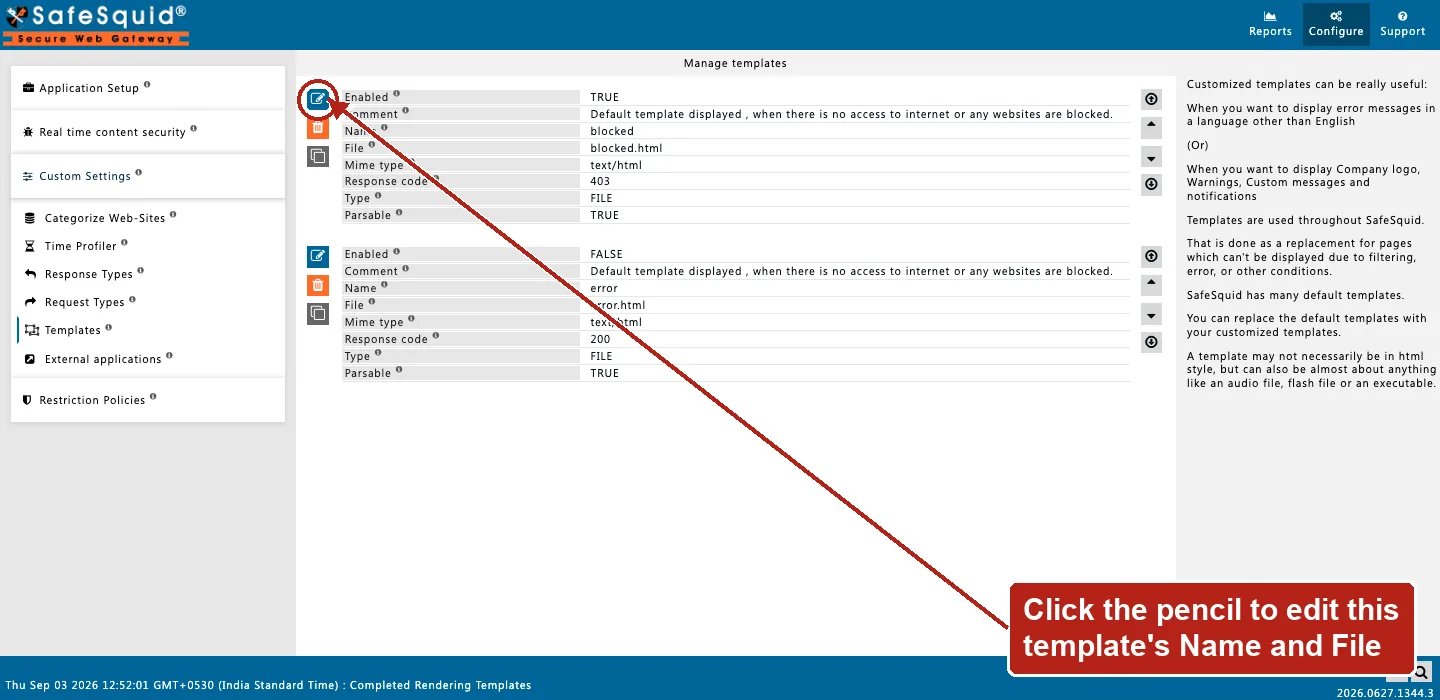
Templates — Manage templates rows
How to verify
- Trigger block referencing template name.
- DEBUG + TEMPLATE native logs.
- Check
X-SafeSquid-Templateresponse header. - Check native logs for “template not found” errors after a configuration change.
- A file changed on disk after the configuration was last applied needs a configuration reload before a FILE entry picks up the change.
Related sections
- Access Profiles — a Deny action invokes a block template by name.
- Header filter — the Drop Original CSP pattern that keeps an isolation or block page’s own CSP from merging incorrectly with the destination’s.