

Block Malicious Domains With a DNS Blacklist
What does this section do?
TheDnsbl section provides domain blocking, category-based routing, and DNS-based blacklisting to prevent access to malicious or unauthorized websites.
Category-based blocking alone always lags a newly-registered attack domain by however long it takes the categorisation feed to see and label it. The uncategorized-domain heuristics in this section — unusually long hostnames, an unusual number of distinct hosts under one uncategorized domain, and homograph (lookalike-character) detection — exist specifically to close that gap, catching suspicious new domains on structural grounds before any external feed has categorized them at all.
This section blocks on:
- Threat categories — Malware, Phishing & Fraud, Botnets, Compromised, Hacking, Illegal Software, Anonymizers, Spam Sites.
- The same content/compliance categories Access Profiles’ Categories field uses — for example Nudity, Gambling.
- Country of the resolved server.
- Classic external blocklist (DNSBL) lookups.
Core Mechanics (C++ Source Validation)
- Sequential Heuristics: The DNSBL module does not just check lists. It runs a sequence of heuristic checks on the HTTP
Hostheader (including length validation, homograph detection, and category/request structural checks). - Enforcement & Block Status: If any heuristic or blocklist check fails, the connection action is instantly set to DO NOT BYPASS. SafeSquid sets the HTTP status to
LMS_MALICIOUS_SERVER, terminates the forward connection, and serves the specifiedTemplateto the client. - Bypass Checking: The entire module execution is skipped if the connection carries the
FEATURE_DNSBLbypass right, or if the request is destined for the SafeSquid interface itself.
Schema Fields
Global Fields
- Enabled (enabled): When off, DNSBL/category/country/IP checks in this section are skipped. When on, uncategorized-domain heuristics run first, then policy rows.
- Maximum Permissible Unique Hosts In An Uncategorized Domain (limit): Before policy rows, block hosts in an uncategorized registered domain when unique host count under that domain exceeds this value. Legacy UI allows -1 to disable; verify behaviour in your build if you rely on that value.
- Maximum Permissible Host Name Length In An Uncategorized Domain (namelegth): Before policy rows, block when the host label length in an uncategorized domain exceeds this limit. Legacy UI allows -1 to disable; verify behaviour in your build if you rely on that value.
- Block Homograph based Uncategorized Domain (homograph): When on, block hosts in uncategorized domains whose registered domain contains confusable (homograph) characters.
Rule-Based Fields (Per Connection Tuning)
- Enabled (enabled): Skip this policy row when disabled.
- Comment (comment): Notes for operators. Used as block reason when non-empty (category/request blocks).
- Threatful Categories (bl_categories): Block when the connection’s website categories include any listed category. No DNS lookup. First matching policy row wins within this check.
- Threatful Requests (bl_requests): Block when the connection’s request types include any listed type. No DNS lookup. First matching policy row wins within this check.
- Threatful Countries (bl_countries): After resolving the host A record, block when GeoIP country code is in this list. Requires a successful A lookup and runs inside the IP-check pass.
- DNSBL Domain (domain): Suffix appended to the request host for DNSBL lookup (for example example.com.in.dnsbl.org ). Leave empty on rows that only use category/request/country/IP list checks.
- Blocked IP addresses (badips): IPs that count as a DNSBL hit. Compared against: host A record, reverse-DNSBL answer, or direct IP match. Failed DNSBL lookups are treated as 0.0.0.0 ; include that address to block lookup failures.
- Template (templ): Block page template when this row triggers a block. Blank uses blocked (request-type rows may append the match name).
How SafeSquid processes checks
- When website categories are empty, uncategorized heuristics run: host name length, homograph, then unique-host count under the registered domain.
- Category check: walk policy rows top to bottom. First row whose Threatful Categories match any connection category blocks immediately (no DNS).
- Request type check: same first-match walk against Threatful Requests.
- DNSBL check: append DNSBL Domain suffix to the request host, resolve A record, compare to Blocked IP addresses. Failed lookups are treated as
0.0.0.0— include that address to block lookup failures. - IP check: compare host A record, reverse DNSBL answer, and GeoIP country (Threatful Countries) against Blocked IP addresses / country list — first block in each sub-pass wins.
- On block: action DO NOT BYPASS, block template, debug header
X-DNSBL-Filterwith match detail.
Important entry fields
- Threatful Categories — Block when the connection’s website categories include any listed category. First matching policy row wins.
- Threatful Requests — Block when the connection’s request types include any listed type. First matching row wins.
- DNSBL Domain — Suffix appended to the request host (for example
example.com.in.dnsbl.org). Leave empty on rows that only use category/request/country/IP checks. - Blocked IP addresses — IPs that count as a DNSBL hit (ranges supported). Compared against lookup answers and direct host A records.
- Threatful Countries — After resolving the host A record, block when GeoIP country code is in this list.
- Template — Block page when this row triggers. Blank uses
blocked(request-type rows may append the match name).
Examples
Open Configure → Real time content security → DNS Blacklist → DNS and IP Black Listing Policies. Row fields are Enabled, Comment, and Threatful Categories (or Threatful Requests) — the top row in the capture below is hidden since its category list names a CSAM category not suitable to publish verbatim; the remaining rows show the field shape clearly.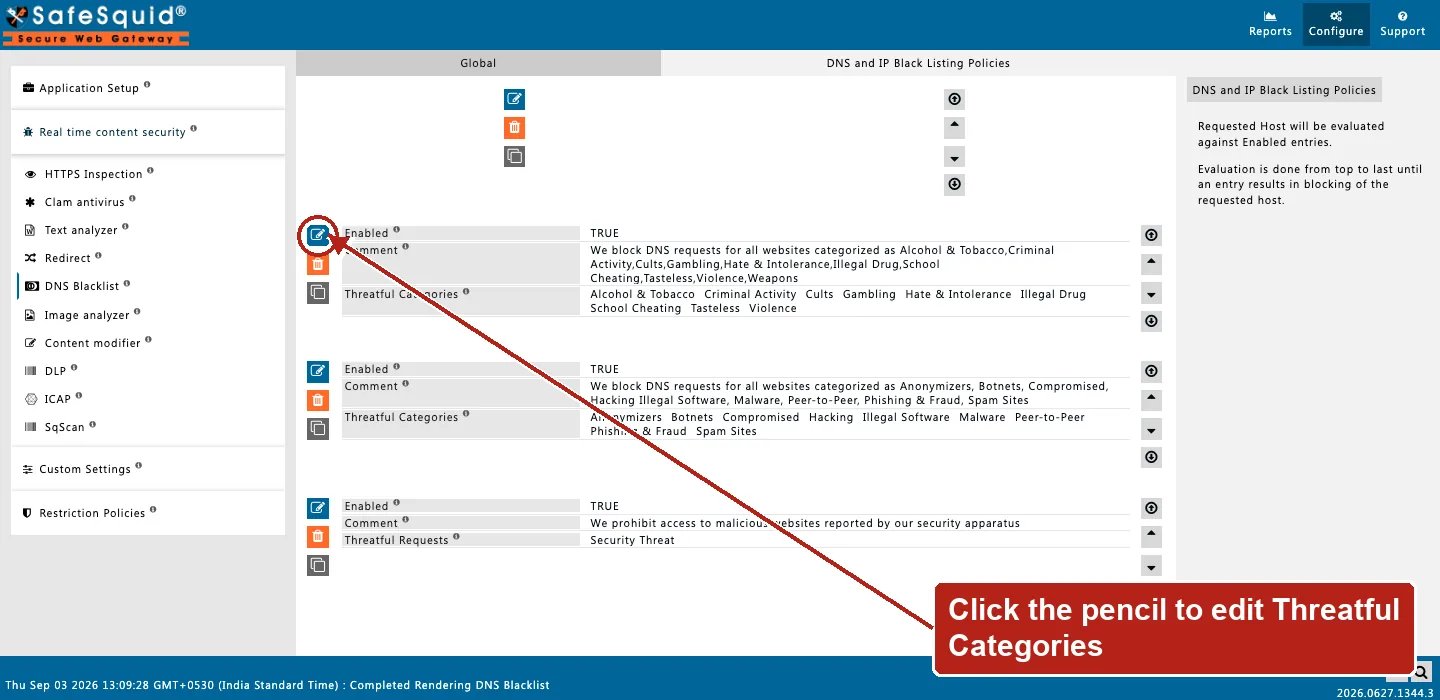
DNS Blacklist — DNS and IP Black Listing Policies rows
How to verify
- Request a known-listed or test host and confirm HTTP 451 block page.
- Check debug response header
X-DNSBL-Filter(category name,Request/…, DNSBL host/IP, or heuristic reason). - Enable SECURITY in
LOG_LEVELfor nativednsbl/ blocked lines. - Open Reports → Detailed logs;
filter_nameshowsdnsblwith filtering reason.
- If a category or country block was expected but did not fire, confirm the destination’s own categorisation or resolved address first. This section can only act on categories and addresses already available to it.
Next steps
- SSqore - turn on SSqore cloud categorization so Access Profiles can match requests by website category.
- Access Profiles - decide what each user can fetch by combining time, request type, response type, category, and group labels into ordered allow and deny rules.