

Decide What Each User Can Fetch With Access Profiles
The Access Profiles section is the central content-policy hub. Access restrictions decide who connects; Access Profiles decide what they may fetch. It combines Time Profiler, Request Types, Response Types, categories, and User-Groups, then adds profile tags and sets Allow/Deny.Unlike Access restrictions (first match), every matching row in Default and Secondary Policies applies. Later rows see tags changed by earlier rows. A broad Deny early in the list is not final. A later, more specific Allow can still override it, and the reverse works too. The recommended shape is to deny broadly first and carve out specific exceptions after.
Profile pipeline
On each request (non-interface), SafeSquid builds label lists in this order before Access Profiles runs:- Time Profiler →
time_schedules - Request Types →
request_types - Domain categorization →
website_categories - Access Profiles →
profiles+action - Response Types on response headers/body → updates
response_types; Access Profiles runs again
user_groups (not profiles). Access Profiles User Groups gate matches those tags.
Core mechanics
List order
- Clear the connection’s profile tags; set the action to ALLOW.
- Walk Default Policies top-down — every match applies.
- Walk Secondary Policies top-down — same cumulative rules.
- Final action not Allow → block (bypass cookie may apply).
Action values
- Allow — Default. Downstream sections use applied profile tags.
- Deny — Block. With Access Allow bypassing, temporary bypass cookie may be offered.
- Do not bypass — Hard block; no bypass cookie.
- Inherit — Keep action from earlier matching rows; use when row only adds/removes tags.
Rule fields
All configured criteria on a row must match. Blank = any. Use! to negate tags in list fields.
- Enabled (
enabled) — disabled entries are skipped entirely; they never match and never affect the connection. - Comment (
comment) — free text describing why the entry exists. Also shown to the user as the block reason when this entry’s Action sets Deny or Do not bypass. - Trace Entry (
profile_tracing) — writes a native log line every time this entry adds or removes a Profile label. Switch it off again once testing is done. - Proxy instance (
proxyhost) — a regular expression matched against this appliance’s own hostname, for deployments where several instances share one configuration but should apply different entries. Blank applies on every instance. - Applicable Profiles — Tags on connection from earlier rows in this pass (list is cleared at start).
- Time Schedule — Tags from Time Profiler.
- Request Types — Tags from Request Types.
- Response Types — Tags from Response Types; requires response header when field set. Also skipped for a response confirmed empty (not chunked, Content-Length zero).
- User Groups — From Access restrictions. Non-blank + empty user_groups → row skipped. Setting this field never by itself forces a login prompt.
- Categories — Domain categories; empty lookup tests as
UNCATEGORIZED. When referer categorization is enabled, the referer’s category is matched too. - Action (
action) — only changes the connection’s running Action when it differs from the current Action and is not Inherit. - Added Profiles / Removed profiles — labels applied when the entry matches. Added runs first, then Removed, on the same entry — so one entry can add one label and remove a different one. But cannot remove a label it just added. A label already present is not duplicated; removing a label that is not present has no effect.
Default Policies vs. Secondary Policies
Default Policies is evaluated first, for every connection, on every pass. Secondary Policies runs after it, using the labels and Action Default Policies left behind. The natural home for scoped exceptions layered on top of a broad Default Policies deny.Examples
Open Configure → Restriction Policies → Access Profiles. Default Policies is the tab that opens first; each row shows Enabled, Comment, Trace Entry, Categories or Request Types, Action, and Added Profiles inline, and the right-hand panel restates the evaluation order.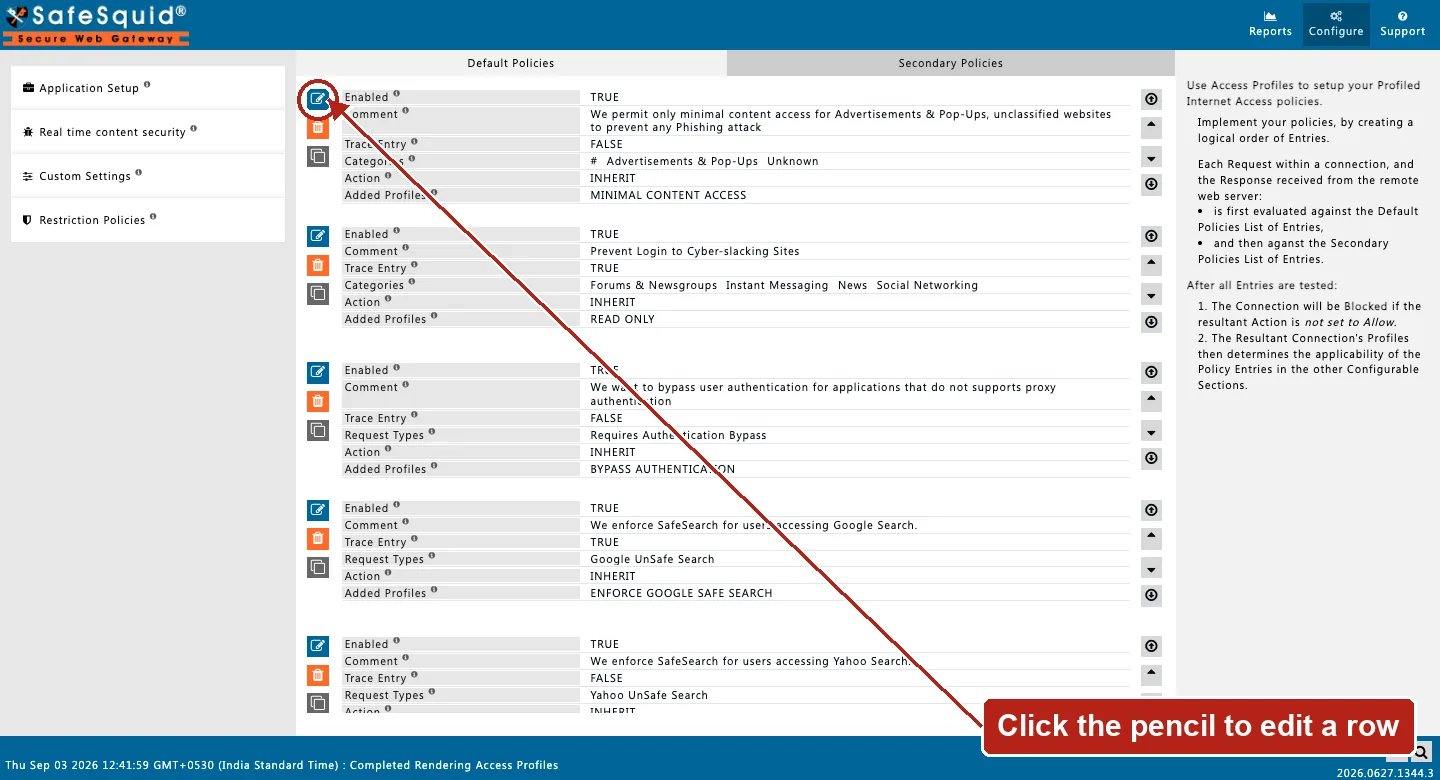
Access Profiles — Default Policies list
How to verify
- Reports → Detailed logs — profiles, request/response/time profile columns.
- Enable Trace Entry on one row; check native logs.
- Debug headers —
X-SafeSquid-Profiles,X-SafeSquid-Access-Policy. - If an expected label is missing, check whether an earlier entry’s gates actually fit the connection. A skipped entry contributes nothing.
- To confirm cumulative behaviour, deliberately place a Deny in Default Policies and a narrower Allow below it in Secondary Policies, and verify the connection is allowed. This is what most clearly distinguishes Access Profiles from Access restrictions.
- When a block is unexpected, check the Comment recorded as the block reason and whether the Action was Deny or Do not bypass. A Do not bypass block will not respond to a bypass cookie even for a user who otherwise holds the Allow bypassing right.
Next steps
- Time Profiler - tag connections with time labels from the appliance clock so Access Profiles can apply policy by weekday and time of day.
- Request Types - label HTTP requests with tags that Access Profiles and other filters match on, based on what the client asked for.
- Response Types - label HTTP responses by their real content type, such as executable, archive, or image, so Access Profiles can block by actual file type.