

Route Requests Through a Proxy Chain
What does this section do?
TheForward section configures upstream proxy routing, enabling SafeSquid to chain requests to parents, siblings, or Cache Array Routing Protocol (CARP) clusters.
It is infrastructure routing, not a security control. It decides where a request goes next on its way out, not whether it is allowed.
Core Mechanics (C++ Source Validation)
CARP hash, blank Proxy stop, ICP peer selection.- CARP Hashing: When routing requests through an array of proxies, the routing engine performs a deterministic 32-bit bitwise rotation hash combining the requested URL and the peer’s hostname. The peer generating the highest hash score receives the request.
- Self-Resolution (Loop Prevention): If SafeSquid calculates that its own hostname generates the highest CARP hash (
op >= hp), it drops the forwarding requirement and resolves the request directly. - Cache Coordination: When a request is forwarded to another CARP array member, SafeSquid sets
CONNECTION_NOCACHE. This ensures the object is only cached on the designated CARP owner, creating a single, distributed logical cache without duplication.
Schema Fields
Global Fields
- Enabled (enabled): Toggles proxy forwarding globally.
- Enable CARP (carp): Enables Cache Array Routing Protocol for load balancing across peers.
- CARP hash size (carphashsize): Determines the hash bucket size for CARP distribution.
- CARP hash size semantics:
0uses the full hash range, matching the behavior of other CARP-compatible proxies when every peer in the array also uses0. A non-zero value increases the chance that different URLs land on the same peer — more cache overlap across peers. Every peer in the array must be configured with the same non-zero value for consistent results.
Rule-Based Fields (Per Connection Tuning)
- Enabled (enabled): Toggles the rule.
- Comment (comment): User description.
- Profiles (profiles): The trigger condition. Limit this entry to connections that already carry these Access Profile tags.
- Profiles negation: a profile prefixed with
!applies the entry when that profile is absent. - Proxy (proxy): The IP address or hostname of the upstream proxy server.
- User name (username): The username to authenticate with the upstream proxy.
- Password (password): The password to authenticate with the upstream proxy.
- Domain (domain): The NT domain to present when the upstream proxy uses NTLM authentication. Not a URL filter.
- Port (port): The TCP port of the upstream proxy server.
- ICP peer type (icptype): Defines the relationship with the peer (e.g., Parent, Sibling).
- ICP port (icpport): The UDP port used for ICP queries.
- Type (type): The type of the upstream proxy:
HTTP,SOCKS4,SOCKS5, orCONNECT. - Applies to (which): The request types forwarded through this proxy: HTTP, FTP, and/or CONNECT (HTTPS).
Important entry fields
- Profiles — Limit the row with Access Profile tags. Blank matches all profiles.
- Proxy — Upstream hostname or IP. Blank on a matching row stops candidate collection without forwarding. Rows whose Proxy equals this instance hostname or System configuration Proxy hostname are skipped (shared-config safety).
- Type — HTTP (standard proxy), SOCKS4 / SOCKS5, or CONNECT tunnel. Port defaults to
3128for HTTP/SOCKS and443for CONNECT when Port is 0. - Applies to — Protocol flags: HTTP, FTP, CONNECT. Row is skipped when the connection protocol does not match any selected flag.
- ICP peer type / ICP port. When global CARP is off: NONE gives fixed priority 1; PARENT forwards on ICP miss; SIBLING forwards only on ICP HIT. UDP ICP uses the ICP port on this row; global ICP listen port and timeout come from Caching.
- ICP eligibility — only Type
HTTPis eligible for ICP peer selection. - User name / Password / Domain — Upstream proxy authentication when the selected peer requires it. Domain applies only to NTLM.
Processing order
- If forwarding is disabled, or Access Bypass → Forward is set, skip.
- Walk Forwarding proxies top to bottom; add each enabled matching row with a non-self Proxy to the candidate list.
- Blank Proxy on a matching row stops collection immediately.
- CONNECT requests skip ICP/CARP selection logic used for plain HTTP.
- Select one peer: CARP hash among candidates, or ICP priorities, or random tie-break.
- Send the request through the selected peer, or direct if no candidate remains.
startup.ini may append implicit upstream rows from the proxy’s IP detection / port when set — not shown in the Web UI but affects runtime.Examples
Open Configure → Application Setup → Proxy chain → Forwarding proxies. Row fields are Enabled, Comment, Profiles, Proxy, Port, ICP peer type, ICP port, Type, and Applies to.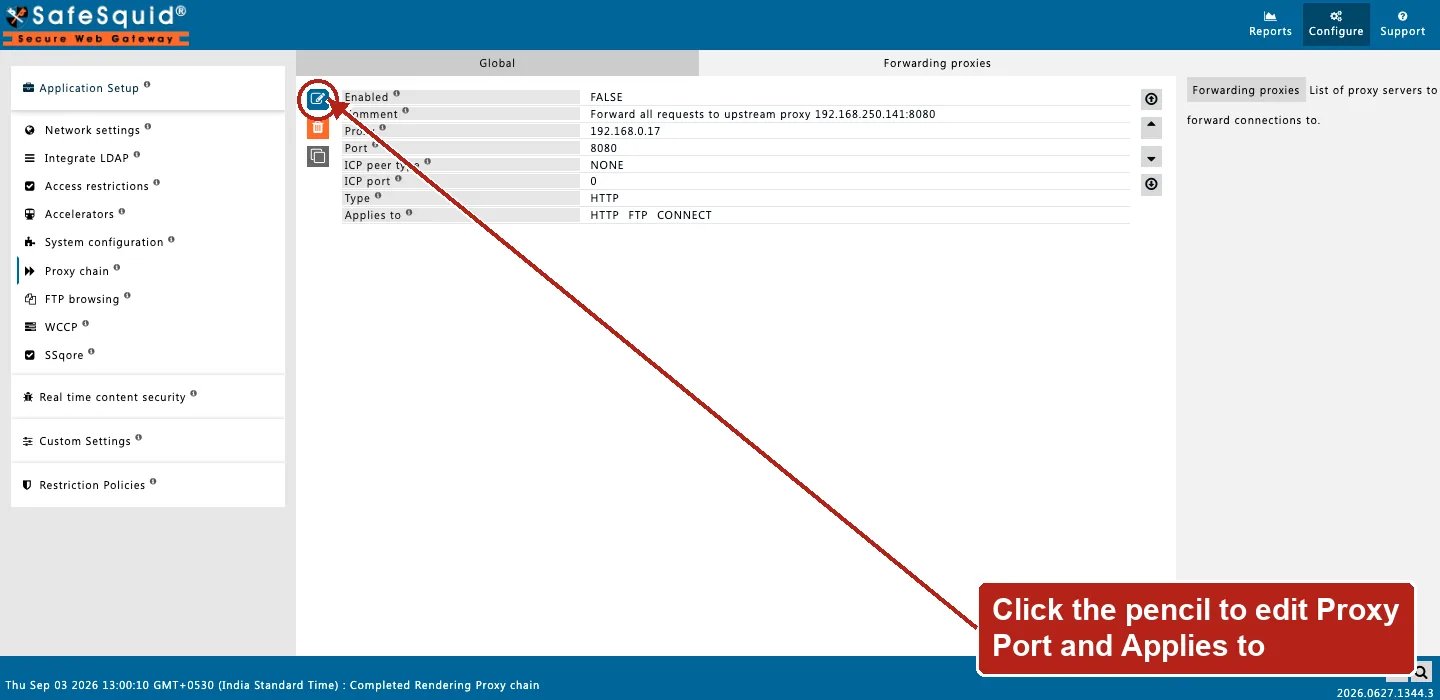
Proxy chain — Forwarding proxies row
How to verify
- Enable FORWARD in
LOG_LEVEL; look for nativeforwarding:lines. - From a test client, confirm upstream sees traffic from SafeSquid (or from your upstream auth logs).
- Enable Trace Entry on one Forwarding proxies row to see candidate collection.
- Detailed logs may show forward-related status when policies apply.
- If a request that should be forwarded goes direct instead, look for a blank-Proxy row positioned above the one you expected to match. It stops candidate collection silently.
- For a CARP setup, confirm every peer in the array uses the same CARP hash size.
Next steps
- Caching - control in-memory HTTP caching in SafeSquid: set refresh rules, freshness limits, and object size limits for cached content.