

Control Who Connects Through Access Restrictions
The Access section defines the primary security perimeter: who may connect, whether they authenticate, which proxy features they may use, and which User-Groups and bypass flags attach to the connection.Configure authentication mechanisms in Authentication. LDAP directory setup is in Integrate LDAP. Content allow/deny is in Access Profiles.
Core mechanics
Default policy and list order
With Default Access Policy = Deny (recommended):- Walk the Allow list top-down; first enabled row whose gates pass wins for that pass.
- If an Allow row matched, walk the Deny list; a Deny match revokes access.
- If no Allow row matched, access is denied.
Inner gate order
For each enabled row: Profiles → Interface → IP → LDAP Profiles. Any failure skips to the next row.Client IP and X-Forwarded-For
WhenX-Forwarded-For is present, it replaces the TCP client IP for ip matching.
LDAP Profiles need identity first
An entry that sets only LDAP Profiles cannot match on the first, identity-less request — SafeSquid has no directory group list to test yet — and by itself will not trigger a login prompt. LDAP Profiles only has anything to test once identity is already known, from a prior Kerberos/SSO login, a completed System authentication challenge, or an IP-to-user map.Two-pass authentication
- First pass (no credentials) — If gates pass and
pamauth=TRUEor User name is set, the row matches and issues a 407/401 challenge. Ifpamauth=FALSEand User name is blank, the row matches immediately — unauthenticated access. - Second pass (credentials present) — SafeSquid populates the connection’s LDAP distinguished name with group strings (commas stored as spaces). LDAP Profiles rows can match; PAM validation runs during the access check.
- If the first list produces no match at all — not even a credential challenge — the second list is skipped entirely and Default Access Policy decides the outcome directly.
User-Groups assembly on match
On match, SafeSquid rebuilds the connection’s User-Groups in this order: the entry’s own Add to User-Groups values, then every LDAP group the signed-in user belongs to, then the user’s own directory identity. This assembled set — not just the entry’s Add to User-Groups field — is what every later section’s User-Groups matching actually tests (Access Profiles, DLP, and similar).Kerberos / SSO (ntlm_authentication)
UI label Kerberos / SSO; internal field ntlm_authentication. When TRUE, SafeSquid offers Negotiate (GSSAPI/Kerberos). When FALSE, Negotiate is not advertised. Requires HTTP.keytab for SSO to succeed. See Authentication.
DLP bypass
Requires both the Allow bypassing access right (BYPASS) and the DLP bypass checkbox. Either alone leaves DLP active.
If nothing matches either list
When neither list produces a match, the connection is denied outright: it receives a block page and the connection is closed. If a match still needed credentials that never arrived, the client instead receives an authentication challenge and can retry.Recommended entry ordering
- IP/interface no-auth rows (specific addresses first)
- Profile-bypass rows (e.g. BYPASS AUTHENTICATION) — before auth rows
- LDAP Profiles — before PAM regex (group beats username pattern)
- PAM regex and entry-credential rows
- Profile-gated showcase rows (each has a
profilesconstraint) - PAM catch-all — last Allow row
- Deny exceptions — paired with an Allow range to demonstrate revoke
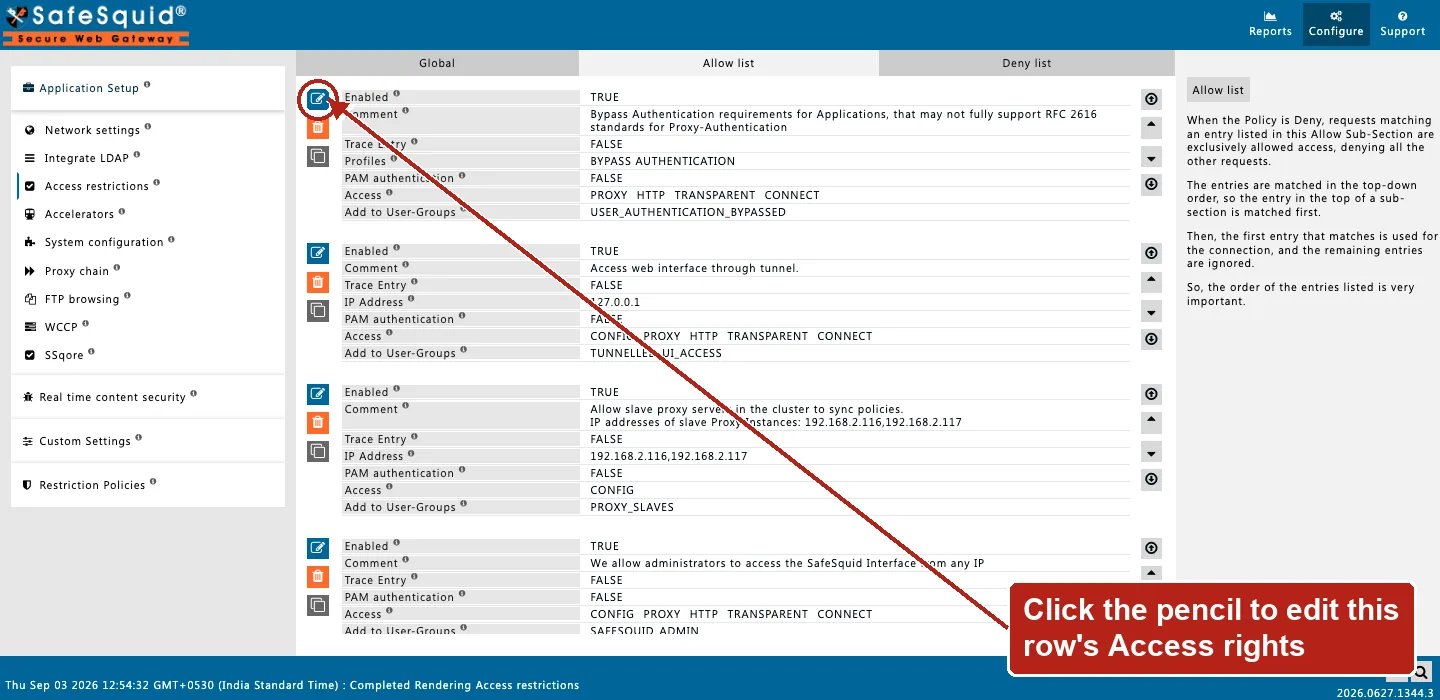
Access restrictions — Allow list rows
Global fields
- Default Access Policy — Deny recommended. Controls default when no row matches and which list is walked first.
- Kerberos / SSO — Enables Negotiate when keytab is present.
Rule fields
All configured criteria on a row must match. Blank means any.- IP Address — Single IP, comma list, or hyphen range. CIDR not supported. Uses XFF when present.
- Interface — Listen socket IP:port of the accept.
- System authentication — Cache → PAM → LDAP bind; User name is a regex filter; Password ignored.
- User name / Password — With System auth off: exact case-sensitive match. Non-empty User name still triggers challenge on first pass.
- LDAP Profiles — Exact match against the connection’s LDAP distinguished name; write DNs with spaces not commas.
- Access — CONFIG, PROXY, HTTP, TRANSPARENT, CONNECT, BYPASS — independent rights.
- MAX Concurrent Connections — Keyed
username@client-ip; 0 = no cap.
- Profiles (
add_profiles) — limits the entry to connections that already carry a listed Access Profile. Blank = ignored. - Negation —
LDAP ProfilesandProfilesboth accept!valueto negate a match. - Add to User-Groups (
add_user_groups) — group names added to the connection’s User-Groups on match. LDAP groups and the user’s directory identity are added automatically alongside these, regardless of this field — see “User-Groups assembly on match” above. - Bypass (
bypass) — modules skipped on match: Header filtering, Redirect, Cookie filtering, Rewrite, External, Forward, Text analyzer/Keyword filtering, DNSBL, Limits, Antivirus, ICAP, DLP. - Interface username / Interface password (
ifusername/ifpassword) — optional second Web UI login, required together. Only relevant when this entry also grants the Web interface Access right. - Comment (
comment) — written to native security logs when this entry matches. - Trace Entry (
profile_tracing) — logs each User-Group this entry adds; turn off after testing. - MAX Concurrent Connections — the uncapped case —
0removes the connection ceiling. But connections are still counted against the entry, not skipped from counting.
Examples
How to verify
- Test from a known client IP without spoofed XFF (unless testing that path).
- Reports → Detailed logs — username, IP, access filter.
- Enable Trace Entry on one row; check native logs.
- SECURITY log family for authentication outcomes.
- If Default Access Policy is Deny and an Allow-listed client is unexpectedly blocked, check the Deny list for a second-pass override before suspecting the Allow entry.
Next steps
- Authentication - choose how SafeSquid identifies users, including Kerberos SSO and system authentication, so Access Profiles and logs can name them.
- Integrate LDAP - sync directory users and groups into SafeSquid so Access Profiles and sign-in can apply policy by group membership, not IP address alone.
- Access Profiles - decide what each user can fetch by combining time, request type, response type, category, and group labels into ordered allow and deny rules.