

Block Sensitive Uploads With DLP
What does this section do?
TheDLP section inspects uploaded content and can block sensitive data leaving the network. MIME-based DLP policies set allow or block actions; OCR policies score text extracted from uploads against a global Threshold.
DLP runs on the request (upload) path only — not on downloaded responses. Access Bypass with DLP skips inspection. Access Allow bypassing can soften a DENY block when a valid bypass cookie is present.
Because the MIME layer only sees declared content type, pair a MIME allow entry (for example, allowing spreadsheet uploads) with a matching destination restriction in Access Profiles — otherwise allowing a common upload type through DLP is effectively blanket permission to upload that type anywhere, defeating the control.
Core Mechanics (C++ Source Validation)
MIME regex compile (commas →|), policy walk, OCR scoring.
MIME policy — last match wins
Unlike most SafeSquid lists, DLP MIME rows use last matching enabled row wins. Each row whose POSIX regex matches the uploaded part’s MIME type overwrites the action as the walk continues top to bottom.OCR scoring
Unless MIME action is already DO NOT BYPASS, SafeSquid extracts text once (text/* uses text extraction; image/* uses OCR). Enabled OCR rows are walked while score < Threshold; each keyword regex match adds Weight. Score ≥ Threshold → DO NOT BYPASS.
Modern zip-based Office documents (.docx, .xlsx, .pptx) are unarchived directly: their real paragraph or cell text is extracted with no OCR needed. Any images embedded inside the document are separately OCR’d for text they contain.
Bypass severity
DENY may be bypassed with Allow bypassing and a valid bypass cookie. DO NOT BYPASS is never bypassed.Processing flow
Section fields
The console splits DLP into three tabs. The MIME walk and the OCR walk are separate stages of the same upload inspection — see Processing flow above for how they hand off.- Global
- DLP policies
- OCR policies
Global fields
- Enabled (enabled) — Master switch for upload inspection and OCR scoring.
- Threshold (threshold) — OCR keyword weights summed per upload; total ≥ Threshold yields DO NOT BYPASS.
Examples
Open Configure → Real time content security → DLP → DLP policies (sibling tabs: Global, OCR policies). Row fields are Enabled, Comment, Profiles, Upload Content type, and Action.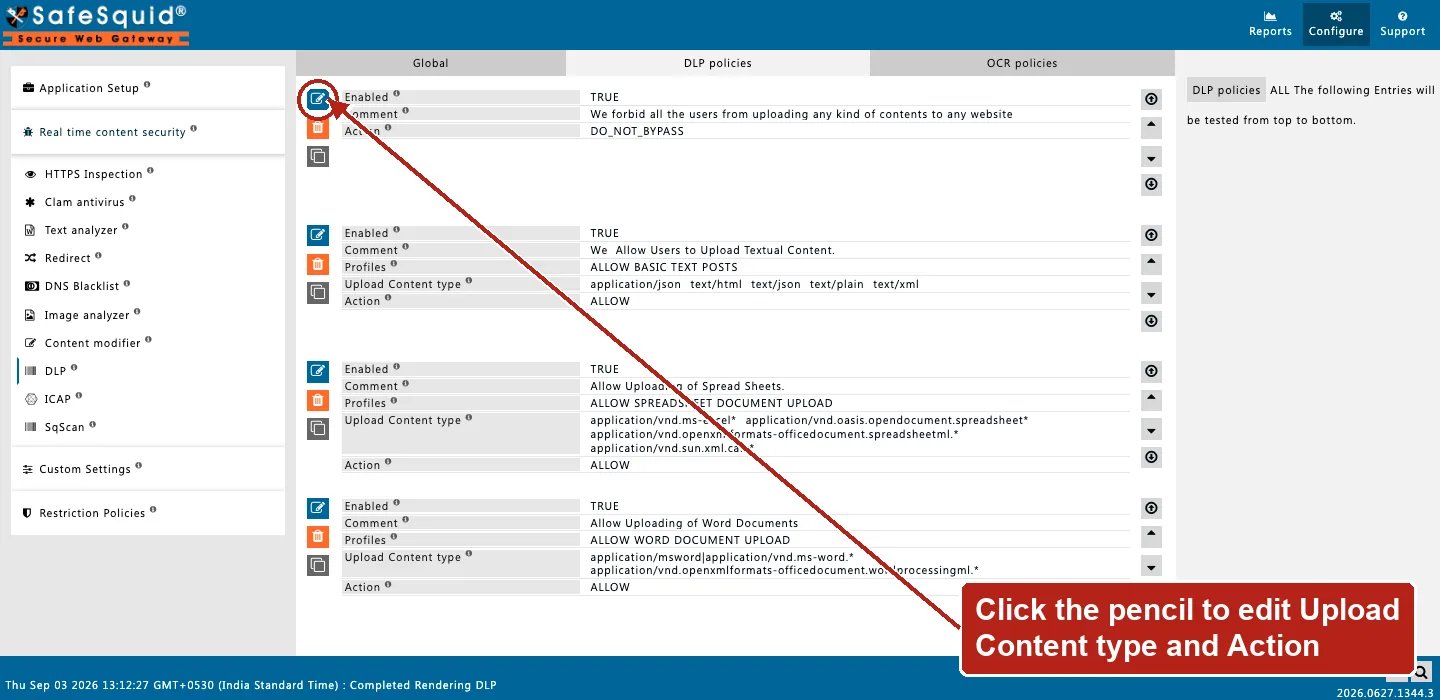
DLP — DLP policies rows
Block PDF uploads
- Configuration: Upload Content type
application/pdf, Action DENY, CommentPDF uploads not permitted. - Result: any upload part whose MIME matches is blocked with that comment as reason.
OCR keyword threshold
- Configuration: Threshold 100; OCR row
confidentialWeight 60; OCR rowinternal use onlyWeight 50. - Result: image upload containing both phrases scores 110 → DO NOT BYPASS at Threshold 100.
Last match overrides allow
- Configuration: Row A blank MIME ALLOW; Row B below
image/DO NOT BYPASS. - Result: image uploads match both; row B wins (last match) and hard-blocks. Non-image uploads match only row A unless OCR scores high enough.
Legacy document format bypasses content inspection
- Configuration: Threshold 100; an OCR row looking for a sensitive keyword. A user uploads a
.docfile (legacy binary Word format) containing that keyword in its body text. - Result: the MIME layer’s action for
.docapplies as configured. But the content-inspection layer cannot open the legacy binary format to extract its text. So the keyword is never seen and never contributes to the score. This is a known limitation of the pre-2007 Office formats and PDF, not a misconfiguration. A policy relying on keyword detection alone should not be assumed to cover these formats.
How to verify
- Upload test content through a profile without DLP bypass.
- Enable DLP in
LOG_LEVELfor nativedlp:lines. - Reports → Detailed logs — filter name DLP with action and score.
- Pair Access BYPASS + DLP checkbox to confirm skip path.
- Test keyword scoring with
.docx/.xlsx/.pptxuploads — testing with.doc/.xls/.pptor PDF does not exercise the content-inspection layer at all, by design.
Next steps
- Text analyzer - score text in HTTP payloads against keyword patterns and block content once its cumulative score passes the threshold.
- ICAP - send HTTP request and response bodies to ICAP services, built-in or third-party, at the REQMOD and RESPMOD hooks.