

Control In-Memory Caching in SafeSquid
Open Configure → Application Setup → Accelerators → Caching. This section sits under the Accelerators menu group alongside Caching and Prefetching. They interact, since a prefetched object is only useful if Caching later serves it. The Cache section controls in-memory HTTP caching, refresh policy, and ICP parameters for forwarding.Core mechanics
Refresh — first match wins
Walk Refresh rows top-down; first enabled row whose profiles match sets min/max age, validate, and cachable flag, then stops.cachable=FALSE sets CACHE_INVALID unless CACHE_FORCE.
Freshness semantics
What each Refresh age field actually does, once an entry has matched:- Minimum age — guards against serving something that changed very recently: if the origin’s Last-Modified is more recent than this many seconds ago, the object is not treated as safe to serve without revalidating.
- Maximum age — hard ceiling. SafeSquid expires the object this many seconds after caching regardless of the freshness the origin’s own headers promised.
0disables the ceiling. - Revalidate age — applies only when the origin gave no explicit freshness guidance at all (no
Expires, nomax-age): fresh for this many seconds since caching, then must revalidate. - Last-Modified time factor — last-resort heuristic, used only when the origin gave no freshness guidance but did supply a Last-Modified date: the longer ago the object was modified relative to when it was fetched, the longer it is assumed to stay fresh, scaled by this percentage.
Violate RFC
Objects stored despiteno-cache / no-store get CACHE_VIOLATION. When Violate RFC is off, reads return NULL (not served). When on, violation objects may be served.
Object size limits
- Minimum file size — an object smaller than this is discarded after the write completes rather than kept.
- Maximum file size — an object exceeding this during writing is discarded unless the matching Refresh entry forced caching regardless of size.
0 disables either check.
Memory management
When memory used by cached objects exceeds Memory cache size, a cleanup pass evicts least-recently-used, currently-unread entries first, targeting Memory cache size minus Memory free extra. Clean interval is the minimum time between passes so cleanup does not run continuously under sustained pressure.Cache bypass
If the connection was flagged elsewhere to bypass the cache, no cache lookup happens at all.Manage cached objects
A regular-expression pattern plus “Delete matches” invalidates and removes every cached entry whose key matches, except an entry a client is actively reading at that moment, which is left alone rather than pulled out from under the reader.Schema fields
Global fields
- Enabled (
enabled) — master switch. Off means no cache lookup and no write for any request. - Violate RFC (
violate_rfc) — see above. - Memory cache size (
maxmemsize) — acceptsK/M/Gsuffixes. - Memory free extra (
memextra) — how far below the cache size a cleanup pass frees. - Minimum file size (
minsize) / Maximum file size (maxsize) — see Object size limits above. - Prefetch window (
prefetchwindow) — seconds after a Prefetching-driven fetch during which a second prefetch write for the same URL is rejected. - ICP port (
icpport) — UDP port for ICP query/reply used by Proxy chain peer selection;0leaves ICP unbound. - ICP timeout (
icptimeout) — milliseconds to wait for a peer’s ICP reply. A slow peer is treated as down for that query. - Store balance method (
sbalancemethod) — FILL SIZE picks the store holding the least data. FILL PERCENT picks the store least full by percentage of its own quota. No effect while disk caching is disabled. - journal size (
journalsize) —0uses a default of 128,000 records. - Clean interval (
cleaninterval) —0uses a default of 30 seconds.
Store entry fields (inactive — disk caching is disabled)
- Enabled (
enabled), Comment (comment), Profiles (profiles) — as elsewhere. - Path (
path) — blank skips the entry. - Maximum disk size (
maxdisksize) —0is treated as unconfigured and skipped in selection. - Disk free extra (
diskextra) — free space targeted below the quota during cleanup. - MD5 integrity check (
md5) — verifies each object’s content hash on read and invalidates on mismatch when disk caching is active. No effect today.
Refresh entry fields
- Cachable (
cachable) — off marks new matching objects invalid on arrival. - Minimum age (
minage), Maximum age (maxage), Revalidate age (validate), Last-Modified time factor (lmfactor) — see Freshness semantics above. - Profiles (
profiles) — blank matches every connection. - Comment (
comment) — administrator note.
Examples
Open Configure → Application Setup → Accelerators → Caching → Refresh. Row fields are Enabled, Comment, Profiles, Cachable, Minimum/Maximum age, Revalidate age, and Last-Modified time factor.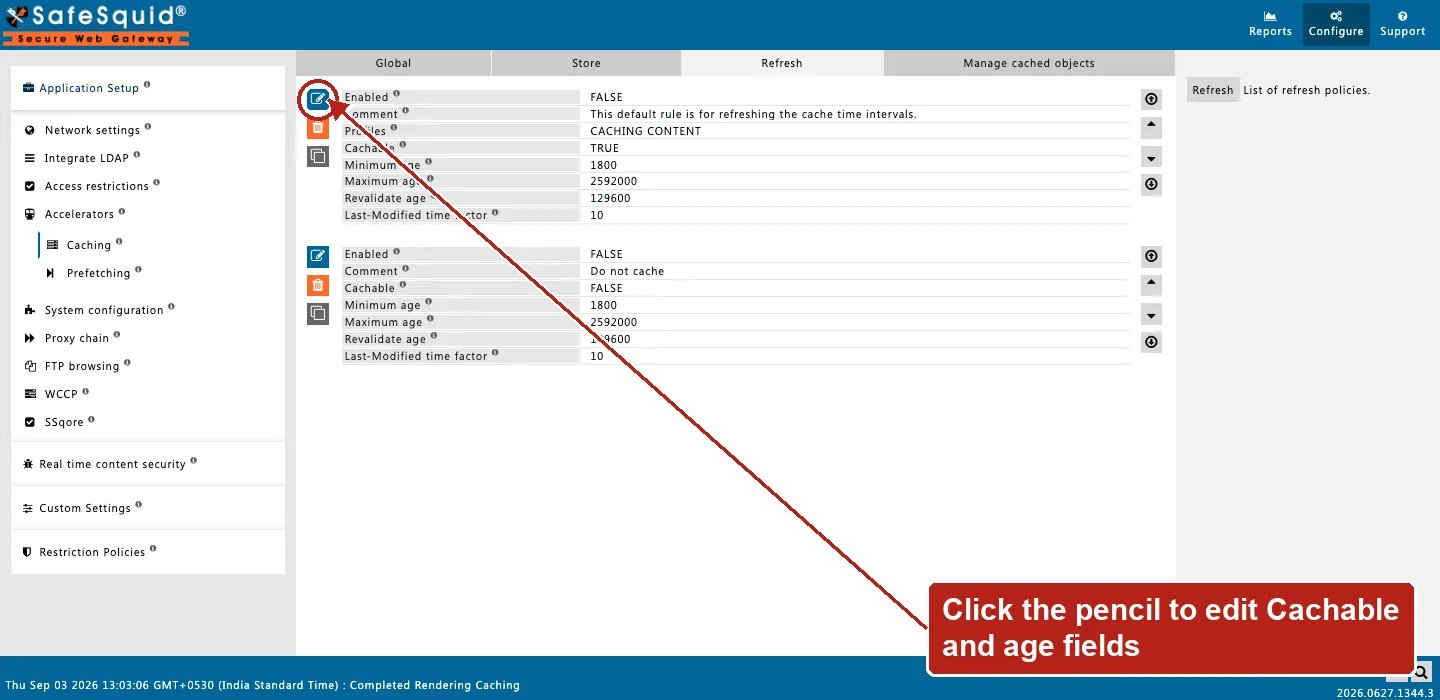
Caching — Refresh rows
How to verify
- Enable CACHE in
LOG_LEVEL. - Repeat URL request; check Detailed logs for hit/miss.
- Use Manage cached objects to inspect or purge entries.
- If an object you expect to be cached never shows as a hit, read the Refresh entries top to bottom. A broader entry above the intended one can be winning, exactly as in any other first-match list.
Next steps
- Prefetching - prefetch linked stylesheets, scripts, and images into the cache while the HTML page is delivered. So the browser’s follow-up requests load faster.