

Reduce Cross-Site Tracking With Elevated Privacy
Open Configure → Restriction Policies → Privacy control → Elevated Privacy. This section sits under the Privacy control menu group alongside Cookie filter, Header filter and Elevated Privacy — configure them together, since a Cookie filter allow row and an Elevated Privacy STANDARD row can otherwise fight over the same header. TheElevated section reduces cross-site tracking by stripping third-party cookies and selected tracking headers. Without it, third-party cookies and related trackers can follow users from site to site.
Core mechanics
First match wins
On each request and response header pass, enabled Elevated policy rows are walked top to bottom. The first matching row sets the privacy level for that connection; later rows are skipped.Privacy levels (action field)
- NOT-REQUIRED — No stripping; bypass elevated privacy.
- LOW — Drop third-party Cookie and Set-Cookie when cookie flag set.
- STANDARD — LOW plus remove Referer and Origin on outgoing requests.
- PARANOID — STANDARD plus remove User-Agent (may break browser-variant sites).
X-Elevated-Privacy reports level when Send Debugging Headers includes client.
Global fields
- Enabled (
enabled) — master switch. When off, request and response header processing exits without changing any headers.
Important entry fields
- Profiles (
profiles) — limits the row to connections carrying the listed Access Profiles; blank matches every connection. - Privacy Levels (
action) — NOT-REQUIRED, LOW, STANDARD, or PARANOID, applied when this row is the first match. - Comment (
comment) — operator note only; does not affect matching.
Examples
Open Configure → Restriction Policies → Privacy control → Elevated Privacy → Elevated policies. Rows are tested top to bottom; the first enabled match sets the level for the connection.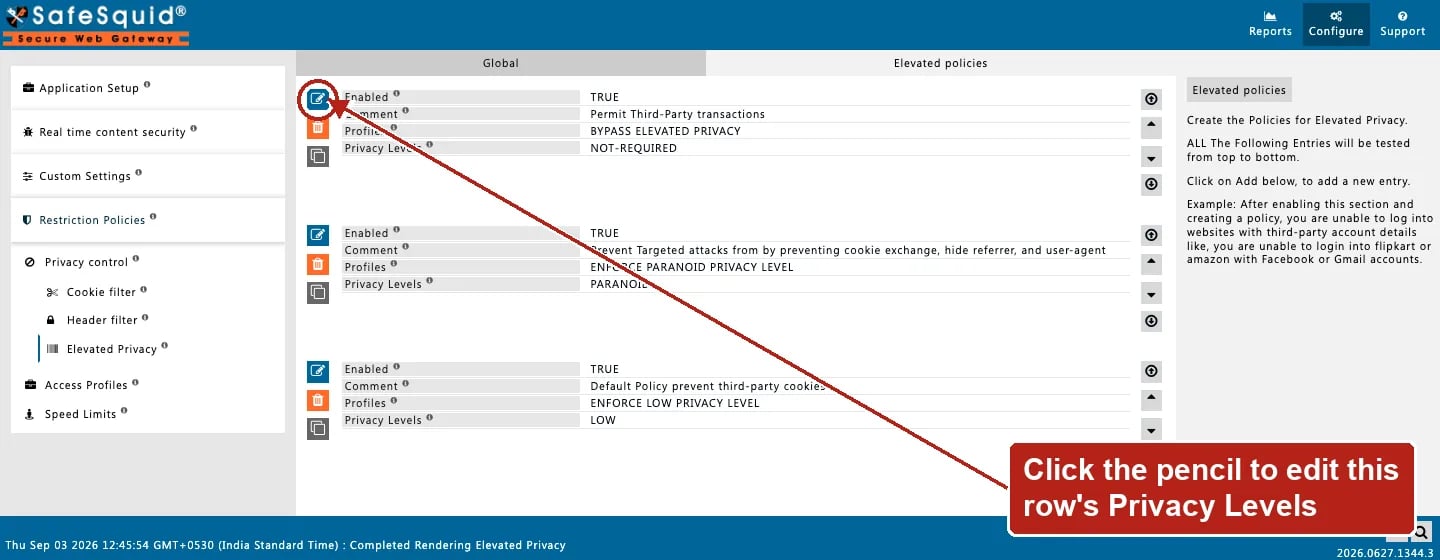
Privacy control — Elevated Privacy policy rows
How to verify
- Browse multi-site flow; inspect request headers upstream of proxy.
- Check
privacy.logunder Reports. - Enable elevated log level for native privacy lines.
- Debug header
X-Elevated-Privacyon client when configured.
Next steps
- Cookie filter - control which HTTP cookies pass between clients and servers using a global policy plus allow and deny override lists.
- Header filter - strip or inject HTTP headers on client requests and server responses using global, allow, deny, and insert rules.