

OpenLDAP Simple Authentication
Simple authentication validates users against OpenLDAP using standard LDAP bind. Users are prompted by their browser to enter their directory credentials when accessing the proxy.Problem statement
OpenLDAP environments still need directory-backed user identity on the proxy path, especially where group-based policy or audit attribution is required. :::note Prerequisites- SafeSquid installed and operational.
- OpenLDAP server reachable from the SafeSquid server (default port 389).
- Admin access to the SafeSquid Configuration Portal.
- A known-good bind account and correct Base DN. :::
Configure OpenLDAP Connection
- Access SafeSquid Interface: Click Configure → Application Setup → Integrate LDAP.
- Enable Section: Set the Integrate LDAP global section to TRUE.
- Add LDAP Server:
- Go to LDAP Servers tab and click Add New.
- LDAP Server IP: Enter your OpenLDAP server IP.
- Bind DN: Enter the admin DN (e.g.,
cn=admin,dc=safesquid,dc=net). - Password: Enter the bind password using the encryption arrow.
- Base DN: Enter your directory base (e.g.,
dc=safesquid,dc=net). - LDAP Domain: Enter your domain name.
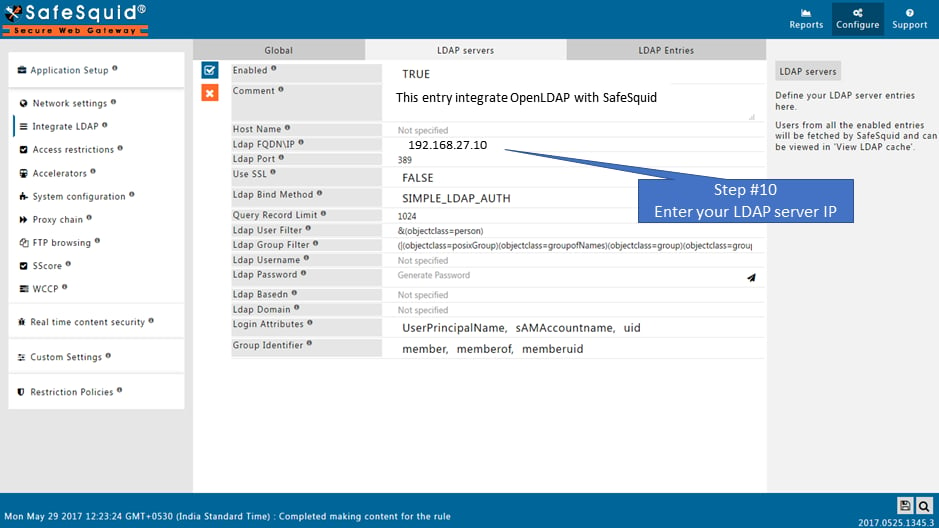
- Save Configuration: Click the checkmark to save.
Operational notes
- This is the confirmed OpenLDAP-backed authentication path.
- Keep the user experience explicit: this method is browser-prompt based, not Kerberos-like transparent SSO.
- Verify group visibility before relying on group-based policy outcomes.
Verification
Troubleshooting
Troubleshooting
Source register
Next steps
- Enable SSO Authentication to apply these identities to access rules.
- Access Restriction to define policies by LDAP group.