

OpenLDAP SSO Authentication
Configure Access Restrictions to utilize OpenLDAP identities. This enables identity-based policies where users are recognized by their directory username and group membership.Scope note
This page documents the rule-wiring flow that applies OpenLDAP-backed identity in SafeSquid policy. Do not casually equate this page with the Kerberos-based transparent SSO model documented for Active Directory. :::note Prerequisites- OpenLDAP Simple Authentication configured and successful.
- LDAP users and groups must be visible in the LDAP Entities tab. :::
Enable Authentication in Access Rules
- Access Restrictions: Go to Application Setup → Access Restrictions → Allow List.
- Edit Rule: Edit the rule matching your client segment or create a new one.
- Apply LDAP Profiles:
- LDAP Profiles: Select specific LDAP groups (e.g.,
IT_Admins) from the dropdown. - Leave blank to apply this rule to all directory users.
- LDAP Profiles: Select specific LDAP groups (e.g.,
- Enable PAM: Ensure PAM Authentication is set to TRUE.
- Save Policy: Click the checkmark to save.
Operational notes
- Treat this as an identity-application path unless your target environment has separately proven a transparent user experience.
- Keep the terminology precise when describing the deployment to operators or customers.
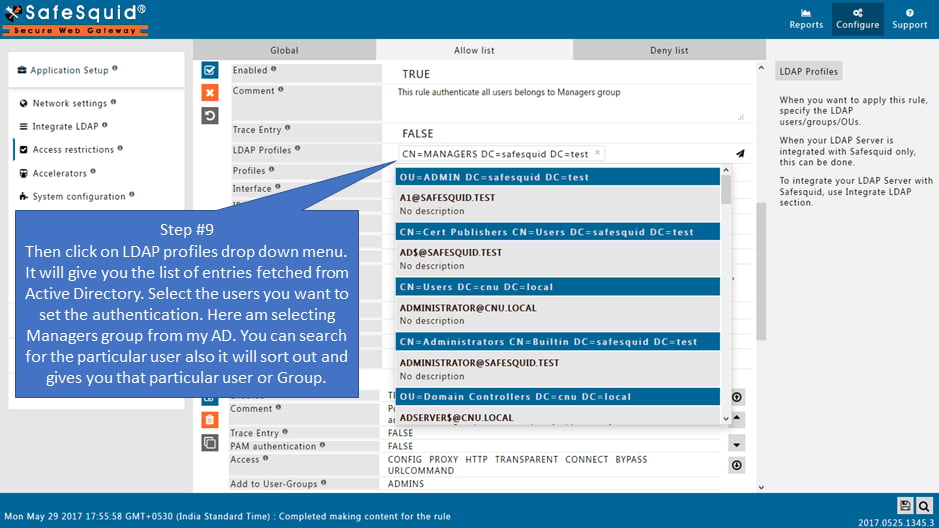
admins or users.
:::
Verification
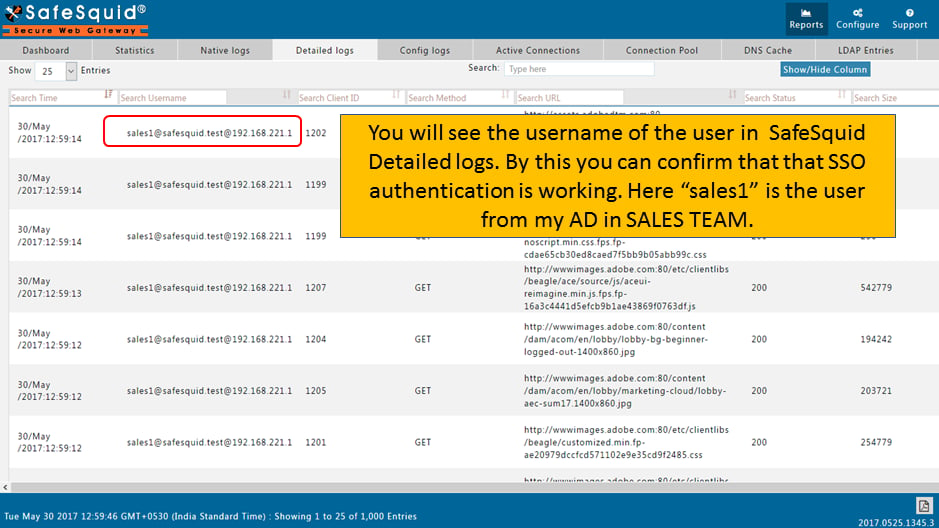
Troubleshooting
Source register
Next steps
- Access Restriction to define policies for your different LDAP groups.
- SSL Inspection to attribute encrypted traffic to specific users.
- Bypass Authentication for automated services.